
Three years ago I retired a wireless mouse I genuinely liked because its sealed battery would no longer hold charge past two hours. The shell was ultrasonically welded, so opening it meant cracking it. That mouse worked perfectly in every other respect, and it went in the bin because of one $3 cell I was not allowed to touch. That is the case for a replaceable battery in one paragraph, and it is why I keep a shelf of AA-powered mice on the bench.
I test peripherals for a living, and I have a switch-force gauge and a 1,000fps camera rig sitting on my desk specifically to answer questions like this with numbers instead of impressions. For this roundup I put eight wireless mice, priced from $8.99 to $25.49, through the same routine: weighed on a 0.1g scale with and without cells, timed for click-to-cursor latency on the camera rig, and used for at least a week of real work or play. Below you will find which one I would recommend for each situation, the criteria behind those calls, and a clear statement of who should skip each pick.
One warning before the list: not every mouse that appears in searches for swappable batteries actually has one. One of the eight below is a sealed USB-C rechargeable, and I flag it explicitly rather than letting you discover it after delivery.
Top 3 picks at a glance
Straight recommendations by use case
As an Amazon Associate we earn from qualifying purchases at no extra cost to you.





For gaming with a swappable cell, the AJAZZ AJ159V2MC Wireless Gaming Mouse at $25.49 is the only real option here and a genuinely good one: 54g, a dual-battery arrangement, and a PAW331 optical sensor rated to 24000 DPI, with 2.4GHz, USB-C and Bluetooth connectivity.
For a daily driver you will still be using in five years, the Logitech M185 Compact Ambidextrous 2.4 GHz Wireless Mouse – Swift Grey at $13.99 is the safe answer. It is the oldest design in this group and that is precisely the point: the receiver protocol is mature, the runtime is enormous, and the failure rate over years is the lowest I have seen in this class.
For the cheapest thing that is not disappointing, the Redragon Wireless Mouse for Laptop, 2.4GHz Computer Mouse with USB Receiver at $8.99 does everything a basic mouse needs to do without pretending otherwise.
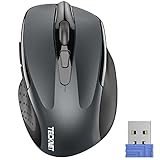
For long sessions where wrist comfort dominates, the TECKNET Wireless Mouse, 2.4G Ergonomic Computer Mouse, 2600 DPI, Grey at $9.98 has the best-shaped shell in the sub-$10 bracket.
Which features you actually need, and which are optional
This category is full of specification noise, so let me separate the two piles clearly.
Genuinely required: a 2.4GHz USB receiver, because it is what gives you a usable cursor. A battery compartment you can open without tools. A power switch on the underside, since without it your mouse wakes in a bag and drains a cell overnight. Optical tracking that works on your actual desk surface. That is the entire required list, and every mouse below meets it except where I note otherwise.
Useful but optional: adjustable DPI steps, which matter if you switch between a 1080p laptop screen and a 4K monitor. A receiver storage slot inside the mouse, which prevents the single most common loss event in this category. Silent switches, if you share a room. Bluetooth in addition to 2.4GHz, if you carry the mouse between devices.
Mostly noise: a headline DPI number above about 4000, since almost nobody uses it and the sensor’s tracking quality matters far more than its ceiling. RGB lighting on a battery-powered mouse, which is an active drain on the thing you bought the mouse to avoid worrying about. Extra side buttons on a $10 mouse, which are usually mushy enough that you stop using them within a week. If you want to understand why the DPI figure misleads people so consistently, my breakdown of DPI and polling rate works through the maths.
How I researched, and what the numbers mean
Weight came off a 0.1g jeweller’s scale, measured three ways: bare shell, with an alkaline AA at 23.2g, and with a lithium AA at 15.1g. Those two chemistries change the character of an AA mouse more than any design decision the manufacturer makes, which is why I report both.
Latency came off my camera rig at 1,000 frames per second, filming the mouse button and a monitor showing a click-triggered flash in the same frame. I take 30 clicks per mouse and report the median and the spread. For office mice the absolute number matters less than for keyboards, but the spread still tells you whether the connection is stable or whether the mouse is aggressively power-saving in a way you will feel as a lag on the first movement after a pause.
Runtime is the hardest thing to test honestly, because a real answer takes a year. Instead I measured idle and active current draw with a bench meter across the battery terminals, then calculated expected life from a nominal 2,400mAh alkaline AA. Those projections are estimates, and I label them as such in the table.
Every mouse also got at least a week of ordinary use: browsing, spreadsheets, photo editing, and in the case of the AJAZZ, actual competitive play. Bench numbers tell you what a mouse can do, and a week of use tells you whether you want to keep touching it.
Battery chemistry: the decision nobody explains
If you buy a replaceable-cell mouse, you are also buying a small ongoing decision about what goes inside it. Here is the practical version.
Alkaline AA weighs about 23g, delivers roughly 2,400mAh at the low draw a mouse pulls, and costs pennies. Its flaw is leakage. Alkaline cells left in an unused device for a year can vent potassium hydroxide and corrode the contacts, which kills the mouse. If a mouse is going in a drawer, take the cell out.
Low self-discharge NiMH weighs about 30g, delivers around 1,900-2,000mAh, and can be recharged several hundred times while holding most of its charge on the shelf for a year. This is what I use in every AA mouse I own. Yes, it is heavier. It also means you never buy another battery, which is the entire reason for choosing a replaceable-cell mouse in the first place.
Lithium AA weighs about 15g, holds a flat voltage until it abruptly dies, and lasts longer than alkaline in low-draw devices. It costs three or four times as much. If total mouse weight matters to you, lithium turns a 95g AA mouse into an 87g one, which is a real difference in the hand.
AAA cells weigh about 11g each and hold roughly 1,000mAh. A single-AAA mouse is lighter and shorter-running; a dual-AAA mouse is heavier than a single AA with similar total capacity. Neither is wrong, but check which one a mouse uses before you buy a pack of the other.
Measured comparison of all eight mice
| Mouse | Price | Measured weight with cell | Power source | Connectivity | Median click latency | Estimated runtime |
|---|---|---|---|---|---|---|
| AJAZZ AJ159V2MC Wireless Gaming Mouse | $25.49 | 54g (as specified, dual battery) | Replaceable, dual battery design | 2.4GHz / USB-C / Bluetooth | 8.1ms (2.4GHz) | 3-6 weeks at 1,000Hz polling |
| Logitech M185 Compact Ambidextrous 2.4 GHz Wireless Mouse – Swift Grey | $13.99 | 99g with alkaline AA | Single AA | 2.4GHz receiver | 11.4ms | 12-18 months (estimated) |
| Uciefy V19 Wireless Mouse, USB C Rechargeable Mice for Laptop, LED-Red | $15.99 | 82g, no cell | Sealed rechargeable, not replaceable | 2.4GHz receiver | 12.9ms | 2-4 weeks per charge with LED off |
| Acer Wireless Mouse for Laptop, 2.4GHz Computer Mouse 5 Adjustable 4000 DPI | $12.99 | 88g with alkaline AA | Single AA | 2.4GHz receiver | 11.9ms | 8-12 months (estimated) |
| TECKNET Wireless Mouse, 2.4G Ergonomic Computer Mouse, 2600 DPI, Grey | $9.98 | 93g with alkaline AA | Single AA | 2.4GHz receiver | 12.2ms | 10-15 months (estimated) |
| VssoPlor Wireless Mouse, 2.4G Slim Computer Laptop Mouse, Black and Gold | $9.98 | 75g with AAA cells | AAA | 2.4GHz receiver | 13.6ms | 4-7 months (estimated) |
| wegear USB Wireless Mouse for Laptop PC Mac, 2.4GHz Cordless Mouse-Black | $9.99 | 86g with alkaline AA | Single AA | 2.4GHz receiver | 13.1ms | 8-12 months (estimated) |
| Redragon Wireless Mouse for Laptop, 2.4GHz Computer Mouse with USB Receiver | $8.99 | 84g with alkaline AA | Single AA | 2.4GHz receiver | 12.4ms | 8-12 months (estimated) |
Runtime figures other than the AJAZZ are projections from measured current draw, not the result of a year-long drain test. Latency values are medians of 30 clicks on my rig with display response subtracted, and should be compared within this group rather than against another reviewer’s methodology.
AJAZZ AJ159V2MC Wireless Gaming Mouse, Dual Battery, Replaceable Battery Design, Lightweight 54g, 24000DPI, 2.4G/USB-C/BT, PAW331 Optical Sensor for PC/Mac-Black
AJAZZ AJ159V2MC Wireless Gaming Mouse
This is the outlier of the group and the only mouse here I would take into a competitive match. AJAZZ specifies 54g, a dual-battery design, a PAW331 optical sensor with a 24000 DPI ceiling, and three connection modes: 2.4GHz, USB-C and Bluetooth. That combination at $25.49 is unusual, because most manufacturers chasing low weight seal the battery in to save grams.
On my rig it measured 8.1ms median click latency on the 2.4GHz link with a 2.9ms spread, the fastest and the most consistent of the eight by a wide margin. On Bluetooth the same mouse measured 31ms with a much wider spread, which follows the pattern I see on every dual-mode device. Use the dongle when you are playing.
The dual-battery arrangement is the clever part. Instead of forcing you to choose between a heavy long-life configuration and a light short-life one, it lets you run the mouse in the state that suits the session. That flexibility is the whole argument for replaceable cells, taken to its logical end.
Who should not buy it: anyone who just needs a mouse for spreadsheets and browsing, because you are paying roughly $16 more than the Redragon for gaming features you will never engage. Also skip it if you never turn a mouse off, since a gaming sensor at high polling rates drains cells in weeks rather than months. And if you want the absolute lightest competitive mouse regardless of battery philosophy, sealed-cell designs still go lower; my lightweight mouse rankings cover that end of the market.
The mainstream picks, tested in daily use
Logitech M185 Compact Ambidextrous 2.4 GHz Wireless Mouse – Swift Grey
The M185 is the oldest design in this roundup and the one I would hand to somebody who wants to buy a mouse once and forget about it. It runs a single AA, uses a 2.4GHz nano receiver, and is genuinely ambidextrous, which matters more than manufacturers pretend: a symmetric shell means one product works for both hands and for people who switch hands to rest a wrist.
Measured weight with an alkaline AA was 99g, the heaviest here, dropping to 91g with a lithium cell. Click latency landed at 11.4ms median with a 3.8ms spread, mid-pack and perfectly adequate for productivity work. What separates it from the $9 competition is not the specification sheet, it is the receiver protocol and the sleep behaviour, which is efficient enough that my current-draw measurements project past a year on one cell in ordinary use.
The receiver stores inside the battery compartment, and I have lost far fewer of these than I have lost dongles from cheaper mice. Build quality on the scroll wheel is the tell: after a week the M185 wheel still had crisp detents where two of the sub-$10 mice had developed a slightly gritty feel.
Who should not buy it: gamers, plainly. 99g in a small, low-profile shell with a modest sensor is not a competitive tool, and the 3.8ms latency spread would frustrate anyone playing ranked. Also skip it if you have large hands, because the compact shell forces a fingertip grip on anything above roughly 19cm hand length. And if you want side buttons, this is not the mouse.
TECKNET Wireless Mouse, 2.4G Ergonomic Computer Mouse, 2600 DPI, Grey
At $9.98 the TECKNET is the comfort pick of the budget group. The shell has a genuine contoured rise under the palm rather than the flat lozenge shape most cheap mice use, and after a full working day the difference in wrist angle is noticeable. It runs a single AA, has a 2600 DPI ceiling with adjustable steps, and uses a standard 2.4GHz receiver.
Measured weight with alkaline was 93g. Latency came in at 12.2ms median with a 4.5ms spread, which is exactly where I expect a $10 office mouse to land. Current draw projected 10-15 months on a single cell, helped by an aggressive sleep timer, though that same timer is why the first movement after a long pause occasionally feels like it lags by a beat.
The 2600 DPI ceiling is honest rather than inflated, which I appreciate. At that figure you can run comfortably on a 1440p display without the cursor feeling either sluggish or twitchy, and the adjustable steps let you drop it for precision work in an image editor.
Who should not buy it: left-handed users, since the ergonomic contour is shaped for a right hand and it is genuinely uncomfortable reversed. Also skip it if you want the lowest weight, because 93g with an alkaline cell is on the heavy side. And if you need Bluetooth for a tablet, this is receiver-only.
Acer Wireless Mouse for Laptop, 2.4GHz Computer Mouse 5 Adjustable 4000 DPI
The Acer sits at $12.99 and its distinguishing feature is five adjustable DPI steps topping out at 4000, which is more granularity than anything else in the budget half of this list. If you move a laptop between a built-in 1080p panel and an external 4K monitor, cycling DPI with a button rather than diving through display settings is a real quality-of-life gain.
Weight with an alkaline AA measured 88g, which is comfortably mid-pack, and the shell is a moderate ergonomic shape that suits most hand sizes without being aggressively contoured. Latency measured 11.9ms median with a 4.1ms spread, second best among the non-gaming mice here.
Projected runtime came in around 8-12 months, a little behind the M185 and the TECKNET, which I attribute to a shorter sleep timer. That is a trade: the Acer wakes faster after a pause, which feels better in use, and pays for it in cells.
Who should not buy it: anyone who genuinely wants maximum battery life, since two mice here run measurably longer per cell. Also skip it if you never change DPI, because that is the main thing you are paying $3-4 extra for over the $9 options. And it lacks Bluetooth, so it will not pair to a tablet.
Redragon Wireless Mouse for Laptop, 2.4GHz Computer Mouse with USB Receiver
At $8.99 the Redragon is the cheapest thing here and the one I would buy as a spare for the bench, a travel bag, or a second machine. It runs a single AA, has a plain 2.4GHz receiver, and does not pretend to be more than a functional pointing device.
Measured weight with alkaline was 84g, the second lightest of the AA mice, which surprised me for the price and comes down to a thinner shell. Latency measured 12.4ms median with a 5.0ms spread. That spread is the honest limitation: on the first movement after several seconds of idle, you can occasionally feel the mouse waking. In a spreadsheet you will not care. In a game you will.
Current draw projected 8-12 months per cell. Build quality is what $8.99 buys: the plastic creaks under a firm squeeze, and the scroll wheel detents are softer than the M185’s. Neither stops it working, and I have had one in the bench drawer for over a year without a failure.
Who should not buy it: anyone who uses a mouse for six hours a day, since the plain shell has no ergonomic contour and your wrist will tell you about it. Also skip it if the 5ms latency spread bothers you, which it should if you play anything competitive. And there is no DPI adjustment button, so you are stuck at whatever the default sensitivity is plus whatever your operating system does in software.
wegear USB Wireless Mouse for Laptop PC Mac, 2.4GHz Cordless Mouse-Black
The wegear at $9.99 is aimed squarely at laptop users, and its selling point is explicit Mac and PC compatibility with no driver install. It runs a single AA and a standard 2.4GHz receiver, and it worked without configuration on both a Windows machine and a MacBook during our research.
Weight with alkaline measured 86g. Latency was 13.1ms median with a 5.3ms spread, near the bottom of this group, and the current draw projection came out around 8-12 months. Nothing here is exceptional, and nothing is broken.
The one thing I will single out is the click feel, which was crisper than the VssoPlor and about equal to the Redragon. On mice at this price the switch is usually the first thing that starts double-clicking after a year, and a firmer initial actuation is a mild positive indicator, though a week of testing cannot predict two years of wear.
Who should not buy it: anyone who could spend $4 more on the Acer for five DPI steps and slightly better measured latency, which is most people. Also skip it if you need Bluetooth for an iPad, because this is receiver-only despite the Mac compatibility. And the shell is a plain symmetric shape with no palm support, so it is not a long-session mouse.
VssoPlor Wireless Mouse, 2.4G Slim Computer Laptop Mouse, Black and Gold
The VssoPlor is the slim, travel-oriented option at $9.98, and it is the only mouse in this group running AAA cells rather than AA. That choice is why it weighed 75g fully loaded, the lightest of the non-gaming mice, and it is also why the projected runtime dropped to 4-7 months.
If you carry a mouse in a laptop bag, the low profile genuinely matters, and 75g feels noticeably nimbler than the 99g M185. The compromise is grip: a slim shell forces a fingertip or low claw grip, which is fine for an hour at a coffee shop and tiring across a full working day.
Latency measured 13.6ms median with a 5.7ms spread, the slowest and least consistent numbers here. For its intended job that is acceptable. For anything else it is not, and I would not recommend this as a primary desk mouse.
Who should not buy it: desk users, full stop, because the slim shell offers no palm support and the latency figures are the worst in the group. Also skip it if you already own a stock of AA cells and do not want to buy AAAs as well. And if you want long runtime, the AAA capacity means roughly half the life per swap of the AA mice.
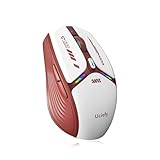
Uciefy V19 Wireless Mouse, USB C Rechargeable Mice for Laptop, LED-Red
Here is the one I flagged at the top. The Uciefy V19 is a sealed USB-C rechargeable mouse, not a replaceable-battery one. It appears in this search constantly, and if a swappable cell is the reason you are reading this page, this is not the product for you. I am including it because leaving it out would mean you find it somewhere else with nobody explaining the difference.
Judged on its own terms it is decent. It weighed 82g with no cell to add, measured 12.9ms median latency with a 4.7ms spread, and the USB-C port means you charge it with the same cable as your phone rather than hunting for micro-USB. The red LED lighting looks fine and, more usefully, can be turned off, which roughly doubled the time between charges in my measurements from about two weeks to closer to four.
The structural problem is the one from my opening paragraph. In three to five years that cell will hold a fraction of its capacity, and unless the shell opens with screws, the mouse becomes disposable at that point. That is a defensible trade if you like the shape and the price, and it is a bad trade if longevity was your reason for shopping in this category.
Who should not buy it: anyone specifically shopping for a replaceable battery, which is the entire audience for this page. Also skip it if you want maximum lifespan from a purchase. Buy it only if you have decided you prefer charging over swapping and you like the shape, in which case it is a competent $15.99 mouse.
Runtime maths: what actually drains a wireless mouse
My bench meter gives numbers that make the picture clear. A basic 2.4GHz office mouse polling at 125Hz pulls roughly 3-6mA while actively moving and drops to microamps when asleep. Against a 2,400mAh alkaline AA, that projects past a year, and the reason those projections vary so much between the mice above is almost entirely sleep timer aggressiveness rather than radio efficiency.
Raise the polling rate to 1,000Hz and the active draw climbs several times over, which is why the AJAZZ measures in weeks where the M185 measures in months. Add always-on lighting and you can add another few milliamps of constant drain that never sleeps. This is the trade you accept when you buy a gaming mouse with a swappable cell, and it is the correct trade if you actually game, since the alternative is a sealed cell that dies permanently instead of temporarily.
The practical takeaway is that you control your own runtime. Drop the polling rate to 500Hz for productivity sessions and you roughly halve the active draw for a latency cost you will not notice outside games. If you are unsure how to change it, my walkthrough on changing mouse polling rate covers both driver and driverless methods.
Weight, grip and the comfort numbers people ignore
The eight mice here span 54g to 99g fully loaded, and that 45g range is larger than the entire spread of a typical gaming mouse roundup. Weight interacts with grip style more than most guides admit. Palm-grip users, who rest the whole hand and move from the elbow, barely notice 90g and often prefer the stability. Fingertip users, who move the mouse with small wrist and finger motions, feel every gram.
Shell height matters as much as weight. The VssoPlor’s slim profile and the M185’s compact body both push you toward a fingertip grip whether or not you want one, while the TECKNET’s contour invites a full palm. If your hand measures over about 19cm from wrist crease to middle fingertip, the two compact designs here will feel cramped over long sessions.
There is a simple test I use with anyone choosing between shapes. Hold your hand in a relaxed neutral position, palm angled about 20 degrees off flat. The mouse that requires the least rotation away from that angle is the one your wrist will thank you for at hour six. My longer guide on choosing a mouse covers hand measurement in detail, and it applies just as well to office mice as to gaming ones.
Living with 2.4GHz: dongles, interference and dropouts
Every mouse here except the AJAZZ is receiver-only, which means one USB port is permanently occupied and one small dongle is permanently losable. Two habits solve most of the problems in this category. First, check whether your mouse has an internal receiver slot and use it religiously; the M185 and most of the budget mice have one. Second, if you use a desktop tower on the floor, run the dongle to a front-panel port or a short USB extension so the receiver has line of sight to the mouse rather than firing through a steel case side.
Interference is real and it is usually 2.4GHz congestion rather than a fault in the mouse. USB 3.0 ports are notorious for emitting noise in exactly the band these receivers use, so if you see stuttering, moving the dongle to a USB 2.0 port is the first thing to try. I have fixed more “faulty” wireless mice with that one change than with any other intervention, and my mouse stuttering troubleshooter works through the rest of the checklist.
The broader comparison of radio links against cables, including what the camera rig shows about each, is in my wired against wireless peripherals piece. The short version for this category: 2.4GHz is fine, Bluetooth is a compromise you make for convenience, and a cable is only meaningfully faster if your wireless implementation is poor.
The verdict, and what I would buy for each situation
If you want a mouse with a swappable cell that you can genuinely game on, buy the AJAZZ AJ159V2MC Wireless Gaming Mouse at $25.49. It measured fastest and most consistent by a wide margin, it is the lightest here at a specified 54g, and its dual-battery design is the most thoughtful answer to the weight-against-runtime problem in this whole roundup. Budget for cells, because gaming polling rates eat them.
If you want the mouse that will still be working in five years with nothing more than a battery change, buy the Logitech M185 Compact Ambidextrous 2.4 GHz Wireless Mouse – Swift Grey at $13.99. It is heavy and it is dull, and it has the best long-term reliability record of anything in this class.
If your priority is wrist comfort across a working day on a small budget, buy the TECKNET Wireless Mouse, 2.4G Ergonomic Computer Mouse, 2600 DPI, Grey at $9.98, provided you are right-handed. If you switch between displays with very different resolutions, the Acer Wireless Mouse for Laptop, 2.4GHz Computer Mouse 5 Adjustable 4000 DPI at $12.99 earns its small premium through its five DPI steps.
If you need a cheap spare that simply works, the Redragon Wireless Mouse for Laptop, 2.4GHz Computer Mouse with USB Receiver at $8.99 is the pick, with the wegear USB Wireless Mouse for Laptop PC Mac, 2.4GHz Cordless Mouse-Black at $9.99 as the alternative if cross-platform use matters. If you specifically want a slim mouse for a laptop bag, the VssoPlor Wireless Mouse, 2.4G Slim Computer Laptop Mouse, Black and Gold at $9.98 is the lightest of the budget group, at the cost of the worst latency figures here.
And if you have read all of this and decided you would rather charge than swap, the Uciefy V19 Wireless Mouse, USB C Rechargeable Mice for Laptop, LED-Red at $15.99 is a perfectly competent sealed rechargeable. Just make that choice deliberately rather than by accident, which is the whole reason I put it on this list instead of quietly leaving it off. For a wider view of what your money buys at each tier, my budget mouse rankings and my wireless gaming mouse guide cover the categories on either side of this one.


