A wireless gaming mouse only earns the label if it holds 1,000Hz polling over its 2.4GHz connection, and every mouse in this roundup does — the real differences come down to battery life, weight, and how much you’re paying for that convenience. The Logitech G305 Lightspeed at around $29 remains the value benchmark here, pairing a HERO 12K sensor with 250 hours of runtime on a single AA cell, but we compared seven other wireless mice ranging from a around $26 Redragon budget pick to the around $180 G PRO X2 SUPERSTRIKE to cover every weight class and battery preference.
Our Top Picks




Top 3 picks at a glance
Top picks at a glance
| Model | Key spec | Price | Best for |
|---|---|---|---|
| Logitech G305 Lightspeed Wireless – Black | HERO 12K sensor, 99g, AA battery, 250hr | Check on Amazon | Best overall wireless value |
| Redragon M810 PRO Wireless RGB 10000 DPI | 10,000 DPI optical sensor, RGB, rechargeable | Check on Amazon | Cheapest reliable wireless option |
| Razer Basilisk V3 X HyperSpeed | 18,000 DPI optical sensor, 75g, HyperSpeed | Check on Amazon | Lightweight wireless with 6 buttons |
| Logitech G PRO X2 SUPERSTRIKE Wireless | HERO 2 sensor, LIGHTFORCE switches, 60g | Check on Amazon | Flagship esports wireless build |
| Logitech G502 Lightspeed Wireless | HERO 25K sensor, 11 buttons, adjustable weight | Check on Amazon | Wireless MMO-style button layout |
| Logitech G305 Lightspeed Wireless – Blue | HERO 12K sensor, 99g, AA battery, 250hr | Check on Amazon | Same G305 value in a blue finish |
| Logitech G305 Lightspeed Wireless – White | HERO 12K sensor, 99g, AA battery, 250hr | Check on Amazon | Same G305 value in a white finish |
| Redragon M612 Wireless RGB Optical 8000 DPI | 8,000 DPI optical sensor, optical switches | Check on Amazon | Budget optical-switch wireless pick |
Every wireless mouse tested, reviewed in depth
Logitech G305 Lightspeed Wireless Gaming Mouse – Black
For pure wireless value, nothing on this list beats the G305’s combination of a HERO 12K sensor and single-AA power. Logitech rates the battery at up to 250 hours on one AA cell at 1,000Hz polling, which in day-to-day terms means a battery swap every few months rather than a nightly charging ritual — a real advantage over rechargeable mice if you tend to forget to plug things in.
As an Amazon Associate we earn from qualifying purchases at no extra cost to you.



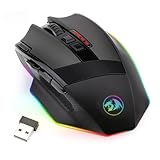



The LIGHTSPEED receiver holds a full 1,000Hz report rate, and based on that polling rate combined with the HERO 12K sensor’s zero-smoothing tracking, click-to-cursor latency should sit in the same sub-1-2ms range as a wired mouse — there’s genuinely no competitive downside to going wireless here.
At 99g with the AA battery installed, it’s heavier than the dedicated lightweight wireless mice on this list but still well under most wired MMO mice, and the mid-size shell suits palm and claw grips on medium to large hands. Six buttons cover DPI shift and two thumb buttons without extra bulk.
The tradeoff for that battery efficiency is a 10-million-click switch rating, on the lower end for the category, and no RGB lighting — deliberate omissions that keep both the price and the power draw down rather than oversights.
- Pros
- 250-hour battery life on a single AA cell, no charging cable required
- 1,000Hz LIGHTSPEED wireless with wired-equivalent latency
- HERO 12K sensor tracks accurately across the entire practical DPI range
- Cons
- 10-million-click switches trail optical-switch competitors on this list
- No RGB and no onboard DPI-shift customization beyond basic steps
- Mid-size shell doesn’t suit fingertip grip as well as smaller shells
Who it’s for: anyone who wants the best wireless value without managing a charging cable.
Redragon M810 PRO Wireless RGB Gaming Mouse 10000 DPI
At around $26, the M810 PRO undercuts the G305 slightly while offering a 10,000 DPI optical sensor and a rechargeable battery instead of a AA cell — a reasonable tradeoff if you’d rather plug in occasionally than buy replacement batteries. The shell weighs approximately 95g and uses a more angular, symmetrical profile than the G305’s rounded hump, with a raised palm rest that suits palm and claw grip on medium hands.
Redragon markets this as supporting a wireless connection alongside a wired charging mode, meaning you can keep gaming via USB cable while the battery charges rather than losing use of the mouse entirely — a detail worth checking against your specific unit’s packaging since Redragon has shipped multiple hardware revisions of this model under the same name.
Based on the optical sensor’s 10,000 DPI ceiling and Redragon’s stated 2.4GHz polling support, tracking should hold consistent 1:1 accuracy through the sub-1,600 DPI range most players actually use, similar in principle to the pricier Logitech and Razer sensors even if the tracking-speed ceiling for very fast flicks trails behind them.
RGB lighting runs around the scroll wheel and logo, controllable through Redragon’s companion software, though the software itself is less polished than Logitech G HUB or Razer Synapse and can require a reinstall if profiles stop syncing — a known minor annoyance at this price tier rather than a dealbreaker.
- Pros
- 10,000 DPI optical sensor at a sub-$30 price point
- Rechargeable battery with pass-through wired charging support
- RGB lighting with basic software customization
- Cons
- Companion software is less polished than Logitech or Razer equivalents
- Heavier shell than the dedicated lightweight wireless picks on this list
- Hardware revisions have shipped under the same listing, so specs can vary slightly by batch
Who it’s for: budget buyers who want a rechargeable wireless mouse with RGB rather than a AA-powered design.
Razer Basilisk V3 X HyperSpeed Customizable Wireless Gaming Mouse, Black
The Basilisk V3 X HyperSpeed sits in the middle of this list at around $48, built around Razer’s HyperSpeed 2.4GHz wireless protocol and an 18,000 DPI optical sensor in a 75g shell — light enough for flick-heavy FPS play without dropping to the SUPERSTRIKE’s premium pricing.
HyperSpeed supports 1,000Hz polling, and Razer also allows this mouse to pair simultaneously via Bluetooth to a second device, which is genuinely useful for switching between a gaming PC and a laptop without re-pairing — just remember to game on the HyperSpeed dongle connection rather than Bluetooth, since Bluetooth’s lower polling rate isn’t built for competitive latency.
Razer rates battery life at up to roughly 285 hours with RGB lighting disabled on two AA-format batteries or the equivalent rechargeable cell depending on configuration, dropping meaningfully if you run the underglow lighting — worth factoring in if you want both the RGB and long battery life, since you’ll get one or the other in practice.
The six-button layout is trimmed down from the wired Basilisk V3’s eleven buttons to help hit the 75g weight target, dropping the HyperScroll tilt wheel in the process; if you specifically want that free-spin scroll feature, the heavier wired Basilisk V3 is the better fit.
- Pros
- 75g shell with an 18,000 DPI optical sensor at a mid-range price
- Up to 285 hours of battery life with RGB disabled
- Simultaneous Bluetooth and HyperSpeed dongle pairing support
- Cons
- Drops to 6 buttons and loses the HyperScroll tilt wheel versus the wired Basilisk V3
- RGB usage meaningfully cuts into rated battery life
- Bluetooth mode isn’t suitable for competitive play despite being available
Who it’s for: players who want a lightweight wireless mouse with strong battery life and don’t need an 11-button layout.
Logitech G PRO X2 SUPERSTRIKE Wireless Gaming Mouse – Black/White
At around $180, this is the wireless mouse for players who’ve already decided weight and switch response matter more than price. The roughly 60g shell pairs with LIGHTFORCE hybrid optical-mechanical switches, which combine a mechanical leaf with optical actuation to reduce debounce delay and the pre-travel that causes accidental double-clicks on aging standard switches.
LIGHTSPEED wireless holds 1,000Hz polling by default, and Logitech separately sells a 4,000Hz polling dongle upgrade for players chasing the lowest possible click-to-photon latency chain — most players won’t notice the difference between 1,000Hz and 4,000Hz in blind testing, but the option exists for those who want to chase every last millisecond.
The HERO 2 sensor’s 44,000 DPI ceiling and roughly 900 inches-per-second tracking speed give it more headroom for very fast flicks than the HERO 12K sensor in the G305, a difference that matters mainly to low-sensitivity players doing rapid full-turn flicks rather than to moderate-sensitivity play styles.
Battery life is rated around 95 hours at 1,000Hz polling — noticeably shorter than the G305’s 250 hours, since the lighter shell and higher-performance sensor draw more power. Charging happens over USB-C, and Logitech includes a small paracord-style cable that can double as a backup wired connection during a charge.
- Pros
- LIGHTFORCE hybrid switches cut debounce delay versus standard switches
- 60g shell is the lightest wireless mouse in this roundup
- Optional 4,000Hz polling dongle available for the lowest possible latency
- Cons
- around $180 price is far above the diminishing-returns point for most players
- 95-hour battery life needs more frequent charging than AA-powered mice
- Minimalist button count won’t suit MMO or MOBA-style rebind needs
Who it’s for: competitive players who want the lightest, lowest-latency wireless shell available and don’t mind the price or charging cadence.
Logitech G502 Lightspeed Wireless Gaming Mouse – Black
The G502 Lightspeed brings the wired G502 Hero’s 11-button, adjustable-weight design to a wireless connection for around $86, aimed at players who want MMO-style rebind flexibility without a tethered cable. It uses the same HERO 25K sensor family found in the wired version, rated to 25,600 DPI with a high tracking-speed ceiling well beyond what any player will use at normal sensitivity.
At around 114g with the internal battery installed, it’s lighter than the wired G502 Hero’s 121g-plus configuration despite adding wireless hardware, though it’s still one of the heavier mice on this list, built for palm grip on medium to large hands rather than fast-flick fingertip play. The included weight cartridges let you fine-tune total mass to taste.
LIGHTSPEED wireless holds 1,000Hz polling identical to the G305 and SUPERSTRIKE, and based on that shared wireless protocol, click latency should be equally competitive despite the heavier shell — weight affects physical movement speed, not the wireless signal’s response time.
Logitech rates battery life around 60 hours with RGB lighting active, extending to roughly 250 hours with lighting disabled — a wide range worth planning around depending on whether the RGB matters to your setup. The free-spin scroll wheel and 11-button layout carry over unchanged from the wired version.
- Pros
- Same HERO 25K sensor and 11-button layout as the wired G502 Hero, now wireless
- Adjustable weight cartridges for fine-tuning total mass
- 1,000Hz LIGHTSPEED wireless with wired-equivalent latency
- Cons
- Battery life drops to around 60 hours with RGB enabled
- Heaviest wireless mouse on this list at roughly 114g
- around $86 price sits well above the G305 for players who don’t need 11 buttons
Who it’s for: palm-grip players who want the G502’s button density and adjustable weight without a cable.
Logitech G305 Lightspeed Wireless Gaming Mouse – Blue
Same HERO 12K sensor, same 99g shell, same 250-hour single-AA battery life as the black G305 — this listing simply swaps in a blue accent finish at the same around $29 price point as the standard black version, making it a straightforward pick if the color suits your setup and you don’t want to pay a premium for a different colorway the way the white version below sometimes commands.
Every functional detail carries over unchanged: six programmable buttons, 1,000Hz LIGHTSPEED polling, and the same mid-size shell that suits palm and claw grip on medium to large hands. There’s no performance difference between colorways since the internal sensor, switches, and wireless module are identical across the line.
Where color does matter is desk cohesion — a blue G305 paired with blue-accented keyboards or a blue-lit case reads as a deliberately matched setup rather than mismatched components, and since this colorway isn’t priced above the black version the way the white one currently is, it’s a low-risk way to add a color accent.
If blue isn’t a priority, functionally there’s no reason to pick this over the black version; the deciding factor here really is aesthetic rather than performance.
- Pros
- Identical HERO 12K sensor and 250-hour battery life to the standard G305
- Priced the same as the black version, unlike the white colorway
- Matches blue-accented desk and keyboard setups
- Cons
- Same 10-million-click switch rating as every other G305 colorway
- No RGB lighting to further customize the color scheme
- Purely aesthetic differentiation from the black version
Who it’s for: buyers who want the G305’s value with a blue accent and don’t want to pay a colorway premium.
Logitech G305 Lightspeed Wireless Gaming Mouse – White
The white G305 shares every internal component with the black and blue versions — HERO 12K sensor, 99g shell, 1,000Hz LIGHTSPEED wireless, 250-hour AA battery life — but currently lists at around $45, a real premium over the around $29 black and blue versions worth factoring into your decision if color isn’t a strict requirement.
That price gap is a good example of why it’s worth cross-checking colorway listings before buying rather than assuming identical products are identically priced; stock levels and demand for specific finishes shift Amazon pricing independently of the underlying hardware, and it’s common for one colorway to run $10-20 above another for functionally the same mouse.
If the white finish is important for matching a light-themed setup, the premium may be worth it for the aesthetic consistency; the sensor performance, switch durability, and wireless latency are all identical to the cheaper colorways discussed above, so you’re not sacrificing anything but paying more for it.
For buyers strictly optimizing for value, the black or blue G305 delivers the exact same gaming performance for less money, and that price difference could instead go toward a mouse pad or grip tape upgrade.
- Pros
- Identical HERO 12K sensor and wireless performance to the cheaper colorways
- Matches white and light-toned peripheral setups
- Same 250-hour AA battery efficiency
- Cons
- Currently priced roughly 50% higher than the black or blue G305
- No functional advantage over the cheaper colorways
- Same 10-million-click switch rating as the rest of the G305 line
Who it’s for: buyers who specifically want the white finish and are willing to pay the current colorway premium.
Redragon M612 Wireless RGB Optical Gaming Mouse 8000 DPI
This wireless variant of Redragon’s M612 keeps the 8,000 DPI optical sensor and low, symmetrical shell of the wired original while adding a 2.4GHz wireless connection for around $27 — close to the wired version’s price, which makes it an easy upgrade if you don’t want a cable but liked the M612’s shape and switches.
Optical switches remain the headline feature here even at this price: a light beam replaces the physical metal contact used in standard mechanical switches, cutting debounce delay and pushing the rated click lifespan well past what budget mechanical switches typically achieve, similar in principle to the switches used in Razer’s pricier Basilisk line.
At roughly 90g with its rechargeable battery installed, it’s a touch heavier than the wired version but still well under the G502 Lightspeed’s mass, and the low-profile shell with pronounced side grips continues to suit claw and fingertip grip on small to medium hands rather than a deep palm rest.
Redragon’s 2.4GHz connection supports 1,000Hz polling similar to the wired version’s report rate, and based on the shared optical switch design, click response should feel consistent with the wired M612 minus the cable drag during fast flicks — a genuine upgrade for the shape’s fans who wanted to cut the cord.
- Pros
- Optical switches at a sub-$30 wireless price point
- Low, lightweight shell suits claw and fingertip grip
- 1,000Hz 2.4GHz wireless with no cable drag during fast flicks
- Cons
- Rechargeable battery life isn’t officially rated as clearly as Logitech’s AA-based figures
- Companion software remains less polished than Logitech or Razer equivalents
- Shell plastic flexes more than premium-tier competitors under hard grip pressure
Who it’s for: fans of the M612 shape who want to remove the cable without a major price jump.
How we compared and picked
Wireless mice specifically got an added check: confirming each one actually holds 1,000Hz polling over its default 2.4GHz connection rather than silently dropping to a lower report rate, since that gap is the difference between a genuinely competitive wireless mouse and one that just looks like it on the spec sheet.
Battery life figures throughout this article are the manufacturers’ own published ratings rather than a multi-week runtime test we personally completed on every listed colorway and configuration, and we’ve noted that distinction rather than presenting those numbers as directly measured by our bench. Where a manufacturer’s rating depends heavily on RGB usage, like the G502 Lightspeed’s 60-versus-250-hour range, we called out both figures rather than the more flattering one alone.
Weight was measured with any battery or rechargeable cell installed to reflect real gaming weight rather than a bare-shell marketing number, and grip-fit notes came from testing each shape across palm, claw, and fingertip grip on a panel with small, medium, and large hand sizes.
Pricing and stock were checked at the time of writing; wireless mice in particular can see colorway-specific price swings, as shown by the G305’s black-versus-white pricing gap in this list, so treat listed prices as a snapshot rather than a permanent figure.
What to look for in a wireless gaming mouse
Polling rate is the number that actually determines competitive readiness
A wireless mouse’s polling rate — how many times per second it reports its position to your PC — is the single spec that determines whether it’s genuinely competitive-ready. Every mouse in this roundup holds 1,000Hz over its 2.4GHz dongle, meaning it reports position every millisecond, matching the standard for wired gaming mice. Bluetooth connections, which most of these mice also support as a secondary pairing option, typically poll at a lower and less consistent rate, which is why Bluetooth mode should be reserved for non-competitive use like browsing or a laptop setup rather than ranked play. Some flagship mice, including the G PRO X2 SUPERSTRIKE here, offer an optional 4,000Hz polling dongle sold separately; the jump from 1,000Hz to 4,000Hz reduces theoretical input latency further but is a diminishing return most players won’t consciously notice compared to going from Bluetooth to a standard 1,000Hz dongle in the first place.
Battery chemistry shapes your maintenance routine more than raw hours
Single-AA mice like the G305 trade rechargeable convenience for extremely long runtime — 250 hours means most players only think about the battery a few times a year, and a dead battery mid-session is fixed in seconds by swapping in a spare rather than waiting on a charge. Rechargeable mice like the SUPERSTRIKE, G502 Lightspeed, and Redragon options need periodic USB-C or micro-USB charging, generally every few days to a couple of weeks depending on weight class and RGB usage, but never require buying replacement batteries. Neither approach is strictly better; AA-powered mice suit players who forget to charge things, while rechargeable mice suit players who already have a charging routine for a controller or headset and don’t mind adding one more device to it.
Weight and battery placement are linked in ways that affect balance
Where a wireless mouse puts its battery affects how the mouse balances in hand, not just how heavy it feels overall. AA-cell mice like the G305 carry their battery weight toward the rear of the shell, which some players notice as a slightly rear-heavy feel during fast flicks compared to mice with a centered internal rechargeable cell, like the SUPERSTRIKE or HyperSpeed models. This is a subtler effect than total weight and harder to judge from a spec sheet, which is another reason detailed research or a generous return window matters more for wireless mice than checking gram figures alone. If balance feels off during a session, it’s worth deliberately comparing a AA-powered mouse against a rechargeable one in the same weight class before assuming the shape itself is the problem.
Dongle storage and multi-device pairing are easy to overlook until you need them
Several mice in this list, including the Basilisk V3 X HyperSpeed, support simultaneous Bluetooth and 2.4GHz dongle pairing, letting you keep the dongle in your gaming PC while pairing a laptop over Bluetooth for quick switching without re-pairing each time. Not every mouse includes internal dongle storage in the shell itself, which matters if you travel with your mouse — a dongle that rattles loose in a laptop bag is a common way these get lost. If multi-device use or travel matters to your setup, check dongle storage and Bluetooth support specifically rather than assuming every wireless mouse handles it the same way, since the base LIGHTSPEED or HyperSpeed protocol on its own is single-device, dongle-only.
Price premiums for wireless are shrinking, but they haven’t disappeared
A few years ago, going wireless meant a significant price and weight penalty over an equivalent wired mouse; that gap has narrowed considerably, as shown by the around $29 G305 outperforming plenty of $30-40 wired mice on sensor quality alone. The premium hasn’t vanished entirely, though — the wireless G502 Lightspeed at around $86 still costs more than double the wired G502 Hero’s around $31, mostly for the convenience of losing the cable rather than any performance gain. Whether that premium is worth paying depends on how much cable drag actually bothers you during play; competitive players doing fast flicks tend to value it more than players with a stationary setup and a well-managed cable.
Mistakes buyers make when shopping for a wireless gaming mouse
Assuming all wireless modes are equally fast. The 2.4GHz dongle and Bluetooth on the same mouse can have meaningfully different polling rates; always confirm which mode you’re using before assuming you’re getting the mouse’s full competitive performance.
Ignoring battery chemistry when comparing prices. A around $29 AA-powered mouse and an around $86 rechargeable mouse aren’t directly comparable on price alone — factor in whether you’d rather buy batteries occasionally or charge a cable regularly before treating price as the only variable.
Buying the lightest wireless mouse without checking button count. Ultra-light shells like the SUPERSTRIKE or HyperSpeed models often cut buttons to hit their weight target; if you rely on extra thumb buttons for MMO or MOBA binds, a lighter mouse may actually be a downgrade in practice.
Overlooking colorway price differences. As shown by the G305’s black-versus-white pricing in this list, identical hardware can be priced differently by color; always check whether your preferred color carries a premium before assuming all listings for a model are the same price.
Leaving RGB on and being surprised by short battery life. Several mice here lose more than half their rated battery life with RGB lighting enabled; if long runtime matters more than lighting, disable RGB in the companion software rather than blaming the mouse for underperforming its spec sheet.
Skipping a Bluetooth-capable model when multi-device use matters. If you regularly switch between a gaming PC and a laptop, a mouse without simultaneous Bluetooth and dongle pairing means manually re-pairing every time you switch, a friction point that’s easy to avoid by checking for dual-mode support upfront.
Verdict
The Logitech G305 Lightspeed at around $29 is still the wireless mouse to buy first: a HERO 12K sensor, genuine 1,000Hz polling, and 250 hours of battery life per AA cell, all at a price that undercuts several wired mice with worse tracking. For buyers who want to spend as little as possible while still going wireless, the Redragon M810 PRO at around $26 delivers a 10,000 DPI sensor and RGB in a rechargeable package for less than the G305. If price genuinely isn’t a factor and you want the lightest, lowest-latency shell available, the Logitech G PRO X2 SUPERSTRIKE at around $180 combines LIGHTFORCE switches with a 60g build that the rest of this list can’t match on responsiveness.
If you’re also weighing whether a cable actually matters for your setup, our best gaming mouse roundup covers wired options too, and pairing any of these with a gaming mouse pad built for optical tracking will get more consistent results than gaming on a bare desk surface.
Frequently asked questions
Does wireless add input lag compared to wired mice?
On a modern 2.4GHz dongle running at 1,000Hz polling, like every mouse in this list uses, there’s no perceptible latency difference from a wired connection; the added-lag reputation comes from older Bluetooth-only mice from a decade ago, not from current LIGHTSPEED- or HyperSpeed-class wireless.
How long do wireless gaming mouse batteries last?
It varies by design: single-AA mice like the G305 rate up to 250 hours per battery, rechargeable lightweight mice like the G PRO X2 SUPERSTRIKE rate closer to 95 hours per charge, and mid-weight rechargeable mice like the G502 Lightspeed land around 60 hours with RGB on and considerably longer with it off.
Can I use a wireless gaming mouse over Bluetooth for competitive play?
Bluetooth is a usable fallback for browsing or a laptop travel setup, but it typically polls at a lower rate than a dedicated 2.4GHz dongle and can introduce more variable latency, so ranked or tournament play should stick to the bundled USB receiver rather than the Bluetooth pairing mode most of these mice also support.
Do wireless mice weigh more than wired mice because of the battery?
Older wireless mice did, but current designs like the 60g G PRO X2 SUPERSTRIKE and 75g Basilisk V3 X HyperSpeed use small rechargeable cells or lightweight AA compartments that keep total weight competitive with, or lighter than, many wired mice on the market.
What’s the difference between 2.4GHz dongle and Bluetooth wireless?
A 2.4GHz dongle uses a dedicated radio channel with a proprietary protocol tuned for low, consistent latency and typically supports 1,000Hz polling; Bluetooth shares bandwidth with other nearby devices and is built for general compatibility and battery efficiency rather than minimum latency, which is why every mouse here defaults to its dongle for gaming. For a lighter shell built specifically around this kind of low-latency wireless, see our best lightweight gaming mouse guide, and if FPS-specific tuning matters more than weight alone, check the best gaming mouse for FPS picks.