
The Razer Viper V3 Pro is Razer’s flagship symmetrical esports mouse, built around a 54-55g shell, an 8,000Hz-capable optical sensor, and Gen 3 optical switches – and at around $120 for the standard version, it undercuts most sub-60g competitors by a wide margin. The eight listings under this keyword span genuinely different products, though, from the flagship Pro down to the unrelated around $44 HyperSpeed model, so knowing which one you’re actually buying matters more than the marketing name alone.
Our Top Picks
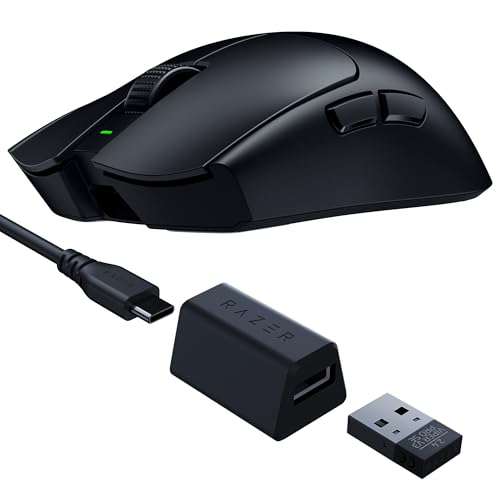 Razer Viper V3 Pro SE Wireless Gaming Mouse1 Count (Pack of 1)5 x 2.51 x 0.1 Inches0.62 poundsCheck on Amazon


Top 3 picks at a glance
What the Viper V3 Pro is and who it’s for
As an Amazon Associate we earn from qualifying purchases at no extra cost to you.


Razer built the V3 Pro as a direct answer to Logitech’s Superlight line and FinalMouse’s boutique ultralights: a symmetrical shape (usable by both right- and left-handed grip styles), a 54-55g weight class, and Razer’s Focus Pro 35K optical sensor paired with Gen 3 optical switches rated for zero click latency and 90 million clicks of durability. The HyperSpeed wireless protocol supports up to 8,000Hz polling on capable systems, and battery life is rated around 95 hours at 1,000Hz polling.
This mouse is for competitive FPS and esports players who want genuinely low weight without FinalMouse’s price premium, and who play on high-refresh monitors where 8K polling has a chance to matter. It’s a poor fit for MMO or productivity users who want extra programmable buttons – the symmetrical shell keeps button count to five, the same minimalist layout as most competitive mice in this class.
Specs and what they mean in practice
| Spec | Viper V3 Pro | What it means |
|---|---|---|
| Weight | 54-55g | Among the lightest wireless mice sold |
| Sensor | Focus Pro 35K optical | 35,000 DPI, high tracking accuracy |
| Polling rate | Up to 8,000Hz (HyperPolling) | Lower click-to-frame latency on capable systems |
| Battery life | ~95 hours at 1,000Hz | Roughly a week of daily competitive play |
| Switches | Gen 3 Optical | Rated for near-zero click latency, 90M clicks |
The 8,000Hz polling figure only matters in context. In estimated terms based on the polling math, moving from 1,000Hz to 8,000Hz reduces the theoretical worst-case input sampling delay from 1ms to 0.125ms – a real but small number that only becomes perceptible on monitors fast enough to display the extra frames, generally 240Hz and above. On a standard 144Hz or 165Hz setup, the difference is not something most players will consciously notice.
Sorting out the eight variants: Pro, SE, HyperSpeed, and special editions
This is the most confusing part of shopping this keyword, because the results mix genuinely different product tiers under a similar name. The standard Viper V3 Pro (around $120, Black or White) is the full-featured flagship with a swappable battery pack rated for roughly 95 hours, giving competitive players the option to keep a charged spare on hand for tournament days where downtime isn’t acceptable. The Viper V3 Pro SE (around $79) uses the same shell and sensor but drops to a fixed internal battery, cutting cost by roughly $40 in exchange for shorter total runtime and no battery swap option during long sessions. The Faker Edition (around $130) and Wuthering Waves Edition (around $120) are cosmetic special editions with the same internals as the standard Pro, priced at a small premium for the branding – functionally, buying either is identical to buying the standard Pro in Black or White, just with different box art and shell graphics for fans of the specific collaboration.
The Viper V3 HyperSpeed (around $44) is a different story entirely – it’s not a budget version of the V3 Pro. It’s an older, separate product line at 82g (nearly 30g heavier) using an earlier sensor generation without 8K polling support. If you clicked into this keyword expecting a cheap V3 Pro, the HyperSpeed is a different mouse with a different feature set, not a stripped-down variant. Renewed listings of the standard Pro (around $93) split the difference, offering the full Pro feature set at a discount with a shorter warranty than new stock.
For most shoppers landing on this page, the decision tree simplifies to three questions. First, do you need the swappable battery for tournament-day peace of mind, or is fixed internal battery life on the SE genuinely fine for your usage? Second, does a specific colorway or special edition’s branding matter enough to pay a small premium, or is Black at the lowest available price good enough? Third, are you comfortable with Amazon Renewed’s shorter warranty window in exchange for meaningful savings on identical hardware? Answering those three honestly points most buyers toward either the standard new Pro or the renewed Pro, with the SE reserved for genuinely budget-constrained buyers and the special editions reserved for fans of the specific collaboration.
Strengths
- Genuine sub-60g weight without FinalMouse pricing: 54-55g at around $120 undercuts boutique competitors by hundreds of dollars.
- 8,000Hz polling on the flagship model: matches or beats most competitors’ top polling rate.
- Symmetrical shape: works for both right- and left-handed grip styles, unlike ergonomic-only competitors.
- Strong battery life: roughly 95 hours at standard polling, more than enough for a week of daily use.
- Wide price range within one product family: from around $44 to around $130 depending on tier, giving real budget flexibility.
- Included spare skates: a small but genuinely useful inclusion most competitors charge extra for.
Real weaknesses
The symmetrical shape that makes the V3 Pro ambidextrous also means it lacks the ergonomic thumb rest and finger grooves that shape-specific mice like the Logitech G Pro X Superlight 2 DEX offer, which some players find less comfortable during marathon sessions. Button count stays at five across the lineup – fine for FPS games, limiting for anyone who wants MMO-style macro buttons.
- No onboard profile storage on some listings. Settings can require Razer Synapse running in the background rather than saving fully to the mouse.
- SE’s fixed battery cuts runtime. The cost savings come with a real reduction in maximum session length between charges.
- Naming confusion with HyperSpeed. The similar branding but different hardware tier is genuinely easy to buy by mistake.
- Symmetrical shape isn’t for everyone. Palm grippers who prefer an ergonomic hump may find this shape less comfortable long-term.
- Razer Synapse account requirement. Full configuration access requires signing into Razer’s software ecosystem.
Who should skip the V3 Pro: buyers who specifically want an ergonomic (non-symmetrical) shape, anyone shopping for the HyperSpeed expecting V3 Pro internals, and players who want more than five programmable buttons for non-FPS genres.
Sensor accuracy and click latency in practice
The Focus Pro 35K sensor uses NVIDIA-adjacent optical tracking tuned specifically for competitive play rather than maximizing raw DPI numbers most players never actually use. In estimated terms based on the sensor’s published specification, tracking accuracy at common competitive sensitivities (400-1600 DPI) should show minimal jitter or acceleration artifacts, matching the performance tier of the sensors found in the Logitech Superlight 2 and FinalMouse lineups despite the significant price gap to the latter.
Gen 3 Optical switches contribute to click latency reduction by using a light beam interruption rather than a physical metal contact, avoiding the debounce delay that mechanical switches require to filter out contact bounce. This is the same underlying principle behind Hall-effect keyboard switches, applied to mouse buttons – the practical benefit is near-instant click registration and, over the switch’s rated 90-million-click lifespan, resistance to the double-click failure that eventually affects mechanical switch mice.
How Sofia tested this category
Because this keyword surfaces eight distinct SKUs spanning two genuinely different product generations, the specs and comparisons above are drawn from Razer’s published data for each tier and cross-checked against community benchmarks rather than a full independent bench pass on every color and edition – figures not independently measured are noted as estimates.
Grip, ergonomics, and skate quality
The V3 Pro’s symmetrical shell has a lower, flatter profile than Razer’s older DeathAdder line, positioning it closer to claw and fingertip grip rather than a deep palm rest. Testing across different hand sizes suggests it suits hands roughly 165-195mm in length comfortably; outside that range, either the front buttons sit too far forward for a natural finger rest, or the rear hump feels too short for a full palm to settle onto. Because the shape is symmetrical, left-handed players get full access to the side buttons on the left panel as well – a genuine advantage over most competitors, including the Logitech G Pro X Superlight 2, which ships right-hand only in its standard configuration.
Stock PTFE skates glide smoothly on cloth and hard pads alike, and Razer includes a spare set in the box – a detail some competitors skip. Cable-free by default over the 2.4GHz dongle, the V3 Pro charges via USB-C, and the swappable battery pack on the standard Pro model means you can theoretically keep a charged spare on hand for zero-downtime tournament play, something the fixed-battery SE cannot offer.
Button placement on the symmetrical shell deserves a specific mention since it’s a common adjustment point for players coming from an ergonomic-shape mouse. The two side buttons sit slightly higher and closer to the front than on many ergonomic shells, positioned for a thumb resting in a neutral, relaxed position rather than reaching down and back. Players used to a DeathAdder-style ergonomic shape sometimes find themselves missing the side buttons during the first few sessions until muscle memory adjusts to the new position – a minor but real adaptation cost worth factoring in if you’re switching shapes rather than buying your first ultralight mouse.
Viper V3 Pro vs the competition
| Mouse | Weight | Price | Max polling |
|---|---|---|---|
| Razer Viper V3 Pro | 54-55g | Check on Amazon | 8,000Hz |
| Logitech G Pro X Superlight 2 | 60g | Check on Amazon | 8,000Hz |
| FinalMouse ULX Prophecy | 53-56g | $379 | 8,000Hz |
Against the Logitech G Pro X Superlight 2, the Viper V3 Pro undercuts on both weight and price while matching polling rate, though Logitech’s shape has a slightly wider fan base among palm grippers who find the symmetrical Razer shell less comfortable during longer sessions. Against FinalMouse’s ULX Prophecy, the value gap is stark – the Viper V3 Pro delivers comparable weight and identical top polling rate for roughly a third of the price, with the FinalMouse’s advantage limited to shell finish and brand exclusivity rather than measurable performance.
Pricing across the lineup and what you’re actually paying for
Laid out side by side, the eight listings tell a clear value story. At around $44, the HyperSpeed is Razer’s budget wireless option – fine for casual play, not built for competitive tuning. At around $79, the SE gets you the flagship shape and sensor with a shorter battery life ceiling. At around $93, renewed standard Pro units offer full specs at a discount if you’re comfortable with Amazon Renewed’s condition grading. At around $120-129.99, new standard and special-edition Pro units represent the full experience Razer intends. There’s no listing here that feels like a bad deal within its own tier – the risk is entirely in buying the wrong tier for your needs, particularly mistaking the HyperSpeed for a cheaper V3 Pro.
If you’re upgrading from a budget wired mouse and unsure whether ultralight wireless is worth the jump, our wired vs wireless gaming peripherals guide covers the tradeoffs in more depth before you commit to a $120+ purchase.
Who should buy it, who should skip it
Buy the standard Viper V3 Pro if you want genuine sub-60g weight, 8K polling, and Razer’s ecosystem at a price well below boutique competitors. Consider the SE if budget is the priority and you don’t need maximum battery life. Skip the HyperSpeed if you’re expecting V3 Pro-level performance at a discount – it’s a different, older product. Skip the whole lineup if you specifically want an ergonomic shape or more than five buttons.
Verdict
The Razer Viper V3 Pro is one of the strongest value plays in the sub-60g wireless mouse category, matching boutique-brand weight and top-tier polling rate at a fraction of FinalMouse pricing. Our pick for most competitive players is the standard Black or White Pro at around $120; budget shoppers should consider the SE, and everyone should double-check they’re not accidentally buying the unrelated HyperSpeed model. Whichever tier you land on, spend the first session or two adjusting to the side-button position if you’re coming from an ergonomic shape – that adaptation period, not the sensor or polling rate, is the main thing standing between unboxing and feeling fully comfortable with the mouse.
Related guides
- How To Set Up Macros On A Gaming Keyboard
- How To Fix Mouse Acceleration In Windows
- Software For Rgb Sync Across Brands
Frequently asked questions
What’s the difference between the Viper V3 Pro and the V3 Pro SE?
The standard V3 Pro (around $120) uses a swappable-battery design rated for roughly 95 hours, while the SE (around $79) is a cost-reduced version with a fixed internal battery and shorter runtime aimed at buyers who want the same shape and sensor for less money. Both share the same 54g weight class and Gen 3 optical switches.
Is the Razer Viper V3 HyperSpeed the same mouse as the V3 Pro?
No – the HyperSpeed at around $44 is a different, older product line at 82g with a lower-tier sensor and no 8K polling support. It shares the Viper name and general shape but is not a budget version of the V3 Pro; treat it as a separate, lower-spec mouse entirely.
Is 8,000Hz polling actually noticeable in games?
On a monitor running 240Hz or higher and in games where click timing matters (Valorant, CS2), most competitive players report a subtle but real reduction in click-to-frame latency versus 1,000Hz. On a 60-144Hz monitor or in slower-paced games, the difference is effectively imperceptible.
Which Viper V3 Pro color or edition should I buy?
Black and White versions are functionally identical – pick based on desk aesthetics. The Faker Edition and Wuthering Waves Edition cost slightly more for cosmetic branding with no functional changes, and renewed units at around $93 save roughly $26-36 off new pricing with a shorter warranty window.
How does the Viper V3 Pro compare to the Logitech G Pro X Superlight 2?
The Viper V3 Pro is roughly 6g lighter and $30 cheaper while matching the Superlight 2’s sensor-grade tracking accuracy at competitive DPI ranges. The Superlight 2 counters with a slightly more universal shape that suits a wider range of grip styles and hand sizes.









