
A gaming PC dumps a surprising amount of heat into a small room, and by hour three your hands are clammy and the desk feels like a radiator. A quiet desk fan fixes the comfort problem without turning your setup into a wind tunnel or drowning out your headset. Here is what to look for so you get airflow you can feel but barely hear.
As an Amazon Associate we earn from qualifying purchases at no extra cost to you.


Our Top Picks



Top 3 picks at a glance
More quiet desk fans worth considering
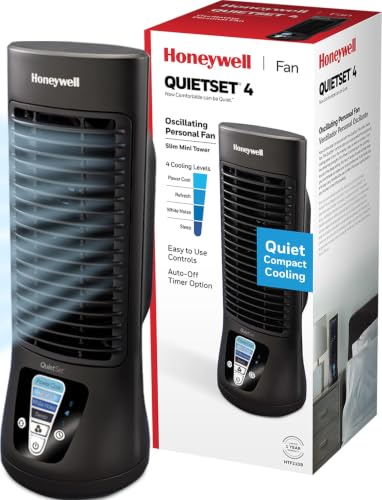
The Honeywell QuietSet models above are the easy default: compact, oscillating, and tuned for low noise. They are not the only good answer, though. Some gaming desks need a fan that clamps to a shelf, some rooms are hot enough to need a stronger circulator run at a low setting, and some players want a cordless fan they can move to the couch. The picks below cover those situations. Each one is judged by the same rule this guide uses throughout: how quiet it is at the speed you will actually run it, not how hard it can blow at maximum.
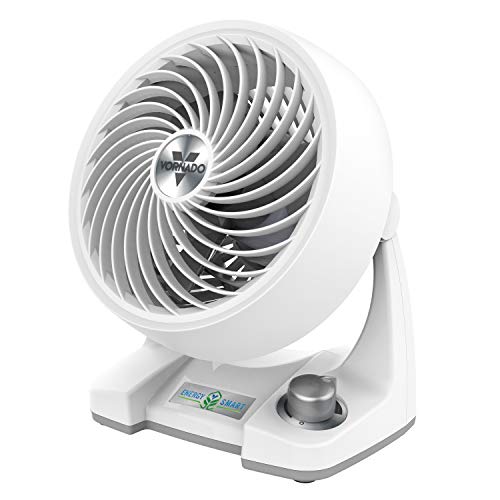
Vornado 133DC Energy Smart Compact Air Circulator

The 133DC is the pick for anyone who hates choosing between “too weak” and “too loud.” Instead of three fixed steps, it uses a variable speed dial on a brushless DC motor, so you can turn it down to exactly the point where you feel the air and stop there. That fine control is the single most useful feature for a gaming desk, because the quietest fan setting is always the lowest one that keeps you comfortable.
Key specs from the listing and the maker: a compact body roughly 9 inches tall, an adjustable tilt head, a DC motor that Vornado rates as up to 80 percent more energy efficient than its AC equivalents, and a published noise figure of under 30 dB at the low end and around 48 dB at full speed. Vornado’s circulator design throws a tight column of air that reaches across a room, so even a low setting aimed at your chest moves noticeably more air than a cheap USB fan.
Strengths: near-infinite speed control, a smooth low “whoosh” rather than a motor whine, efficient DC power draw, and a sturdy build backed by Vornado’s multi-year satisfaction guarantee.
Drawbacks: it does not oscillate, so you aim it once and live with that direction. It is also a plug-in fan, not USB, and it sits in the premium tier for a personal fan.
How it compares: the QuietSet fans sweep air back and forth, which some people find more natural. The 133DC instead points a focused stream exactly where you want it and lets you dial the volume precisely. If your main complaint is that every fan you own is either inaudible and useless or useful and annoying, this is the one that fixes it.
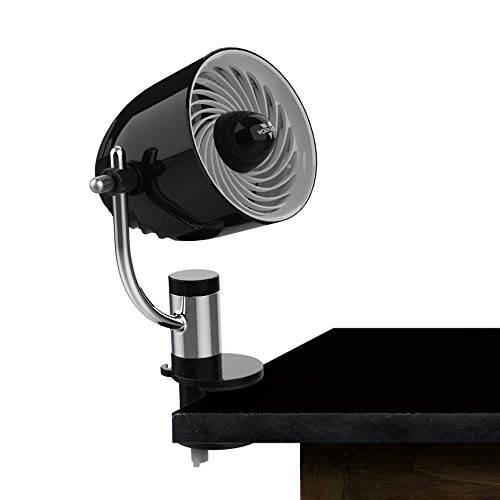
Vornado Pivot Clip Personal Air Circulator

Desk space on a gaming setup is precious, with a mouse that needs room to swing, a keyboard, a headset stand, and often a microphone arm. The Pivot Clip solves that by clamping to the edge of a desk, a monitor shelf, or a bed frame instead of taking up surface area. Its 1.5-inch clip opening fits most desktops and shelves.
It is small, about 9 inches tall with a 4-inch fan, and offers three speeds. Published figures put it at roughly 31 dB on low and 41 dB on high, which keeps even the top speed below the level of normal conversation. A pivoting head and swiveling body let you aim it at your hands, face, or neck from almost any mounting point.
Strengths: zero desk footprint, very low noise on its first two speeds, flexible aiming, and the build quality Vornado is known for. A removable grille makes dusting simple.
Drawbacks: a 4-inch fan only cools one person at close range, it does not oscillate, and it runs from a wall outlet rather than USB. In a genuinely hot room it supplements other cooling rather than replacing it.
How it compares: it is the quietest way on this list to get air onto your hands without moving anything on your desk. Pair it with a larger circulator elsewhere in the room if the whole space is stuffy, and let the clip fan handle the close-range comfort.
Honeywell HT-900 TurboForce Air Circulator

The HT-900 is one of the longest-running budget fans in its class, and it earns a place here for players in hot rooms who need real airflow on a tight budget. It is noticeably more powerful than a typical USB desk fan, with three speeds and a head that pivots up to 90 degrees. It can sit on the desk or be mounted on a wall.
The trade-off is noise. On high it is clearly audible, and its motor has more hum than the Vornado models. The trick is to treat it like a larger fan run slowly: on its lowest setting, a few feet away, it moves enough air to cool a desk while the sound blends into general background noise that a closed-back headset will hide.
Strengths: strong airflow for the size, budget pricing, wall-mount option, and a simple, durable design.
Drawbacks: louder than the QuietSet and Vornado picks, especially on medium and high; no oscillation; the grille is not designed for quick removal, so cleaning takes more effort.
How it compares: choose the HT-900 if heat is the bigger problem than noise, or if you can place it farther away, such as on a shelf behind the monitor, so distance does some of the quieting. If you game with open-back headphones or stream with a sensitive mic, the Vornado models are the safer choice.
DREO 12-Inch Table Air Circulator

This DREO circulator, sold as the TurboPoly 312, is for the setup where the whole room heats up, not just the desk. It is a compact table unit with a 7-inch blade inside a roughly 12-inch body, and DREO rates its airflow reach at up to 70 feet. The listing gives a low-speed noise figure of 25 dB, and some newer listings of the same design quote 28 dB.
It has three speeds on a simple knob and a head that tilts through 120 degrees, so it can blow straight across the desk or angle up to stir air near the ceiling. That vertical tilt is useful in a gaming room: point it slightly upward and it mixes the warm air that collects around the top of the PC and monitor with cooler air lower in the room.
Strengths: serious airflow for the footprint, a quiet low setting, flexible tilt, and a mid-range price for a whole-room circulator. It draws around 35 watts, which is modest for its output.
Drawbacks: it is bigger than a personal fan and needs real desk or floor space; it does not oscillate side to side; the knob offers only three steps, so you cannot fine-tune like the Vornado 133DC.
How it compares: where the QuietSet and Pivot Clip cool you, the DREO cools the room. Run it on low from a corner or shelf and it can replace a desk fan entirely, or pair it with a small clip fan for a two-fan setup that stays quiet because neither fan needs to work hard.
KONSIDEN 11.8-Inch Bladeless Desk Fan

If you prefer the bladeless look, or have kids, pets, or cables near the fan, the KONSIDEN F6 is a sensible mid-range option. It is a slim, roughly 12-inch-wide unit with touch controls and three speeds, powered over USB at around 5 watts. KONSIDEN rates it at about 30 dB.
As this guide’s FAQ explains, bladeless does not automatically mean quieter. What the F6 does well is deliver a smooth, even stream of air with no exposed blades to catch a stray cable or finger, and its smooth outer surfaces are easy to wipe down. Low power draw means it runs happily from a monitor USB port or a powered hub.
Strengths: USB power, low noise, safe enclosed design, tidy look, and very easy cleaning.
Drawbacks: airflow is gentler than a bladed fan of similar size, especially on the lowest setting, and the touch buttons can be sensitive. There is no oscillation. Note that this is the corded version; KONSIDEN sells a separate rechargeable model.
How it compares: it is less powerful than the DREO or HT-900 and less precise than the Vornado 133DC, but it is one of the quietest and neatest USB-powered options here. It suits a moderately warm room where you mainly want gentle air on your face during long sessions.
KIMMOO Rechargeable USB Desk Fan
The KIMMOO is the cordless pick. It is a small rechargeable fan with a digital display and 100 speed levels, so you can step the airflow up or down in tiny increments, similar in spirit to the Vornado’s dial but in a battery-powered package. The head rotates through 90 degrees for aiming.
The listing quotes about 8.5 hours of runtime per charge and a recharge time of about 2.5 hours from a 5V/2A adapter. Runtime depends heavily on speed, so expect the longest sessions at lower settings, which are also the quietest. Its “turbo” top speeds are strong for the size but noticeably louder, so treat them as a quick blast after a match rather than a setting for gameplay.
Strengths: no cord to route, very fine speed control, compact and light enough to move between a desk, couch, and bedside, and USB charging.
Drawbacks: a small fan cannot cool a hot room; top speeds are loud; battery fans eventually lose capacity; and budget-tier build quality is not in the same league as Vornado.
How it compares: it fills the battery slot discussed in the USB and plug-in section. For a fixed PC desk the QuietSet or a Vornado is the better long-term fan, but for console gaming from the couch or a setup with no free outlet nearby, the KIMMOO is the most flexible choice here.
Why noise level is the real spec
Any fan moves air; the trick is doing it quietly at your desk, inches from your ears. Noise is measured in decibels (dB), and the gap between a cheap fan and a good one is huge. A whisper-quiet desk fan runs around 20 to 35 dB on low, roughly the level of a quiet room, while a harsh fan can hit 50 dB and compete with your game audio. Prioritize the low-speed noise figure over the top-speed airflow.
What the numbers mean
| Noise level | Comparable to | Desk experience |
|---|---|---|
| 20-30 dB | Whisper, rustling leaves | Barely noticeable |
| 30-40 dB | Quiet library | Present but easy to ignore |
| 40-50 dB | Quiet office, light rain | Competes with audio |
| 50 dB+ | Busy office; conversation is about 60 dB | Distracting, fatiguing |
Features that matter on a desk
Look for brushless DC motors, which are far quieter and more efficient than cheap AC motors and often draw only 2 to 5 watts, letting you run them off a USB port. Multiple speed steps let you dial in the minimum airflow that keeps you comfortable, which is also the quietest. A tilt and swivel head lets you aim air at your hands or face rather than across the whole desk, so you can run a lower, quieter speed and still feel it.
Size and placement
A 4 to 6-inch fan clamped to the desk edge or shelf saves surface space and puts the airflow near your hands. Larger 8 to 10-inch fans move more air at lower RPM, which can be quieter for the same cooling but take up more room. Position the fan to pull cooler air across you rather than blowing hot exhaust from the PC back at your face; aim it away from the case’s exhaust vents.
USB vs plug-in and battery options
USB-powered fans are convenient and can run off a monitor or hub port, but check that the port supplies enough current; a 5V/1A port limits fan power. A wall-plug fan gives more headroom for higher speeds if your room runs genuinely hot. Rechargeable battery fans add portability for a console or couch setup, typically lasting several hours per charge on low.
Quiet desk fans compared
This table lines up the extra picks by the things that matter at a gaming desk: how they mount, how they are powered, how finely you can control them, and roughly where they sit on price. Noise figures are the makers’ published low-speed ratings, which are measured in different ways by different brands, so use them to compare broadly rather than to the decibel.
| Fan | Type and mounting | Power | Speed control | Published low-speed noise | Price tier |
|---|---|---|---|---|---|
| Vornado 133DC | Compact circulator, tabletop | Wall plug, DC motor | Variable dial | Under 30 dB | Premium |
| Vornado Pivot Clip | 4-inch clip fan | Wall plug | 3 speeds | About 31 dB | Mid-range |
| Honeywell HT-900 | Small circulator, table or wall | Wall plug | 3 speeds | Not published; audible hum | Budget |
| DREO 12-inch circulator | Room circulator, table or wall | Wall plug, about 35 W | 3 speeds | 25-28 dB | Mid-range |
| KONSIDEN bladeless | Bladeless desk fan | USB, about 5 W | 3 speeds, touch | About 30 dB | Mid-range |
| KIMMOO rechargeable | Personal fan, tabletop | Battery or USB | 100 steps, display | About 35 dB (listing) | Budget |
How to choose a quiet fan for your setup
Noise is the headline spec, but the right fan also depends on your room, your desk, and how you game. Work through these points in order and the choice usually makes itself.
Decide whether you are cooling yourself or the room
A personal fan, like the Pivot Clip, a QuietSet, or the KIMMOO, cools the person sitting in front of it. It does almost nothing for the temperature of the room. If the room itself is stuffy after an hour of gaming, a circulator such as the DREO or the HT-900 moves enough air to mix and exhaust the warm layer that builds around your PC. Many hot setups are best served by one of each: a circulator on low across the room and a small personal fan on its lowest speed at the desk.
Look for fine speed control, not just a high top speed
The quietest fan is the one you can run slowly. A fan with only three fixed speeds often forces you to choose between too little air and too much noise. Variable dials, like the Vornado 133DC, or many-step digital controls, like the KIMMOO, let you settle on the exact level you need. If a fan has fixed steps, check that its lowest speed is genuinely low, because that is the speed you will use most.
Prefer DC motors and larger blades for low noise
Brushless DC motors run smoother and draw less power than basic AC motors, and they can spin very slowly without stalling, which is where the quietest operation lives. Larger blades also help: a bigger fan spinning slowly moves the same air as a small fan spinning fast, with less high-pitched whine. That is why a circulator on low can be quieter than a tiny USB fan on high.
Match the mount to your desk
Measure the free space before you buy. Clip fans need a desk edge or shelf up to their clip opening, usually around 1.5 inches. Tabletop circulators need a stable spot where they will not vibrate against a monitor stand or speakers. If your desk is crowded, a clip fan on a shelf or a circulator on a nearby surface beats squeezing another object next to your mouse.
Think about the microphone
If you stream or use voice chat, a fan blowing across the microphone creates a rumble that noise suppression struggles to remove. Choose a fan you can aim precisely, keep it on the opposite side from your mic arm, and avoid pointing it at the capsule. A steady low hum is easier for software filters to remove than a fan that pulses as it oscillates.
Check the power source
USB fans keep cable clutter down and can run from a monitor or hub port, but they are limited in strength. Plug-in fans have more headroom. Battery fans free you from cables but need regular charging and lose capacity over the years. If you plan to power a fan from a monitor’s USB port, remember that the port may switch off when the monitor sleeps.
Make cleaning easy
Dust on the blades and grille adds noise and cuts airflow. A removable grille or smooth bladeless surfaces make the monthly clean a two-minute job. Gaming rooms are often dusty because the PC fans pull air through the space all day, so this matters more than it sounds.
Setup tips for quieter, cooler gaming sessions
Where and how you run a fan changes its noise and its cooling as much as the model you buy. These habits get the most out of any of the picks above.
- Aim at your hands and forearms first. Sweaty palms are the first discomfort most players notice, and a gentle stream across the keyboard and mouse hand feels cooling at a very low speed. Air on the face is pleasant but needs more flow to feel the same.
- Use distance as a volume knob. Noise drops noticeably with every extra foot between the fan and your ears. A fan on a shelf behind the monitor or on a side table, angled toward you, can be run a step higher without sounding louder than a fan right beside your head.
- Isolate vibration. A fan sitting on a thin desk or a hollow monitor stand can transmit a hum into the surface. A small rubber pad, a folded cloth, or a mouse pad offcut under the base removes most of it.
- Keep it away from the PC exhaust. Do not place a fan where it pulls in the hot air leaving the back or top of the case and blows it straight back at you. Put it on the side away from the exhaust, or use it to push fresh air toward the case intake instead.
- Turn oscillation off if you hear it. Oscillating fans can make a faint clicking or a rising and falling sound as they sweep. If that is distracting during quiet scenes, lock the head and aim it directly.
- Clean it monthly. Wipe the blades and grille or vacuum them with a brush attachment. A dusty fan is both louder and weaker.
- Use a timer or smart plug at night. If your gaming desk is in a bedroom, a simple plug-in timer lets the fan keep running after you log off, then switch off once the room has cooled.
Matching a fan to common gaming setups
| Setup | Good fit | Why |
|---|---|---|
| Small bedroom with a high-end PC | Room circulator on low plus a clip fan | Moves the warm air out of the room while the clip fan cools you quietly |
| Streaming with a sensitive microphone | Variable-speed fan aimed away from the mic | Lowest steady noise and precise aiming |
| Crowded desk with no spare surface | Clip-on fan on a shelf or desk edge | No footprint and easy aiming |
| Console gaming from the couch | Rechargeable fan | No cord to run across the room |
| Shared room, quiet hours | USB bladeless or QuietSet on lowest setting | Soft, steady sound that is easy to ignore |
FAQ
Will a desk fan help my PC run cooler too?
A little, if you aim it to improve airflow around the case intakes, but its main job is your comfort, not component temps. Your PC’s own fans handle internal cooling; the desk fan just makes the surrounding air, and you, feel less stifling.
Are bladeless fans quieter?
Not necessarily. Bladeless designs can be smooth and safe around cables and hands, but many are no quieter than a good bladed fan and cost more. Judge by the published low-speed dB rating and the motor type, not the styling.
How quiet does a desk fan need to be for gaming with a headset?
With a closed-back headset, a fan around 30 to 40 dB at your seat is usually masked by game audio. With open-back headphones, speakers, or a sensitive microphone, aim for a fan you can run at 30 dB or less, which in practice means a DC motor or a larger fan on its lowest speed.
Can a USB port run a desk fan all day?
Yes, for small USB fans that draw a few watts. A standard USB port on a PC, monitor, or powered hub can run them continuously. Larger circulators need a wall outlet. If the fan stops when your monitor sleeps, move it to a PC port or a USB wall charger.
Is a clip fan or a tabletop fan better for a gaming desk?
A clip fan is better when desk space is tight or you want air from a specific angle, such as down from a shelf. A tabletop fan is better when you want more airflow or the option to move it easily. For a crowded setup with a wide mouse area, a clip fan usually wins.
Should a desk fan oscillate?
Oscillation spreads air more naturally and avoids a constant draft on one spot, which some people prefer for long sessions. Fixed fans can be aimed more precisely and avoid the faint sound of the sweep mechanism. If you share the room or want to cool a wider area, oscillation helps; for a single seat, a well-aimed fixed fan is often quieter.
Will a fan cool the room or just me?
A fan does not lower the air temperature; it moves air so your skin sheds heat faster. A personal fan makes you feel cooler, while a stronger circulator can push warm air toward an open door or window so the room actually improves. In a room heated by a gaming PC, ventilation plus a fan is far more effective than a fan alone.
Why does my desk fan sound louder than when it was new?
Dust is the usual cause. Buildup on the blades throws them off balance and roughens the airflow, which adds both hum and wind noise. Unplug the fan, remove the grille if possible, and clean the blades and motor vents. If it still rattles, check that the base sits flat and that nothing on the desk is vibrating in sympathy, such as a loose monitor stand or speaker.
Is it safe to leave a desk fan running overnight?
A quality fan in good condition is designed for long running times, and low-wattage DC and USB fans run cool. Keep the cord undamaged, keep the vents clear of fabric and paper, and avoid running cheap battery fans while charging overnight on soft surfaces. A timer is a simple way to limit unattended running time.
How far should the fan be from me?
For a small personal fan, about two to three feet is a good starting point: close enough to feel the air on low, far enough that the motor noise is not right at your ear. Larger circulators can sit across the desk or on a nearby shelf and still reach you on their lowest setting.
Reducing the heat at the source too
A fan treats the symptom, but a few changes cut the heat itself so you can run the fan even lower and quieter. Make sure the PC’s own intake and exhaust are not blowing hot air directly at your seat; rotating the case or repositioning it so exhaust vents point away from you helps immediately. Good case airflow and clean dust filters keep the machine from dumping extra heat into the room.
In a small closed room, cracking a door or window for cross-ventilation lets the accumulated warm air escape rather than recirculating. If the space runs hot year-round, a slightly larger fan run at a low, quiet speed moves the same air with less noise than a small fan screaming at maximum. Pairing modest room ventilation with a gentle, well-aimed desk fan is quieter and more effective than relying on airflow speed alone.
Reading fan specs without being misled
Fan listings are full of numbers, and not all of them mean what they seem. A few minutes with the spec sheet helps you compare fans fairly.
Decibel ratings are not standardized
Brands measure noise at different distances, in different rooms, and often without saying which speed the figure refers to. A fan advertised at 25 dB may only reach that on its lowest setting measured several feet away. Treat any figure as a best case, compare only the low-speed number between fans, and favor brands that publish both a low and a high figure. Also remember that decibels are logarithmic: a 10 dB increase sounds roughly twice as loud, so the gap between a 30 dB fan and a 40 dB fan is bigger than it looks.
Airflow figures need context
Some fans list airflow in cubic feet per minute (CFM), others give an air throw distance in feet. CFM tells you how much air moves; throw distance tells you how far a focused stream travels. For cooling one person at a desk, either is fine. For stirring a whole room, CFM is the more useful number. A high throw figure on a small fan usually means a narrow, concentrated stream, which is great for aiming but not for room circulation.
Watts reveal motor type and running cost
A small USB fan drawing around 2 to 5 watts costs almost nothing to run all day. Larger AC fans draw 20 to 50 watts or more. A fan that delivers strong airflow on relatively few watts usually has an efficient DC motor or well-designed blades, both of which tend to go hand in hand with lower noise.
“Speeds” can mean very different things
Three speeds on one fan and 100 speeds on another are not directly comparable. What matters is how low the bottom setting goes and how evenly the steps are spread. A three-speed fan with a very gentle low can be quieter in daily use than a many-speed fan whose lowest setting is still fairly strong.
Desk fan or something bigger?
A quiet desk fan is the right tool for most gaming setups, but it helps to know where its limits are. A gaming PC under load can turn several hundred watts of electricity into heat, and in a small closed room that adds up over a long session. A fan cannot remove that heat; it only moves it around and helps your body shed it.
- Desk fan alone: enough when the room is warm but not hot, or when the discomfort is mostly sweaty hands and a stuffy feeling at the desk.
- Desk fan plus room circulator: the next step when the whole room heats up. The circulator pushes warm air toward a door or window while the desk fan keeps you comfortable.
- Window fan for exhaust: if the outside air is cooler than the room, a fan in the window blowing out pulls the accumulated heat away far more effectively than any desk fan.
- Air conditioning: when outdoor air is hot too, only an air conditioner or heat pump actually lowers the temperature. Portable units are noisy, so if you use one, run it before a session to cool the room, then switch to a quiet fan while you play.
Whatever you add, the desk fan remains useful, because even in an air-conditioned room a gentle stream of air across your hands makes long sessions noticeably more comfortable.
Quick picks by need
- Quietest balance of control and airflow: Vornado 133DC, thanks to its variable dial and DC motor.
- No desk space to spare: Vornado Pivot Clip on a shelf or desk edge.
- Hot room, small budget: Honeywell HT-900, placed a few feet away and run on low.
- Cooling the whole room: DREO 12-inch circulator on its lowest setting.
- USB power and a tidy look: KONSIDEN bladeless.
- No cord at all: KIMMOO rechargeable for the couch or a bedside setup.
- Simple oscillating default: the Honeywell QuietSet picks at the top of this guide.
Bottom line
For a hot gaming setup, pick a small brushless-motor fan with a low-speed rating around 20 to 35 dB, several speed steps, and a tilting head so you can aim gentle airflow at your hands and run it quietly. A 4 to 6-inch clamp fan saves desk space; a larger fan moves more air per RPM. Judge fans by their quiet-speed noise, not their maximum gust.


