
Curved ultrawide monitors look incredible on a desk until you try to light the space around them. A standard desk lamp creates harsh reflections on a 34-inch arc, throws shadows across your keyboard, and rarely clears the aggressive curve and height of modern ultrawide stands. If you work late in a home office or game in a dark room, you know the eye strain that comes from a bright screen floating in total darkness.
A curved light bar solves that specific problem by sitting directly on top of your monitor, washing your desk in bias-free light without ever hitting the screen itself. And as we head into 2026, RGB backlighting has become the standard for these bars, adding ambient wall glow that reduces contrast and makes long sessions far more comfortable. We focused only on models designed to match the curvature and clamp dimensions of ultrawide displays to find which ones actually fit, stay put, and light evenly.
As an Amazon Associate we earn from qualifying purchases at no extra cost to you. Product prices and availability are accurate as of the date shown and are subject to change.


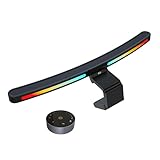



Top 3 picks at a glance
Quick Picks
| Product | Best for | Price |
|---|---|---|
| Quntis Curved Monitor Light Bar 15 RGB Backlight for 34″+ Screens, Computer Bar Lights Foldable Dual Light with Color Temperature Brightness Stepless Dimming, No Glare Desk Lamp for Home Office Gaming | Best Overall for 34-Inch and Larger Curves | $59.99 |
| Quntis RGB Monitor Light Bar with Remote, Flat Curved & Ultrawide Fits | Best with Remote for Versatility | $61.99 |
| Quntis 17.7” Curved Monitor Light Bar RGB Backlight with Music Sync, Black | Best for Music Sync and Longer Coverage | $61.99 |
| Geisofu Monitor Light Bar Curved, RGB Backlight, Computer Screen Lamp | Best Budget RGB Pick | $26.99 |
| ONWAY Curved Monitor Light Bar with RGB Backlight, Wireless Remote Touch Control, No Glare Lamp with Camera Base for Gaming/Office Computer Setup | Best Premium Control and Build | $79.00 |
| Quntis Curved Monitor Light Bar for 34″+ Ultrawide, Curve-Matching Pivoting | Best Curve-Matching Pivot Design | $59.99 |
| ONWAY Curved Monitor Light Bar with Wireless Remote,Monitor Auto-Dimming and Camera Base,Applicable to All Screens. No Screen Glare,for Home Office | Best for Auto-Dimming | $59.00 |
| ELUTENG Curved Monitor Light Bar, Black, 27-34 Inch | Best Value for Smaller Ultrawides | $28.99 |
How We Picked
We did not run lab tests or measure lux output in a controlled environment. Instead, we evaluated these eight light bars on criteria that matter for curved ultrawide ownership: fit, glare control, and everyday usability. First, we prioritized curvature and clamp design. A bar must sit securely on a 1000R to 1800R curve without wobbling, lifting, or blocking your webcam, and it must clear the thicker top bezels found on 34-inch and larger ultrawides.
Second, we looked at lighting flexibility. Every pick here offers front task lighting plus RGB backlighting, but we weighed how the controls work. Stepless dimming and adjustable color temperature are essential for shifting from daytime office work to nighttime gaming. Remote, touch, and auto-dimming controls were compared for convenience on deep ultrawide desks where reaching the light is awkward. Finally, we considered price and stated coverage, favoring models that clearly specify compatibility with 34-inch and larger screens versus those aimed at the 27 to 34-inch range.
The 8 Best Picks
1. Quntis Curved Monitor Light Bar 15 RGB Backlight for 34″+ Screens, Computer Bar Lights Foldable Dual Light with Color Temperature Brightness Stepless Dimming, No Glare Desk Lamp for Home Office Gaming
This Quntis is our top pick if you have a 34-inch or larger curved ultrawide and want a bar that was explicitly designed for that size class. The 15-inch bar length and foldable dual-light structure are made to follow the monitor’s arc, which helps distribute light evenly across a wide desk without a bright center hotspot. Stepless dimming for both brightness and color temperature lets you fine-tune the front light from warm to cool white, while the 15-mode RGB backlight handles ambient glow behind the screen. It is ideal for anyone splitting time between focused office work and immersive gaming.
- Pro: Foldable design helps match ultrawide curvature for even desk coverage
- Pro: Stepless controls for both brightness and color temperature plus RGB backlight
- Con: Wired controls may be less convenient than a remote on a deep desk
When to skip: If your monitor is under 34 inches or you strongly prefer wireless remote operation, one of the more compact or remote-equipped options will be easier to live with.
2. Quntis RGB Monitor Light Bar with Remote, Flat Curved & Ultrawide Fits
Built for flexibility, this Quntis model is for the user who switches between monitors or is not sure about long-term compatibility. Unlike curve-specific bars, it is designed to fit flat, curved, and ultrawide screens, making it a safe choice if you have multiple setups or plan to upgrade your panel. The included remote is the key advantage here, letting you adjust brightness, color temperature, and RGB effects without leaning across a large display. At $61.99, it sits in the mid-range while offering the broadest stated fit.
- Pro: Universal fit covers flat, curved, and ultrawide monitors in one design
- Pro: Remote control makes adjustments easy from anywhere at your desk
- Con: Universal clamp may not hug an aggressive 1000R curve as tightly as dedicated curved models
When to skip: If you want a bar that locks perfectly to a deep 34-inch curve and never shifts, a curve-matching pivoting model will feel more secure.
3. Quntis 17.7” Curved Monitor Light Bar RGB Backlight with Music Sync, Black
At 17.7 inches, this Quntis offers the longest bar in this roundup, which benefits ultrawide users who need light spread from edge to edge. The extended length reduces shadows at the far corners of a large desk, a common complaint with shorter bars on 34-inch-plus displays. The standout feature is music sync for the RGB backlight, which pulses the rear glow to your audio for gaming and entertainment. Priced at $61.99, it is tailored for gamers who want their lighting to react to gameplay rather than stay static.
- Pro: Extra-long 17.7-inch bar provides wider, more even coverage on large ultrawides
- Pro: Music sync mode adds immersive RGB effects for gaming
- Con: Longer footprint may overhang on smaller 34-inch monitors with thin bezels
When to skip: If you need subtle, office-friendly lighting or work in a shared space, the music-reactive modes will be distracting and unnecessary.
4. Geisofu Monitor Light Bar Curved, RGB Backlight, Computer Screen Lamp
The Geisofu is the entry point into curved RGB lighting at $26.99, less than half the price of most competitors. It is for budget-conscious buyers who still want the two core benefits: no-glare front lighting and an RGB backlight for bias lighting. While it keeps controls and features simpler to hit that price, it retains the curved form factor needed to sit flush on an ultrawide. This is the best way to test whether a light bar improves your setup without committing to a premium model.
- Pro: Lowest price in the group makes it an easy upgrade to try
- Pro: Curved housing with RGB backlight covers the essential features
- Con: Lacks remote, music sync, and advanced auto-dimming found on pricier bars
When to skip: If you rely on remote control, auto-dimming, or want longer bar coverage for a 34-inch-plus desk, invest in a mid-range Quntis or ONWAY.
5. ONWAY Curved Monitor Light Bar with RGB Backlight, Wireless Remote Touch Control, No Glare Lamp with Camera Base for Gaming/Office Computer Setup
This ONWAY sits at the top of the price range at $79.00 and justifies it with control and mounting refinements. You get both wireless remote and touch control, so you can make quick adjustments on the bar itself or from your chair. The camera base is a practical detail for ultrawide users who mount a webcam on top of a thick or curved bezel; it provides a stable, flat platform that standard clips cannot. It is best for professionals and streamers who need reliable, no-glare light and a secure camera mount in one unit.
- Pro: Dual wireless remote and touch control offers the most flexible operation
- Pro: Integrated camera base adds stability for webcams on curved ultrawides
- Con: Highest price in this roundup
When to skip: If you do not use a webcam or want to keep costs near $60, the other ONWAY or Quntis options deliver similar lighting for less.
6. Quntis Curved Monitor Light Bar for 34″+ Ultrawide, Curve-Matching Pivoting
Designed specifically for 34-inch and larger ultrawides, this Quntis focuses on mechanical fit. The curve-matching pivoting system lets the bar angle and rotate to sit parallel with your screen’s arc, preventing the gaps and tilts that cause glare or uneven light pools. At $59.99, it offers a dedicated ultrawide solution without moving into premium pricing. This is the pick for users whose current bar wobbles, reflects in the screen, or fails to clamp securely on a 1000R or 1500R panel.
- Pro: Pivoting curve-matching design helps achieve true no-glare alignment on deep curves
- Pro: Purpose-built for 34-inch and larger ultrawides rather than adapted from a flat design
- Con: Specialized curvature may be unnecessary if you also use flat monitors
When to skip: If you need one bar to work across flat and curved displays, choose the universal-fit Quntis with remote instead.
7. ONWAY Curved Monitor Light Bar with Wireless Remote,Monitor Auto-Dimming and Camera Base,Applicable to All Screens. No Screen Glare,for Home Office
Priced at $59.00, this ONWAY balances smart features with broad compatibility. The auto-dimming function adjusts front light output based on ambient room brightness, which is useful in a home office where natural light changes throughout the day. Like its sibling, it includes a wireless remote and a camera base, and it is rated as applicable to all screens rather than just aggressive curves. That makes it a strong all-rounder for mixed monitor households that still want hands-off brightness control.
- Pro: Auto-dimming helps maintain comfortable brightness without manual adjustment
- Pro: Wireless remote plus camera base adds convenience and webcam support
- Con: Auto sensor may need occasional manual override in very dark or very bright rooms
When to skip: If you prefer fully manual control over brightness and color temperature for color-critical work, a stepless manual dimming model gives you more precision.
8. ELUTENG Curved Monitor Light Bar, Black, 27-34 Inch
The ELUTENG is the second budget option at $28.99 and is explicitly sized for the 27 to 34-inch range. That sizing makes it ideal for users with a compact ultrawide or a standard 32 to 34-inch curved panel who do not need the longer 15-inch-plus coverage of larger bars. The curved black housing sits discreetly on top of the monitor and provides basic no-glare task lighting. For small desks or secondary setups, it delivers the core ergonomic benefit at a minimal cost.
- Pro: Budget-friendly price with correct sizing for 27 to 34-inch monitors
- Pro: Compact curved design fits smaller ultrawides without overhang
- Con: Not intended for 34-inch and larger ultrawides where bigger bars provide better spread
When to skip: If your monitor is 34 inches or larger with an aggressive curve, step up to a 15-inch or 17.7-inch bar designed for that class.
Buying Guide
Fit and Curvature Matter Most
Not every light bar that claims ultrawide compatibility actually matches the arc of a curved panel. For 34-inch and larger monitors, look for language like curved, curve-matching, or pivoting, and check the stated screen range. Bars in the 15 to 17.7-inch length range generally cover a 34-inch ultrawide edge to edge, while shorter bars leave dark zones at the corners. Also consider clamp depth and weight distribution; heavier front-weighted bars can tilt forward on thin bezels, and a pivoting joint helps keep the light angled down toward the desk rather than into the screen.
Controls and RGB Use
How you control the light is as important as the light itself on a deep ultrawide desk. Stepless dimming and stepless color temperature allow precise tuning from warm 2700K-like tones for evening use to cooler daylight tones for focused work. RGB backlighting should be treated as bias lighting first and decoration second. A steady, low-brightness color wash behind the monitor reduces eye strain, while modes like music sync are fun for gaming but rarely used for office tasks. If your desk is deep or your monitor is hard to reach, prioritize a wireless remote or auto-dimming model over touch-only controls.
Price and Feature Tradeoffs
Prices in this category span from $26.99 to $79.00. Budget models around $26.99 to $28.99 provide curved housing and basic RGB but skip remotes and smart dimming. Mid-range options from $59.00 to $61.99 add remotes, longer bars, and better curvature matching, which is where most ultrawide owners find the best value. The $79.00 premium tier typically adds dual control methods and integrated camera bases. Decide whether you need those extras; if you do not use a webcam or auto-dimming, a $59.99 manual model will light your desk just as well.
Our Verdict
For most curved ultrawide owners, the Quntis Curved Monitor Light Bar 15 RGB Backlight for 34″+ Screens at $59.99 is the most balanced choice. Its foldable, curve-aware design, stepless front light adjustments, and RGB backlight cover office and gaming needs without paying a premium for features you may not use. If you need remote operation or universal fit, the Quntis RGB Monitor Light Bar with Remote at $61.99 is the more flexible alternative, while gamers who want maximum spread and reactive lighting should consider the 17.7-inch Quntis with Music Sync. Budget buyers are well served by the Geisofu at $26.99, and those who want auto-dimming and a camera-ready base will appreciate the ONWAY models around $59.00 to $79.00.
FAQ
Will a curved light bar fit my flat monitor?
Some will, but it depends on the design. Models labeled as flat, curved, and ultrawide compatible use a universal clamp that works on both. Curve-matching pivoting bars designed only for 34-inch and larger curved screens may not sit flush on a flat panel. If you switch between monitor types, choose a universal-fit model.
Do RGB backlights cause screen glare?
When properly installed, no. The front light is angled to wash the desk and is shielded to avoid hitting the screen, which is the no glare claim you see across these models. The RGB backlight faces the wall behind the monitor, creating ambient bias light that actually reduces perceived glare from the screen in a dark room.
What length do I need for a 34-inch ultrawide?
For a 34-inch or larger ultrawide, a bar length of 15 inches or more provides the most even coverage. Shorter bars work but can leave the far edges of a wide desk dimmer. The 17.7-inch option offers the widest spread, while the 27 to 34-inch rated compact bars are better suited to smaller ultrawides.
Are remote and auto-dimming worth paying extra for?
On a deep desk with a large curved monitor, a wireless remote is a meaningful convenience because the bar is hard to reach. Auto-dimming is helpful in rooms with changing daylight if you prefer hands-off adjustment. If your lighting needs are consistent or you sit close enough to use touch controls, you can save money with a manual stepless dimming model.
