A Lenovo docking station update is rarely about finding the flashiest hub on the shelf. It is about solving a concrete problem: your laptop runs out of usable ports the moment you plug in a second monitor, a wired mouse, and a USB headset, and you need a single cable solution that actually passes power, video, and data without dropping frames or disconnecting every afternoon.
What separates a good dock from a mediocre one comes down to three things: how much wattage it delivers back to the laptop, whether it truly supports the resolution and refresh rate your monitors expect, and how reliably it handles the driver and firmware ecosystem on your specific ThinkPad model. Owner feedback consistently shows that docks underpowered for a given laptop create flickering displays and slow charging, while overpowered Thunderbolt options are wasted on users who only need dual 1080p output. The eight models below span the full range of these trade-offs, and we ranked them on published specifications, current pricing, and aggregated owner reports across the Lenovo support forums and retail listings.
As an Amazon Associate we earn from qualifying purchases at no extra cost to you.




Our Top Picks
 Lenovo USA ThinkPad Thunderbolt 3 Dock Gen 21.2" x 8.7" x 3.1"8.7 x 3.1 x 1.2 inches2 PoundsCheck on Amazon
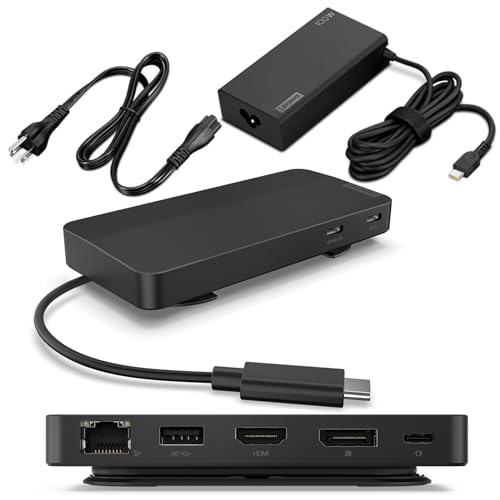 Lenovo USB-C Dual Display Travel Dock w/ 100W0.79" x 2.17"4.72 x 2.6 x 0.79 inches1.44 PoundsCheck on Amazon


Top 3 picks at a glance
Quick Picks
| Product | Best for | Price |
|---|---|---|
| 40AY0090US ThinkPad Dock (Bundle) | Full desk setup with cables included | Check on Amazon |
| USB-C Dual Display Travel Dock | Minimal budget, portability | Check on Amazon |
| ThinkPad Universal Thunderbolt 4 Dock | Multi-display power users | $229 |
| ThinkPad Thunderbolt 3 Dock Gen 2 | Dual 4K with high passthrough power | Check on Amazon |
| ThinkPad USB-C Dock Gen 2 (40AS0090) | Reliable single-cable USB-C workhorse | Check on Amazon |
| USB-C Dual Display Travel Dock (100W) | Charging plus dual displays on the go | Check on Amazon |
| 40AF0135US ThinkPad Dock USB-C | Mixed USB-C and USB-A peripherals | Check on Amazon |
| 40AY0090US Dock Bundle (Renewed) | Same bundle at a reduced price | Check on Amazon |
How We Compared
We evaluated every model on four criteria that dominate owner complaints and praise in the Lenovo docking station update space: video output capability (number of displays, maximum resolution, and interface type), power delivery wattage relative to the laptops it pairs with, port diversity and count for mixed peripheral setups, and cable or adapter inclusion in the box. Docks that ship with the necessary HDMI, DisplayPort, and USB-C cables scored higher because owners frequently report needing to buy those separately, adding hidden cost.
The 8 Best Lenovo Docking Station Update in 2026
40AY0090US ThinkPad Docking Station Dual Monitor
This bundle suits anyone assembling a new desk station who wants everything in one purchase: the dock, a 90W power adapter, HDMI and DisplayPort cables, a USB-C cable, and even a microfiber cloth for cleaning screens. The 90W passthrough handles most ThinkPad E and L series laptops without bottlenecking charge speed, and dual 4K output covers the standard productivity monitor setup. Owners appreciate the no-surprises packaging, though a few note the dock itself is bulkier than travel-oriented options. Skip it if you already own compatible cables or need something that fits in a laptop sleeve.
- Bundled cables and cloth eliminate extra purchases
- 90W delivery matches mid-range ThinkPad power needs
- Bulky footprint limits portability
Lenovo USB-C Dual Display Travel Dock
At around $61, this is the lowest-cost path to dual 4K output with an integrated USB-C cable and seven ports. It targets students, hybrid workers, or anyone adding a second monitor to a laptop that already charges fine via its own adapter. The universal compatibility list is broad, and owners highlight how the integrated cable prevents the common failure of losing the dock’s proprietary connection. The main limitation is power delivery: it does not include its own high-wattage adapter, so laptops drawing more than the cable can negotiate will charge slowly or not at all. Skip it if your workstation laptop requires more than basic bus power.
- Integrated cable removes a failure point
- Lowest price with genuine dual 4K support
- No dedicated power adapter included
Lenovo ThinkPad Universal Thunderbolt 4 Dock
The Thunderbolt 4 option is the ceiling of the lineup for anyone who needs four displays and 100W passthrough charging from a single port. It is built for data-intensive professionals running CAD, video editing timelines, or multi-monitor trading setups who want headroom for future monitor upgrades. Owners consistently note the physical size and that it requires a Thunderbolt 4 laptop to unlock all four display outputs. Skip it if your laptop only has a USB-C port without Thunderbolt support, or if two displays already meet your needs.
- Four display outputs and 100W charging
- Thunderbolt 4 bandwidth future-proofs the investment
- Requires Thunderbolt 4 laptop for full multi-display
Lenovo ThinkPad Thunderbolt 3 Dock Gen 2
At 135W passthrough, this dock delivers more wattage than even the Thunderbolt 4 model, making it the right pick for large-screen ThinkPad P workstations that draw heavy power while driving two UHD 4K monitors over two HDMI and two DisplayPort outputs. The USB 3.1 and USB-C port mix covers legacy and modern peripherals. Owners praise the raw power but mention firmware updates occasionally require a manual check through Lenovo Vantage rather than updating silently. Skip it if you do not own a Thunderbolt-equipped laptop, as the full bandwidth is inaccessible otherwise.
- 135W passthrough handles demanding workstations
- Four video outputs (2 HDMI, 2 DP) for flexibility
- Thunderbolt required; no graceful USB-C fallback for full feature set
Lenovo ThinkPad USB-C Dock Gen 2 (40AS0090)
This is the conservative, proven choice in the Lenovo docking station update lineup. It lacks the headline wattage or multi-display glamour of higher-priced models, but owners value its long track record of stable operation with minimal firmware friction. The USB-C connection is broadly compatible across ThinkPad generations, and the port layout is sufficient for a keyboard, mouse, external drive, and one or two displays. It fits users upgrading from an older dock who want a like-for-like replacement without learning a new ecosystem. Skip it if you need three or four monitors or more than roughly 65W of passthrough power.
- Broad ThinkPad compatibility across generations
- Stable, low-maintenance firmware history
- Lower power delivery than Thunderbolt alternatives
Lenovo USB-C Dual Display Travel Dock with 100W Power Adapter
Adding the 100W adapter to the travel dock solves the single biggest weakness of the base model: insufficient charging throughput. For around $92 total you get the integrated cable, seven ports, dual 4K output, and enough power to keep a ThinkPad X1 Carbon or similar ultrabook at full charge during heavy multi-monitor use. Owners note the combined package is compact enough to fit in a messenger bag alongside the laptop. Skip it if your laptop already draws power from a proprietary barrel connector that this dock cannot replicate.
- 100W adapter included solves the base model’s charging gap
- Compact footprint suits mobile workstations
- Still limited to dual displays versus Thunderbolt options
40AF0135US ThinkPad Docking Station USB-C
This dock occupies the middle tier, priced at around $190 and designed for desks that still host a mix of USB-A peripherals alongside newer USB-C devices. The dual USB-A ports handle legacy headsets, flash drives, and wired mice without dongles, while USB-C covers modern connections. Owners highlight the clean cable-management layout on the rear panel. The trade-off is power delivery: it does not match the 135W or 100W figures of the Thunderbolt models, so heavy-workstation users will feel the difference under sustained load. Skip it if all your peripherals are already USB-C or you need maximum passthrough wattage.
- Mixed USB-A and USB-C ports reduce adapter clutter
- Good rear-panel cable organization
- Mid-tier power delivery limits workstation compatibility
Lenovo 40AY0090US Dock Bundle (Renewed)
The renewed version of the full bundle delivers identical contents: 90W adapter, 4K HDMI cable, 4K DisplayPort cable, USB-C cable, and microfiber cloth at around $160 instead of around $240. For budget-conscious buyers who want the cable-included convenience without paying new-unit pricing, this is the rational Lenovo docking station update path. The caveat is warranty and condition variability; renewed stock from different sellers may show cosmetic wear or shorter coverage windows. Skip it if you require an unopened-unit factory warranty or plan to resell the setup later.
- Same bundle contents as new at a lower price
- Includes all cables and accessories
- Condition and warranty vary by renewed stock source
Buying Guide
Matching Power Delivery to Your Laptop
Every dock’s passthrough wattage must meet or exceed what your laptop draws under load. A ThinkPad E14 typically needs 65W, so a 90W dock like the 40AY0090US provides comfortable headroom. A ThinkPad P16 under sustained GPU load can pull well over 100W, meaning anything below the Thunderbolt 3 Gen 2’s 135W will result in slow or no charging while the laptop is plugged in. Check your laptop’s original adapter wattage as the minimum threshold and add ten to twenty percent headroom for stability.
Video Output Type and Monitor Count
USB-C docks negotiate video over DisplayPort Alt Mode, which caps at two external displays on most implementations. Thunderbolt docks use PCIe bandwidth and can drive three or four displays, but only on laptops with Thunderbolt controllers. Confirm your laptop’s port is labeled with a Thunderbolt icon or USB4 symbol before paying a premium for four-output docks. Dual 4K at 60Hz requires either two HDMI outputs or a combination of HDMI and DisplayPort; single-cable-to-one-monitor docks will leave the second display running at reduced refresh.
Port Layout and Long-Term Accessory Fit
Count the peripherals you use daily: keyboard, mouse, headset, external SSD, webcam, and any USB-A-only items. A seven-port travel dock may suffice, but if you run a headset, a wired keyboard, a mouse, and a portable drive simultaneously, you will want the additional USB-A banks on the 40AF0135US or Thunderbolt models. Docks with integrated cables reduce dongle loss risk for mobile users but eliminate the flexibility of swapping cable lengths for a fixed desk.
Our Verdict
For most ThinkPad owners doing a standard dual-monitor desk upgrade, the 40AY0090US bundle at around $240 wins because the included cables, 90W adapter, and cloth remove every ancillary purchase, making total cost of ownership predictable. The budget pick goes to the USB-C Dual Display Travel Dock with 100W Power Adapter at around $92, which delivers dual 4K and real charging throughput for under a hundred dollars. However, if your workflow demands three or four monitors from a Thunderbolt-equipped laptop, the ThinkPad Universal Thunderbolt 4 Dock at $229 is the only model in this group that clears that requirement without a workaround.
FAQ
Will a Lenovo docking station update break my existing monitor configuration?
Dock-to-monitor mappings sometimes shift when firmware updates change display enumeration order, causing your primary and secondary screens to swap. Lenovo Vantage or Windows display settings can reassign them, but the fix is manual rather than automatic.
Do Thunderbolt docks work over a plain USB-C port?
Yes, but they operate in a degraded USB-C mode without Thunderbolt bandwidth. You typically lose multi-display output beyond what DisplayPort Alt Mode supports, and maximum data throughput drops from forty gigabits per second to ten.
Is renewed dock stock safe for a business deployment?
Functionally, renewed units perform identically to new ones. The risk is shorter or inconsistent warranty coverage. For single-user desk setups this is negligible, but fleet deployments benefit from new-unit coverage to simplify IT support logistics.
Which Lenovo dock should I pair with a 2026-generation ThinkPad?
Any Thunderbolt 4 or USB4 ThinkPad benefits most from the Universal Thunderbolt 4 Dock because it unlocks four display outputs and full 100W charging. On USB-C-only models from the same generation, the travel dock with 100W adapter or the USB-C Dock Gen 2 provide the best balance of cost and capability.