
Our Top Picks

The Short Answer
Yes, an under-desk cable tray is absolutely worth the installation, provided you have more than three devices plugged in at your workstation or use an adjustable standing desk.
If your daily setup consists of nothing more than a single laptop and its charging cord, installing a heavy-duty metal tray is unnecessary. However, if your desk plays host to a monitor, a desktop tower, a printer, external hard drives, and speaker systems, a cable tray is the single most effective hardware upgrade you can make. It transforms a hazardous, dust-collecting nest of wires into a clean, safe, and visually appealing workspace. The small upfront investment of time and money yields massive dividends in equipment longevity, easy cleaning, and mental peace of mind.
As an Amazon Associate we earn from qualifying purchases at no extra cost to you.

What You Actually Get
If you are asking yourself, “is an under desk cable tray worth the installation?” the answer comes down to your current hardware footprint. At their core, these trays are long, horizontal channels designed to suspend power strips, surge protectors, and bulky power adapters directly beneath your desktop, keeping them entirely off the floor.
Most premium models on the market fall into two structural categories: screw-mounted channels and clamp-on baskets. They are typically constructed from powder-coated carbon steel or heavy-gauge wire mesh to allow for heat dissipation. This ventilation is crucial, as a standard 12-outlet surge protector running at a peak load of 1800W, alongside multiple 90W to 230W laptop charging bricks, can generate significant ambient heat if left unventilated.
Consider the physical footprint of typical industry-standard options:
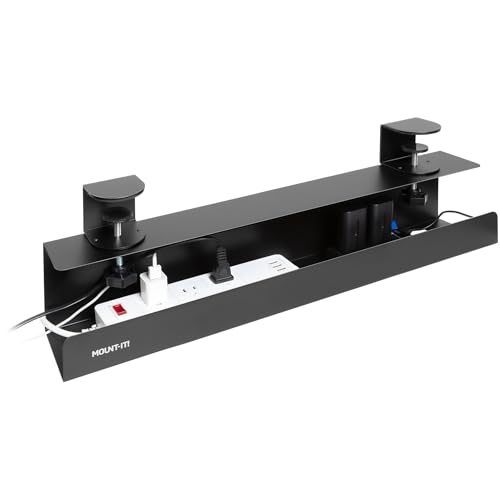
- The Clamp-On Option: Products like the Mount-It! Under Desk Cable Management Tray (around $39) offer a length of 23.6 inches. This size is ideal for compact desks (around 40 to 48 inches wide). Because it clamps onto the edge of your desk, it requires zero drilling—making it the go-to choice for glass desktops, thin particle board, or high-end solid wood desks where you want to avoid permanent modification. It can easily support up to 11 pounds of gear.
- The Heavy-Duty Screw-In Option: Products like the Univivi Under Desk Cable Management Tray (around $38) provide a much wider 32-inch channel. This is designed for larger setups (55-inch desks and wider). It screws directly into the underside of wood or MDF desktops, offering rock-solid stability. This extra length easily accommodates massive, heavy-duty surge protectors, multiple bulky power bricks, and excess cords, holding up to 15 to 20 pounds without sagging.
Ultimately, what you get is a dedicated, hidden shelf that consolidates all your power distribution. Instead of running ten separate cords from your desk down to a wall outlet, you run a single, heavy-duty extension cord from the tray to the wall, leaving the rest of your cables completely suspended and invisible.
Pros
- Drastic Reduction in Cord Strain: When cables hang freely, gravity pulls on the delicate copper connectors inside your HDMI, DisplayPort, and USB-C inputs. A tray supports this weight, extending the lifespan of your expensive computer ports.
- An Absolute Necessity for Standing Desks: If you use a sit-stand desk that transitions from 28 inches to 48 inches in height, dangling wires are a recipe for disaster. Without a tray, a cable can easily snag on a chair armrest, ripping ports out of your computer or pulling expensive monitors crashing to the ground. A tray moves with the desk, requiring only one slack cable to go to the wall.
- Child and Pet Safety: Exposed, floor-level power strips are a major hazard. Puppies love to chew on rubberized cords, and toddlers are drawn to glowing power switches. Raising these components to the underside of the desk removes the electrical hazard entirely.
- Easier Cleaning and Less Dust: Cable nests on the floor are notorious dust magnets that make vacuuming or sweeping nearly impossible. Suspending your cords allows robot vacuums or traditional brooms to clear the floor area effortlessly.
- Professional Aesthetics: A clean, cord-free aesthetic drastically improves focus and productivity. As we move closer to 2026, a streamlined, clutter-free workspace has transitioned from a luxury to an industry standard for professional home offices.
Cons
- Installation Friction and Physical Effort: Installing a screw-in tray requires crawling under your desk, measuring pilot holes, and using a drill or screwdriver upside down. If you have a solid hardwood desk, this requires precision; if you have a cheap hollow-core desk, screws may not hold securely.
- Difficult On-the-Fly Changes: Once you have meticulously routed, zip-tied, and tucked all your cables into a tray, adding a new device or removing a charger to travel with becomes a major chore. You must undo your organization to free a single cable.
- Potential Loss of Knee Clearance: On shallow desks (less than 24 inches deep), a tray that hangs down 4 to 5 inches can easily bump against your knees or shins, especially if you like to cross your legs while working.
- Heat Trapping: If you pack a narrow, enclosed tray with multiple high-wattage power adapters (such as those for gaming consoles or high-end laptops), heat can build up if the tray lacks proper ventilation slots.
Who Should Buy It
You should invest in and install an under-desk cable tray if you fall into any of the following categories:
- Standing Desk Users: This is a non-negotiable accessory to prevent equipment damage during height transitions.
- Multi-Monitor Power Users: If you run two or more monitors, a desktop PC, external speakers, and desktop lighting, you have too many cables to manage with simple adhesive clips.
- Pet Owners: If you have cats or dogs that like to explore the dark spaces under your furniture, lifting the wires out of reach is essential.
- Design Enthusiasts: Anyone who values a clean, minimalist room aesthetic will find the visual transformation deeply satisfying.
Who Should Skip It
You can safely pass on this installation if:
- You Have an Ultra-Minimalist Setup: If you only charge a laptop and perhaps a phone at your desk, a simple adhesive cord clip on the side of your desk leg is more than enough.
- You Have a Very Shallow Desk: If your desk is under 20 inches deep, the tray will severely restrict your legroom and make sitting uncomfortable.
- You Frequently Travel with Your Chargers: If you constantly pack up your laptop charger to take to coffee shops or offices, keeping it locked inside an under-desk tray will quickly become frustrating.
Cheaper Alternatives
If you aren’t ready to spend $35 to $40 on a dedicated metal tray or deal with the installation process, there are several budget-friendly alternatives you can consider:
| Option | Average Cost Range | Trade-offs & Limitations |
|---|---|---|
| Adhesive J-Channel Raceways | around $12 – around $18 | Great for routing single cables along the back edge, but too narrow to hold large power strips or bulky power bricks. Adhesive can also fail on textured surfaces. |
| Under-Desk Mesh Nets | around $15 – around $22 | Highly flexible and lightweight, but they tend to sag over time, making the underside of your desk look lumpy and untidy from a distance. |
| Adhesive Cable Clips | around $5 – around $10 (multi-packs) | Extremely cheap and easy to place, but they only hold individual wires. They cannot lift heavy power strips off the floor. |
| Velcro One-Wrap Straps | around $6 – around $9 (per roll) | Incredibly versatile for bundling wires together, but does nothing to lift the bundled cables off the floor unless paired with screw-in mounts. |
FAQ
Will installing an under-desk cable tray damage my desk?
It depends on the mounting style you choose. Screw-in trays require drilling small pilot holes into the underside of your desktop, which leaves permanent marks. However, clamp-on trays use padded turn-screw clamps to secure themselves to the edge of your desk, leaving absolutely zero permanent marks or structural damage.
Can I use a cable tray on a glass or metal desk?
Yes, but you must use a clamp-on model. Do not attempt to drill into glass or metal desks. A clamp-on tray rests securely on the edge of the desk frame, distributing the weight safely without risking cracks to tempered glass or structural warping to thin metal sheets.
How much weight can a standard cable tray hold?
Most high-quality steel or wire mesh trays are rated to hold between 10 and 20 pounds. This is more than enough to support a heavy 12-outlet surge protector, three to four large laptop/monitor power bricks, and all associated cabling. Always check the manufacturer’s specific weight limits before loading them up.
How do I prevent my power bricks from overheating inside the tray?
To avoid heat buildup, choose a wire mesh tray or a steel tray with open ventilation slots rather than a solid plastic channel. Additionally, avoid stacking power bricks directly on top of one another. Spread them out horizontally along the tray to allow maximum airflow around each adapter.
Related guides
- Best Ultrawide Gaming Monitors: Six Screens Sized Against Real Desks: 6 Compared (2026)
- Best Game Room Neon Lights: Ten Signs and Icon Lamps Compared: 10 Compared (2026)
- 10 Best 75% Hot-Swappable Mechanical Keyboards (October 2026)
- Best Mini-LED Monitor: Five Listings From a Renewed KTC to a 5K LG, Compared by Pixels and Ports (2026)









