
If you’ve ever bought a headset stand that arrived too big for your desk, tipped over every time you touched it, or hogged prime real estate next to your monitor, this guide is for you. Small desk owners face a specific problem: every square inch counts, and most headphone stands are designed for spacious setups, not 40-inch desks wedged into a corner.
The biggest mistake buyers make is treating all headset stands as interchangeable. They’re not. A weighted desktop tower that looks gorgeous in a product photo can eat 4 to 6 inches of desk depth and wobble on a thin surface. A cheap plastic hook may save you $8 but snap within weeks under a heavy gaming headset. And clamp-on stands — often the smartest choice for small desks — get rejected simply because buyers don’t realize their desk edge can support one.
As an Amazon Associate we earn from qualifying purchases at no extra cost to you.


The second mistake is buying for looks instead of weight capacity and footprint. A stand that fits your headset’s weight and your desk’s dimensions will serve you for years. A stand that only matches your RGB lighting becomes a drawer-dweller by spring. Below, we’ll work through what actually matters, with real numbers so you can measure once and buy once.
Our Top Picks
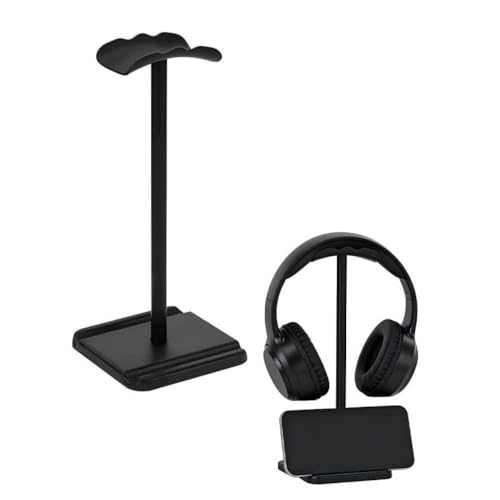


Top 3 picks at a glance
Decide These 3 Things First
Before comparing any products, answer these three questions. They’ll eliminate half the options on the market immediately.
1. How much free desk surface can you spare? Take a tape measure and mark out the area behind or beside your monitor. If you have less than 4 inches of depth to give, skip freestanding stands entirely and look at clamp-on or under-desk mounts. If you have 6 or more inches of clear depth, a compact freestanding stand becomes viable and usually offers the widest style range.
2. How heavy is your headset? Most consumer headphones weigh between 8 and 12 ounces. Gaming headsets with batteries, boom mics, and metal reinforcement — like many wireless models — run 12 to 16 ounces. Check the spec sheet on your headphones or weigh them on a kitchen scale. Any stand rated for at least 1 pound will handle virtually every headset on the market; anything rated below 10 ounces should be treated with suspicion.
3. What is your desk edge like? Run your hand along the back or side edge of your desk. If it’s a flat slab between 0.4 and 2 inches thick with at least 1 inch of flat surface underneath, clamp-on stands will work. If it’s a beveled edge, a frame-leg desk with an apron, or a glass top thinner than 0.3 inches, you’ll need a freestanding or adhesive/paper-backed mount instead — or a clamp with adjustable padding that can grip unusual edges.
Once you’ve answered these, the decisive factors below become straightforward comparisons rather than guesswork.
Footprint and Size: The Small-Desk Dealbreaker
This is the factor that matters most for your situation, so measure carefully before buying anything.
Freestanding stands typically occupy a base between 4 and 6 inches in diameter, with total heights of 9 to 12 inches. Compact models exist with bases as small as 3.5 inches across, but check the base shape: a square 4-inch base wastes less usable space than a round 5-inch base, because headphones don’t need the corners. Also note the hook height — a stand with a hook 8 inches or higher will make a tall headset (like over-ear gaming models with 3.5-inch-deep earcups) tower near your monitor arm’s range of motion.
Clamp-on stands use essentially zero desk surface. A typical clamp like the EURPMASK model mounts to desk edges up to about 1.8 inches thick and projects only 2 to 3 inches into your workspace — usually at the edge, where nothing else lives anyway. For a desk under 48 inches wide, this is often the winning design.
Under-desk and adhesive mounts are the zero-footprint option. Aluminum hooks like the JAKO style attach beneath the desk lip or to the side, holding the headset completely out of sight. The tradeoff: you lose the “display” aspect, and installation on glass or hollow surfaces requires adhesive pads rather than screws, which have lower weight limits — usually around 1 pound for quality 3M-style pads.
Rule of thumb: if your desk is 40 inches wide or less, prioritize clamp-on or under-desk mounting. Between 40 and 55 inches, a compact freestanding stand works if you place it behind the monitor. Above 55 inches, choose whatever you find attractive.
Material: Plastic vs. Metal vs. Wood
Material determines durability, weight, and how the stand ages.
ABS plastic dominates the budget tier ($5 to $8). It’s lightweight and won’t scratch your headset, but thin plastic arms — anything under 0.1 inch thick — can flex or crack under a 14-ounce gaming headset over time. Look for descriptions mentioning reinforced or thickened plastic, and check the listed weight: a stand weighing under 3 ounces itself is usually too flimsy for daily use.
Aluminum alloy appears in the $6 to $15 range and offers the best strength-to-cost ratio. An aluminum under-desk hook can support 2 to 5 pounds — far more than any headset needs — and resists flexing forever. The downside is that bare metal can scratch headphone headbands; quality models add silicone or rubber padding on the contact surface, which you should insist on.
Acrylic and wood occupy the mid-to-premium aesthetic tier ($10 to $25). Acrylic stands (clear or smoked) run 0.2 to 0.4 inches thick and look great but can crack if the base takes a hard knock. Wood stands, typically beech or walnut, add warmth and weight for stability but cost more and vary wildly in finish quality from small sellers.
Practical guidance: for a gaming headset over 12 ounces, buy metal or reinforced plastic. For lightweight listening headphones under 10 ounces, any well-reviewed material works.
Construction and Stability: Where Budget Stands Fail
Two construction details separate stands that last from stands that frustrate.
Base weighting. A freestanding stand tips when the headset’s center of gravity sits outside the base. Stability comes from either mass (a base weighing 8 ounces or more, often with a steel plate inside) or geometry (a base wide enough relative to the hook height). A useful benchmark: the base diameter should be at least two-thirds of the hook height. A stand with a 9-inch hook on a 5-inch base is a tipping risk; one with an 8-inch hook on a 6-inch base is rock solid.
Clamp mechanism. For clamp-on stands, check the screw mechanism. A plastic thumbscrew works but strips over months of adjustment; a metal screw with a comfortable pad distributes pressure without marring the desk. Rotating designs — like 360-degree swivel hangers — add flexibility, letting you tuck the hook under the desk when unused, but check that the pivot feels damped rather than loose. A loose swivel lets the headset swing and slam against the desk leg.
Contact padding. Wherever the stand touches your headset — the hook cradle and any headband contact point — there should be soft material. Bare plastic and metal hooks wear through headband leather and stitching over months. Silicone pads also grip better, preventing the headset from sliding off when you bump the desk.
Comfort and Daily-Use Performance
“Comfort” for a stand sounds odd, but it describes how the stand behaves in daily use, and it’s worth 30 seconds of thought.
Cable management. Some stands include a utility slot, peg, or channel for routing your headphone cable — a genuinely useful feature on small desks where cables otherwise dangle into your keyboard zone. Models with a dedicated cable slot at the hook base keep the cord from slipping off nightly. If you use a wired headset, this feature alone justifies a dollar or two of price difference.
Accessory storage. Stands with a small tray or utility slot can hold earbuds, dongles, or a USB receiver — valuable on a desk where drawer space is nonexistent. It’s not essential, but it turns a single-purpose object into a small organizational hub.
Reach and placement. You’ll grab and replace your headset dozens of times a day. Place the stand within 12 inches of your monitor’s edge so you never stretch across the desk. Clamp-on and under-desk hooks mounted at the desk’s front-right or front-left corner make one-handed grabs effortless.
Headset protection. A curved, wide cradle (1.5 inches or broader) distributes the headband’s weight better than a narrow hook, preventing a permanent dent in padded headbands during long storage periods. If your headphones cost over $100, insist on a broad, padded cradle.
Price Tiers: What Each Dollar Buys You
Headset stands cluster into three clear tiers, and knowing the boundaries prevents overpaying.
Budget: $5 to $8. This tier covers simple plastic freestanding stands and basic aluminum hooks — think the around $5 utility-slot stand or the around $6 New Bee stand. Expect functional design, plastic or light alloy construction, and adequate performance for headsets under 12 ounces. Build quality varies between units, so lean on reviews mentioning longevity past 6 months.
Mid-tier: $8 to $15. Here you get metal construction, rotating or adjustable mechanisms, and better padding — the around $11 EURPMASK rotating clamp and the around $6 aluminum JAKO hook sit in or near this range on features. This is the sweet spot for most small-desk buyers: full metal builds, swivel functions, and edge-clamping designs that free up surface space.
Premium: $15 to $40. You’re paying for materials (solid walnut, machined aluminum), weighted bases with steel cores, and design cachet. Functionally, a $30 stand holds headphones the same way an $8 one does. Buy premium for aesthetics and heirloom build quality, not better performance.
Honest advice: unless the stand is a centerpiece of your setup’s look, the $6 to $12 range covers every functional need. Spending more buys beauty, not capability.
Warranty and Support
Most headset stands ship with minimal formal coverage, so adjust expectations accordingly.
Established accessory brands commonly offer a 12-month replacement warranty covering manufacturing defects — cracked arms, stripped clamps, failed swivels. Some extend to 18 or 24 months. Generic unbranded listings frequently offer none, or only the marketplace’s standard 30-day return window.
What to check before buying: whether the seller names a warranty duration in the listing; whether the brand has responsive customer service (scan reviews for support experiences, not just product praise); and whether the return window covers “changed my mind” scenarios or only defects. For a $6 to $12 purchase, a hassle-free 30-day return often matters more than a long warranty on paper. Prioritize sellers with hundreds of reviews over a longer warranty claim from a storefront with a dozen.
Delivery and Assembly
The good news: headset stands are among the easiest accessories to receive and set up.
Assembly time. Freestanding stands are typically one piece or two snap-together parts — under 2 minutes, no tools. Clamp-on stands attach with a single thumbscrew — 1 to 3 minutes. Under-desk adhesive mounts need careful placement (clean the surface with rubbing alcohol first, press for 30 seconds, then wait 24 hours before loading) but require no drilling.
Shipping considerations. Plastic stands weigh under 8 ounces and ship cheaply; aluminum stands run 5 to 12 ounces. Because these items are low-cost, check whether shipping exceeds the product price — some marketplace listings charge $4 to $6 shipping on a $6 item. Bundled or free-shipping listings effectively cut your total cost by 40 to 50 percent.
What to inspect on arrival. Check for cracks in plastic arms, verify the clamp pad is included, and test the swivel tension immediately while your return window is open. Loading a defective stand for months is the most common way buyers lose refund eligibility.
Spec Checklist
| Spec | Budget ($5–$8) | Mid ($8–$15) | Premium ($15–$40) |
|---|---|---|---|
| Material | ABS plastic or light alloy | Aluminum alloy, reinforced plastic | Solid wood, machined aluminum |
| Weight capacity | About 0.75–1 lb | 1–3 lb | 2–5 lb |
| Desk footprint | 4–6 in base (freestanding) | Clamp-on; near-zero surface use | 5–7 in base or clamp |
| Contact padding | Basic plastic or thin rubber | Silicone or rubber pads | Full leather or wide silicone cradle |
| Cable management | Occasionally | Common (slot or peg) | Usually integrated |
| Adjustability | None | Rotating hook, adjustable clamp | Fixed premium design |
| Warranty | 30-day return | 12 months typical | 12–24 months |
Red Flags
Walk away from a listing if you spot any of these:
No weight or dimension specs. If the seller doesn’t list base size, hook height, or desk-edge thickness range for clamps, you’re buying blind — and the odds of a fit problem rise sharply.
Featherweight stand weight. A freestanding stand that itself weighs under 3 ounces will tip with a full-size gaming headset, no matter what the photos suggest.
Clamp range below your desk thickness. If your desk edge is 1.5 inches and the clamp maxes out at 1.2 inches, no amount of tightening fixes it. Check the stated range every time.
Unpadded metal hooks. Bare aluminum cradles scuff headbands and let headphones slide off. Padding should be visible in the photos, not just promised.
Review counts under 50 with perfect scores. A handful of glowing reviews on a new listing often reflects early incentives, not long-term durability. Look for reviews written 6 or more months after purchase.
Shipping that nearly doubles the price. A around $5 stand with around $5 shipping is a around $11 stand. Compare total cost across listings before checkout.
FAQ
Will a clamp-on stand damage my desk?
Not if it has a padded clamp face. Quality clamps include a silicone or felt pad that distributes pressure, leaving no marks on wood, laminate, or metal surfaces. Avoid overtightening — snug is enough, since a headset weighs under a pound. Glass tops thinner than 0.3 inches are the one surface we’d avoid clamping.
Are cheap $6 headset stands actually durable?
Surprisingly often, yes — for the right headset. A around $6 stand holding lightweight listening headphones under 10 ounces can last for years. The failure mode is mismatch, not price: problems appear when a 14-ounce gaming headset rides a thin plastic hook for months. Match the stand’s build to your headset’s weight and cheap works fine.
Where should I place a headset stand on a small desk?
Best practice for desks under 48 inches: mount a clamp-on or under-desk hook at the front corner nearest your dominant hand, within 12 inches of your monitor edge. If you must use surface space, put a freestanding stand behind the monitor, where the 4-to-6-inch base doesn’t compete with your keyboard, mousepad, or drink.
Do I need a stand at all, or can I just hang my headphones on my monitor?
Hanging headphones on a monitor top works but carries risks: the headband rests on a hard, narrow edge that can compress padding over time, and any bump sends a $150 headset to the floor. A dedicated stand costs less than $12 — even heading into 2026, that’s one of the cheapest insurance policies in desk accessories — and keeps the headband cradled on a padded, curved surface.
The bottom line: measure your desk edge and free space, weigh your headset, and buy in the $6 to $12 range from a seller with strong long-term reviews. For most small-desk setups, a rotating clamp-on stand solves the space problem completely — and leaves your surface free for everything else.









