
Our Top Picks
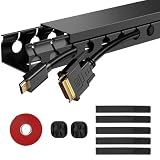
 Scanfield Under Desk Cable Management Tray2pcs Self Adhesive17 x 3.5 x 0.1 inches2.5 poundsCheck on Amazon


Top 3 picks at a glance

The Short Answer
For under-desk cable raceways, the most practical width range is 2 to 6 inches, with depths of 2 to 5.6 inches and lengths from 15 to 48 inches. If you want a single takeaway: choose a raceway at least 17 inches long for a single desk setup, roughly 5 inches wide to hold power strips and adapters, and mount it 2 to 4 inches back from the desk’s front edge so it stays hidden from view. Narrow channel-style raceways around 2 inches wide work well for thin cable bundles and standing-desk setups, while open trays in the 4 to 6 inch range suit desks with power bricks and surge protectors.
Standard Sizes
Cable raceways for under-desk use come in a few common size families. The table below reflects dimensions you will actually find on the market, including the four example products reviewed for this guide.
As an Amazon Associate we earn from qualifying purchases at no extra cost to you.


| Product | Length | Width | Depth/Height | Mount Style | Price |
|---|---|---|---|---|---|
| Scanfield Under Desk Cable Management Tray (2-Pack) | 17 in (43 cm) | ~3.5 in (8.9 cm) | ~2.5 in (6.4 cm) | No-screw adhesive/clamp | Check on Amazon |
| YECAYE Cable Management (6-Pack) | ~15.7 in (40 cm) | ~3.2 in (8.1 cm) | ~2.4 in (6.1 cm) | Adhesive | Check on Amazon |
| Cotohim Under Desk Cable Management Tray | 35.8 in (91 cm) | 5.6 in (14.2 cm) | ~3.9 in (10 cm) | Clamp or screw | Check on Amazon |
| ENONCI Cable Raceway (2-Pack) | 31 in (79 cm) | ~2.4 in (6.1 cm) | ~1.6 in (4.1 cm) | Adhesive | Check on Amazon |
Beyond these, you will also encounter larger commercial trays at 39 inches (100 cm) long and 5 to 6 inches wide, and slim rigid channels at 15 to 16 inches. Weight is rarely a deciding factor, but note that adhesive-mounted trays generally should not carry more than 5 to 10 pounds of loaded cables and equipment, while screw-mounted trays routinely hold 15 to 25 pounds or more.
How to Measure Your Space
- Measure the clearance under your desk. Use a tape measure to check the vertical distance from the underside of the desktop to the floor. You want at least 4 inches of clearance below the raceway so cables can drop freely. Standing-desk frames often reduce this, so measure at the desk’s lowest setting if applicable.
- Measure available run length. Find the clear span between crossbars, drawers, or frame supports. Adhesive trays need a continuous flat surface; a 17-inch tray needs at least 18 inches of clear run, and a 35.8-inch tray needs roughly 37 inches.
- Check the depth of your frame rails. Some desk frames have metal crossbars that sit 1 to 2 inches below the desktop. If your raceway hangs 2.5 to 4 inches deep, confirm it will not collide with knee clearance — most people need 24 inches or more of knee height.
- Count and measure your cable bundle. Wrap your cables loosely and measure the bundle diameter. A bundle under 1.5 inches fits a narrow 2-inch channel; a power strip plus adapters usually needs 4 to 5.6 inches of width.
- Confirm the power strip size if storing one inside. A typical 6-outlet strip is 10 to 12 inches long and 1.5 to 2 inches thick. Your raceway interior must exceed both figures by at least half an inch.
- Plan the mounting distance from the edge. Mark a line 2 to 4 inches in from the front edge of the desk. Anything closer shows when seated; anything deeper gets awkward to reach.
By Room or Use Case
Home Office Desk
A single desk with a monitor, laptop charger, and desk lamp produces a modest bundle. Two 17-inch trays, like the Scanfield 2-pack, cover most setups — one near the back for monitor and charger cables, one on a side edge for the power drop. Total cost typically runs $25 to $35. If you use a large surge protector, step up to one long tray in the 31 to 36 inch range instead.
Gaming Setup
Gaming desks carry more equipment: monitor, PC, console, headset stand, RGB strips, and controllers. The cable bundle often exceeds 2 inches in diameter, so choose a tray at least 5 inches wide — the Cotohim at 35.8 × 5.6 inches is a good match at around $32. Allow for 20 to 30 pounds of supported weight if power bricks sit in the tray, which means screw mounting rather than adhesive.
Standing Desk
Height-adjustable desks are the trickiest case. Cables must flex as the desk moves, so the raceway should mount on the desktop itself, not the frame. Choose a shallower tray, 1.5 to 2.5 inches deep, and leave a service loop of 8 to 12 inches of slack cable. Avoid narrow enclosed channels that pinch cables; open trays at 3 inches wide or more handle the movement better. Budget $15 to $35 for a two- or three-tray set.
Shared or Conference Tables
Long tables benefit from one continuous run rather than several short trays. A 36-inch tray centered under the table’s midpoint, or two 31-inch trays placed where people actually sit, keeps power drops tidy. Screw mounting is worth the effort here since shared furniture gets bumped and loaded heavily. Expect to spend $25 to $60 for adequate coverage.
Under-Desk Cable Channel (Minimalist)
If you only need to hide two or three thin cables — a charger and a monitor lead — a rigid channel raceway around 2 to 2.4 inches wide, such as the ENONCI 31-inch 2-pack at around $14, is enough. These sit nearly flush against the underside and stay invisible from most angles, though they will not hold a power strip.
Common Sizing Mistakes
- Buying too narrow for a power strip. An enclosed channel under 3 inches wide cannot fit a standard surge protector. Measure the strip first, not just the cables.
- Ignoring adhesive weight limits. Adhesive trays rated for 5 to 10 pounds will fail if you stuff in a heavy brick-style laptop charger plus a strip. Anything over 10 pounds should be screwed in.
- Choosing a tray too deep for the desk. A 4-inch-deep tray under a 28-inch-high desk steals knee room. Keep total tray depth at or under 3 inches for desks under 29 inches tall.
- Measuring the desktop, not the underside. Frame rails, cable grommets, and drawer boxes interrupt the mounting surface. Measure the actual clear spans.
- Forgetting cable drop length. If the tray sits 2 inches below the desktop and your wall outlet is 12 inches off the floor, verify cords reach without tension — a common miss on standing desks at full height.
- Overlapping tray ends. When combining short trays into a longer run, leave at least 1 inch between them; butted ends make future cable changes frustrating.
FAQ
What size cable raceway do I need for a power strip under my desk?
Choose a tray at least 4 inches wide and 2.5 inches deep to fit a standard 6-outlet strip, which typically measures 10 to 12 inches long. For length, a single 31 to 36 inch tray covers one full-size strip plus slack cable. Narrow 2-inch channels will not work.
How far below the desk edge should I mount a raceway?
Mount it 2 to 4 inches in from the front edge of the desktop. This keeps it hidden from the seated line of sight while remaining reachable. Deeper mounting makes plugging and unplugging awkward.
Can adhesive-mounted raceways hold heavy cables?
Most adhesive trays support 5 to 10 pounds when applied to a clean, smooth, non-porous surface. For heavier loads — big power bricks, multiple strips, or anything near 15 pounds — use screw-mounted trays like clamp-style models that grip the desk edge.
Is one long tray better than several short ones?
For desks up to 60 inches wide, one long tray (31 to 36 inches) is cleaner and easier to manage. For wider desks or standing desks, two or three 15 to 17 inch trays let you position storage where cables naturally gather and are easier to install around frame hardware. As of 2026, most multi-pack sets in the $15 to $35 range are the economical route either way.
Related guides
- Best Ultrawide Gaming Monitors: Six Screens Sized Against Real Desks: 6 Compared (2026)
- Best Game Room Neon Lights: Ten Signs and Icon Lamps Compared: 10 Compared (2026)
- 10 Best 75% Hot-Swappable Mechanical Keyboards (October 2026)
- Best Mini-LED Monitor: Five Listings From a Renewed KTC to a 5K LG, Compared by Pixels and Ports (2026)









