Flying a general aviation aircraft in Microsoft Flight Simulator without rudder pedals is like driving a car with a broken steering column — the yoke handles roll and pitch, but coordinated turns, crosswind landings, and taxiing all demand independent foot input. The best yoke and rudder pedal combos for msfs solve the problem of building a complete flight deck without spending a fortune on single-brand ecosystem lock-in. You want tactile resistance that mimics real control surfaces, toe brakes you can modulate with your arches, and mounting hardware that keeps everything from sliding across your desk during a heavy crosswind approach.
What separates a genuinely useful setup from a cheap plastic toy comes down to three things: mechanical feel, adjustability, and whether the components actually talk to each other through clean axis mapping. Some products on this list are standalone rudder pedals you pair with a separate yoke; others are bundles that ship with a yoke, pedals, and extras already calibrated. We compared the full range to help you sort signal from noise.
As an Amazon Associate we earn from qualifying purchases at no extra cost to you.





Our Top Picks
 Thrustmaster T-Flight Full Kit HOTAS with Rudder Pedalsregular18.7 x 14.21 x 12.68 inches12.37 poundsCheck on Amazon




Top 3 picks at a glance
Quick Picks
| Product | Best for | Price |
|---|---|---|
| Logitech G Pro Flight Bundle | Full combo on a budget | Check on Amazon |
| Logitech G Pro Flight Rudder Pedals | Pairing with a separate yoke | Check on Amazon |
| Thrustmaster T-Flight Full Kit HOTAS | Multi-sim versatility | Check on Amazon |
| Thrustmaster TPR Rudder Pedals | Precision instrument flying | Check on Amazon |
| Thrustmaster TFRP Rudder Pedals | Cross-platform affordability | Check on Amazon |
| Logitech Pro Flight + Switch Panel | Avionics immersion | Check on Amazon |
| Logitech Pro Flight + Throttle Quadrant | Multi-engine management | Check on Amazon |
| Honeycomb Charlie Rudder Pedals | Realistic brake modulation | Check on Amazon |
How We Compared
We evaluated each product on four criteria: axis resolution and deadzone behavior when mapped directly into MSFS, physical build quality under repeated heavy-input use (landings, aggressive taxiing), toe brake travel and modulation range compared to real Cessna or Boeing pedal feel, and ecosystem flexibility — whether you can mix and match yokes or throttles from different brands without driver conflicts.
The 8 Best Yoke And Rudder Pedal Combos For Msfs in 2026
Logitech G Pro Flight Yoke System + Pro Flight Rudder Pedals Bundle
This bundle is the most straightforward entry point into a full yoke-and-pedals setup without hunting for compatible parts. The yoke offers three axes and a metal-framed construction that resists flex under load, while the rudder pedals provide proportional toe brakes and a solid metal base plate. Setup in MSFS is plug-and-play through the Logitech G Hub, and the included control panel adds a radio stack layer of immersion.
- Yoke, pedals, and panel arrive pre-mapped — zero configuration friction.
- Metal construction on both components gives a reassuring weight.
- The yoke’s rubberized trim wheel feels plasticky and wears faster than the rest of the unit.
Skip this if you already own a quality yoke from another brand and only need pedals.
Logitech G Pro Flight Rudder Pedals
Sold individually, these pedals are the natural companion to any Logitech yoke but work with third-party sticks too. The proportional toe brakes are the standout feature — you can feather a Cessna 172’s right brake into a crosswind touchdown without the pedals jumping to full lock. The spring resistance on the rudder axis is moderate, which suits light aircraft but may feel too soft for jet pilots.
- Proportional toe brakes with genuine analog range, not binary switches.
- Compact footprint fits under a standard desk without a dedicated pedal plate.
- Limited forward travel compared to larger-format pedals like the Thrustmaster TPR.
Pass on these if you need maximum rudder travel for aerobatic or tailwheel work.
Thrustmaster T-Flight Full Kit HOTAS with Rudder Pedals – XBOX & PC
This kit is a HOTAS setup — a throttle with an attached flight stick plus standalone rudder pedals. It is not a yoke, which matters for MSFS users who specifically want general aviation control feel. That said, the pedals themselves are surprisingly capable for the price, with decent spring tension and toe brakes that respond smoothly. The throttle quadrant is excellent for multi-engine simulations.
- Included throttle quadrant handles condition levers and mixture with good detent feel.
- Works across XBOX and PC, useful if you jump between platforms.
- No yoke in the box — stick-only control will feel wrong for Cessna and Piper flying.
Skip this if you are committed to yoke-based control and want that authentic GA feel.
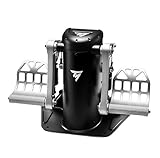
Thrustmaster TPR Rudder Pedals, Flight Simulator Rudder Control – PC
The TPR is the gold standard for rudder fidelity on PC. Each pedal operates on an independent axis with a wide adjustment range for foot size and leg length, and the toe brakes are fully proportional with separate axis outputs. The metal-on-metal mechanical feel is close to real aviation hardware. The price reflects that engineering, and it is PC-only, which limits console flexibility.
- Independent axis calibration per pedal — essential for precise crosswind landings.
- Broad height and angle adjustment accommodates almost any leg geometry.
- The steep price and PC-exclusive compatibility rule it out for budget or console users.
Consider alternatives if you do not fly IFR or demand competition-level precision.
Thrustmaster TFRP Precision Flight Sim Rudder Pedals – PS5, XBOX & PC
The TFRP is Thrustmaster’s accessible rudder solution. It delivers genuine proportional toe brakes and independent axes at a fraction of the TPR’s cost, and it works across all three major platforms. The build uses more plastic than the TPR, but the axis smoothness and lack of deadzone make it perfectly serviceable for VFR flying and light GA operations in MSFS.
- Cross-platform compatibility with no driver conflicts on any supported system.
- Proportional toe brakes at a price point that keeps a yoke in the budget.
- The plastic base flexes noticeably under aggressive braking compared to metal-framed rivals.
Look elsewhere if you need the pedal to survive daily heavy-use sessions for years.
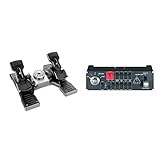
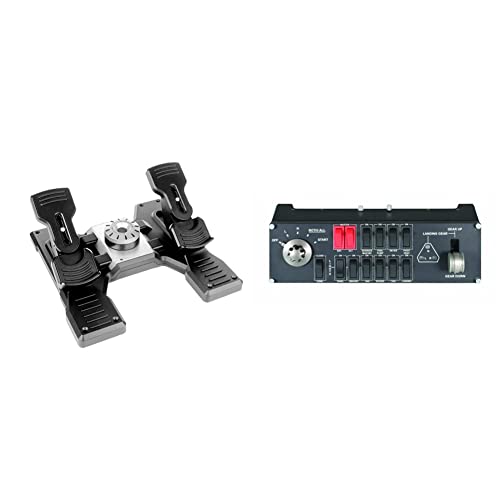
Logitech Pro Flight Rudder Pedals & Pro Flight Switch Panel, WHITE
This pairing gives you rudder pedals plus the Pro Flight Switch Panel, which adds a physical radio stack, autopilot controls, and a gear/flaps toggle to your desk. The pedals themselves share the same mechanism as the standalone Logitech rudder pedals — proportional toe brakes, moderate spring, compact form. The switch panel is where this bundle earns its premium over buying separately.
- Switch panel provides tactile avionics interaction that screen-clicking cannot replicate.
- White colorway matches cleanly with other Logitech Pro Flight components.
- The pedals alone do not justify this bundle if you already have a panel or prefer a yoke-only desk.
Not worth it if your sim rig already has a dedicated avionics panel from another brand.
Logitech Pro Flight Rudder Pedals & Flight Throttle Quadrant
Combining the same solid Logitech rudder pedals with a four-lever throttle quadrant, this bundle covers rudder and power management in one purchase. The quadrant handles throttle, mixture, prop, and flaps with individual detents that feel distinct under finger pressure. For single-engine GA flying in MSFS, the quadrant is more than you need, but for twins it is a genuine workflow upgrade.
- Four independently detented levers with good spacing for blind operation.
- Pedals and quadrant share a consistent build language and cable management.
- The quadrant’s plastic lever tips chip over months of frequent use.
Skip this if you fly only single-engine prop aircraft — the extra levers add cost you will never touch.
Honeycomb Aeronautical Charlie Rudder Pedals – PC
The Charlie pedals represent Honeycomb’s commitment to realistic feel at a mid-range price. Left and right toe brake axes are independently mapped, and the adjustable foot angle mechanism lets you set the pedal face to match real aircraft geometry. The build quality is exceptional for the segment — steel and aluminum throughout, with a base plate that grips any desk surface. Setup in MSFS requires manual axis calibration through the Honeycomb app rather than plug-and-play simplicity.
- Realistic toe brake modulation with genuine progressive resistance through full travel.
- Adjustable feet angles and forward travel accommodate a wide range of pilot leg lengths.
- PC-only with a separate companion app that adds a configuration layer.
Not the right choice if you want zero-setup simplicity across multiple platforms.
Buying Guide
Proportional Toe Brakes Are Non-Negotiable
The single most important spec is whether the toe brake axis outputs a continuous range of values or just a binary on/off signal. Proportional brakes let you apply ten percent right rudder brake to hold a Cessna 172 aligned on centerline during a gusty crosswind landing. Binary brakes force a full lock or nothing, which makes ground handling twitchy and frustrating. Every product on this list offers proportional toe brakes, but the degree of smoothness varies — the Thrustmaster TPR and Honeycomb Charlie deliver the finest resolution, while budget options can show slight stepping in the brake curve.
Independent Axis Mapping for Rudder and Brakes
Each pedal should output its own axis data independently from the other. This lets MSFS treat rudder input and brake input as separate signals on the same foot, which is how real aircraft work. If a product merges both feet into a single rudder axis, you lose the ability to brake asymmetrically. The Logitech pedals and Thrustmaster TFRP both support independent axes, but the TFRP requires you to enable split-brake mode in settings — verify this is active before judging the pedal’s feel.
Mounting Stability and Desk Clearance
Rudder pedals that shift under load ruin immersion faster than any software issue. Look for a wide base plate, rubber grip feet, or a clamp that secures to the desk edge. Under-desk mounting with a dedicated plate is ideal for heavy landings. The Logitech pedals are compact enough to work without a plate, while the Thrustmaster TPR and Honeycomb Charlie benefit from a flat, deep mounting surface to prevent tipping during aggressive brake input.
Our Verdict
Top pick: Logitech G Pro Flight Yoke System + Pro Flight Rudder Pedals Bundle — the most complete, zero-friction path to a working yoke and pedals setup for the price. Budget pick: Thrustmaster TFRP — genuine proportional toe brakes and cross-platform compatibility at the lowest cost that still delivers a usable rudder axis. Condition under which another wins: if you fly IFR or demand the finest brake modulation available on PC, the Thrustmaster TPR justifies its premium through independent axis calibration that no other product on this list matches.
FAQ
Can I use rudder pedals from one brand with a yoke from another?
Yes. MSFS reads input devices at the operating system level, so a Logitech yoke paired with Thrustmaster pedals works without issue. Just ensure you map each axis individually in MSFS controls settings rather than relying on a single brand’s driver suite.
Do rudder pedals help with taxiing in MSFS?
They help significantly. Nose wheel steering in MSFS responds to rudder input, and toe brakes let you manage speed without touching the keyboard. Without pedals, taxiing large airliners requires constant brake-and-throttle switching that feels clunky.
Is a yoke necessary for MSFS or can I fly with just pedals?
Pedals alone only control rudder and brakes. You still need a yoke, stick, or joystick for pitch and roll control. The combination of the two gives you the full three-axis-plus-brakes picture that general aviation flying demands.
What is the minimum desk setup needed to mount rudder pedals?
A flat desk surface at least twenty inches deep is sufficient for most pedals in this list. Dedicated pedal plates or under-desk clamps improve stability for heavier units like the Thrustmaster TPR or Honeycomb Charlie, especially during aggressive crosswind corrections.