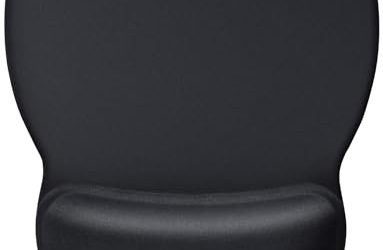
A square desk mat earns its place by doing one simple job well: it draws a clear border around the keyboard and mouse, so the middle of the desk stops being a drifting pile of cables, cups, and controllers. Everything inside the border belongs to the current session. Everything outside it needs a home somewhere else. That single rule turns a cluttered desk into a tidy zone. The mat is a flat, washable boundary that makes tidiness easy to see and easy to restore at the end of the day.
This guide builds a complete square-mat setup around that idea. The picks below cover the edges of the zone rather than the mat itself: a light-duty rail for spare leads, plain automatic bulbs for evening light, a clamp mount for an arm, a padded case for the laptop, and proper glassware that lives on a side table. Each pick is framed honestly. A mat protects the surface and defines the zone, but it does not change how a mouse tracks, and none of these companions changes that either. What they change is how fast the desk returns to clean.
As an Amazon Associate, we earn from qualifying purchases.
Our Top Picks
 tomtoc 360° Protective Laptop Case for 13.5-14.4 Inch13.5-14.4 Inch13.8 x 10.2 x 1.26 inches0.66 poundsCheck on Amazon


Top 3 picks at a glance
SANY DAYO Jewelry Organizer With 30 Hooks
The first companion sits at the back edge of the mat, where spare leads usually tangle into a nest. Stated plainly, this pick is a jewelry organizer with thirty hooks, repurposed here as a light-duty cable rail. It was designed for necklaces and bracelets, and that origin defines its limits. It handles light, flexible leads gracefully: a spare mouse cable, a charging lead, a headset cord. Hung in a neat row, those leads stop tangling around the keyboard feet.
The limits matter as much as the uses. This rail never holds power bricks or power strips. A brick is heavy, warm, and the wrong shape for small hooks, and a strip belongs in a ventilated tray under the desk. Consoles, drives, and controllers rest on shelves and trays built for their weight. Keep the rail to light leads only, and it does its one job quietly for years.
Placement is simple: mount or stand the organizer just behind the mat, close enough that a spare lead reaches its device without stretching. When a session ends, the spare leads go back on their hooks as part of the reset. The mat holds the working tools, the rail holds the waiting ones.
Specs
- Thirty individual hooks in a row format
- Jewelry organizer repurposed as a light-duty lead rail
- Light cables only: mouse leads, charging leads, headset cords
- Not rated for power bricks, strips, consoles, or drives
- Mounts or stands at the back edge of the desk
HEKEE Dusk to Dawn Bulbs A19
Evening sessions need light that does not fight the screen, and this pick handles the room side of that job. These are plain automatic sensor bulbs in a standard A19 shape. A built-in dusk-to-dawn sensor turns them on when the room darkens and off when daylight returns, with no app, hub, or schedule to program. Stated plainly, they are not smart bulbs: no color changes, no phone dimming, no voice commands. They simply keep a dim room from going fully dark behind the monitor.
They are also not task lighting. A sensor bulb gives soft ambient fill, comfortable for general play, but reading small print or doing detailed work still calls for a real desk lamp. Treat these bulbs as background light only: the room stays gently lit in the evening, and nobody has to flip a switch when a session runs long.
Two caveats come with the sensor design. In a windowless or very dim room, the sensor may decide it is always evening, so the bulbs may stay on whenever they have power; that is expected behavior, not a fault. And they should only go into enclosed fixtures if both fixture and bulb are rated for enclosed use, since trapped heat shortens bulb life.
Specs
- Standard A19 shape for common household fixtures
- Built-in dusk-to-dawn sensor, fully automatic
- No app, hub, dimming, color, or voice features
- Ambient room light only, not a desk lamp substitute
- May stay on in dim rooms; check enclosed-fixture rating
ULANZI Super Clamp
A tidy zone has no room for wobbly stands eating mat space, and that is where a clamp earns its keep. This super clamp grips a desk edge, shelf edge, or pole and holds an arm or accessory up off the surface. It is a mount only. Stated clearly, the clamp includes no light, no phone, and no camera of its own; it provides the grip, and whatever arm or holder is attached provides the function.
Used well, it keeps the mat clear. A lamp arm clamped at the back corner reaches over the zone without standing on it. A camera arm parks above the surface instead of beside the keyboard. A phone holder floats at the edge of view rather than lying loose on the mat. Every item lifted off the surface is one less thing crowding the keyboard.
The clamp has firm limits. It should never be clamped to a monitor: a screen is not a load-bearing structure, and clamping to one risks cracked housings and damaged panels. Keep it off laptop lids, glass, and thin panels that can flex or crack. Tighten it onto solid wood or metal, and re-check the grip now and then, since bumps slowly loosen any clamp.
Specs
- Clamp mount for desk edges, shelf edges, and poles
- Mount only: includes no light, phone, camera, or arm
- Keeps arms and holders off the mat surface
- Never clamp to a monitor, laptop lid, or glass
- Requires a solid edge and periodic grip checks
tomtoc Laptop Case
Many gaming desks double as work desks, and the laptop that shares the space needs a parking spot that is not the mat. This padded soft case gives it one. The laptop slides into the case at the end of a work block and stands upright in a drawer or on a shelf, protected from dust and casual knocks. During play, the case keeps the work machine out of the zone; during work, it carries the machine between rooms.
The case’s limits are plain. It is a padded soft case, not a hard shell. It softens bumps and light knocks, but it will not protect a laptop from a serious drop or being crushed in a bag. It is also not waterproof, so a wet commute calls for keeping it inside a bag. It is a good everyday sleeve rather than armor.
Fit is the one detail to get right before ordering. A case that is too tight stresses zippers, while one that is too loose lets the machine slide. Check the internal dimensions against the laptop’s actual measurements, including thickness with any shell attached. Measure first, and the case becomes part of the reset: work ends, laptop parked, mat clear for play.
Specs
- Padded soft case for everyday laptop carry and storage
- Softens bumps and scrapes; not a hard shell
- Not waterproof; keep away from rain and spills
- Parks the laptop off the mat during play
- Check internal dimensions before ordering
JoyJolt Faye Highball Glasses 13 oz, 6 Pack
The last pick protects the zone from its most common enemy: the drink set down wherever is closest. These are real glass highball glasses in a six pack, sized for water, iced tea, or juice during a long session. Real glass washes clean without holding flavors, and six matching glasses mean one is always clean.
The rule that comes with them is strict, and it is the whole point: drinks in these glasses live on a side table, never on the mat. Glass sweats, tips, and breaks, and a spill across a desk mat reaches the keyboard and mouse in seconds. A small side table keeps the drink within reach and completely outside the border. That one habit prevents more desk damage than any other in this guide.
Honesty about glass applies too. These are real, breakable glassware. A chipped rim means the glass should be retired, since a chip can cut a lip and only grows worse with washing. Broken glass near a play space gets cleaned up fully and immediately. Treated with basic respect, a simple set of glasses serves the setup for a long time.
Specs
- Set of six matching highball glasses
- 13 oz capacity each, for water and cold drinks
- Real glass: breakable; retire chipped rims
- Drinks belong on a side table, never on the mat
- Carry separately from gaming gear
How to Choose
Start with the mat and the rule, because everything else supports them. Choose a square mat that fits the keyboard and mouse with a small margin on each side, no larger. A mat that sprawls across the whole desk defines nothing; a mat sized to the working tools creates a border the eye can check at a glance. Then set the zone rule: inside the mat is for the keyboard, the mouse, and nothing else. Controllers, phones, and cups all live outside it. That is what makes a five-minute reset possible.
Next, give everything outside the zone a fixed home. Spare light leads go on the rail, with power bricks and strips in a floor tray. The laptop goes in its case, parked in a drawer or on a shelf. Drinks go on a side table. Lighting splits into two honest layers: a real desk lamp for tasks, and plain sensor bulbs for ambience. Mounts clamp to solid furniture edges, never to a monitor. When every object has one home, tidiness depends on geography rather than motivation.
Finally, protect the zone with a schedule. Wipe the mat weekly, following the mat maker’s care guidance; a mat that is never cleaned becomes the dirtiest thing on the desk. Keep the honest expectation in view: the mat protects the surface and defines the zone, but it does not change how a mouse tracks.
FAQ
Does a square desk mat change how a mouse tracks?
No. A desk mat protects the desk surface and defines a clean working zone, but it does not change how a mouse sensor tracks or how a game responds. Any difference in glide comes from the mat’s surface texture compared with the bare desk, not from improved accuracy. Tracking quality still depends on the mouse and the player’s own practice.
How often should the mat be wiped down?
A weekly wipe suits most desks, following the mat maker’s care guidance. Desks that see snacks, pets, or heavy dust benefit from a quicker rhythm. A neglected mat collects crumbs and grit that end up under the mouse and keyboard, which defeats its purpose.
Can a drink sit on the mat if it is on a coaster?
It should not. A coaster stops rings, but it does not stop tipping, sweating, or spills, and one knocked glass can soak the keyboard and mouse in seconds. Drinks belong on a side table, within reach and fully outside the zone. The rule has no exceptions, which is exactly why it works.
Can the hook rail hold a power strip or a console?
No. The organizer in this guide is a jewelry organizer repurposed as a light-duty rail, meant for light spare leads only. Power strips and bricks belong in a ventilated tray on the floor or under the desk, and consoles belong on shelves or stands built for their weight. Overloading small hooks bends them and creates clutter.
Final Verdict
A tidy gaming desk is built from one clear zone, a home for everything outside it, and a short routine that restores both. The square mat draws the border and protects the surface. The repurposed hook rail keeps spare light leads in a row, within its honest limits. The sensor bulbs keep evenings gently lit without pretending to be smart lights or task lamps. The clamp lifts arms off the surface, the padded case parks the laptop away from play, and real glasses on a side table keep drinks where they can do no harm.
None of it changes how a mouse tracks, and none of it replaces practice, breaks, or a real desk lamp. What it delivers is a desk that resets in minutes and stays ready because each piece has one job and one home. Start with the mat and the rule, add the companions in the order your desk causes friction, and the tidy zone will hold.
Product and ASIN Reference
| Product | ASIN |
|---|---|
| SANY DAYO jewelry organizer 30 hooks | B07QFZSVQW |
| HEKEE dusk to dawn bulbs A19 | B07HGZMYZ4 |
| ULANZI super clamp | B09C882D4M |
| tomtoc laptop case | B073TVX735 |
| JoyJolt Faye highball glasses 13 oz 6 pack | B08BB62QWT |
Related guides
More from Amazon
Programs that pair well with the guide above. Offers and eligibility are set by Amazon and may change.
Free shipping on eligible items, Prime Video and more. Eligible new members can start with a free trial.
Start a Prime free trialAd-free music streaming. Eligible new subscribers can start with a free trial.
Try Music Unlimited freeA Prime membership for ages 18-24 with a trial period. Eligibility is set by Amazon.
See Prime for Young AdultsAudiobooks and podcasts to listen to on the go. Eligible new members can start with a free trial.
Try Audible freeAs an Amazon Associate we earn from qualifying purchases.