The best portable LED video light panels for most streamers and mobile creators are the Elgato Key Light Neo for simple desk use, the Lume Cube Panel Pro 2.0 for a compact battery-powered setup, and the amaran P60x for the most useful balance of panel size, output, and color control.
A good portable panel should do more than fit in a backpack: it needs enough brightness to work through diffusion, accurate skin tones, reliable battery performance, controls that remain usable during a live session, and a mounting system that does not force you to improvise. The right choice depends mainly on whether you film at a desk, travel with a camera, or need one panel to light a larger subject.
As an Amazon Associate we earn from qualifying purchases at no extra cost to you.


Our Top Picks

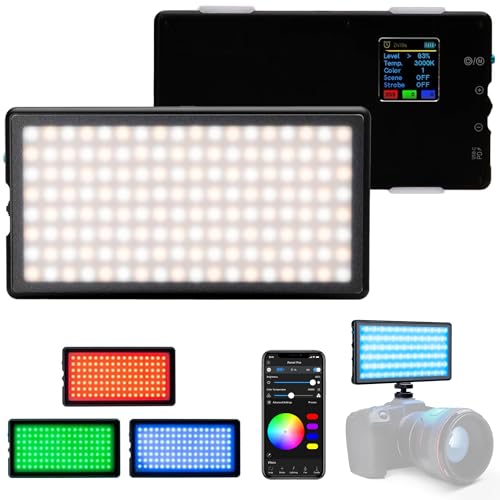


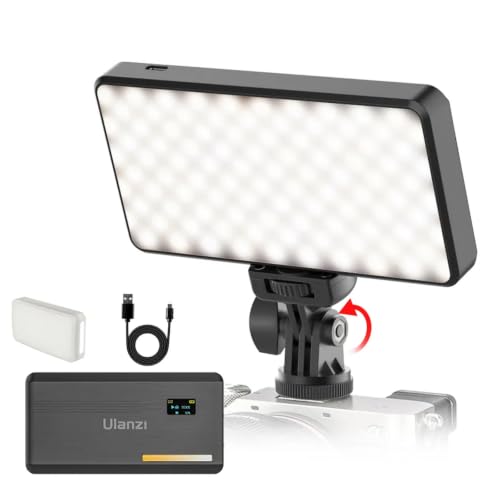
Top 3 picks at a glance
Quick comparison of the leading options
| Panel | Best use | Color range | Color accuracy | Power and battery | Mounting |
|---|---|---|---|---|---|
| Elgato Key Light Neo | Streaming and video calls | 2900–7000K | CRI 94 | USB-powered via USB-C; no internal battery | Monitor mount with 1/4-inch thread |
| Lume Cube Panel Pro 2.0 | Travel, talking-head video, mobile kits | 2700–7500K plus full RGB | CRI 96+ | Internal rechargeable battery; USB-C charging | Three 1/4-inch threads |
| amaran P60x | Brighter portable key light | 3200–6500K | CRI 95+, TLCI 97+ | AC power or optional battery solution | Yoke, light stand, and softbox-compatible mounting |
| Ulanzi VL49 | Low-cost fill light and compact rigs | 5500K daylight | Suitable for basic video rather than color-critical work | Internal rechargeable battery | Multiple cold shoes and 1/4-inch threads |
| amaran AL-MC | Very small accent or close fill light | RGB plus adjustable white light | High color quality for its size | Internal rechargeable battery | Magnetic rear, 1/4-inch mount, and accessory mounting |
Specifications vary by measurement method, modifier, and firmware, so lux figures from different manufacturers are not perfectly interchangeable. A panel measured with a reflector can appear much brighter than the same panel through diffusion. Treat the table as a buying guide rather than a laboratory ranking.
Best overall for streaming: Elgato Key Light Neo
The Elgato Key Light Neo is the easiest recommendation for a streamer who wants a small, controlled key light without building a full lighting kit. Its adjustable color temperature covers 2900K to 7000K, from warm indoor rooms through cool daylight, and its compact square panel clips to a monitor with the included mount or sits on a small tripod via its 1/4-inch thread.
Its main strength is control. Wi-Fi adjustment from Elgato’s software, plus onboard buttons for brightness, color temperature and presets, makes it convenient when the light is mounted above a monitor. It runs from USB power rather than a battery, so it suits a permanent desk setup; maximum brightness depends on the power source, so use a USB-C charger rated for 3A if you want its full output.
The limitation is surface area. A small panel creates harder shadows when placed close to the face. Put it slightly above eye level, move it farther away, and use a thin diffuser if the light looks harsh. For a very soft portrait look, a larger panel such as the amaran P60x will outperform it even if both are set to a similar brightness level.
Best compact travel panel: Lume Cube Panel Pro 2.0
The Lume Cube Panel Pro 2.0 is a strong choice for creators who move between rooms, hotel desks, and outdoor locations. Its built-in battery, compact body, adjustable color modes, and mounting options make it more self-contained than a conventional studio panel.
It is especially useful as a camera-top or side-mounted light for interviews, product demonstrations, and mobile video. The RGB features are helpful for background color or practical effects, but they should not be confused with extra white-light output: a panel normally produces its strongest, cleanest light in its dedicated white modes.
For a face-lit talking-head shot, mount it 30–60 degrees to one side of the camera and slightly above the subject’s eye line. If the background becomes too dark, lower the panel’s intensity and raise the camera exposure only if necessary; overdriving a tiny panel often produces a bright face with distracting falloff.
Best for more output: amaran P60x
The amaran P60x is the better option when a pocket-sized light is not bright enough. Its larger emitting surface produces more usable illumination and softer shadows, while its bi-color range from 3200K to 6500K can match warm interior light or cool window light.
It is portable in a production-kit sense rather than a pocket-gadget sense. You can transport it easily, but you should plan for a stand, power cable, and possibly a battery plate or compatible battery solution. With a softbox or diffusion, it becomes a practical key light for a seated presenter, gaming desk, or small product table.
Choose it when brightness matters more than minimum size. If you only record short clips beside a phone, its extra accessories may be unnecessary. If you want one light that can cover both streaming and more deliberate camera work, the larger panel is easier to grow into.
Budget and ultra-compact alternatives
Ulanzi VL49
The Ulanzi VL49 is best treated as a fill light, emergency light, or small background source. Its low price and several mounting points make it easy to attach to a phone cage, compact camera, or tabletop rig. It is less suitable as the only key light for a full face because its small surface and modest output create visible falloff.
amaran AL-MC
The amaran AL-MC is useful when size matters more than raw brightness. Its magnetic rear lets it attach to metal surfaces, while its RGB capability makes it effective for practical accents, colored backgrounds, and close-up fill. For a main talking-head light, use it only at short distances or in pairs.
Best pocket RGB panel with a metal body: SmallRig P96L

The SmallRig P96L sits between the tiny Ulanzi VL49 and the Lume Cube Panel Pro 2.0. It is roughly the footprint of a small phone, about 11 mm thick, and wrapped in an aluminium alloy shell, so it survives being thrown in a camera bag better than plastic pocket lights. For a streamer or mobile creator, it is most useful as a compact fill light, a hair light behind a chair, or a coloured accent that can be hidden on a shelf.
The key specifications are the reason it earns a place here. SmallRig lists a CRI of 96 or higher, a bi-color white range of roughly 2500K to 8000K, full RGB control, and a set of built-in scene effects. A small OLED screen shows the current mode, brightness and color temperature, which matters when you are adjusting a light on top of a camera with no phone app open. Power comes from a built-in battery of about 1,500 mAh with USB-C charging; expect around an hour at full output and many hours at low settings.
Strengths: high color accuracy for its size, a sturdy metal housing, a readable display, and a 1/4-inch thread plus cold-shoe compatibility for cages and small arms. The RGB effects are genuinely useful for background color washes on a gaming desk.
Drawbacks: the battery is small, so a full-brightness stream will need a USB-C power source nearby. Like every palm-sized light, it is a hard source; use it at a distance or bounce it off a wall if you want it as a key light.
How it compares: the P96L is brighter and more robust than the Ulanzi VL49 and offers RGB that the basic VL49 daylight model lacks. It does not match the surface area or punch of the Lume Cube Panel Pro 2.0, but it sits in a much lower tier and is a smarter second light. Think of it as a budget accent and fill tool rather than your only key light.
Best long-runtime bi-color pocket light: Ulanzi VL200
The Ulanzi VL200 is the pick for creators whose main complaint about small panels is battery life. Its built-in 5,000 mAh battery is several times larger than the cell inside most pocket lights, and Ulanzi rates runtime from roughly two hours at full output to around fifteen hours at low settings, depending on the color temperature you choose. That makes it a realistic option for a long outdoor shoot or an unplugged desk session.
It uses 200 LED beads split evenly between warm and cool white, giving a wide 2500K to 9000K range and a listed CRI of 95 or higher. It is white-light only, which is a deliberate trade: every LED contributes to the white output instead of sharing space with RGB chips. The body is a slim rectangle of about 148 x 76 mm, a little larger than a phone, with mounting threads and a cold shoe for camera use. Published photometric figures put it at a few hundred lux at half a metre, enough for close fill on a face.
Strengths: excellent battery capacity for its class, a very wide color temperature range for matching warm lamps or cold daylight, simple button control, and a size that still fits in a jacket pocket.
Drawbacks: no RGB, no app control, and its output is modest when placed more than about a metre away. The larger battery also makes it heavier than the P96L or Lume Cube Panel Mini.
How it compares: where the Lume Cube Panel Pro 2.0 wins on output and effects, the VL200 wins on runtime per charge at a much lower tier. Against the Elgato Key Light Neo it lacks wireless control, but it needs no power cable, and for travel or as a fill light that rarely runs flat, it is one of the most practical budget options.
Best tiny bi-color light for travel kits: Lume Cube Panel Mini

The Lume Cube Panel Mini is the smaller sibling of the Panel Pro 2.0 already covered above. It is aimed at creators who want a premium-feeling, extremely small bi-color light for laptop calls, phone video and on-camera fill. Lume Cube lists it at about 300 lumens with a CRI of 96 or higher, and the unit weighs only around 85 g, light enough to sit on a phone clamp without tipping it.
Battery runtime is rated at a little over an hour at full brightness and around two hours at half power, with very long runtime at the lowest setting. It charges over USB-C, has two 1/4-inch threads so it can be mounted horizontally or vertically, and uses a small LCD to show brightness and color temperature. Depending on the production version, the white range is listed as 3200K to 5600K or a wider span, so check the current listing if you need very warm light.
Strengths: high color accuracy, tiny size, two mounting points, and a clean, simple control layout. It is easy to use for video calls at a hotel desk where you have no space for a stand.
Drawbacks: no RGB, short runtime at full output, and a very small emitting surface. It is a mid-range product despite its size, so you pay for the brand and finish rather than raw brightness.
How it compares: next to the Ulanzi VL200 it is lighter and more compact but runs out of battery much sooner. Next to the Panel Pro 2.0 it gives up output and RGB in exchange for size. Pick it if weight is your main constraint; pick the Panel Pro 2.0 if it needs to be your main light.
Best magnetic RGB light for small rigs: NEEWER RGB61

The NEEWER RGB61 is a compact, squarer light with a strong built-in magnet, which makes it especially convenient for gaming desks with metal frames, PC cases, monitor arms and steel shelving. NEEWER lists a CRI of 97 or higher, full 360-degree RGB hue control, a 2500K to 8500K white range and 20 scene effects. Its 61 LEDs are split between warm white, cool white and RGB chips.
The built-in 2,000 mAh battery is rated for roughly two and a half hours at full brightness, and it charges via USB-C. Mounting options are generous for its size: the magnetic back, three cold-shoe mounts and a 1/4-inch thread, so you can stack a microphone or a second light on top of it in a camera cage. A clip-on diffuser is included, which helps soften the small source.
Strengths: very high listed color accuracy, a magnet that makes quick placement easy, three cold shoes, and a budget tier that makes buying two for background and rim lighting reasonable.
Drawbacks: output is limited to close-range work, and NEEWER advises against running it while charging to preserve battery health, which is a nuisance for long streams. The plastic housing is less rugged than the SmallRig P96L.
How it compares: the RGB61 overlaps with the amaran AL-MC as a magnetic RGB accent light, but sits in a lower tier. Against the SmallRig P96L it trades the metal body and display for the magnet and extra cold shoes. Both make good second lights alongside a main key such as the Elgato Key Light Neo or amaran P60x.
Best plug-in desk alternative: Logitech Litra Glow

Not every creator needs a battery. If your “portable” requirement is really about moving a small light between a desktop and a laptop, the Logitech Litra Glow is a simple option. It is a compact square light, about 9 cm across, that clips onto a monitor with a three-way adjustable mount and draws power over a single USB cable. Removing the mount exposes a 1/4-inch thread for a small tripod.
Logitech lists a maximum of 250 lumens, a 2700K to 6500K white range and a CRI of 93, and it uses a frosted front it calls TrueSoft to spread the light across the face. Brightness and color temperature can be adjusted with buttons on the back or through Logitech’s G HUB software, where presets can be saved. Logitech recommends a USB 3.0 port for best performance.
Strengths: nothing to charge, an integrated monitor mount, soft front diffusion and easy software control for a webcam setup. It stays out of the way above a screen and suits video calls as much as streaming.
Drawbacks: no battery, no RGB and modest output; it is designed for a face that is about an arm’s length away, not for lighting a room or a product table.
How it compares: it is the closest alternative to the Elgato Key Light Neo for desk users, but simpler: you give up Wi-Fi app control and some maximum output in exchange for a lower price tier. For anyone filming away from a computer, the Lume Cube or Ulanzi options are better fits.
How to choose by brightness, not marketing numbers
Lux is meaningful only when the distance and beam angle are specified. Light follows an inverse-square relationship: doubling the distance from a panel reduces the illumination at the subject to roughly one-quarter. This is why moving a small light from 30 cm to 60 cm can make it look dramatically weaker.
Here is a practical power-budget example. Suppose a panel provides 1,500 lux at 1 metre and you place it 0.5 metres from your face. In ideal conditions, the illumination is approximately:
1,500 × (1 ÷ 0.5)2 = 6,000 lux
Add a diffuser that transmits about 70% of the light and the effective level becomes roughly 4,200 lux. That is usually ample for a webcam or mirrorless camera at a moderate ISO. If you move the panel to 1 metre to make the light softer, the level falls back to about 1,050 lux after diffusion. A larger panel is therefore valuable not only because it is brighter, but because it can remain farther away while still exposing the subject properly.
Decision matrix for streaming and mobile setups
| Your situation | Choose | Why | Watch out for |
|---|---|---|---|
| Permanent desk, webcam, software control | Elgato Key Light Neo | Simple wireless adjustment and USB-C operation | Small source can look harsh without diffusion |
| Phone video and frequent travel | Lume Cube Panel Pro 2.0 | Self-contained battery and compact mounting | Runtime falls at maximum brightness |
| Seated presenter or larger desk scene | amaran P60x | More output and a larger, softer source | Needs a stand and a more deliberate power plan |
| Second light, background, or tight budget | Ulanzi VL49 or amaran AL-MC | Easy to hide in a compact rig | Not ideal as the only key light at distance |
Battery life: calculate before a long stream
Manufacturers often quote maximum runtime at a lower brightness setting. A simple estimate helps prevent surprises. If a light has a 20 Wh battery and draws 10 W at your selected output, the ideal runtime is:
20 Wh ÷ 10 W = 2 hours
Allow for conversion losses, battery ageing, charging overhead, and brightness regulation, so a practical estimate might be 1.5–1.8 hours. At half the power, the same battery could last close to four hours, although the relationship is not always perfectly linear.
For a three-hour stream, a USB-C panel should either stay connected to a sufficiently powerful charger or have a battery bank available. Check the panel’s input requirement: a charger that supplies only 5 W may maintain a low setting but fail to charge while the light is running at full output.
Color accuracy and control features that matter
- CRI and TLCI: Look for ratings in the mid-90s or higher when skin tones, clothing, and product colors matter.
- Bi-color adjustment: Useful for matching a warm room lamp or a cool window. It is more practical than RGB when the light is your main key.
- RGB: Best for background color and effects, not maximum white brightness.
- Onboard controls: Important when Wi-Fi is unreliable or you are filming away from a phone.
- Wireless control: Helpful for a mounted streaming light, but not a substitute for physical buttons in a travel kit.
- Flicker-free operation: Look for a light designed for video across common shutter speeds, especially when recording slow motion.
Mounting tips for a stable mobile setup
A 1/4-inch thread is the most versatile connection for tripods, magic arms, and small light stands. Cold-shoe mounts are convenient on a camera cage but are not always strong enough for a large panel. For a desk, clamp-based arms save space, but tighten every joint before recording because a panel placed high above a monitor can gradually sag.
For a basic face-lighting arrangement, put the key panel 45 degrees from the lens, 15–30 degrees above eye level, and close enough to remain bright without forcing the camera to raise ISO. Add a small second panel behind or beside the subject only when the background needs separation. One well-positioned key light usually looks better than two weak lights pointed directly at the face.
How the additional picks compare
The table below summarizes the extra lights added to this guide. Tiers are relative to portable video lights in general: budget, mid-range and premium.
| Light | Tier | Light type | Listed CRI | Power | Best role |
|---|---|---|---|---|---|
| SmallRig P96L | Budget | Bi-color plus RGB | 96+ | About 1,500 mAh battery, USB-C | Fill, hair light, RGB accent |
| Ulanzi VL200 | Budget | Bi-color, 2500K to 9000K | 95+ | 5,000 mAh battery, USB-C | Long unplugged fill or close key |
| Lume Cube Panel Mini | Mid-range | Bi-color | 96+ | Built-in battery, USB-C | Ultralight travel and laptop calls |
| NEEWER RGB61 | Budget | Bi-color plus RGB | 97+ | 2,000 mAh battery, USB-C | Magnetic accent on metal desks and rigs |
| Logitech Litra Glow | Mid-range | White, 2700K to 6500K | 93 | USB powered, no battery | Monitor-mounted webcam key light |
Two practical takeaways stand out. First, the battery-powered lights in this group are best used as second or third lights, or as a key light only when they can sit close to the subject. Second, the plug-in Litra Glow avoids battery anxiety entirely but ties you to a computer, which is fine at a desk and useless on location.
Selection checklist before you buy
Most buying mistakes with portable panels come from choosing on a single headline number. Run through these points instead:
- Define the job of the light. A key light sets the exposure on your face; a fill light reduces shadows; an accent or background light adds separation and color. A pocket RGB light is a great accent and a weak key, while a larger bi-color panel is the opposite.
- Check the working distance. Decide how far the light will sit from you, then compare output at that distance. A light that looks bright at 30 cm can be too weak at the 60 to 90 cm needed for a soft, even look.
- Prioritize CRI over effects. For faces, a CRI in the mid-90s or higher matters more than the number of scene modes. Effects are a bonus, not a reason to buy.
- Match runtime to your longest session. Compare the rated runtime at around 50 to 70 percent output, which is where most people actually run a small panel, not the best-case figure at minimum brightness.
- Confirm pass-through power. If you plan to stream for hours, check whether the light can run safely while charging. Some manufacturers advise against it.
- Look at the mounting options. A 1/4-inch thread is essential; cold-shoe and magnetic mounts add flexibility. Monitor clamps are convenient for desk-only use.
- Think about control. Physical buttons and a display are faster on location; app or software control suits a light mounted out of reach above a desk.
Setup tips for streaming with small panels
Small lights reward careful placement more than large ones. These habits produce cleaner results without buying more gear:
- Raise the key light above eye level. A panel placed level with or below the face creates unflattering upward shadows. Aim slightly downward from above the camera line.
- Set color temperature to the room, not the other way round. If your room lamps are warm, set the panel to a similar warm value and lock your camera’s white balance. Mixed color sources make skin look patchy.
- Turn down the monitor glow. A bright monitor acts as a cool, uneven fill light. Lowering screen brightness or adding a key light that overpowers it gives a more consistent look.
- Bounce instead of blasting. Pointing a small light at a white wall or a piece of foam board turns it into a much larger, softer source, at the cost of some brightness.
- Use RGB behind you, not on you. Colored light works best on the background or as a rim light. Keep the light on your face in white mode for natural skin tones.
- Lock camera exposure. Auto exposure on webcams constantly reacts to RGB effects and screen flashes. Manual or locked exposure keeps your face stable.
- Keep a spare power path. Run a USB-C cable to a fixed position on the desk so any battery light can be topped up between segments.
Common mistakes with portable LED panels
A few errors appear again and again in small home studios. The first is placing a tiny panel directly in front of the face at close range, which flattens features and creates a bright hotspot on the forehead. Moving it to one side at roughly 30 to 45 degrees immediately adds shape.
The second is buying two identical small lights and pointing both at the face from the front. This often produces double shadows and reflections in glasses. One key light plus a dimmer fill or a background accent looks more natural.
The third is ignoring reflections. People who wear glasses should place the key light higher and further to the side so the reflection lands outside the lens area. A larger, softer source also produces a less distracting reflection than a small bright one.
Finally, many creators run RGB lights at full saturation behind them. Deep, saturated color can clip on webcams and make the background look noisy. Lower saturation and brightness on accent lights so they support the shot instead of dominating it.
Sample portable kits by budget tier
Instead of buying lights one at a time, it helps to think in small kits. These combinations use lights from this guide and cover the most common streaming and mobile scenarios.
Budget desk and travel kit
Pair the Ulanzi VL200 as a close key light with a NEEWER RGB61 or SmallRig P96L as a background accent. The VL200’s large battery handles long sessions, while the RGB light adds color to a shelf or wall behind you. Add a small desk tripod or clamp arm for the key light and use the magnet or cold shoe for the accent. This kit fits in a small pouch and works for video calls, short streams and phone video.
Mid-range streaming kit
Use the Elgato Key Light Neo or Logitech Litra Glow as the main key, mounted above the monitor and slightly to one side, and add the Lume Cube Panel Mini or SmallRig P96L as a hair or rim light behind you. The key light stays plugged in or on a desk mount, so you never worry about its battery, while the small rear light separates you from a dark room. Software control of the main light keeps adjustments quick during a live session.
Premium creator kit
Build around the amaran P60x with a softbox as the key light for a larger, softer source, then add the Lume Cube Panel Pro 2.0 as a portable fill or on-camera light for location work. An amaran AL-MC or NEEWER RGB61 can handle accents. This combination covers a seated desk stream, a product table and an interview on location with the same set of lights.
Whichever tier you choose, spend most of the budget on the key light. A good key with a cheap accent almost always looks better than three mediocre lights of equal power.
Final recommendation
Choose the Elgato Key Light Neo for the simplest streaming workflow, the Lume Cube Panel Pro 2.0 for a genuinely compact travel kit, and the amaran P60x when brightness and softer light matter more than pocket size. Budget panels such as the Ulanzi VL49 and compact RGB units such as the amaran AL-MC are valuable additions, but they work best as fill, accent, or backup lights rather than as the sole source for a full-size streaming setup.
Is a magnetic mount strong enough for a panel on a PC case or monitor arm?
For small lights such as the NEEWER RGB61 or amaran AL-MC, a built-in magnet is usually secure on flat steel surfaces like PC case panels, metal shelving and many monitor arms. It is less reliable on curved, painted or thin surfaces, and on aluminium, which is not magnetic. For larger panels, always use a threaded mount rather than relying on a magnet.
How many portable lights do I need for a streaming setup?
One good key light covers most webcam setups. A second, dimmer light adds fill or separates you from the background, and a small RGB accent can add color to shelves or walls. Starting with one key light and adding a budget accent light later is usually better than buying several weak lights at once.
Is a higher color temperature always better for video?
No. Higher Kelvin values look cooler and bluer, lower values look warmer. The right setting is the one that matches the other light in the room, such as a window or household lamps, so that your camera’s white balance can render skin naturally. A wide range, such as 2500K to 9000K on the Ulanzi VL200, simply gives you more flexibility to match.
Can a USB-powered desk light like the Litra Glow work with a laptop?
Yes, as long as the laptop provides a suitable USB port. Logitech recommends a USB 3.0 port for best performance. Using a USB hub with its own power supply can help if the laptop has limited ports, and a light that draws power from the computer will of course turn off when the computer sleeps.
Do pocket LED lights flicker on camera?
Lights designed for video, including the models in this guide, are generally intended to be flicker-free at common shutter speeds. Flicker is more likely at very low brightness settings or when recording slow motion at high frame rates. If you notice banding, raise the light’s brightness slightly and adjust the camera’s shutter speed to match your local mains frequency.