The best nesting tables for small spaces are a three-piece set with a compact stacked footprint, a 17–24 inch height range, a stable metal or hardwood frame, and enough surface area for your laptop, controller, drinks, or charging gear without blocking walkways.
As an Amazon Associate we earn from qualifying purchases at no extra cost to you.


Our Top Picks
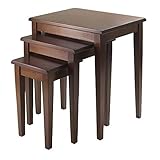
 Winsome Regalia Nesting Accent Tables14.9"D x 20"W x 21.6"H14.9 x 20 x 21.7 inches24.5 poundsCheck on Amazon


Top 3 picks at a glance
What to Look For in Nesting Tables
Nesting tables work because the smaller tables slide beneath the largest one instead of occupying three separate locations. The important comparison is not just each tabletop’s dimensions; it is the footprint of the entire stack, the clearance between levels, and how much weight the frame can safely support.
- Stacked footprint: Measure the largest table’s width and depth, then allow at least 2 inches of clearance on the side where smaller tables slide out.
- Table heights: A useful set typically includes a low table around 16–18 inches, a middle table around 19–21 inches, and a high table around 22–24 inches.
- Weight limits: Look for at least 20–30 pounds per table for everyday use. If a table will hold a desktop PC, monitor, or heavy console setup, verify the limit rather than assuming the largest table is stronger.
- Surface material: Tempered glass is visually light, solid wood is durable and repairable, laminate is practical, and engineered wood keeps costs down but needs protection from moisture.
- Assembly: Fewer parts do not always mean easier assembly. Check whether the legs attach with ordinary bolts, whether a supplied hex key is required, and whether the frame needs alignment before tightening.
Head-to-Head Comparison of the Main Types
| Table type | Typical stacked footprint | Typical heights | Typical load per table | Surface strengths | Assembly expectation |
|---|---|---|---|---|---|
| Compact metal and laminate set | 20–24 x 14–18 in | 16–22 in | 20–35 lb | Easy to clean, practical for gadgets | 20–45 minutes; usually bolt-on legs |
| Solid-wood set | 22–28 x 16–20 in | 18–24 in | 30–50 lb | Repairable, warm appearance, good rigidity | 30–60 minutes; heavier parts and more alignment |
| Tempered-glass set | 20–26 x 14–19 in | 17–23 in | 25–40 lb | Light visual footprint, resists stains | 30–60 minutes; careful handling required |
| Lift-top or storage nesting set | 24–32 x 16–22 in | 18–25 in | 25–45 lb | Extra storage and concealed cables | 45–90 minutes; hinges or hardware add complexity |
| Three-piece C-table set | 18–24 x 12–16 in | 22–28 in | 15–25 lb | Convenient for sofas and chairs | 15–40 minutes; generally simple frames |
For most apartments, bedrooms, and gaming rooms, the compact metal-and-laminate category offers the best balance. It keeps the stacked footprint small, handles peripherals and drinks, and usually costs less than a solid-wood set. Choose solid wood when you expect frequent repositioning or heavier loads. Choose glass when visual openness matters more than scratch resistance or cable concealment.
Best Choice by Room and Use
| Your situation | Recommended specification | Why it fits |
|---|---|---|
| Beside a small sofa | Largest top no wider than 24 inches; 20–24 inch height | Provides a useful landing surface without extending far into the seating area |
| Gaming room with a controller and headset | Laminate or sealed wood; 25 lb minimum load; 18–22 inch heights | Handles accessories and is less fragile than glass near active play |
| Rental apartment or dorm | Under 24 x 18 inches stacked; under 30 lb total set weight | Easier to move and less likely to obstruct a narrow walkway |
| Monitor or small desktop setup | Solid wood or reinforced metal; 40 lb or higher capacity; top at least 20 x 16 inches | Reduces wobble and provides enough depth for a compact display |
| Living room that needs flexible hosting space | Three tables, with the largest at least 26 x 18 inches | Two smaller tables can move beside guests while the largest stays central |
| Minimalist interior | Tempered glass or slim metal; 14–18 inch stacked depth | Creates less visual and physical obstruction |
How Much Surface Area Do You Actually Need?
A tabletop that looks adequate in a product photo can become crowded quickly. A typical laptop footprint is about 13 x 9 inches, while a mouse needs another 7 x 6 inches of usable space beside it. Add a 3-inch-wide drink and a little clearance, and a comfortable laptop surface is approximately 20 x 14 inches.
That calculation explains why a 16 x 12 inch table is suitable for a mug or controller but frustrating for laptop gaming. For a console setup, measure the objects rather than the console alone: a console measuring 13 x 8 inches may need a 16 x 12 inch surface once ventilation clearance and cable bends are included.
Keep at least 2 inches free around console ventilation openings and avoid placing a heat-producing device directly against a fabric-covered side table. For a monitor, a 24-inch display commonly needs a tabletop at least 20 inches wide and 12 inches deep, although a monitor arm can reduce the required depth if the table is rated for clamp pressure.
Understanding Weight Limits and Stability
Weight capacity is only useful when the load is centered. A 30-pound rating may assume the object sits near the middle of the table, not at the front edge. A monitor, speaker, or desktop tower placed off-center creates leverage that can make a lightweight table rock even when the total weight is below the stated limit.
Use this practical rule: add the weight of every item, then keep the total at no more than 70 percent of the advertised capacity for a frequently moved table. For example, a setup containing a 12-pound monitor, 8-pound computer, 3-pound speaker pair, and 2 pounds of accessories weighs 25 pounds. A table rated for 30 pounds technically qualifies, but 25 is 83 percent of its rating. A 40-pound-rated table gives a more appropriate margin.
Check for adjustable feet if the floor is uneven. A crossbar between the legs usually improves lateral stability, while a single central pedestal saves leg space but can be easier to tip when weight is placed near an edge.
Surface Materials: Which One Suits Gaming Gear?
Laminate and engineered wood
These are usually the most practical choices for controllers, keyboards, drinks, and charging docks. Laminate resists ordinary spills and wipes clean, but exposed edges can swell if water reaches the core. Use a coaster and wipe spills promptly.
Solid wood
Solid wood offers the best combination of rigidity and repairability. It is a good choice for a table that will be moved often or used under a heavy monitor. It is also heavier, so confirm that you can lift the complete set without dragging it across the floor.
Tempered glass
Glass makes a small room look less crowded and does not absorb spills. It shows fingerprints, can transmit keyboard vibration, and needs protective pads beneath metal devices. Tempered glass is safer than ordinary glass, but it should still be inspected for chips before assembly and use.
Metal tops
Powder-coated metal is durable and thin, but it can sound loud when a controller or mouse is dropped onto it. A desk mat or felt pad reduces noise and helps prevent scratches.
Assembly: What to Check Before Buying
- Confirm that the tables nest in the intended direction. Some designs only slide together from one side, which matters beside a wall or sofa.
- Check the assembled dimensions, not just the dimensions of the largest tabletop.
- Look for threaded inserts rather than screws driven directly into soft board. Inserts are more resistant to loosening after repeated moves.
- Make sure the instructions specify whether bolts should be fully tightened before the frame is squared.
- After assembly, place the set on a hard floor and test each table with a light push from two directions. Rocking usually indicates a loose joint, reversed leg, or uneven foot.
For a typical bolt-on-leg set, assemble each frame loosely, place it on a level surface, square the legs, and then tighten the fasteners in alternating corners. This prevents a frame from locking into a slight twist. Recheck the bolts after a week because wood-based panels and padded feet can settle.
Final Buying Recommendation
For the majority of small-space buyers in 2026, choose a three-piece nesting set with a stacked footprint around 22 x 16 inches, heights of approximately 17, 20, and 23 inches, a 30-pound minimum capacity per table, and a sealed laminate or solid-wood top. Those specifications cover drinks, controllers, laptops, and most compact displays while preserving layout flexibility.
Go smaller only when every inch of floor space matters, and accept that the tables will be accessory stands rather than laptop surfaces. Go larger or heavier when you plan to support monitors, desktop hardware, or frequent guests. The most useful set is not the one with the largest tabletop; it is the one that disappears against a wall when stored and can still provide a stable, correctly sized surface when the room layout changes.