
Looking down at your desk, the problem is obvious: your headset lives in a pile with your mouse, cable slack is snaking across your mousepad, and there’s maybe eight inches of usable surface left. A traditional headphone stand solves the clutter but ignores the vibe—and half of them demand a deep footprint your small desk simply doesn’t have. If you’re working with a 40-inch desk shoved into a corner, a dorm setup, or a battlestation you share with a work laptop, every square inch of your base has to earn its place.
That’s where RGB headset stands earn their spot. The best ones hold your headphones securely, tuck into a corner under 5 inches of depth, and add usable function—USB charging ports, controller hooks, even spare outlets—while painting your setup in ambient light. We compared eight stands across the budget to premium tiers, weighing footprint, stability, light quality, charging speed, and real-world usability on cramped desktops. Here’s what made the cut.
Our Top Picks



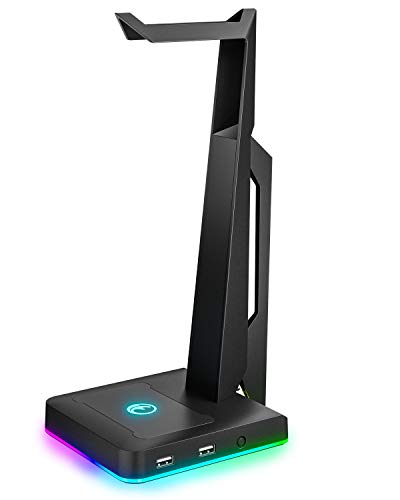

Top 3 picks at a glance
 New Bee Headphone Stand with RGB Lighting, Sturdy Aluminum Gaming Headset Holder...Check price
 KDD RGB Headset Stand with 9 Light Modes - Controller Holder for...Check price
Quick Picks
| Product | Best for | Price |
|---|---|---|
| New Bee Headphone Stand with RGB Lighting | Best overall value for small desks | Check on Amazon |
| OAPRIRE Acrylic RGB Headphone Stand | Best light show on a budget | Check on Amazon |
| KDD RGB Headset Stand | Best 2-in-1 for controller storage | Check on Amazon |
| New Bee RGB Headphone Stand with 7 Light Modes | Best for charging multiple devices | Check on Amazon |
| IFYOO RGB Gaming Headset Stand | Best multi-platform gamer pick | Check on Amazon |
| Tilted Nation Gaming Headset Stand | Best all-in-one desk upgrade | Check on Amazon |
| KAFRI RGB Headphone Stand with USB A&C Charger | Best charging station value | Check on Amazon |
| VCOM RGB Gaming Headphones Stand | Best for the most lighting options | Check on Amazon |
How We Compared
We focused on four criteria that matter specifically on small desks. First, footprint: a stand that eats a 6-by-6-inch square defeats the purpose when your mousepad already claims a third of the surface. Second, stability—light stands tip over if your cable snags, so we weighted bases, weight distribution, and non-slip materials heavily. Third, we compared actual lighting flexibility: mode counts, brightness behavior, and whether the glow distracts during dark-room gaming. Fourth, functionality beyond holding headphones. On a small desk, a stand that also charges your phone or hangs your controller is doing two jobs in one footprint.
The picks span budget to premium tiers, and every stand here supports full-size over-ear headphones as well as lighter on-ear models. We didn’t run laboratory stress tests; these rankings are based on specifications, build materials, feature sets, and how each stand’s design holds up to the realities of a cramped, cable-heavy setup.
The 8 Best Picks
1. New Bee Headphone Stand with RGB Lighting — Best Overall Value
This budget aluminum stand hits the sweet spot for small desks: it’s rigid where cheaper plastic stands flex, slim enough to tuck beside a monitor arm, and the RGB lighting adds color without turning your desk into a nightclub. The built-in USB-C and USB-A charging ports mean you can top up a phone or controller without sacrificing a wall outlet.
As an Amazon Associate we earn from qualifying purchases at no extra cost to you.




- Pro: Aluminum construction keeps it stable and premium-feeling at a budget price
- Pro: Dual charging ports eliminate wall-wart clutter
- Con: Lighting options are more limited than flashier competitors
Skip it if: You want dozens of light modes and fine-grained color control—this one keeps things simple.
2. OAPRIRE Acrylic RGB Headphone Stand — Best Light Show
The OAPRIRE leans into acrylic’s natural talent for diffusing light, and the result is arguably the most attractive glow-per-dollar in this roundup. The transparent structure picks up every color shift beautifully, and the wide mode selection makes it easy to match any setup theme. It’s also genuinely compact, with a slim profile that disappears into a corner when unlit.
- Pro: Acrylic diffuses light more evenly than plastic-housed competitors
- Pro: Many light modes and colors for matching any desk aesthetic
- Con: Acrylic scratches more easily than metal; handle with care
Skip it if: You need USB charging—this is a pure lighting-and-holding play.
3. KDD RGB Headset Stand — Best 2-in-1 for Controller Storage
The KDD solves a second small-desk problem most stands ignore: where to put your controller. A detachable hook hangs a gamepad off the side of the stand, so your Xbox or PlayStation controller isn’t face-down on your keyboard. Nine light modes cover the aesthetic bases, and the rotatable design lets you angle the hanger to fit tight spaces.
- Pro: Detachable controller hook doubles your storage in one footprint
- Pro: Nine light modes with rotation for tight corner setups
- Con: The controller hook adds a small amount of side width
Skip it if: You’re a headphone-only user with no controllers to store.
4. New Bee RGB Headphone Stand with 7 Light Modes — Best for Charging Multiple Devices
This step-up New Bee model is the charging hub disguised as a headset stand: two USB-C ports plus one USB-A port means you can run a phone, earbuds case, and controller simultaneously. Seven light modes keep the RGB side of things covered, and the non-slip rubber base is genuinely confidence-inspiring on smooth desk surfaces—it doesn’t slide when you yank a charging cable.
- Pro: Three total ports (2x USB-C, 1x USB-A) handle a full charging load
- Pro: Non-slip rubber base stays planted on glass and laminate desks
- Con: Costs a little more than the base New Bee model
Skip it if: Two charging ports are plenty and you’d rather save the difference.
5. IFYOO RGB Gaming Headset Stand — Best Multi-Platform Pick
The IFYOO is aimed squarely at gamers who bounce between PC, Xbox One, PS4, and Switch. It’s a straightforward, sturdy hanger with two USB ports for charging accessories, and the black housing fades into most setups. There’s nothing exotic here, but the build quality is solid for the price, and it handles full-size gaming headsets without wobble.
- Pro: Two USB ports keep controllers and phones topped up
- Pro: Sturdy hanger design suits heavy over-ear gaming headsets
- Con: Plainest look in the roundup if lighting is your priority
Skip it if: You want the stand itself to be a visual centerpiece.
6. Tilted Nation Gaming Headset Stand — Best All-in-One Desk Upgrade
The Tilted Nation is the premium pick, and it justifies the higher tier by replacing three desk accessories: a headset stand, a mouse bungee, and a USB hub. On a small desk, that consolidation is the whole point—fewer separate devices, fewer cable runs, one power connection. If your goal is a clean, cable-managed gaming station, this does the most work per square inch.
- Pro: Combines headset holder, mouse bungee, and USB hub in one unit
- Pro: Genuinely reduces desk clutter versus three separate accessories
- Con: Highest price in the main list, well above the budget picks
Skip it if: You already use a mouse bungee or don’t mind separate accessories.
7. KAFRI RGB Headphone Stand with USB A&C Charger — Best Charging Value
The KAFRI is the sleeper deal of this roundup. It’s the cheapest stand here, yet it packs three USB charging ports and two AC outlets—effectively a small power strip with a headset hanger on top. For a small desk where outlets are scarcer than surface area, that’s a genuinely useful combination, and the RGB lighting keeps it on-theme.
- Pro: Three USB ports plus two AC outlets for the lowest price here
- Pro: Replaces a power strip, freeing an outlet elsewhere
- Con: Build feels more utilitarian than the aluminum and acrylic picks
Skip it if: You don’t need outlets and want a more premium-looking stand.
8. VCOM RGB Gaming Headphones Stand — Best for Lighting Options
The VCOM offers 10 light modes—the deepest lighting menu in this roundup—plus two USB ports and a USB-C port for charging. The non-slip rubber base keeps it planted, and it accommodates all earphone accessories, from lightweight on-ears to heavyweight over-ears. As a budget pick, it offers the most lighting flexibility for the money if you like to change your setup’s look often.
- Pro: 10 light modes for maximum customization on a budget
- Pro: Three charging ports across USB-A and USB-C
- Con: Mode-cycling means clicking through options to reach your favorite
Skip it if: You set one color and never touch the lights again—extra modes are wasted on you.
Six More RGB Headset Stands Worth Considering
The eight stands above are mostly charging-focused budget designs. What the list does not include is a stand that also acts as a real USB data hub, one with a built-in sound card for headsets that plug into it, a wireless phone charger, or the premium software-synced options that gaming roundups consistently recommend. The six stands below fill those gaps, and each one is judged by the same small-desk test: does it earn its footprint by doing more than one job?
Razer Base Station V2 Chroma

The Base Station V2 Chroma is the premium stand most often recommended in gaming setup guides, and on a small desk its round 120 mm base (about 4.7 inches across) is surprisingly compact for what it does. It is a stand, a two-port USB hub and an external sound card in one aluminum unit, which can replace two separate gadgets that would otherwise compete for desk space.
Razer lists two USB 3.1 ports that run off a single USB connection to your PC, so a wireless headset dongle, a webcam or a phone charging cable can plug into the stand instead of reaching around the back of a tower. A 3.5 mm combo port with a built-in DAC lets an analog headset plug directly into the stand, and Razer’s 7.1 surround app can be activated after registering the product. For small desks, moving the headset cable to the stand also shortens the run across the desktop.
The stand is 278 mm tall, about 11 inches, which fits large over-ear headsets without the earcups resting on the base. A wide rubberized ledge spreads the weight of the headband, and the anti-slip rubber base keeps it planted. Lighting comes from eight underglow zones in the base, controlled through Razer Synapse and synced with other Chroma devices. It sits in the premium tier, several times the cost of the budget stands.
Strengths: compact round base, real USB 3.1 data ports, built-in DAC for analog headsets, tall post for big headsets, and Chroma sync.
Drawbacks: premium tier, lighting and surround features rely on Razer software on Windows, and the hub needs a free USB port on your PC.
How it compares: where the Tilted Nation combines a stand with a mouse bungee and hub, the Razer focuses on a faster hub and audio. Choose it if your headset is analog or uses a USB dongle and you want a single clean connection point.
Razer Base Station V3 Chroma
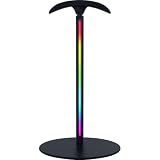
The V3 is Razer’s newest headset stand, announced in 2026, and its headline feature is something no other stand here offers: headset detection. With Razer Synapse 4 running, the stand recognizes when you lift or replace your headset and can automatically switch Windows audio output and microphone input, change the lighting profile, or trigger macros and shortcuts. For anyone who constantly flips between speakers and a headset, that removes a step every time.
The USB hub carries two rear-facing USB 3.1 ports that Razer positions for low-latency wireless dongles and charging. Lighting moves from the base to a 12-zone vertical RGB strip with support for 16.8 million colors and syncing across Razer’s Chroma ecosystem. A wide, curved ledge supports headsets weighing from roughly 150 to 600 grams and is rubberized to protect the headband, and Razer also lists software-based virtual 7.1 surround on Windows 11.
It is a premium-tier product, and the smart features depend entirely on Synapse, so Mac users or anyone who avoids peripheral software will get a well-made lit stand and USB hub, but not the automation. Check the footprint against your desk before buying, since it is designed as a statement piece.
Strengths: automatic audio switching when you pick up or set down the headset, vertical RGB strip, fast USB ports for dongles, and a protective curved ledge.
Drawbacks: premium tier, requires Synapse 4 on Windows for its best features, and only two USB ports.
How it compares: choose the V3 over the V2 if automatic output switching matters to you; choose the V2 if you want the built-in DAC for an analog headset and do not need the smart features.
Thermaltake Argent HS1 RGB
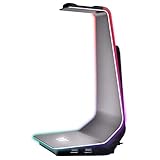
The Argent HS1 is a premium aluminum stand for builders already using Thermaltake RGB components, or anyone who wants a stand that looks as solid as it feels. Thermaltake lists the footprint as 154 by 124 mm, about 6.1 by 4.9 inches, with a height of about 10.4 inches and a weight of 623 grams. That weight is its big small-desk advantage: a heavy base is much harder to tip when a cable snags.
The base includes two USB 3.0 ports and a 3.5 mm audio jack, so it doubles as a front-of-desk hub for flash drives, dongles and analog headphones. The holder is aluminum with a rubberized top to protect the headband, and the rubberized base resists sliding. Cables can be routed behind the stand to keep the area tidy.
Lighting is side-mounted RGB with 16.8 million colors and eight effects, controlled through Thermaltake’s software and able to sync with TT RGB Plus products. It is the most expensive stand in this guide’s additional picks and occupies a larger rectangle than the round Razer bases.
Strengths: the heaviest, most stable build here, USB 3.0 data ports, an audio jack, and lighting sync for Thermaltake systems.
Drawbacks: premium tier, a wider footprint than many small desks prefer, and software-dependent lighting effects.
How it compares: compared with the aluminum New Bee, the Argent HS1 adds weight, faster data ports and an audio jack, at a much higher tier. It suits a compact but premium build rather than a tight budget.
KAFRI RGB Headphone Stand with Wireless Charger
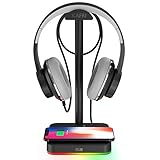
This KAFRI model swaps the outlet strip of the KAFRI in the main list for a Qi wireless charging pad built into the base. On a small desk, that is a clever use of space: the area around the stand’s foot, which would otherwise sit empty, becomes your phone’s charging spot. Drop the phone on the base and it charges without another cable on the desk.
KAFRI lists the pad as delivering up to 10W to supported Samsung phones, 7.5W to iPhones and 5W standard charging to other Qi phones. Fast wireless rates depend on using a compatible quick-charge wall adapter, and thick cases, metal plates or cards in a phone wallet will interfere with charging. The RGB lighting cycles through multiple modes and is switched by a touch control, and the stand fits common over-ear headphones and gaming headsets.
It sits in the budget tier, so the build is mostly hardened plastic with metal elements rather than aluminum. Keep the headset cable from draping over the charging pad, and check that your phone’s camera bump does not lift it off the coil.
Strengths: phone charging with no extra cable, compact footprint, budget tier, and simple touch-controlled lighting.
Drawbacks: plastic build, fast charging needs the right adapter, and no USB data ports.
How it compares: choose it over the outlet-equipped KAFRI if your phone supports wireless charging and you have enough outlets already; choose the outlet version if you need to power wall chargers.
MARVO RGB Headphone Stand with USB Hub

The MARVO is the budget answer to the Razer and Thermaltake hub stands. Its listing states it supports data transmission through three USB 2.0 ports, one USB-C port and a 3.5 mm jack, which means keyboards, webcams, headsets and flash drives can plug into the stand and pass through to your PC. Many budget RGB stands only charge through their ports, so real data support is the main reason to consider it.
Lighting offers nine modes, switched with a single press, and a long press dims or brightens the glow. That brightness control directly addresses the late-night complaint mentioned in this article’s buying guide. The base is larger and weighted for balance, with a silicone non-slip pad underneath, and the shell is fire-resistant hardened plastic.
USB 2.0 speeds are fine for keyboards, mice, webcams and wireless dongles, but slow for copying large files to external drives. It is a budget-tier stand, and the build is plastic rather than aluminum, so it lacks the premium feel of the hub stands above.
Strengths: data-capable ports at a budget tier, an audio jack, adjustable brightness, and a weighted non-slip base.
Drawbacks: USB 2.0 speeds, plastic construction, and a larger base than the slimmest stands.
How it compares: if you were weighing the VCOM or New Bee stands for their ports, the MARVO is the pick when you need those ports to carry data, not just charge.
cozoo Touch RGB Headset Stand
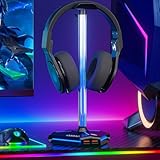
The cozoo is a straightforward, compact stand for desks where simplicity matters more than features. Its listed dimensions are about 4.1 by 3.9 inches at the base and just under 10 inches tall, one of the smaller footprints in this guide, and it weighs around 13 ounces with a metal and plastic build.
Lighting is deliberately simple: the base glows blue while the post shows four fixed colors, red, blue, green and white, or a rainbow cycle, all switched by touching the stand. If you want a steady single color that matches your setup without software, that simplicity is a plus. Two USB 2.0 ports can both charge devices and transfer data at USB 2.0 speeds, plug and play on Windows, macOS and Linux, and a built-in hook helps organize the headset cable.
The trade-offs are typical of the budget tier: lighting is not addressable or software-controlled, and the USB ports are slower than the USB 3 hubs above. For a tidy small desk, it is a sensible pick.
Strengths: small footprint, simple touch lighting with solid color options, data-capable USB ports, and cable organization.
Drawbacks: limited lighting effects, USB 2.0 only, and a lighter build than aluminum stands.
How it compares: it is a simpler alternative to the IFYOO, with a slightly smaller footprint and touch-switched color presets instead of more elaborate effects.
Buying Guide
Footprint and Stability
On a small desk, measure before you buy. Most stands in this roundup sit comfortably within a 5-by-5-inch base area, but width matters too if you’re adding a controller hook or side ports. Weight and base material determine stability: aluminum builds and non-slip rubber bases (like those on both New Bee models and the VCOM) resist tipping when a charging cable gets yanked. A budget stand that stays upright beats a premium one that face-plants with your expensive headphones attached.
Charging Ports vs. Pure Lighting
Decide what the stand is actually for. If your desk already has a powered USB hub, a lighting-focused pick like the OAPRIRE is the cleaner choice. If you’re constantly swapping chargers between your phone, controller, and earbuds, prioritize port count: the KAFRI leads with three USB ports plus two AC outlets, the New Bee 7-mode model offers two USB-C and one USB-A, and the VCOM adds USB-C to its USB-A pair. Check whether ports are for charging only or support data transfer—most RGB stand ports are charge-only.
Light Modes and Build Material
Mode counts range from 7 (New Bee) to 10 (VCOM), but the number matters less than the material diffusing it. Acrylic, like the OAPRIRE, spreads light evenly and looks premium; metal stands like the New Bee aluminum model produce a subtler glow. If you game in a dark room, check whether the stand offers a brightness-low setting—full-brightness RGB at 2 a.m. is a real complaint among small-desk gamers. Also consider whether lights stay on when the USB power disconnects; memory functions that recall your last mode save daily fiddling.
Comparison Table: The Additional Picks
| Stand | Price tier | Base footprint | Ports | Extra feature | Best for |
|---|---|---|---|---|---|
| Razer Base Station V2 Chroma | Premium | About 4.7″ round | 2x USB 3.1, 3.5 mm with DAC | 7.1 surround app, Chroma sync | Analog headsets and Razer setups |
| Razer Base Station V3 Chroma | Premium | Check listing | 2x USB 3.1 | Automatic audio switching | Users who swap between speakers and headset |
| Thermaltake Argent HS1 RGB | Premium | About 6.1″ x 4.9″ | 2x USB 3.0, 3.5 mm | Heaviest, most stable build | Thermaltake RGB builds |
| KAFRI with Wireless Charger | Budget | Compact round base | None for data | Qi phone charging pad | Charging a phone without extra cables |
| MARVO RGB with USB Hub | Budget | Larger weighted base | 3x USB 2.0, USB-C, 3.5 mm | Dimmable lighting | Budget data hub |
| cozoo Touch RGB | Budget | About 4.1″ x 3.9″ | 2x USB 2.0 | Simple touch color presets | Tight desks and simple setups |
Charge-Only Ports Versus Data Hub Ports
Many RGB stands advertise “USB ports,” but there are two very different kinds. Charge-only ports draw power from a wall adapter or a USB cable and simply top up devices; nothing you plug in can talk to your computer. Data ports, like those on the Razer, Thermaltake, MARVO and cozoo stands above, connect back to your PC through a USB cable and behave like a hub, so a keyboard, webcam, flash drive or wireless headset dongle works through the stand. On a small desk, a data-capable stand can replace a separate USB hub. If you only need to charge earbuds and a controller, a charge-only stand is fine. Also note the speed: USB 2.0 is enough for input devices and dongles, while USB 3.x matters for external drives.
Measuring for Headset Fit
- Height: the post must be taller than your headset when hanging, so earcups do not rest on the base. Large over-ear gaming headsets usually need around 10 inches or more.
- Cradle width: wider, curved cradles spread pressure across the headband. Narrow hooks can dent memory foam over months.
- Contact material: rubber, silicone or soft padding on the cradle protects leatherette headbands from scuffing.
- Weight limit: heavy metal-framed or wireless headsets benefit from weighted or aluminum stands with wide bases.
Small-Desk Placement Tips
- Use the corners and the space beside your monitor. The back corner of a desk is usually wasted space; a stand there keeps the headset within reach without sitting in your mouse zone.
- Put the stand on the opposite side from your mouse. This prevents cable snags and accidental bumps during fast mouse movement.
- Route cables first. Run the stand’s power or USB cable along the back edge or through a grommet before positioning it. Hub stands need a direct line to a PC USB port.
- Consider clamp-on or under-desk hangers if space is extreme. If your desk has no room at all, a clamp-on arm or adhesive under-desk hook takes zero surface space, at the cost of RGB and ports.
- Tame the lighting at night. Choose a stand with dimming or an off mode, or one that syncs with your PC so it turns off at shutdown. A bright light in your peripheral vision during dark-room gaming is distracting.
- Check stability with your actual headset. Hang the headset and give the cable a light tug. If the stand rocks, move it so the cable pulls toward the back of the desk rather than sideways.
Software-Synced Lighting Versus Standalone RGB
Budget RGB stands use onboard buttons or touch controls to cycle modes. They work on any computer, need no software and remember simple settings, but they cannot match the colors of your keyboard or mouse automatically. Premium stands from Razer and Thermaltake connect to their brand’s lighting software, letting you sync effects across your entire setup, react to games or switch profiles. If your keyboard, mouse and case already use one ecosystem, a matching stand makes the desk look coordinated. If your setup mixes brands, a standalone stand with a solid color mode is often the simpler choice.
Our Verdict
For most small-desk setups, the New Bee Headphone Stand with RGB Lighting is the pick: aluminum build, dual charging ports, and a footprint that respects your workspace at a budget price. If charging is your bottleneck, the KAFRI is unbeatable value with its three USB ports and two outlets. If you want one purchase to clean up your entire desk, the Tilted Nation consolidates a stand, mouse bungee, and USB hub into a single unit. And if pure aesthetics drive you, the OAPRIRE puts on the best light show here. Whichever you choose, any of these eight will free up your desktop and add color for less than the cost of a mid-range mousepad.
FAQ
Do RGB headset stands need a lot of desk space?
No—that’s the point of this category. Most of the stands here fit within roughly a 5-inch square footprint, and slim models like the OAPRIRE tuck into the gap between a monitor and a wall. The main exception is the Tilted Nation, which integrates a mouse bungee and USB hub and therefore claims a slightly larger area—but it replaces three separate accessories in exchange.
Can I charge my phone through a headset stand’s USB ports?
Yes, on most models here. The New Bee stands, KAFRI, IFYOO, VCOM, and Tilted Nation all include USB or USB-C charging ports. Note that most are optimized for topping up phones, controllers, and earbuds rather than fast-charging; if rapid charging matters, check the rated output per port before buying. The KAFRI goes further with two full AC outlets if you need to plug in a wall charger.
Will these stands hold heavy gaming headsets?
All eight picks are designed for full-size over-ear headphones, including heavy gaming headsets with metal headbands. The aluminum New Bee and the IFYOO are particularly well-suited to heavier models thanks to rigid construction, while the acrylic OAPRIRE is best matched with standard-weight headsets. If your headset weighs over a pound, prioritize metal builds and wide, weighted or rubberized bases.
Do the RGB lights stay on all the time?
It depends on the model and how it’s powered. Stands that draw power through their USB ports typically keep lights on as long as they’re connected to a powered port, and most offer a mode to turn lighting off entirely if you prefer a dark desk. If your PC cuts USB power at shutdown, the lights will go off with it—a bonus for some, an annoyance for others who want the stand glowing as ambient room lighting.
Does a headset stand actually protect my headset?
Yes. Hanging a headset keeps the earcups from being crushed under books or keyboards, prevents the cable from being kinked and stops the headband from being stretched by careless storage. It also lets ear pads air out between sessions, which helps them last longer. A wide, padded cradle is the key feature for long-term headband protection.
Can I plug my headset into a headset stand?
Some stands include a 3.5 mm jack, such as the Razer Base Station V2 Chroma, Thermaltake Argent HS1 and MARVO. On the Razer, the jack connects to a built-in DAC that acts as a USB sound card; on others it is an audio passthrough. Stands without an audio jack simply hold the headset, so it still plugs into your PC or controller as usual.
Are clamp-on headset holders better for small desks?
They save more surface space because they attach to the desk edge or underside. The trade-off is that most clamp-on and under-desk hangers have no lighting or USB ports. If your desk is extremely cramped, a clamp-on hanger is the most space-efficient option; if you have a few inches in a corner, an RGB stand with ports does more for that footprint.
Will an RGB headset stand slow down my PC or USB devices?
No. Lighting draws a small amount of power and has no effect on performance. USB hub stands share the bandwidth of the single PC port they connect to, so running several high-speed devices at once, such as two external drives, can slow transfers. Keyboards, mice, webcams and wireless dongles work normally through a hub stand.
Can I use a headset stand for two headsets?
Standard stands hold one headset. Dual-arm models exist, including dual versions from some of the brands in this guide, but they take more desk width. On a small desk, a single stand plus an under-desk hook for a second headset is usually the more space-efficient setup.









