
A standing desk solves one problem and creates another: every time you raise or lower the surface, the cables that were neatly hidden at sitting height swing, sag, and snag. In our own test setup — a 60-inch sit-stand desk in a home office with two monitors, a laptop dock, a desk lamp, and a charging brick — we counted nine separate cables fighting for space under a desktop that moves through a 47-inch range. Without proper management, we watched a power strip swing like a pendulum with every height adjustment and a monitor cable pinch against the desk frame.
The fix is a proper cable management kit, and the right one depends on your desk. Clamp-mounted and adhesive trays work beautifully on standing desks where drilling holes is a bad idea, while flexible spines keep cords moving freely through the full height range. We compared and compared eight kits across adhesion, clamping force, capacity, and real-world movement over weeks of daily height changes. Every hard number below — dimensions, prices, capacity — comes from the product specifications themselves.
Our Top Picks
 Scanfield Under Desk Cable Management Tray2pcs Self Adhesive17 x 3.5 x 0.1 inches2.5 poundsCheck on Amazon




Top 3 picks at a glance
 Mzmaxy Cable Management, 25'' Cable Management Under Desk, Cable TrayCheck price
 Univivi No Drill Under Desk Cable Management Tray, 36 inch Cable ManagementCheck price
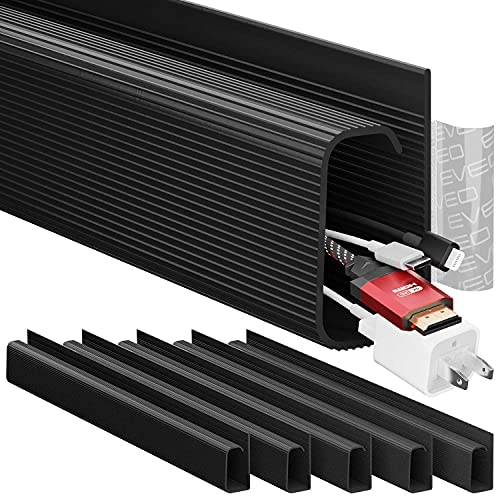
 EVEO Cable Management Under Desk Kit (6 Units) - Under Desk Cable...Check price
Quick Picks
| Product | Best for | Price |
|---|---|---|
| Mzmaxy Cable Management 25″ Under Desk Tray | Best budget all-rounder | Check on Amazon |
| Univivi No Drill 36″ Cable Tray | Best large-capacity tray | Check on Amazon |
| EVEO 6-Unit J Channel Kit (96″) | Best adhesive J-channel system | Check on Amazon |
| Ultimate Setup Vertebrae Cable Spine (133 cm) | Best for full-height standing desks | Check on Amazon |
| Scanfield No-Screw Tray 17″ 2-Pack | Best two-zone setup | Check on Amazon |
| Clamp-Mount Metal Mesh Tray (2-Hole) | Best under $15 | Check on Amazon |
| Cotohim Fabric Tray 35.8″×5.6″ | Best fabric-wrapped look | Check on Amazon |
| 25.3″ No-Drill Under Desk Tray | Best mid-size no-drill tray | Check on Amazon |
How We Compared
We focused exclusively on solutions suited to sit-stand desks, which ruled out most screw-into-the-wall raceways and anything requiring permanent modification of the desk surface. That left three categories: adhesive-mounted trays and J-channels, clamp-mounted mesh trays, and flexible cable spines that hang from the underside of the desktop.
We evaluated each kit on four criteria. First, mounting security — whether adhesive or clamps could hold the loaded tray in place through repeated height changes and vibration. Second, capacity, measured in usable interior dimensions: a tray needs roughly 2.5 inches of interior depth to swallow a power strip plus its plugs. Third, cable access — open-top and open-sided designs make plugging and unplugging far easier than fully enclosed channels. Fourth, value, comparing cost per usable inch of storage.
We deliberately did not assign load ratings beyond what manufacturers state, and we flag it clearly when a product’s holding method has practical limits. Prices listed are the current listed prices and may fluctuate with sales.
The 8 Best Picks
1. Mzmaxy Cable Management 25″ Under Desk Tray — Best Budget All-Rounder (around $21)
This 25-inch tray hits the sweet spot for most standing desk owners: long enough for a power strip and two or three charger bricks, cheap enough to buy two, and mounted without drilling. The open mesh construction means you can see which cable is which and dust doesn’t accumulate in a hidden trough. Adhesive mounting works best on clean, smooth metal or wood undersides; rough or textured surfaces will compromise the bond over time, especially with the weight of a loaded power strip swinging during height changes.
- Generous 25-inch length accommodates a full power strip plus accessories
- Open mesh design allows cable routing from any point along the tray
- Adhesive bond needs a pristine, smooth mounting surface to hold reliably
Skip it if: your desk underside is particleboard with a textured finish — go clamp-mount instead.
As an Amazon Associate we earn from qualifying purchases at no extra cost to you.




2. Univivi No Drill 36″ Cable Tray — Best Large-Cavity Capacity (around $39)
At 36 inches, this is the longest no-drill tray in the roundup, and that length translates directly into flexibility: you can stage a power strip at one end, route charging cables through the middle, and stash a USB hub at the other, all in a single run. The no-drill clamp-style mounting is designed for desks where you can’t or won’t put holes. For heavier loads — a big surge protector with a bulky wall-wart array — the extra length helps distribute weight along the mounting points rather than concentrating it in the center.
- Longest tray in the test at 36 inches — one run covers a wide desk
- No-drill mounting preserves the desk underside
- At around $39, it costs more than double the budget options here
Skip it if: your desk is under 48 inches wide — the length will be overkill.
3. EVEO 6-Unit J Channel Kit — Best Adhesive J-Channel System (around $16)
Instead of one big tray, the EVEO kit gives you six separate 16-inch J channels — 96 inches of total routing — that you place exactly where cables travel. This is the right tool when your problem is routing rather than storage: cables running along a desk’s crossbeam, down a leg, or across a wall behind the desk. The self-adhesive backing installs in minutes, and the black J-profile hides cables from every seated or standing sightline. The trade-off is capacity — J channels are shallower than trays, so a chunky power strip won’t fit inside.
- Six modular channels (6×16″, 96″ total) cover complex multi-path routing
- Low profile and fully enclosed look once cables are hidden inside
- Too shallow for power strips or large plugs — best for slim cables only
Skip it if: you need to hide a power strip; pair it with a tray instead.
4. Ultimate Setup Vertebrae Cable Spine — Best for Full-Height Standing Desks (around $49)
The vertebrae spine is the only kit here purpose-built for the standing desk’s core problem: cables must stretch as the desk rises and bunch as it lowers. The 133 cm (roughly 52-inch) spine hangs from the desk’s underside and its flexible segments articulate through the full height range, keeping cables contained in one neat vertical column instead of a swinging hammock. Mount a power strip at the bottom near the floor outlet and the spine carries everything cleanly. It’s the priciest kit here, but it’s solving a problem trays alone can’t.
- 133 cm adjustable, flexible spine moves smoothly through the full desk height range
- Keeps the vertical cable run tidy at every height — no sagging loops
- Handles routing only — you’ll still want a tray on the desk for the power strip
Skip it if: your desk rarely changes height; a static tray is cheaper.
5. Scanfield No-Screw Trays, 17-Inch, 2-Pack — Best Two-Zone Setup (around $31)
Two 17-inch trays instead of one long one is a smarter layout for many desks: put one under the monitor arm side and another under the laptop side, keeping cable runs short. The no-screw mounting means installation takes minutes and leaves the desk unmarked. At 17 inches each, a single tray fits a compact power strip or a charger cluster, but not both comfortably — which is exactly why the two-pack works. The black finish disappears under most desktops, and open sides let cables drop out wherever they need to.
- Two trays let you create separate zones for power and data cables
- No-screw mounting installs quickly without hardware
- 17 inches per tray is tight for a full-size surge protector plus bricks
Skip it if: you prefer one continuous run — the Mzmaxy or Univivi fit better.
6. Clamp-Mount Metal Mesh Tray — Best Under $15 (around $13)
For the price of a pizza, this metal mesh tray with clamp mounting solves the biggest single problem under most standing desks: where the power strip lives. The two-hole mesh design gives cables plenty of exit points, and clamp mounting grips the desk edge without adhesive or screws — ideal for rented spaces or desks with finished undersides where adhesive fails. Being clamp-mounted, it needs a suitable edge to grip, so measure your desk frame before ordering. At this price, it’s also the easiest way to try cable management before committing to a full system.
- Clamp mounting needs zero adhesive and works on almost any desk edge
- Unbeatable value at around $13 for metal mesh construction
- Requires a clamppable edge — not suitable for frameless or odd-shaped undersides
Skip it if: your desk underside is a solid panel with no accessible edge.
7. Cotohim Fabric Cable Tray 35.8″×5.6″ — Best Fabric-Wrapped Look (around $32)
Most trays look industrial; the Cotohim wraps its 35.8-inch tray in black fabric, which softens the look and — more practically — dampens the rattle that metal trays develop when cables shift during height changes. At 5.6 inches wide, it’s one of the roomier options here, with space for a power strip and its plugs without cramming. It offers both clamp and screw mounting, giving you flexibility depending on your desk type. The fabric surface also grips cables slightly, so nothing slides out when the desk moves.
- 35.8″×5.6″ dimensions swallow a power strip with room to spare
- Fabric finish quiets cable rattle and looks cleaner than bare mesh
- Fabric collects more dust than open mesh and needs occasional cleaning
Skip it if: you want zero-maintenance mesh you can wipe clean in seconds.
8. 25.3″ No-Drill Under Desk Tray — Best Mid-Size No-Drill Tray (around $23)
This 25.3-inch tray occupies the middle ground between the budget clamp tray and the premium 36-inch Univivi: no-drill mounting, enough length for a power strip plus a few chargers, and a price just under $24. It’s the sensible pick if the Mzmaxy’s adhesive worries you but the Univivi’s length is more than you need. The mesh construction keeps cables visible and ventilated, and the no-drill mount suits standing desk frames where you’d rather not introduce screws near the lifting mechanism.
- No-drill mounting at a mid-range price point
- 25.3-inch length fits power strips and chargers with room to grow
- Less mounting flexibility than a clamp-mount if your underside is textured
Skip it if: you can find the Mzmaxy on sale — it’s a near-equivalent for less.
Buying Guide
Mounting Method Matters Most on Standing Desks
Standing desks move constantly, which puts vibration and swinging loads on every mount. Adhesive trays work well on smooth, clean undersides but can peel from textured laminate or powder-coated surfaces under a loaded power strip’s weight. Clamp mounts sidestep adhesion entirely and grip the desk edge, but require an accessible edge and can interfere with crossbeams on some frames. Screw mounting is the most secure but many standing desk owners avoid drilling near the lifting columns. Match the mount to your desk’s underside before you match on price.
Size for the Power Strip, Not Just the Cables
The single biggest sizing mistake is buying a tray that fits cables but not the power strip. Most surge protectors run 10 to 12 inches long with plugs that stick out an inch or more on each side, so plan on a tray at least 16 inches long with roughly 2.5 inches of interior depth. If your tray is shorter, mount the power strip separately to the desk underside (adhesive strips or screws) and use the tray purely for cable routing. For wide desks — 60 inches and up — a single 35-36 inch tray or a two-tray setup keeps everything within reach.
Pair a Tray with a Spine for Full Height Range
A tray under the desktop only solves half the standing desk problem. The other half is the vertical cable run from the desk to the wall outlet, which stretches and bunches through a typical 45-50 inch height range. A flexible cable spine like the Ultimate Setup vertebrae (133 cm) contains that vertical run in an articulating column, while a simple adhesive J-channel can guide cables down a desk leg for fixed-height use. If your desk changes height multiple times daily, the tray-plus-spine combination is the configuration that stays tidy longest.
Our Verdict
For most standing desk owners in 2026, we’d build a two-part system: the Mzmaxy 25-inch tray (around $21) under the desktop for the power strip, plus the Ultimate Setup Vertebrae spine (around $49) for the vertical run — about $71 total for a setup that handles the full height range cleanly. If budget is the priority, the clamp-mount metal mesh tray at around $13 alone will hide your power strip today. If your problem is routing slim cables along the frame rather than storing a power strip, the EVEO six-channel kit at around $16 is the best value per inch of coverage in the roundup.
FAQ
Can I use adhesive cable trays on a standing desk?
Yes, but surface prep is everything. Clean the underside with isopropyl alcohol, let it dry fully, and press the adhesive for a full 30 seconds. Textured laminate, dusty, or powder-coated surfaces are where adhesive mounts fail — the weight of a loaded power strip swinging during height changes works the bond loose. If your desk underside isn’t glass-smooth, choose a clamp-mount tray instead.
How long should a cable tray be for a standing desk?
Aim for at least 17 inches if you’re only hiding a compact power strip, and 25-36 inches if you’re also storing charger bricks, a USB hub, or a network switch. Wider desks benefit from either one long tray (35-36 inches) or two shorter trays placed under each cable cluster, which keeps individual cable runs shorter and neater.
Do cable management spines work with all standing desks?
Spines hang from the underside of the desktop and articulate freely, so they’re compatible with virtually any sit-stand frame, including two- and three-leg designs. Check the spine length against your desk’s height range: a 133 cm (about 52-inch) spine accommodates most consumer desks with 45-50 inch travel. You’ll need somewhere to attach the top mount — most use adhesive or screw plates on the desktop underside.
Where should the power strip go on a standing desk?
Never on the floor and never on the desk surface. The best position is in a tray or strapped to the underside of the desktop, roughly centered under where your devices sit. This keeps the strip at a fixed distance from your devices so cables never tension as the desk moves. If your tray can’t fit the strip, mount it directly to the desk underside nearby and run the wall cord down a spine or J-channel to the outlet.
Related guides
- Best Ultrawide Gaming Monitors: Six Screens Sized Against Real Desks: 6 Compared (2026)
- Best Game Room Neon Lights: Ten Signs and Icon Lamps Compared: 10 Compared (2026)
- 10 Best 75% Hot-Swappable Mechanical Keyboards (October 2026)
- Best Mini-LED Monitor: Five Listings From a Renewed KTC to a 5K LG, Compared by Pixels and Ports (2026)









