Monitor cords are the cables that everyone sees. A power lead, a DisplayPort or HDMI cable and perhaps a USB hub line all dangle from the back of the screen and drape across the desk, and they pick up dust, snag on chair arms and make a nice setup look half-finished. The right cable clip does one simple job: it holds those lines against a stand, a desk edge or a wall so they run in neat, predictable paths. The wrong one lets go after a week or leaves a sticky residue.
This guide is for desk workers, gamers with dual-monitor arms and anyone tidying a streaming corner in 2026. It compares eight clip and tie products using only what the titles say, then explains the choices that decide success: adhesive versus screw-in mounting, clip size relative to the cable, reusability and the surface the clip has to stick to. Earphone-style clothing clips are left out because they are meant for headphone wires, not monitor cords.
Our Top Picks

Top 3 picks at a glance
Quick Picks
As an Amazon Associate we earn from qualifying purchases at no extra cost to you.




| Product | Best for | Key spec from the title |
|---|---|---|
| VIVO Desk Monitor Stand Clips | Cords along a pole-style stand | 1 pole clip and 4 arm clips, black |
| XHF 60-Piece Clear Clips | Large quantity for the whole room | 60 pieces, 5/8 inch, clear adhesive |
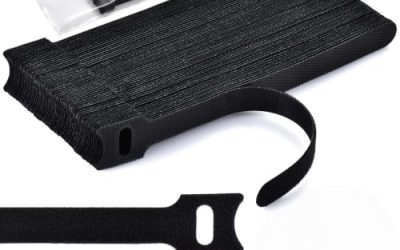
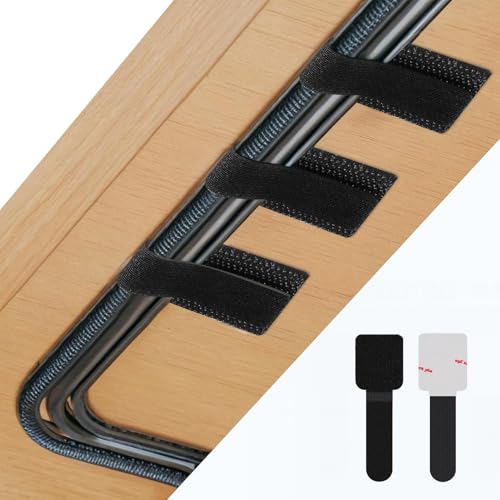
| Abnii 50-Piece Hook and Loop Ties | Bundling several cords together | 50 pieces, self-adhesive, under desk |
| 30-Piece Small Adhesive Clips | Thin charger and monitor leads | 30 pieces, small, black, adhesive |
| KGROTE 100-Piece Clear Clips | Maximum count for the price tier | 100 pieces, strong adhesive, clear |
| 10-Pack Reusable Cable Clips | Renters and frequent rearrangers | Reusable, adhesive pads, screws, ties |
| Adjustable Elastic Clips, 15-Pack | Cords that vary in thickness | 15 pack, elastic, adhesive, black |
| TidyHelper Adhesive Clips | Indoor or outdoor runs | 40 pieces, size M, clear, indoor/outdoor |
How to Choose
Match the clip size to the cable
The most common failure is a clip that does not fit the cord. A power lead for a monitor is thicker than a USB cable, and a DisplayPort lead with a shielded jacket is thicker again. Listings usually name the clip opening in inches or by an S, M or L size. A clip that is too tight pinches the cable, while one that is too loose lets it fall out. As a rule, choose an opening a touch larger than the thickest cord you plan to hold, and bring a small, medium and large size if you are managing several runs.
Adhesive, screw-in and strap-style mounting
Adhesive pads are the fastest way to attach a clip, and they work well on smooth, clean surfaces such as the back of a desk or a monitor base. They struggle on textured, painted or dusty surfaces, so wipe with rubbing alcohol and let it dry before sticking. Screw-in or pole-style clips grip more securely and survive heavy cables. Hook-and-loop straps wrap around bundles and let you add or remove a cable without cutting anything. A mix of mounting types is often the best answer for a full desk.
Reusability and surface damage
Renters and people who shuffle their setup should look for reusable clips and gentler adhesives. Strong adhesive can strip paint or leave a residue when removed, so test a hidden spot first. Warming the pad with a hairdryer on low heat and pulling slowly lowers the risk of damage. For lighter cables, small clips stay put without the hold that peels finishes. If a listing is silent on removal, treat the adhesive as permanent.
Count, color and tidy routing
Bulk packs sound like a bargain, but a hundred clips are only helpful if you actually use them. For one monitor and a small desk, ten to thirty is plenty. Clear clips blend into white walls and light desks, while black clips match monitor stands and dark furniture. Plan the route before you stick anything: lay the cable along the path, mark the clip positions with tape, and space them roughly every hand-width so the cord does not sag. Keep power cables clear of heat sources, and do not overload any clip or bend a cable into a tight kink.
A short installation routine improves results with any product here. Unplug the cables you plan to route, wipe the target surface with isopropyl alcohol and let it dry, then press each clip firmly for several seconds. Waiting a day before loading the clips with heavy cords gives the adhesive time to bond. Leave a little slack near each connector so that moving the monitor does not pull on the port, and group cables by function so that power runs and signal runs stay separate where possible.
Think about future changes, too. Monitors get replaced, hubs get added and a new capture card appears sooner or later, so clips that open easily will serve you better than ones that must be cut off. Label the far ends of cables with a bit of tape before routing so that you can tell the video lead from the USB line without tracing it.
The 8 Best Options
VIVO Cable Management Clips for Desk Monitor Stands
The VIVO kit includes one pole clip and four arm clips in black, designed for desk monitor stands. That makes it a purpose-built choice for dual-monitor arms, where cords have to follow a vertical pole and then branch to each screen. The listing calls it a computer and office workstation cord organization kit.
- Strength: Pole and arm clips are shaped for monitor stands.
- Strength: A small kit covers a typical two-monitor arm.
- Trade-off: Only five clips, so it will not handle a whole room.
Skip it if your monitors sit on plain feet without an arm or pole.
XHF 60PCS 5/8 Inch Clear Adhesive Cable Clips
XHF sells sixty clear clips with a 5/8 inch opening and adhesive backing, intended for wires, wall lights, ethernet cables, cars, TVs and PCs. The quantity is generous, and the clear plastic is a good match for light desks and white walls.
- Strength: Sixty clips cover many runs.
- Strength: Clear style blends with light surfaces.
- Trade-off: The 5/8 inch opening may be tight for thick power cords.
Skip it if your main cable is a thick, shielded display lead.
Abnii 50 PCS Hook and Loop Cable Ties
These self-adhesive straps combine a sticky base with a hook-and-loop tie, in black, for tidying cords under a desk. They are useful for bundling a monitor power line with a USB and video lead into one tidy run. Because the strap opens and closes, adding a cable later is simple.
- Strength: Hook-and-loop design is easy to reopen.
- Strength: Fifty pieces cover long under-desk routes.
- Trade-off: Straps bundle cables, but they do not hold a single cord in a neat, fixed channel.
Skip it if you want a clip that holds a single cord at the desk edge.
30 Pcs Small Black Adhesive Cable Clips
This listing offers thirty small black clips for chargers, speakers, phones and TV cords, mounted with adhesive. The small size suits thin leads and the black color matches many desks. It is a good fit for the thin cables that run from a monitor to a phone stand or a lamp.
- Strength: Small black clips blend with dark surfaces.
- Strength: Thirty pieces are enough for a typical desk.
- Trade-off: Small clips may not hold thicker power leads.
Skip it if your cords are thick or you need a large opening.
KGROTE 100PCS Cable Clips
KGROTE packs one hundred clear adhesive clips with a strong hold claim for desks, walls, cars and TVs. The sheer count makes it attractive for a home office with several workstations or a big wall run.
- Strength: One hundred clear clips cover large projects.
- Strength: Marketed for desks, walls and other surfaces.
- Trade-off: Much of the pack may go unused on a single monitor.
Skip it if you only manage one or two cables.
10 Pack Cable Management Clips
This pack of ten black clips is reusable and includes adhesive pads, screws and ties, which gives you more than one way to mount. That flexibility makes it a sensible choice for a renter who might switch from adhesive to screws, or for anyone who rearranges a desk often.
- Strength: Pads, screws and ties offer several mounting options.
- Strength: Reusable design suits shifting layouts.
- Trade-off: Only ten clips, so heavy routing needs more.
Skip it if you want a huge count at the lowest cost per clip.
Adjustable Elastic Adhesive Cable Clips, 15 Pack
These black elastic clips adapt to different cord thicknesses and mount under desks or behind a desktop or TV. The stretch design suits mixed cable sizes where fixed-opening clips would be too tight or loose.
- Strength: Elastic design handles different cable diameters.
- Strength: Fifteen clips are a manageable count for one desk.
- Trade-off: Elastic loops can loosen over time with heavy cords.
Skip it if you need a rigid hold for thick power leads.
TidyHelper Adhesive Cable Clips, Clear
TidyHelper offers forty clear clips in size M, described as suitable for indoor and outdoor use, on walls, under desks and elsewhere. A mid size covers most monitor leads, and the indoor/outdoor mention suggests a sturdier adhesive.
- Strength: Size M suits many monitor cables.
- Strength: Forty clips are enough for a desk and a wall run.
- Trade-off: Clear clips show dirt over time.
Skip it if you prefer black clips for a dark desk.
Which One Fits Your Situation
You have a monitor arm or pole stand
The VIVO kit is shaped for exactly that job, with a pole clip and four arm clips.
You rent and rearrange often
The 10 Pack Cable Management Clips lists reusability plus screws and ties, so you can choose a gentle option.
You have many cables of different thickness
The Adjustable Elastic Adhesive Clips adapt to varying cord sizes, and the Abnii straps bundle several cords together.
You are tidying a whole room
KGROTE with 100 pieces or XHF with 60 pieces gives enough clips for long runs along walls and baseboards.
Common Mistakes
- Sticking adhesive clips onto dusty or textured surfaces without cleaning them first.
- Choosing clips with an opening narrower than the thickest cord.
- Pulling cables tight, which stresses connectors at the monitor.
- Placing clips too far apart, leaving the cord sagging between them.
- Bundling power leads tightly together in a hot, enclosed space.
Related guides
- What Is The Best Budget Most Responsive Gaming Mouse Wired
- Low Latency Gaming Headphones Usb-C 2.4 Ghz Wireless
- Mechanical Gaming Keyboards Competitive Pc Gaming
Frequently Asked Questions
Will adhesive clips damage a desk?
Strong adhesive can mar paint or veneer. Test in a hidden spot and remove slowly with gentle warmth.
How many clips does a monitor need?
Most single-monitor desks need around ten, spaced along the route. Dual monitors on an arm may need a few more.
Are hook-and-loop straps better than clips?
Straps suit bundling several cords, and clips suit holding one cord in place. Many tidy setups use both.
Can clips handle thick power cables?
Only if the opening is large enough. Check the listing for the clip size and compare with the cord diameter.
Related guides
More from Amazon
Programs that pair well with the guide above. Offers and eligibility are set by Amazon and may change.
Free shipping on eligible items, Prime Video and more. Eligible new members can start with a free trial.
Start a Prime free trialAd-free music streaming. Eligible new subscribers can start with a free trial.
Try Music Unlimited freeA Prime membership for ages 18-24 with a trial period. Eligibility is set by Amazon.
See Prime for Young AdultsAudiobooks and podcasts to listen to on the go. Eligible new members can start with a free trial.
Try Audible freeAs an Amazon Associate we earn from qualifying purchases.