
The best AIO coolers for quiet, powerful PCs are the Arctic Liquid Freezer III Pro 360 for most high-performance builds, the Liquid Freezer III Pro 420 for maximum sustained cooling in large cases, a 280mm Liquid Freezer III where the case is built around 140mm fans, and a quality 240mm model such as the Thermalright Aqua Elite 240 V3 for compact gaming systems with a mainstream CPU.
An all-in-one liquid cooler is not automatically quieter or faster than a large air cooler. The right choice depends on your processor’s sustained power, the radiator space in your case, socket mounting support, pump control, and whether you value low temperatures, low noise, or simple installation most.
As an Amazon Associate we earn from qualifying purchases at no extra cost to you.


Our Top Picks
 ARCTIC Liquid Freezer III Pro 360 A-RGBLiquid Freezer III Pro 360 A-RGB15.7 x 4.7 x 2.9 Inches4.5 poundsCheck on Amazon
 Thermalright Aqua Elite 240 V3 Water Cooling CPUAE240 BLACK V34.72 x 0.98 x 4.72 inches0.2 poundsCheck on Amazon


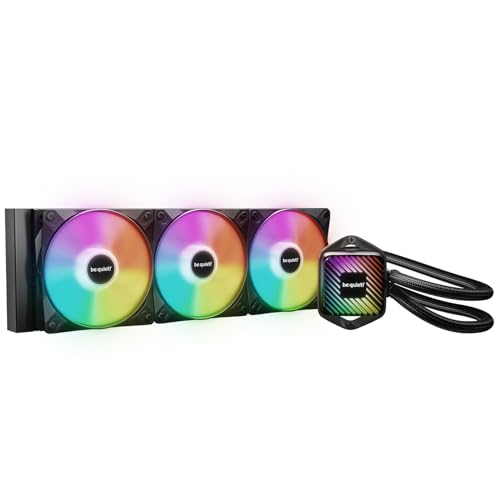
Top 3 picks at a glance
Best AIO coolers at a glance
| Recommended cooler | Radiator | Best match | Why choose it | Price tier |
|---|---|---|---|---|
| Arctic Liquid Freezer III 240 | 240mm | Mainstream gaming CPUs and compact cases | Strong value, good VRM airflow, modest radiator footprint | Budget |
| Arctic Liquid Freezer III 280 | 280mm | Most high-end gaming PCs | Excellent noise-to-cooling balance from two 140mm fans | Budget to mid-range |
| Arctic Liquid Freezer III 360 | 360mm | Hot CPUs, overclocking, and mixed gaming/workstation use | More thermal headroom during long all-core loads | Budget to mid-range |
| Arctic Liquid Freezer III 420 | 420mm | Large cases and maximum sustained cooling | Large fans can move air at lower rotational speeds | Mid-range |
| Corsair iCUE LINK TITAN 360 RX | 360mm | RGB-focused builds with a Corsair ecosystem | Convenient cable management and extensive software control | Premium |
| NZXT Kraken 240 or 360 | 240mm or 360mm | Displays and coordinated NZXT builds | Clean presentation and software-controlled pump/display features | Mid-range to premium |
Prices vary by lighting, display, promotions, and regional availability. The table is a buying guide rather than a ranking based on invented benchmark scores.
Our recommendations by CPU and case
Best for 280mm mounts: Arctic Liquid Freezer III 280
The 280mm Arctic Liquid Freezer III is a strong all-round alternative when your case has a 280mm mount rather than a 360mm one. Its two 140mm fans provide more radiator area and airflow capacity than a 240mm unit, while often running at lower speed for the same CPU temperature. That can make it quieter during gaming and productivity work.
Choose it for high-end AMD Ryzen 7 and Ryzen 9 processors, Intel Core Ultra desktop CPUs, and other modern chips that can sustain high package power. It is also a sensible choice when you want to leave room for mild power-limit increases without immediately moving to a larger 360mm radiator.
Check clearance carefully: a 280mm radiator is approximately 140mm wide, and the radiator-plus-fan assembly is commonly around 60–65mm thick. Top mounting can conflict with tall memory modules or motherboard heatsinks.
Best compact option: a 240mm AIO such as the Thermalright Aqua Elite 240 V3
A 240mm AIO is usually enough for a mainstream gaming CPU, especially when the processor is operated at stock limits or with a sensible efficiency setting. It fits many mid-tower cases that cannot accept a 280mm or 360mm radiator.
Use a 240mm cooler for a gaming-focused Ryzen 5 or Ryzen 7 system, a Core Ultra 5 or Core Ultra 7 build with a reasonable power limit, or a small-form-factor case designed for a 240mm radiator. It can also be preferable to a larger cooler if the larger radiator would have to be front-mounted and restrict graphics-card airflow.
Best overall: Arctic Liquid Freezer III Pro 360
The 360mm Liquid Freezer III Pro is the strongest all-round choice when your case supports it, and it is better suited to long video encodes, 3D rendering, software compilation, and heavy CPU workloads than a 240mm model. It gives the fans more surface area to work with, reducing the need for aggressive fan speeds when the CPU remains fully loaded for many minutes.
For gaming alone, the difference between a good 280mm and 360mm AIO is often smaller than buyers expect. Games frequently depend on the graphics card and do not hold every CPU core at maximum power continuously. Select 360mm when your workload is sustained, your case has a suitable front or top mount, or you want extra thermal margin.
Best for maximum cooling: Arctic Liquid Freezer III Pro 420
A 420mm AIO makes sense only when the case is genuinely designed for it. Three 140mm fans can deliver excellent cooling at restrained speeds, but the radiator is large and may interfere with drive cages, graphics cards, memory, or motherboard components.
It is a specialist choice for a large workstation-gaming tower, a high-power CPU running extended all-core workloads, or a system where low fan speed matters more than compact dimensions. Do not buy one based on radiator size alone: poor case airflow or a restrictive front panel can erase much of its advantage.
Best for software and presentation: Corsair iCUE LINK TITAN 360 RX

The iCUE LINK TITAN 360 RX is a good fit for builders who want synchronized RGB, cleaner internal cabling, and detailed control through Corsair’s software ecosystem. Its appeal is broader than raw cooling: the system is designed to simplify connections between compatible fans and components.
Choose it when you already use compatible Corsair hardware and accept the higher price. If pump noise, value, and simplicity matter more than lighting or software integration, an Arctic model is usually the more direct purchase.
Best for a built-in display: NZXT Kraken 240 or 360

NZXT’s Kraken models suit systems where a pump-head display is part of the design. The 240mm model works well in compact gaming PCs, while the 360mm version is the better choice for high-power processors and quiet operation under sustained load.
A display does not improve CPU cooling, so treat it as a design feature rather than a performance upgrade. Also account for software running in the background and verify that the required mounting hardware supports your exact socket.
More AIO coolers worth considering
Arctic, Corsair and NZXT cover most builds, but several other coolers stand out in current editorial roundups for specific priorities: the lowest possible noise, the lowest cost per radiator size, a long warranty or a specific look. The five additions below fill those gaps. All are 360mm units, because that is the size where the market offers the widest choice and where the differences between brands are easiest to compare.
Best quiet alternative: be quiet! Pure Loop 3 LX 360

be quiet! builds its whole brand around low noise, and the Pure Loop 3 LX 360 is its value-focused liquid cooler for builders who care more about a calm acoustic profile than RGB theatrics. It pairs a 360mm aluminum radiator, roughly 27mm thick, with three 120mm Light Wings LX PWM fans that can be daisy-chained to reduce cable clutter. Independent coverage has singled it out as one of the quietest 360mm units at its price, holding demanding Intel processors at reasonable temperatures while staying at low noise levels.
The feature that matters most for long-term ownership is the refill port. All AIO coolers slowly lose coolant through permeation over the years, which is one of the reasons their pumps eventually get noisier and their temperatures creep up. A refill port lets you top up the loop rather than retire the cooler. The pump uses a modular faceplate, and the tubes are about 400mm long, which gives flexibility for front mounting in mid-tower cases.
Socket support is broad: Intel LGA1851, LGA1700, LGA1200 and LGA115x plus AMD AM5 and AM4. That makes it one of the better choices for upgrading an older Intel build without hunting for an adapter kit.
- Strengths: Low noise under load, refill port for longer service life, wide socket support including older Intel platforms.
- Drawbacks: The LX version is black only, and faceplate customization is limited compared with RGB-focused rivals.
Compared with the Arctic Liquid Freezer III 360, the Pure Loop 3 LX uses a thinner radiator and does not include a VRM fan, so the Arctic typically has the edge in raw cooling. The be quiet! is the better choice when you specifically want a refill port and a quiet fan profile out of the box. It sits in the budget-to-mid-range tier.
Best budget 360mm: Thermalright Frozen Notte 360 ARGB V2

Thermalright has pushed the price of a capable 360mm AIO down further than most builders expected, and the Frozen Notte 360 ARGB V2 is one of its most popular options. The specification sheet is straightforward: a 397 × 120 × 27mm aluminum radiator, a copper cold plate, and three TL-E12B-S 120mm fans rated up to 2,000rpm with S-FDB bearings. The pump runs up to about 5,300rpm and Thermalright rates it at up to 28 dBA.
Socket support is unusually wide, covering Intel LGA115x, 1200, 1700, 1851, 2011 and 2066 plus AMD AM4 and AM5 (and older AMD sockets). Thermalright lists a five-year warranty, which is generous for a budget cooler. ARGB lighting on the pump and fans connects through a standard 3-pin 5V header, so it works with most motherboard lighting software.
For a gaming PC with a mainstream or upper-mainstream CPU, this cooler gives you 360mm radiator area for the price of many 240mm units. The trade-off is refinement: the fans get audible as they approach maximum speed, and the pump is not as quiet as premium designs at full speed. Running the pump at a fixed moderate speed, as described in the pump-noise section of this guide, helps.
- Strengths: Very low cost for a 360mm radiator, five-year warranty, broad socket compatibility.
- Drawbacks: Louder at high fan speeds than premium rivals; check the box contents for thermal paste and mounting hardware before installation.
Choose it over the Thermalright Aqua Elite 240 V3 if your case fits a 360mm radiator; choose the Arctic if you want a VRM fan and a thicker radiator. It is firmly in the budget tier.
Best budget option with swappable style: MSI MAG CoreLiquid A13 360

The MAG CoreLiquid A13 360 is MSI’s entry-level 360mm AIO, and it earns its place through value and flexibility rather than record-breaking temperatures. It uses three pre-installed 120mm ARGB PWM fans on a 360mm radiator around 27mm thick, with an RGB-lit pump head. The faceplate on the pump can be swapped, and MSI has published files so owners can 3D-print their own designs, which is an unusual touch at this price.
Cooling is solid for gaming and moderate productivity workloads. Pre-installed fans save installation time and reduce the chance of mounting fans in the wrong airflow direction, a common mistake covered in the installation section of this guide. Socket support covers Intel LGA1851 and LGA1700 plus AMD AM5 and AM4, so it suits current platforms well.
- Strengths: Strong value, pre-installed fans, customizable pump faceplate, matching white variant available.
- Drawbacks: No support for older Intel LGA115x sockets; the pump and fans are not as refined acoustically as the Arctic or be quiet! options.
It is a sensible choice for an MSI motherboard build that wants coordinated styling at a budget tier. If noise matters more than looks, the Pure Loop 3 LX is the better pick for a similar outlay.
Best mid-range RGB showpiece: Lian Li Galahad II Trinity 360

Lian Li cases are popular in showcase builds, and the Galahad II Trinity 360 is designed to match them. The standard version uses a single-wave 397.5 × 119.2 × 27mm radiator, a 3,200rpm pump rated at about 16.6 dBA, and three 120mm ARGB fans with fluid dynamic bearings rated from 300 to 2,450rpm. The pump comes with three interchangeable caps, so you can change the look of the pump head without replacing anything.
The tubes are around 385mm long, and Lian Li backs the cooler with a five-year warranty. Socket support includes Intel LGA1700, 1200 and 115x and AMD AM5 and AM4; check Lian Li’s current compatibility list for LGA1851 mounting before buying for a Core Ultra build.
There are several versions with very different specifications. The SL-INF version swaps in Lian Li UNI FAN SL-Infinity fans for easier cable management, while the Trinity Performance version moves to a thicker 32mm double-wave radiator, a faster pump and 28mm-thick fans. The Performance model cools better but needs around 61mm of clearance for the radiator and fans combined, so confirm which version you are buying before you order.
- Strengths: Attractive pump with swappable caps, quiet pump, five-year warranty, good match for Lian Li cases.
- Drawbacks: Several confusingly similar versions; you pay more for appearance than for cooling compared with the Arctic or Thermalright options.
Compared with the Corsair iCUE LINK TITAN 360 RX, the Galahad II Trinity offers a similar RGB-focused approach without requiring a Corsair ecosystem. It sits in the mid-range tier.
Best premium quiet cooler: Noctua NL-LC1-36

Noctua spent years building a reputation in air cooling before releasing its own AIO, and the NL-LC1 is aimed at buyers who want the quietest high-end liquid cooling and are willing to pay for it. The 360mm version uses Noctua’s NF-A12x25 G2 fans, which are among the most respected 120mm fans for low-noise cooling, on a radiator around 30mm thick. The pump assembly uses multiple sound-absorbing layers to reduce vibration and hum, addressing the pump whine that annoys many AIO owners.
Noctua backs it with a six-year warranty, longer than most rivals, and offers an optional auxiliary fan for the pump area to help cool motherboard VRMs, which liquid coolers otherwise leave without direct airflow. Socket support covers Intel LGA1851 and LGA1700 plus AMD AM5 and AM4, and the mounting system is designed to apply pressure evenly with straightforward installation. A 240mm and a 420mm version are also available.
- Strengths: Excellent cooling at low noise, premium fans, refined pump acoustics, six-year warranty.
- Drawbacks: Premium price; the radiator is thicker than many, so check case clearance; Noctua’s brown and beige color scheme is not for every build.
Compared with the Arctic Liquid Freezer III 360, the Noctua is quieter and better finished but costs far more for a modest thermal gain. Choose it when silence under sustained load is the top priority and budget is not. It sits firmly in the premium tier.
Comparison of the added AIO coolers
| Cooler | Radiator | Fans | Standout feature | Warranty | Price tier |
|---|---|---|---|---|---|
| be quiet! Pure Loop 3 LX 360 | 360mm, about 27mm thick | 3 × 120mm Light Wings LX | Refill port, quiet profile | Check manufacturer | Budget to mid-range |
| Thermalright Frozen Notte 360 ARGB V2 | 360mm, 27mm thick | 3 × 120mm TL-E12B-S | Lowest cost per radiator size | 5 years | Budget |
| MSI MAG CoreLiquid A13 360 | 360mm, about 27mm thick | 3 × 120mm ARGB, pre-installed | Swappable, printable pump faceplate | Check manufacturer | Budget |
| Lian Li Galahad II Trinity 360 | 360mm, 27mm thick | 3 × 120mm ARGB | Interchangeable pump caps | 5 years | Mid-range |
| Noctua NL-LC1-36 | 360mm, about 30mm thick | 3 × NF-A12x25 G2 | Premium low-noise fans and pump damping | 6 years | Premium |
Radiator size: 240mm versus 280mm versus 360mm
| Radiator | Typical fan layout | Approximate radiator length | Recommended CPU class | Main compromise |
|---|---|---|---|---|
| 240mm | 2 × 120mm | About 275–280mm | Mainstream and moderately high-power gaming CPUs | Fans may need higher speed under sustained load |
| 280mm | 2 × 140mm | About 315–325mm | High-end gaming and mixed workloads | Wider radiator; top clearance is more difficult |
| 360mm | 3 × 120mm | About 395–400mm | High sustained CPU power and workstation use | Requires a long mounting position and three fans |
| 420mm | 3 × 140mm | About 450–460mm | Maximum sustained cooling in large cases | Limited case compatibility |
These dimensions describe common classes, not a guarantee for every model. Always compare the manufacturer’s radiator, fan, and mounting-clearance drawings with your case manual.
Socket compatibility and mounting checks
Modern AIO support commonly includes AMD AM4 and AM5, plus Intel LGA1700 and LGA1851. However, socket support can depend on the cooler’s included hardware, revision, and mounting instructions. LGA1851 and LGA1700 use similar physical mounting arrangements in many products, but do not assume compatibility without checking the official support list.
- Confirm the exact socket, not just the CPU family.
- Check whether the mounting kit is included or must be requested separately.
- For AM5, verify that the cooler’s mounting method is compatible with the motherboard’s standard backplate.
- Measure radiator length, width, and total fan-plus-radiator thickness.
- Check whether a top radiator leaves enough space for memory and motherboard heatsinks.
- For front mounting, confirm that the radiator does not reduce graphics-card clearance.
- Make sure the pump tubing can reach the CPU without sharp bends.
How to choose for low pump noise
Pump noise is separate from fan noise. A large radiator can keep fans quiet, but a pump running at maximum speed may still produce a noticeable whine or hum. Prefer a cooler with controllable pump speed, then set a moderate fixed speed or a temperature-based curve rather than leaving it permanently at 100 percent.
A practical starting point is 60–70 percent pump speed, with radiator fans near 25–35 percent at idle and gradually increasing after the CPU reaches approximately 60–70°C. Adjust upward if temperatures rise rapidly during heavy workloads. The best curve depends on the case, room temperature, motherboard controls, and CPU power limits.
For a quiet gaming PC, set a short temperature hysteresis or response delay if your motherboard supports it. This prevents fans from repeatedly ramping up when a game briefly loads a CPU thread. Keep the pump at a stable speed while allowing the fans to respond more gently.
A simple decision matrix
| Your situation | Best starting choice | Reason |
|---|---|---|
| Compact case with only a 240mm mount | Liquid Freezer III 240 | Fits the space while handling a mainstream CPU class |
| High-end gaming CPU, top-mounted radiator possible | Liquid Freezer III 280 | Strong cooling with two large, potentially slower fans |
| Gaming plus rendering or compiling | Liquid Freezer III 360 | More headroom for long all-core workloads |
| Large case and maximum low-speed cooling | Liquid Freezer III 420 | Largest radiator and fan class, if fully supported |
| RGB ecosystem and low cable clutter | Corsair iCUE LINK TITAN 360 RX | Best fit for compatible Corsair components and software |
| Pump display is central to the build | NZXT Kraken 240 or 360 | Choose size according to CPU power and case clearance |
Radiator fans: intake or exhaust?
Where the radiator sits and which way its fans blow affects both CPU and graphics-card temperatures, and the right answer depends on the rest of the build.
| Radiator setup | Effect on CPU | Effect on GPU and case | Best for |
|---|---|---|---|
| Front-mounted, intake | Coolest CPU, since the radiator gets fresh room air | Warmer air enters the case, raising GPU temperature slightly | CPU-heavy workloads, cases with strong exhaust |
| Top-mounted, exhaust | Slightly warmer CPU, since it uses air already heated inside the case | Hot air leaves the case directly; GPU gets cooler intake air | Gaming PCs with powerful graphics cards |
| Side-mounted, intake | Cool CPU in cases designed for it | Depends on case airflow layout | Dual-chamber and showcase cases |
Whatever you choose, keep overall airflow balanced. A case with far more exhaust than intake pulls dust through every gap, while slight positive pressure, meaning a little more intake than exhaust, keeps dust out of unfiltered openings. If you mount a radiator as intake at the front, make sure there is at least one rear or top exhaust fan to remove the warmed air.
Mounting tips for AM5 and Intel LGA1851/1700
- Check for offset mounting. On recent Intel and AMD processors, the hottest part of the chip is not always centered under the heat spreader. Some coolers, including Arctic’s Liquid Freezer III Pro series, support an offset position to place the cold plate over the hotspot. Follow the manual’s recommended position for your socket.
- Use the correct backplate. AM5 boards usually keep the stock backplate, and most AIOs attach with long standoffs. Intel kits include a dedicated backplate or contact frame; do not mix hardware from different kits.
- Apply even pressure. Tighten the cold-plate screws a few turns at a time in a cross pattern until they stop. Uneven pressure causes poor contact and high temperatures on one side of the CPU.
- Do not over-apply thermal paste. A pea-sized dot or a thin line is enough for most CPUs; many AIOs ship with paste pre-applied, which is fine to use for the first installation.
- Route the tubes before final tightening. Rotate the pump head so the tubes do not press against memory or the graphics card, and avoid sharp bends near the fittings.
- Connect pump and fan cables to the right headers. Most boards label a dedicated pump header (often AIO_PUMP or W_PUMP). Using a regular fan header can cause the pump to throttle at low temperatures if the header is set to a fan curve.
Installation details that affect real cooling
Mount the radiator so the pump is not the highest point in the loop whenever the case layout permits. With a front-mounted radiator, placing the tubes at the bottom is often preferable if it does not create strain or interfere with the graphics card. The goal is to keep any air at the radiator rather than allowing it to collect in the pump.
Use an even mounting pressure and tighten the screws gradually in a cross pattern. Remove the protective film from the cold plate, use the supplied thermal compound unless you have a specific reason not to, and confirm that the pump header is configured to run continuously or at the intended fixed speed.
If temperatures are unexpectedly high, check the pump’s reported speed, confirm that the fans are blowing through the radiator in the intended direction, inspect for protective film, and verify that the CPU power limits are not unusually aggressive. A larger AIO cannot compensate for a blocked front panel, poor exhaust airflow, or an incorrectly mounted cold plate.
AIO versus air cooler: when liquid actually makes sense
The opening of this guide makes the point that an AIO is not automatically better than a large air cooler. It is worth being specific about where each wins, because the answer decides whether you should be shopping in this category at all.
| Factor | Large dual-tower air cooler | 240mm to 280mm AIO | 360mm to 420mm AIO |
|---|---|---|---|
| Sustained heavy CPU loads | Good | Good to very good | Very good to excellent |
| Short gaming bursts | Very good | Very good | Very good |
| Failure points | Fans only | Pump, fans, tubing | Pump, fans, tubing |
| Typical service life | Many years; replace fans as needed | Often around five to seven years | Often around five to seven years |
| Memory and VRM clearance | Can block tall RAM | Clear around the socket | Clear around the socket |
| Visual impact | Large tower dominates the case | Clean socket area, pump display options | Clean socket area, pump display options |
| Price tier for strong performance | Budget to mid-range | Budget to mid-range | Budget to premium |
Liquid cooling earns its keep when the CPU sustains high power for long periods, when a tall tower would block memory or a side panel, or when you want a clean look around the socket. For a gaming-only PC with a mid-range processor, a good air cooler is often simpler, cheaper and just as quiet.
AIO lifespan, warranty and maintenance
An AIO is a sealed loop, but it is not a forever part. Coolant slowly permeates through the tubing over time, and pumps are mechanical components with a finite life. Most manufacturers back their AIOs for five to six years, and that is a reasonable guide to expected service life.
- Dust the radiator every few months. A clogged radiator raises temperatures and forces fans to spin faster. Use compressed air from the clean side, holding the fan blades still.
- Listen for changes in the pump. A new gurgle or rattle after months of quiet operation often means air has moved into the pump. Tilting the case gently, or briefly running the pump at full speed, can move the bubble back to the radiator.
- Watch idle temperatures over time. A slow rise in idle and load temperatures across several years can indicate coolant loss. Coolers with a refill port, such as the be quiet! Pure Loop 3 LX, can be topped up; sealed units are replaced.
- Re-apply thermal paste when you remount. Any time the cold plate comes off the CPU, clean both surfaces and apply fresh paste.
- Register the warranty. Keep the receipt and register the cooler if the brand offers it. Some brands cover hardware damaged by a leak; check the terms.
Choosing by build type
Small form factor and compact mid-towers
Many compact cases support a 240mm radiator only at the top or side. Measure combined radiator and fan thickness carefully, and check that the tubes can reach the CPU without kinking. A 240mm Arctic or Thermalright unit is often the best fit; thick 38mm radiators can be harder to place than 27mm designs.
Mainstream gaming PCs
A 240mm or 280mm AIO handles mainstream gaming processors comfortably at stock settings. Spend the difference on the graphics card if budget is tight. If you want a 360mm radiator without spending more, budget units such as the Thermalright Frozen Notte or MSI MAG CoreLiquid A13 make that possible.
Workstations and high-core-count CPUs
For long renders, compiles and simulations, a 360mm or 420mm radiator with quiet fans keeps fan speeds low during hours of full load. The Arctic Liquid Freezer III 360 or 420 offers the best value here, while the Noctua NL-LC1 is the premium option when noise under sustained load matters most.
Showcase and RGB builds
If the build is designed to be seen, choose the cooler that matches your case ecosystem: Corsair iCUE LINK for Corsair setups, NZXT Kraken for NZXT cases, and the Lian Li Galahad II Trinity for Lian Li builds. Expect to pay more for presentation than for cooling.
Frequently asked questions
Is an AIO cooler always better than a large air cooler?
No, an AIO cooler is not automatically quieter or faster than a large air cooler. The better choice depends on sustained CPU power, available radiator space, socket support, pump control, and whether you prioritize low temperatures, low noise, or simple installation. A large air cooler may therefore be more appropriate for some systems, especially when liquid cooling offers little practical advantage.
Should I mount the radiator at the top or front of my case?
Choose the mounting position that preserves component clearance and suitable airflow. A top-mounted radiator can conflict with tall memory modules or motherboard heatsinks, while a front-mounted radiator can reduce graphics-card clearance or restrict graphics-card airflow. Check the case manual and compare the cooler’s radiator, fan, and total thickness measurements before deciding.
Does a larger radiator always provide better cooling?
No, a larger radiator does not always provide better real-world cooling. A 360mm or 420mm cooler needs a suitable case and mounting position, and poor case airflow or a restrictive front panel can reduce its advantage. For gaming, the difference between a good 280mm and 360mm AIO is often smaller than expected because games may not keep every CPU core fully loaded.
Do I need a 360mm cooler for gaming?
No, you do not need a 360mm cooler for gaming alone. A 240mm AIO is usually enough for a mainstream gaming CPU, while a 280mm model is a strong choice for many high-end gaming PCs. Select 360mm when the processor sustains high power, the case supports it, or you want additional thermal margin during long workloads.
Does a pump-head display improve CPU cooling?
No, a pump-head display does not improve CPU cooling. It is a design feature for builders who want presentation and software-controlled display features. A display-equipped NZXT Kraken can suit a coordinated NZXT build, but you should still verify socket mounting support and account for the required background software when choosing one.
How long does an AIO cooler last?
Most AIO coolers are designed for roughly five to seven years of service, and warranties of five or six years from brands such as Thermalright, Lian Li, Arctic and Noctua reflect that. Pumps eventually wear and coolant slowly permeates through the tubing. Coolers with a refill port can be topped up to extend their life.
What happens if an AIO cooler leaks?
Leaks are uncommon on reputable coolers but not impossible. Coolant can damage the graphics card or motherboard if it drips onto powered components. Inspect the tubing and fittings when installing, avoid sharp tube bends, and replace a cooler that shows any residue around the fittings. Some manufacturers offer coverage for hardware damaged by a leak, so check the warranty terms.
Why is my AIO pump making a gurgling noise?
Gurgling usually means air has collected in the pump. This happens most often when the pump is the highest point in the loop. Re-mounting the radiator so its top is above the pump, or with the tubes at the bottom of a front-mounted radiator, usually solves the problem. Running the pump at a steady speed rather than a fluctuating curve also helps.
Do AIO coolers need maintenance?
Very little. Dust the radiator and fans every few months, check that the pump is reporting a normal speed in your motherboard software, and replace thermal paste whenever you remove the cold plate. The loop itself is sealed and does not need refilling unless the cooler has a refill port and temperatures have crept up over the years.
Should the pump header run at full speed?
Not necessarily. Many pumps are quieter at a fixed 60–70 percent speed with little or no thermal penalty. Check the manufacturer’s guidance, because some coolers expect a constant full-speed connection while others are designed for PWM control.
Final buying advice
For most quiet, powerful gaming PCs, buy the largest radiator that fits without harming airflow or component clearance, then control the pump and fans rather than running them at full speed. The 360mm class, led by the Liquid Freezer III Pro 360, is the best all-round choice when supported; 280mm is a strong balance in cases built around 140mm fans, 240mm is the sensible compact option, and 420mm is reserved for large cases with unusually demanding workloads.









