Sweaty hands turn a gaming mouse from a precision tool into a bar of soap. Mid-flick, your palm slides, your grip tightens to compensate, and your aim drifts exactly when a round is on the line. The real buying decision here is not sensor speed or maximum DPI, because almost every modern gaming mouse tracks far better than any hand can use. The decision is shell texture, airflow, and shape: a mouse that stays put when your palms are damp and lets moisture escape instead of pooling under your hand.


This guide is for competitive players who lose grip during long sessions, for anyone gaming in a warm room without air conditioning, and for palm, claw and fingertip grippers who wipe their mouse down between matches. Every pick below comes from the product name and specifications on its Amazon listing, with a focus on honeycomb shells, matte coatings and textured grips that hold up when hands get wet.
Our Top Picks
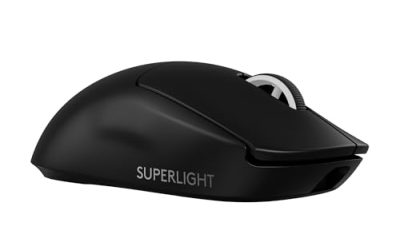
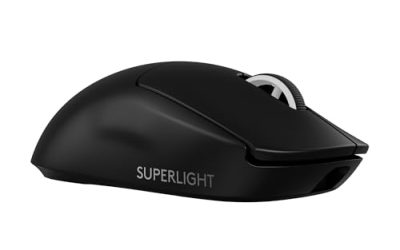
 Logitech G Pro X Superlight 2 Lightspeed WirelessClassic1.57 x 2.5 x 4.92 inches0.1 poundsCheck on Amazon
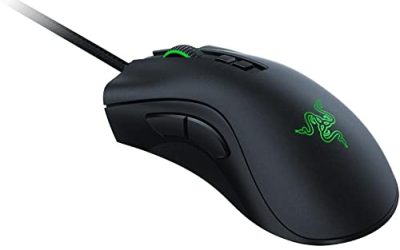
 Razer DeathAdder V3 Pro Wireless Gaming Mouse1000 Hz5.01 x 2.65 x 1.69 inches0.1 poundsCheck on Amazon
Top 3 picks at a glance
Quick Picks
As an Amazon Associate we earn from qualifying purchases.
| Product | Best for | Key spec from title |
|---|---|---|
| Glorious Model O | First honeycomb mouse on a wired setup | 67g honeycomb shell, Pixart 3360 sensor |
| SteelSeries Aerox 3 | Warm rooms and splash-prone desks | Holey shell with AquaBarrier water resistance |
| HyperX Pulsefire Haste Wireless | Wireless play with airflow through the shell | 61g honeycomb shell, 100 hour battery life |
| Logitech G PRO X Superlight 2 | Competitive FPS with a dry matte finish | 60g, HERO 2 sensor, 44,000 DPI |
| Razer DeathAdder V3 Pro | Large hands and long palm-grip sessions | 63g ergonomic shell, Focus Pro 30K sensor |
How to Choose
Shell texture and coating matter more than sensor numbers
A glossy shell looks sharp in photos and turns slippery the moment your palms dampen, so matte and textured finishes should sit at the top of your checklist. Smooth-touch matte coatings, rubberised side grips and fine texture on the main buttons all give your fingers something to hold when moisture breaks the friction between skin and plastic. Check the listing for words like matte, textured or anti-slip, and treat a glossy finish as a warning sign unless the mouse ships with grip tape in the box. A good matte finish also keeps its grip after months of daily use, while a cheap coating can wear smooth and shiny.
Perforated shells let sweat escape instead of pooling
Honeycomb and holey shells were designed to cut weight, but they bring a second benefit for sweaty hands: air moves through the shell and moisture has somewhere to go instead of collecting in a damp film under your palm. Perforations keep your hand cooler during long sessions, and the reduced contact area means less skin pressed against warm plastic. The trade-off is that dust and skin oils collect inside the holes, so wipe it often and clear it with compressed air now and then. If you play in a dusty room, a solid matte shell with textured grips may serve you better than an open honeycomb design.
Match the shape to your grip style and hand size
A mouse that fights your grip style will make sweaty hands worse, because you squeeze harder to control a shape that does not fit. Palm grippers need a taller, longer shell with a full arch to rest against, while claw grippers suit a mid-height shell with a steep front slope, and fingertip grippers want a small, light shell they can steer with fingertips alone. Measure your hand from wrist to middle fingertip and compare it with the dimensions on the listing before ordering. An ergonomic right-handed shape supports the palm during long sessions, while a symmetrical ambidextrous shape suits players who switch grip styles between games.
Weight, cable and wireless change how hard you grip
A heavy mouse demands more grip force to flick and stop, pressing more sweat into the shell, so lighter mice in the 60 gram range tend to stay comfortable longer for damp hands. Wireless removes cable drag, which is another small force your hand otherwise fights all session, and modern wireless mice track just as well as wired ones. If you go wired, look for a light, flexible cable that does not tug the mouse sideways. Battery life matters for wireless picks too, since a mouse that dies mid-match is worse than any grip problem, so check the hours stated on the listing and how it charges.
The 5 Best Options
Glorious Model O
The Model O is the classic first honeycomb mouse, and its open shell is exactly what sweaty hands need: air flows through the perforations, moisture does not pool under your palm, and the matte black finish gives your fingers grip that a glossy shell cannot. At 67 grams it is light enough to flick without squeezing hard, and the ambidextrous shape suits claw and fingertip grippers who want a neutral shell they can steer quickly. The Pixart 3360 sensor and Omron switches cover competitive play comfortably, and the flexible paracord-style cable keeps drag low for a wired mouse.
Specs
- Honeycomb shell design
- 67 grams
- Pixart 3360 sensor
- Up to 12,000 DPI
- Omron switches built for 20 million clicks
- RGB lighting
- Ambidextrous shape with 6 buttons
- Matte black finish
Best for: Players trying a honeycomb mouse for the first time on a wired setup.
Watch out for: Dust and skin oils collect inside the honeycomb holes, so wipe it down often and keep compressed air nearby.
SteelSeries Aerox 3
The Aerox 3 pairs a holey shell with AquaBarrier water resistance, which makes it the most sweat-tolerant mouse in this guide by design. The perforations move air across your palm while the internal coating guards the electronics against moisture, so damp hands are a normal use case rather than a risk. The TrueMove Core sensor tracks cleanly at up to 8,500 CPI, the USB-C cable connects to any modern setup, and the three-zone RGB lighting shines through the holes for a distinctive look. It is a wired mouse, so there is no battery to manage during a marathon session.
Specs
- Holey shell design with AquaBarrier water resistance
- TrueMove Core optical sensor
- Up to 8,500 CPI
- 3-zone RGB lighting
- USB-C connectivity
- PTFE feet
Best for: Warm rooms and players whose hands sweat heavily enough to worry about moisture reaching the internals.
Watch out for: The holey shell lets dust in as easily as air, so clean the perforations regularly to keep the sensor window clear.
HyperX Pulsefire Haste Wireless
The Pulsefire Haste Wireless keeps the honeycomb airflow of the wired original and cuts the cable, which removes one more force your damp hand has to fight during fast flicks. At 61 grams it is one of the lightest wireless mice here, and the hex-pattern shell lets heat and moisture escape from the top and sides while the textured surface keeps your grip steady. The listing rates battery life at 100 hours, the sensor reaches 16,000 DPI, and six programmable buttons cover the extras most FPS and MOBA players actually use. It is a strong pick if you want wireless freedom without giving up the ventilation of a perforated shell.
Specs
- Honeycomb hex shell design
- 61 grams
- Up to 100 hours of battery life
- 2.4GHz wireless connection
- Up to 16,000 DPI
- 6 programmable buttons
Best for: Wireless players who want a light, ventilated shell for long sessions.
Watch out for: The honeycomb holes expose the internals to dust, and the compact shell may feel small for players with very large hands.
Logitech G PRO X Superlight 2
The Superlight 2 takes the opposite approach to the honeycomb mice: a solid, dry matte shell that stays grippy without holes. The matte coating resists the slick film that sweat leaves on glossy plastic, and at 60 grams the mouse needs very little grip force to move, which means less sweat pressed into the surface in the first place. The HERO 2 sensor reaches 44,000 DPI with an 8kHz report rate, the LIGHTFORCE hybrid switches combine optical speed with a mechanical click feel, and LIGHTSPEED wireless keeps the connection lag-free. Five programmable buttons keep the layout clean and the shape neutral for claw and fingertip grips.
Specs
- 60 grams
- HERO 2 sensor
- Up to 44,000 DPI
- 8kHz report rate
- LIGHTFORCE hybrid switches
- LIGHTSPEED wireless
- 5 programmable buttons
- USB-C charging
Best for: Competitive FPS players who want a solid matte shell and the lightest possible wireless mouse.
Watch out for: The smooth solid shell has no ventilation, so in a very warm room a perforated mouse may keep your palm cooler.
Razer DeathAdder V3 Pro
The DeathAdder V3 Pro is the palm-grip answer to sweaty hands, with a tall ergonomic shell that supports the whole hand and a smooth-touch matte finish that resists sweat, skin oils and smudges. The shape was refined with professional players, and the full palm contact spreads grip pressure so no single spot gets damp and slippery. At 63 grams it is remarkably light for an ergonomic mouse, the Focus Pro 30K sensor tracks on almost any surface including glass, and Gen-3 optical switches are built for a 90-million click lifecycle. Battery life reaches 90 hours at the standard polling rate, and HyperSpeed wireless keeps input delay out of the picture.
Specs
- 63 grams
- Focus Pro 30K optical sensor
- Up to 30,000 DPI
- Gen-3 optical mouse switches built for 90 million clicks
- Up to 90 hours of battery life
- HyperSpeed wireless
- 5 programmable buttons
- Smooth-touch matte finish
- PTFE feet
Best for: Large hands and long palm-grip sessions where comfort matters as much as grip.
Watch out for: The ergonomic shape is right-handed only, and the smooth-touch coating can feel slick until your hand warms into it, so give it a few sessions before judging.
Which One Fits Your Situation
You play long ranked sessions in a warm room
Pick the SteelSeries Aerox 3 if your hands sweat heavily, because the holey shell vents heat and the AquaBarrier coating protects the internals from moisture. If you want the same ventilation without a cable, the HyperX Pulsefire Haste Wireless is the better call, since its honeycomb shell breathes and the wireless connection removes cable drag from long flicks.
You palm grip with medium to large hands
Pick the Razer DeathAdder V3 Pro, because its tall ergonomic shell supports your whole palm and spreads grip pressure so no single spot turns slick. The smooth-touch matte finish holds up through long sessions, and the 63 gram weight keeps a large shell from tiring your wrist during long evening sessions.
You play claw or fingertip and want the lightest mouse possible
Pick the Logitech G PRO X Superlight 2, because its 60 gram solid matte shell needs almost no grip force to flick and stop, which keeps sweat from building up in the first place. Its neutral shape suits claw and fingertip grips, and the matte coating stays grippy where a glossy shell would slide.
You want to try a honeycomb mouse without spending much
Pick the Glorious Model O, because it delivers the full perforated-shell experience with a proven sensor and a flexible cable at the accessible end of this guide. The matte black finish and open shell show you quickly whether ventilation solves your sweat problem before you commit to a wireless honeycomb mouse.
Common Mistakes
- Buying a glossy mouse because it looks good in photos, then finding it slides the moment your palms dampen.
- Chasing the highest DPI number on the box instead of checking shell texture, coating and shape, which decide grip far more than sensor speed.
- Ordering a mouse without comparing its length and height to your hand, so a shell that is too small forces a cramped grip that sweats more.
- Never cleaning the mouse, letting sweat residue and skin oils build into a slick layer on the buttons and sides.
- Assuming a honeycomb shell alone fixes sweaty hands, when a solid matte shell with the right shape can grip better in a dusty room.
Frequently Asked Questions
Do honeycomb mice really help sweaty hands?
Yes, because the perforations let air circulate across your palm and give moisture somewhere to escape instead of pooling between skin and plastic. The benefit is strongest during long sessions, when a solid shell traps heat and sweat under your hand. A honeycomb mouse still needs regular cleaning, since dust collects inside the holes, and it works best paired with a matte finish rather than a glossy one.
Is a matte or glossy finish better for sweaty palms?
Matte is better in almost every case, because its fine texture keeps friction when moisture breaks the smooth contact between skin and plastic. Glossy shells feel fine when your hands are dry and turn slick quickly once they dampen, which is exactly when you need grip most. Some glossy mice include grip tape in the box, which solves the problem, but a matte shell needs no extra step.
Should I use grip tape on my gaming mouse?
Grip tape helps if your mouse is otherwise perfect but slippery, because textured tape on the sides and buttons restores friction where sweat removes it. Apply it only to grip areas so it does not cover the sensor or block buttons, and replace it when the edges lift or the texture wears smooth. Buying a new mouse with a textured or matte shell is simpler than taping a glossy one.
How do I clean sweat off a gaming mouse?
Wipe the shell with a slightly damp microfibre cloth after long sessions, then dry it before your next game so moisture does not sit on the coating. For honeycomb shells, use compressed air to clear dust and dried sweat from the holes, and avoid soaking the mouse or spraying cleaner directly into the perforations. Clean the sensor window gently, since a film of grime there can cause tracking skips.
Related guides
More from Amazon
Programs that pair well with the guide above. Offers and eligibility are set by Amazon and may change.
Free shipping on eligible items, Prime Video and more. Eligible new members can start with a free trial.
Start a Prime free trialAd-free music streaming. Eligible new subscribers can start with a free trial.
Try Music Unlimited freeA Prime membership for ages 18-24 with a trial period. Eligibility is set by Amazon.
See Prime for Young AdultsAudiobooks and podcasts to listen to on the go. Eligible new members can start with a free trial.
Try Audible freeAs an Amazon Associate we earn from qualifying purchases.