Buying a first gaming mouse is less about chasing the highest sensor number and more about picking a mouse that feels natural from the first match. A beginner needs a shape that fits without a learning curve, a cable that simply plugs in, and a button layout that can be understood in minutes rather than studied for a weekend. The wrong first mouse teaches bad habits, while the right one quietly disappears into the hand.
This guide is for first-time PC gamers, players switching from a controller or a basic office mouse, and anyone setting up a first gaming desk. Every mouse below is a wired gaming mouse chosen from its name and listed specs on its Amazon page, with simple setup, a forgiving shape, and a modest button count as the deciding factors.
Our Top Picks
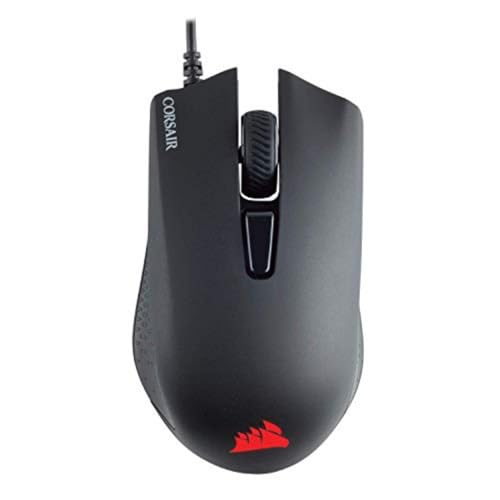
- Corsair Harpoon PRO RGB Wired Lightweight FPS/MOBA Gaming2.5"L x 4.5"W4.54 x 2.29 x 1.59 inches0.19 poundsCheck on Amazon
Top 3 picks at a glance

Quick Picks
As an Amazon Associate we earn from qualifying purchases
| Product | Best for | Key spec from title |
|---|---|---|
| SteelSeries Rival 3 | Small to medium hands learning claw or fingertip grip | TrueMove Core sensor, 8,500 CPI |
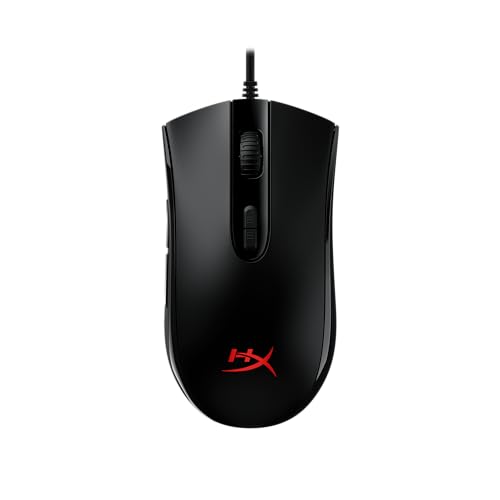
| HyperX Pulsefire Core | A first RGB mouse with simple software controls | Pixart 3327 sensor, up to 6,200 DPI |
| Corsair Harpoon RGB Pro | Lightweight comfort for long first sessions | 12,000 DPI optical sensor, 85 g |
| Razer DeathAdder V2 | Palm grip players who want a classic ergonomic shape | Focus+ 20,000 DPI optical sensor |
| ASUS TUF Gaming M3 Gen II | Spill-prone desks and players who want a tough shell | 8,000 DPI sensor, IP56 dust and water resistance |
How to Choose
Start with shape, not sensor numbers
Shape decides whether a first gaming mouse feels good after an hour of play, and sensor numbers matter far less at this stage. Most beginners play at modest sensitivity, so a sensor rated at 6,200 DPI and one rated at 20,000 DPI feel the same in everyday games. What changes is the shell: a tall right-handed hump supports a palm grip, a shorter shell suits claw grip, and a narrow body suits fingertip grip. Measure the hand from wrist crease to middle fingertip, then compare that length with the listed dimensions before ordering.
Keep the button count small
A first gaming mouse should have six to eight buttons, no more. Two side buttons cover forward and back in a browser or a quick ability in a game, and a DPI button lets sensitivity change on the fly without opening software. Mice with a full thumb grid or a dozen extra buttons demand memorization and punish accidental presses during tense moments. A beginner learns faster when every button has an obvious job, and extra buttons can wait until a favorite genre makes them necessary.
Choose wired for a simpler first setup
Wired mice remove a whole category of beginner problems: no charging, no batteries to swap, no dongle to lose, and no connection mode to troubleshoot. Plug the cable into a USB port and the mouse works, which is exactly the experience a first-time buyer should have. A flexible, lightweight cable matters more than the connection type itself, because a stiff cable drags and fights small hand movements. Wireless is a fine upgrade later, once the basics of grip and sensitivity are settled.
Leave software optional, not mandatory
Good beginner mice work well with default settings, and their software should be a bonus rather than a requirement. Look for a mouse that stores at least one profile on the device, so DPI and button assignments travel with the mouse instead of depending on a program running in the background. Simple software with clear sliders for sensitivity and lighting beats a dense suite full of macros a beginner will never open. If a mouse needs an account or a long install before it feels right, it is the wrong first pick.
The 5 Best Options
SteelSeries Rival 3
The SteelSeries Rival 3 is the simplest on-ramp in this group, a compact right-handed mouse built around a proven optical sensor and a shape that suits claw and fingertip grips. Its 77 gram body is light enough for quick flicks without feeling hollow, and the six-button layout keeps every control within easy reach. The matte shell and split trigger buttons give a clean, uncluttered feel that suits players who want to learn aiming fundamentals before worrying about extra features.
Specs
- TrueMove Core optical sensor, 100 to 8,500 CPI
- 300 IPS tracking speed and 35G acceleration
- 1,000 Hz polling rate
- 77 g without cable
- 6 programmable buttons with 60 million click switches
- 3 independently controlled RGB zones
- Ergonomic right-handed shape for claw or fingertip grip
- 1.8 m cable, 120.6 x 67.0 x 37.9 mm
Best for: Beginners with small to medium hands who use claw or fingertip grip.
Watch out for: The compact shell can feel short for large hands using a full palm grip.
ASIN: B08176SM7C
HyperX Pulsefire Core
The HyperX Pulsefire Core is a friendly first gaming mouse for players who want a little RGB flair without a complicated setup. Its Pixart 3327 sensor tracks cleanly at everyday sensitivity settings, and the seven programmable buttons include two side buttons plus a DPI control that is easy to find by touch. The 87 gram body sits in a comfortable middle ground, neither so light that it skitters nor so heavy that it tires the wrist during a first long session.
Specs
- Pixart 3327 optical sensor, up to 6,200 DPI
- 7 programmable buttons
- 87 g weight
- Wired USB connection
- Software controlled RGB light effects and macro customization
- Item model number HX-MC004B
Best for: Beginners who want RGB lighting and simple customization on a first mouse.
Watch out for: The sensor ceiling is lower than the other picks here, so competitive players may outgrow it sooner.
ASIN: B07H3GFJJ2
Corsair Harpoon RGB Pro
The Corsair Harpoon RGB Pro is the comfort pick of this group, pairing a contoured shape with rubber side grips and a light 85 gram body. It is built for players who play for hours at a time and want a mouse that stays comfortable through a whole evening, and its six programmable buttons keep the layout simple enough to learn in one sitting. The iCUE software is there for lighting and remapping, but the mouse plays well with its defaults straight out of the box.
Specs
- 12,000 DPI optical sensor
- 6 programmable buttons
- 85 g weight
- Wired connection
- Omron switches rated for more than 20 million clicks
- Contoured shape with rubber side grips
- Dynamic RGB backlighting controlled through Corsair iCUE software
Best for: Beginners who want a light, comfortable mouse for long sessions.
Watch out for: The compact shape suits small to medium hands best and can feel cramped for very large hands.
ASIN: B07QVB51L9
Razer DeathAdder V2
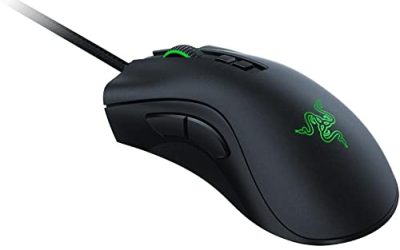
The Razer DeathAdder V2 is the classic ergonomic pick for beginners who rest their whole palm on the mouse. Its long, sculpted right-handed shell has guided new players for years, and the rubberized side grips keep the hand planted during fast turns. Eight programmable buttons give room to grow without overwhelming a first-time user, and the flexible Speedflex cable behaves more like a wireless mouse than a stiff cord, which helps new players who are still learning smooth aim.
Specs
- Focus+ 20,000 DPI optical sensor
- 8 programmable buttons
- 82 g weight
- Razer Speedflex cable, 2.1 m
- Chroma RGB lighting
- 5 onboard memory profiles
- PTFE mouse feet
- Razer optical mouse switches
- Right-handed ergonomic shape, 127 x 61.7 x 42.7 mm
Best for: Palm grip beginners who want a proven ergonomic shape with room to grow.
Watch out for: The right-handed shape does not suit left-handed players, and the extra buttons take a little time to learn.
ASIN: B082G5SPR5
ASUS TUF Gaming M3 Gen II

The ASUS TUF Gaming M3 Gen II is the tough, forgiving pick for a first desk, built to survive the accidents that come with learning. Its IP56 dust and water resistant coating guards against spills and dust, while the 59 gram shell is the lightest in this group and easy to move for players still building mouse control. Six programmable buttons, three onboard memory profiles, and PTFE feet round out a simple package that asks very little of a beginner and forgives a lot.
Specs
- 8,000 DPI optical sensor, 100 to 8,000 DPI range
- 6 programmable buttons
- 59 g weight
- Wired USB connection
- IP56 dust and water resistance
- ASUS Antibacterial Guard on the shell and buttons
- 60 million click switch lifespan
- PTFE mouse feet
- 3 onboard memory profiles
- 200 IPS tracking speed and 30G acceleration
- 1,000 Hz polling rate
- Right-handed ergonomic shape, 123 x 68 x 40 mm
Best for: Beginners who want a light, durable mouse for a shared or spill-prone desk.
Watch out for: The right-handed shape excludes left-handed players, and the light shell can feel too quick for players used to heavier mice.
ASIN: B0C1T2HL7L
Which One Fits Your Situation
You have never owned a gaming mouse
Start with the SteelSeries Rival 3, because it teaches the fundamentals without distractions. Its six buttons, light body, and simple right-handed shape let a new player focus on aiming and movement instead of memorizing controls. The sensor is honest and predictable at beginner sensitivity settings, and there is nothing to charge or pair before the first game.
You play for hours and want comfort first
Pick the Corsair Harpoon RGB Pro, which pairs a contoured shell and rubber side grips with a light 85 gram body. The shape supports the hand through long sessions, and the six-button layout stays simple enough to use without looking down. It is the easiest mouse here to forget about while playing, which is the best compliment a beginner mouse can earn.
You rest your whole palm on the mouse
Choose the Razer DeathAdder V2, whose long ergonomic shell and rubberized grips were designed for exactly that grip. The eight buttons give room to add binds as games get more complex, and the flexible cable keeps drag low while aiming. Its onboard profiles also mean settings stay on the mouse when moving between computers.
Your desk is shared, dusty, or near drinks
Take the ASUS TUF Gaming M3 Gen II, the only pick here with an IP56 dust and water resistant coating. At 59 grams it is also the lightest mouse in this group, so new players can build smooth control without fighting weight. Six buttons and three onboard profiles keep setup simple, and the tough shell handles the knocks of a busy desk.
Common Mistakes
- Buying the highest DPI number on the box instead of a shape that fits the hand.
- Choosing a mouse with a dozen side buttons for a first setup, then hitting the wrong one in every fight.
- Picking a wireless mouse first and then troubleshooting batteries, dongles, and pairing instead of playing.
- Ignoring hand size and grip style, then blaming the sensor for a cramp that a better-fitting shell would have prevented.
- Installing heavy software and changing every setting before playing a single match with the defaults.
Frequently Asked Questions
Do beginners need a high DPI gaming mouse?
No, beginners do not need a very high DPI ceiling. Most new players use sensitivity settings well below the maximum of any mouse in this guide, and a sensor rated at 6,200 DPI tracks just as cleanly as one rated at 20,000 DPI at those settings. Shape, weight, and button layout affect learning far more than the headline number.
Is a wired mouse better for a first gaming mouse?
Yes, wired is the simpler first choice for most beginners. A wired mouse works the moment it is plugged in, with no battery to charge, no dongle to lose, and no wireless mode to troubleshoot. The cable is the only trade-off, and a flexible cable like the ones on the mice here keeps drag low during play.
How many buttons should a first gaming mouse have?
Six to eight buttons is the sweet spot for a first gaming mouse. That covers the two main clicks, the scroll wheel, two side buttons, and a DPI button, which is enough for most games without demanding memorization. Extra buttons become useful later, once a favorite genre makes their purpose obvious.
What grip style should a beginner start with?
Start with whichever grip feels natural when the hand rests on the mouse: palm grip for a full-hand rest, claw grip for an arched hand, or fingertip grip for light, precise control. There is no single correct grip for beginners, so pick a shape that matches the natural hand position and let the grip settle with practice.
Related guides
More from Amazon
Programs that pair well with the guide above. Offers and eligibility are set by Amazon and may change.
Free shipping on eligible items, Prime Video and more. Eligible new members can start with a free trial.
Start a Prime free trialAd-free music streaming. Eligible new subscribers can start with a free trial.
Try Music Unlimited freeA Prime membership for ages 18-24 with a trial period. Eligibility is set by Amazon.
See Prime for Young AdultsAudiobooks and podcasts to listen to on the go. Eligible new members can start with a free trial.
Try Audible freeAs an Amazon Associate we earn from qualifying purchases.