An RGB mouse pad does two jobs at once. It gives your mouse a consistent tracking surface, and it adds a ring of light that ties a desk together. The best gaming mouse pad RGB options do both without asking you to give up glide quality for glow. A pad that looks bright in photos but drags under the mouse will frustrate you in every match.
This guide covers five RGB mouse pads listed on Amazon US. Every pad here is a pad first: a real tracking surface with a defined size, thickness, and base. The group mixes soft cloth extended pads, a two-zone cloth pad, and two hard-surface Razer pads. Cloth suits players who want control and a quieter glide. Hard surfaces suit players who want speed and a surface that wipes clean.
Before you pick, measure your desk. An extended pad that covers the keyboard and mouse area only works when the desk is wide enough and the cable can reach a USB port. Some pads keep lighting profiles on board, while others need companion software for full customization. The sections below walk through surface, lighting, size, and power, then look at each pad in detail.
Our top pick: Razer Goliathus Extended Chroma Gaming Mousepad. Runner-up: Corsair MM700 RGB Extended Cloth Gaming Mouse Pad.
Our Top Picks
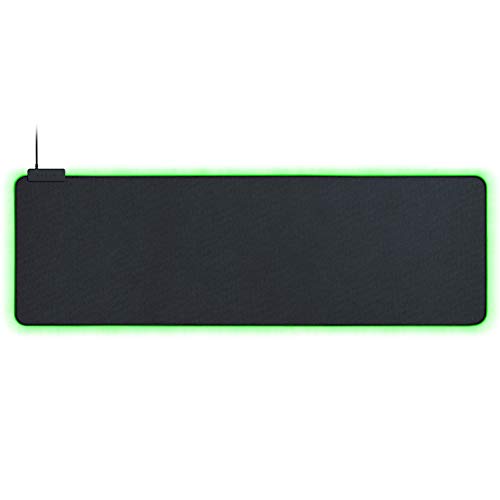 Razer Goliathus Extended Chroma Gaming Mousepad11.6L x 36.3W inches11.58 x 36.25 x 0.12 inches1.23 poundsCheck on Amazon
 Razer Firefly V2 Pro Fully Illuminated RGB Gaming11L x 14.2W inches10.95 x 14.18 x 0.1 inches2.07 poundsCheck on Amazon
 Razer Firefly Hard V2 RGB Gaming Mousepad15.2L x 12W inches10.84 x 13.99 x 0.14 inchesCheck on Amazon
Quick Picks
As an Amazon Associate, we earn from qualifying purchases.
| Product | Best for | Key spec from listing |
|---|---|---|
| Razer Goliathus Extended Chroma Gaming Mousepad | Extended cloth pad with deep Chroma sync | 16.8 million colors, micro-textured cloth, 11.58 x 36.25 inches |
| Corsair MM700 RGB Extended Cloth Gaming Mouse Pad | Three-zone lighting with a built-in USB hub | 930 x 400 mm surface, three-zone 360-degree RGB, two-port USB hub |
| SteelSeries QcK Gaming Mouse Pad – XL RGB Prism Cloth | Two-zone RGB on a classic cloth surface | 900 x 300 x 4 mm, two-zone RGB, micro-woven cloth |
| Razer Firefly V2 Pro Fully Illuminated RGB Gaming Mouse Mat | Fully lit hard surface | 15-zone Chroma lighting, micro-textured hard surface, USB 2.0 port |
| Razer Firefly Hard V2 RGB Gaming Mouse Pad | Edge-lit hard pad with cable management | Customizable Chroma edge lighting, hard micro-textured surface |
How to Choose
Surface and glide
The surface decides how the mouse feels more than the lighting does. Cloth pads give a controlled glide with a little friction, which helps players who lift and reset the mouse often or who aim with the arm. The micro-textured cloth on the Razer Goliathus Extended Chroma and the micro-woven cloth on the SteelSeries QcK Prism are built for that kind of play: the mouse moves smoothly, and the texture gives the sensor a consistent pattern to read.
Hard pads give a faster glide with almost no drag. The Razer Firefly V2 Pro uses a frosted hard surface with a micro-textured finish, and the Razer Firefly Hard V2 uses a hard micro-textured surface as well. Both suit players who flick fast. A hard surface also wipes clean, while cloth pads need more care, since dust and moisture sit in the weave.
Fast shooters with low sensitivity and large arm movements favor a large cloth surface, because the extra friction keeps aim steady during long sweeps. Games with quick wrist flicks favor a hard surface, because the mouse returns to center with less effort. If you switch between genres, an extended cloth pad is the safer middle ground.
Lighting and software
RGB pads differ in how the light is arranged and how you control it. The Razer Goliathus Extended Chroma and the Razer Firefly Hard V2 use edge lighting, where the glow runs around the border of the pad. The SteelSeries QcK Prism Cloth XL uses two lighting zones along its edges. The Corsair MM700 RGB Extended uses three zones that wrap 360 degrees around the pad. The Razer Firefly V2 Pro goes further, with 15 zones that light the whole frosted surface from below, so the pad itself glows rather than only its border.
Razer Chroma pads work with Razer Synapse, which syncs the pad with other Chroma gear and supported games, and lets the pad mirror effects such as a battery indicator on a wireless mouse. The Corsair MM700 RGB Extended works with CORSAIR iCUE software and keeps 12 lighting profiles on board, so you can switch effects with a push button when the software is not running. The SteelSeries QcK Prism Cloth XL works with SteelSeries Engine, which handles its two zones and in-game lighting events.
If your desk already runs one lighting ecosystem, pick a pad from the same family so the colors match without running two apps.
Size, thickness, and desk fit
Extended pads in this guide run from 900 mm wide to more than 36 inches wide, and they are made to hold a keyboard and a mouse together. Measure the desk from edge to edge, then leave room for a monitor stand or a speaker at the back. A pad that hangs over the front edge will curl and lift.
The SteelSeries QcK Prism Cloth XL and the Corsair MM700 RGB Extended are both 4 mm thick, which gives a firm, cushioned base that stays flat under a keyboard. The Razer Goliathus Extended Chroma is 0.12 inches thick, a slimmer profile that keeps the keyboard closer to desk level. Thicker pads feel softer under the wrist, while thinner pads keep the hand closer to the desk.
Every pad in this guide uses a non-slip rubber base, which keeps the mat in place during fast mouse work. A base that grips well matters more on a smooth desk, where a loose pad can drift. Stitched edges also help, since they keep a cloth pad from fraying where the lighting strip meets the fabric.
Power and cable routing
Every RGB pad here draws power over USB, so one more cable joins the desk, and it matters where that cable exits the pad. The Corsair MM700 RGB Extended uses a detachable USB Type-C cable and adds a two-port USB hub, so you can plug a mouse receiver or a headset dongle into the pad itself. The Razer Firefly V2 Pro also uses a detachable USB Type-C cable, and it adds a USB 2.0 port for a wireless mouse dongle, which keeps the receiver close to the mouse.
The Razer Goliathus Extended Chroma, the SteelSeries QcK Prism Cloth XL, and the Razer Firefly Hard V2 each connect over USB as well. Plan the run before you buy: a cable that has to stretch across the desk will pull at the pad, while a short run to a hub or a monitor port keeps the desk tidy. If your PC sits under the desk, a pad with a detachable cable is easier to route through a grommet without moving the whole pad.
Razer Goliathus Extended Chroma Gaming Mousepad
The Razer Goliathus Extended Chroma is the most complete RGB cloth pad in this group. It covers a wide stretch of desk at 11.58 x 36.25 inches, so a full-size keyboard and a mouse share one continuous surface. The micro-textured cloth gives a balanced feel between control and speed, with enough texture for precise aim and enough glide for fast turns. The non-slip rubber base is made from natural foam rubber, and it holds the pad still when the mouse moves hard across it.
The lighting is where this pad earns its place at the top. Razer Chroma supports 16.8 million colors, and the pad syncs with popular games, Razer hardware, Philips Hue lights, and gear from more than 30 partners. Inter-device color synchronization lets Chroma devices light up together, and the pad can mirror a wireless mouse battery level in color, shifting from red at low charge through yellow to green at full charge.
Setup is straightforward. The pad connects over USB and is configured in Razer Synapse, where you can build custom patterns, pick dynamic in-game effects, or leave it on a single color. The main trade-off is size: at more than 36 inches wide, this pad needs a desk that can take it, and it suits a permanent setup more than a desk that gets rearranged often.
Specs
- Dimensions: 11.58 x 36.25 x 0.12 inches
- Weight: 1.23 pounds
- Surface: micro-textured cloth, balanced control and speed
- Lighting: Razer Chroma RGB, 16.8 million colors
- Sync: games, Razer hardware, Philips Hue, and gear from 30 plus partners
- Base: non-slip natural-foam rubber
- Model number: RZ02-02500300-R3U1
- Software: Razer Synapse
Corsair MM700 RGB Extended Cloth Gaming Mouse Pad
The Corsair MM700 RGB Extended is the most flexible pad in this guide for a desk that needs light, size, and connectivity in one piece. Its surface measures 930 x 400 mm, wide enough for a keyboard and a mouse with room to spare, and the cloth is a glide-enhanced woven textile made for gaming sensors. The pad is 4 mm thick, with a plush rubber construction that stays flat and gives the wrist a soft landing.
Lighting runs in three zones around the full 360-degree edge of the pad. Twelve lighting profiles live on board, and a push button cycles through them without any software open. When you want deeper control, CORSAIR iCUE software takes over the three zones and lets you build custom effects and sync the pad with other iCUE gear.
The built-in hub sets this pad apart. Two USB ports sit on the pad, and a detachable USB Type-C cable links it to the PC. A wireless mouse receiver or a headset dongle can plug straight into the pad, which keeps short cables off the desk and the receiver close to the mouse. The anti-skid textured rubber base holds the whole assembly in place, even with a keyboard resting on it.
Specs
- Dimensions: 930 x 400 mm surface, 15.8 x 36.6 inches
- Thickness: 4 mm
- Surface: glide-enhanced woven textile cloth
- Lighting: three-zone 360-degree RGB, 12 on-board profiles
- Control: push-button profile switch, CORSAIR iCUE software
- Hub: two-port USB hub, detachable USB Type-C cable
- Base: anti-skid textured rubber
- Model number: CH-9417070-WW
SteelSeries QcK Gaming Mouse Pad – XL RGB Prism Cloth
The SteelSeries QcK Gaming Mouse Pad in its XL RGB Prism Cloth form takes a familiar surface and adds light to it. The QcK line is known for a micro-woven cloth that gives a smooth, consistent glide, and this version keeps that surface while adding two zones of RGB illumination along the edges. The pad measures 900 x 300 x 4 mm, which fits a keyboard and a mouse on a desk that cannot take a full extended mat.
Two-zone lighting is simpler than the three-zone or 15-zone systems in this guide. SteelSeries Engine controls the two zones, and the software supports dynamic lighting tied to in-game events, so the pad can react to what happens on screen. The effect stays clean: a steady glow along the border that frames the desk without washing out the monitor.
The cloth surface is the reason many players stay with the QcK line. It is optimized for gaming sensors, so tracking stays steady across the whole pad, and the non-slip base keeps the mat fixed when the mouse moves fast. If you want RGB light and a proven cloth surface without the width of an extended desk mat, this pad is the right size and the right shape.
Specs
- Dimensions: 900 x 300 x 4 mm
- Surface: micro-woven cloth, optimized for gaming sensors
- Lighting: two-zone RGB illumination
- Software: SteelSeries Engine, dynamic in-game lighting
- Base: non-slip base
- Model number: 63826
Razer Firefly V2 Pro Fully Illuminated RGB Gaming Mouse Mat
The Razer Firefly V2 Pro is the only pad in this guide that lights up across its whole surface instead of only around its edge. Fifteen lighting zones sit under a frosted hard top, and the full face of the mat glows in 16.8 million colors. The desk under the mouse becomes a light panel, and the color shifts are visible across the whole pad rather than confined to a border strip.
The hard surface is built for speed. Its micro-textured finish is made for optical sensors, so the mouse tracks cleanly during fast swipes, and the rigid top wipes clean after use. The anti-slip base keeps the mat planted, and the detachable USB Type-C cable makes the pad easy to move or route through a desk grommet. A built-in USB 2.0 port gives a wireless mouse dongle a home right beside the mouse.
Chroma control runs through Razer Synapse, where the 15 zones can be set independently or synced with other Chroma gear and supported games. The pad is smaller than the extended cloth pads in this guide, so it suits a desk where the keyboard sits on the desk itself and only the mouse area needs a mat.
Specs
- Lighting: 15-zone Chroma, 16.8 million colors, fully illuminated frosted surface
- Surface: micro-textured hard surface, optimized for optical sensors
- Ports: USB 2.0 port, detachable USB Type-C cable
- Base: anti-slip base
- Model number: RZ02-04920100-R3U1
- Software: Razer Synapse
Razer Firefly Hard V2 RGB Gaming Mouse Pad
The Razer Firefly Hard V2 is the edge-lit hard pad in this group, and it suits players who want a fast surface with a cleaner, slimmer glow than the fully lit V2 Pro. Chroma lighting runs around the edge of the pad, and Razer Synapse controls the colors and effects, including sync with other Chroma gear and supported games. The glow frames the mouse area without lighting the whole desk.
The hard surface uses a micro-textured finish that is built for control and speed in equal measure. The mouse glides with very little drag, and the rigid top holds its shape under the hand. A built-in cable catch keeps a wired mouse cable routed along the pad instead of dragging across the desk during fast movements. The non-slip rubber base holds the pad in place while the mouse moves across it.
This pad is the simplest hard RGB pad in the guide, and that is its strength. It has one job: give the mouse a fast, consistent surface and put a Chroma border around it. If you already run Razer gear and want a hard pad that matches it, the Firefly Hard V2 fits without adding a hub or a large footprint to the desk.
Specs
- Lighting: customizable Chroma RGB edge lighting
- Surface: hard micro-textured finish, balanced control and speed
- Cable management: built-in cable catch
- Base: non-slip rubber base
- Model number: RZ02-03020100-R3U1
- Software: Razer Synapse
Frequently Asked Questions
Do RGB mouse pads need software to work?
No. Every pad in this guide lights up when it is plugged into USB, and the Corsair MM700 RGB Extended keeps 12 lighting profiles on board that you can switch with a push button. Software such as Razer Synapse, CORSAIR iCUE, or SteelSeries Engine adds deeper control, including custom effects and sync with other gear, but the pad still glows without it.
Is a cloth or hard RGB pad better for gaming?
Cloth pads give more control and a quieter glide, which suits aim-heavy play and long arm movements. Hard pads give a faster glide and a surface that wipes clean, which suits quick flicks and fast repositioning. Both track well with modern optical sensors, so the choice comes down to how you move the mouse.
How much desk space does an extended RGB pad need?
Extended pads in this guide run from 900 mm wide to more than 36 inches wide. Measure the desk first, leave room for a monitor stand at the back, and check that a USB port or hub is close enough for the pad cable. A pad that overhangs the desk edge will curl and lift, so the desk should be at least as wide as the pad.
Can an RGB mouse pad sync with other gear?
Yes, when the pad and the other gear share a lighting system. Razer Chroma pads sync with Chroma gear and supported games through Razer Synapse. The Corsair MM700 RGB Extended syncs with iCUE gear through CORSAIR iCUE software. The SteelSeries QcK Prism Cloth XL syncs through SteelSeries Engine. Matching the pad to the ecosystem already on your desk gives the cleanest result.
An RGB mouse pad is a desk upgrade that you use every time you sit down to play. Pick the surface first, since that decides how the mouse feels in every match, then pick the lighting system that matches the gear you already own. The Razer Goliathus Extended Chroma leads this group for its wide cloth surface and deep Chroma sync, the Corsair MM700 RGB Extended follows it for players who want a hub and on-board profiles, and the other three cover the smaller, brighter, and harder options.
Related guides
More from Amazon
Programs that pair well with the guide above. Offers and eligibility are set by Amazon and may change.
Free shipping on eligible items, Prime Video and more. Eligible new members can start with a free trial.
Start a Prime free trialAd-free music streaming. Eligible new subscribers can start with a free trial.
Try Music Unlimited freeA Prime membership for ages 18-24 with a trial period. Eligibility is set by Amazon.
See Prime for Young AdultsAudiobooks and podcasts to listen to on the go. Eligible new members can start with a free trial.
Try Audible freeAs an Amazon Associate we earn from qualifying purchases.