Apple’s MacBook Pro handles a growing library of macOS games well, from Apple Arcade titles to full desktop releases, yet the built-in trackpad was never built for aiming, flicking, or holding down a fire button. A proper mouse fixes that in one move — as long as the mouse actually works with macOS. Plenty of gaming mice assume a Windows PC: their setup apps run on Windows only, and their wireless receivers use USB-A plugs that a modern MacBook Pro cannot take without an adapter.
The five mice in this guide clear both hurdles. Each one pairs with a MacBook Pro over Bluetooth or USB, and each one works without Windows-only software. Logitech’s macOS apps — Logi Options+ for the MX and Lift lines, G HUB for the G line — run on macOS, and the wired pick stores its settings on the mouse itself. Picks range from a travel-light companion to a full-size desk mouse.
Our Top Picks



Top 3 picks at a glance


Quick Picks
If you want the short version, here it is. The MX Master 3S is the most complete desk mouse here. The MX Anywhere 3S is the one to pack in a bag. The G502 HERO is the pick for games that need a lot of buttons. The G305 LIGHTSPEED is the lowest-cost wireless pick. The Lift is the comfort pick for long sessions.
| Mouse | Best for | Connection | Sensor |
|---|---|---|---|
| Logitech MX Master 3S | All-round desk mouse | Bluetooth, Logi Bolt | 8K DPI Darkfield |
| Logitech MX Anywhere 3S | Travel and small hands | Bluetooth, Logi Bolt | 8K DPI Darkfield |
| Logitech G502 HERO | Button-heavy games | Wired USB | HERO 25K, up to 25,600 DPI |
| Logitech G305 LIGHTSPEED | Budget wireless | LIGHTSPEED USB receiver | HERO 12K, up to 12,000 DPI |
| Logitech Lift Vertical | Wrist comfort | Bluetooth, Logi Bolt | Up to 4,000 DPI |
How to Choose a Gaming Mouse for MacBook Pro
Connection comes first
MacBook Pro models from recent years ship with USB-C ports only, so the connection type decides how much extra gear you need. A Bluetooth mouse pairs with nothing extra to buy. A mouse with a USB-A receiver needs a USB-C adapter or a hub before the receiver can plug in. A wired USB-A mouse has the same need. Bluetooth also leaves every port free for a charger or a monitor. The trade-off is latency: Bluetooth adds a small amount of input lag next to a dedicated wireless receiver, and competitive players can feel the difference in fast shooters. For casual play and most single-player games, Bluetooth is fine. For ranked play, a receiver or a cable is the safer call.
Pick software that runs on macOS
Buttons, DPI steps, and scroll behavior live in the maker’s app, so the app has to run on macOS. Logitech’s Logi Options+ and G HUB both run on macOS, which is why every pick in this guide comes from Logitech. Mice from makers whose apps are Windows-only still move a cursor on a Mac, but the extra buttons stay at their defaults and the DPI stays fixed. If you already own a mouse from another brand, check the maker’s site for a macOS app before you count on remapping anything.
Sensor and DPI
DPI sets how far the cursor moves for a given hand movement. A high ceiling matters more on large or high-resolution displays, where a low DPI forces long arm movements to cross the screen. For a 14-inch MacBook Pro display, 4,000 DPI is workable; for a 16-inch model or an external 4K display, 8,000 DPI and above feels better. The sensor matters as much as the number: a modern optical sensor tracks cleanly at high speed with no smoothing, filtering, or acceleration, so the cursor lands where your hand expects it. All five picks here use optical sensors with no smoothing or acceleration in their listed specs.
Shape, weight, and grip
A mouse that fights your hand will tire you out before a long session ends. Palm-grip players tend to like tall, full-size shells with a thumb rest. Claw-grip players tend to like shorter shells with a raised hump. Fingertip players tend to like light, low shells. Weight matters too: a light mouse near 99 grams flicks easily, while a heavier mouse near 141 grams feels planted and steady for precise aiming. There is no single right answer — hand size and grip style decide it, so match the shell to your hand before you match the spec sheet.
Battery and charging
Wireless mice split into two camps: rechargeable cells charged over USB-C, and disposable AA cells swapped in when they run out. Rechargeable mice cost nothing extra to keep running and charge from the same cable as the laptop. AA mice run for months on one cell and never need a charging pause. Either way, check the listed battery life before you buy, and keep a spare cable or a spare cell in the bag for travel.
The 5 Best Gaming Mice for MacBook Pro
1. Logitech MX Master 3S — Best All-Round Desk Mouse

The MX Master 3S is the most complete mouse in this guide, and the easiest one to recommend for a MacBook Pro that doubles as a work machine. Its sculpted right-handed shell fills a palm-grip hand, the thumb rest sits where a thumb naturally lands, and the quiet clicks keep late-night sessions from waking anyone nearby. The 8K DPI Darkfield sensor tracks on just about any surface, glass included, so it keeps working on a bare desk, a hotel table, or a notebook cover.
The MagSpeed scroll wheel is the feature that sets it apart. It spins freely through long documents and web pages, then clicks into a notched mode for line-by-line control. A second wheel under the thumb scrolls sideways, which helps in timelines, spreadsheets, and wide canvases. Seven buttons cover back, forward, app switching, and gesture control, and Logi Options+ on macOS maps each one, including Mac-specific gestures.
Battery life is generous: a full charge lasts up to 70 days, and a one-minute charge over USB-C gives around three hours of use. The mouse pairs with up to three devices over Bluetooth or the included Logi Bolt receiver, and Flow moves the cursor between a MacBook Pro and a second computer. At 141 grams it is the heaviest mouse here, which suits steady aiming more than fast flicks.
Specs
- Sensor: Darkfield optical, up to 8,000 DPI, tracks on glass
- Buttons: 7, programmable through Logi Options+ on macOS
- Scroll: MagSpeed electromagnetic wheel plus thumb wheel
- Connection: Bluetooth Low Energy, Logi Bolt USB receiver
- Battery: Rechargeable 500 mAh Li-Po, up to 70 days, USB-C charging
- Weight: 141 g
- Dimensions: 124.9 x 84.3 x 51 mm
- Model: 910-006557
Best for: MacBook Pro owners who want one mouse for work and play, with a full-size palm-grip shell.
Watch out for: Right-handed shape only; 141 g is heavy for fast-paced shooters; the Logi Bolt receiver is USB-A, so use Bluetooth or a USB-C adapter with a modern MacBook Pro.
2. Logitech MX Anywhere 3S — Best for Travel
The MX Anywhere 3S packs the core of the Master 3S into a compact shell that fits a laptop bag pocket. It carries the same 8K DPI Darkfield sensor, the same quiet clicks, and the same MagSpeed wheel, so it tracks on glass and scrolls through long pages just as well. The difference is size: this is a small mouse for small to medium hands, and it weighs far less in the hand.
It pairs with up to three devices over Bluetooth or Logi Bolt, and it charges over USB-C with up to 70 days of battery per charge. Logi Options+ on macOS handles button mapping and Flow across computers. For a MacBook Pro owner who works from cafes, co-working spaces, or hotel desks, the size is the point — it goes where a full-size mouse will not.
The compact shell is also the main trade-off. Large hands can cramp on it during long sessions, and there is no thumb rest. It is a travel mouse first and a desk mouse second, so pair it with a full-size mouse at home if your hands run large.
Specs
- Sensor: Darkfield optical, up to 8,000 DPI, tracks on glass
- Buttons: 6, programmable through Logi Options+ on macOS
- Scroll: MagSpeed wheel
- Connection: Bluetooth Low Energy, Logi Bolt USB receiver
- Battery: Rechargeable, up to 70 days, USB-C charging
- Model: 910-006925
Best for: Travel, small to medium hands, and MacBook Pro owners who work away from a desk.
Watch out for: Compact shell can cramp large hands; no thumb rest; the Logi Bolt receiver is USB-A, so use Bluetooth or a USB-C adapter with a modern MacBook Pro.
3. Logitech G502 HERO — Best for Button-Heavy Games
The G502 HERO is the pick for games that ask a lot of a mouse. Eleven programmable buttons cover weapon swaps, abilities, items, and push-to-talk without moving the left hand off the keys. The dual-mode scroll wheel spins freely or clicks in notches, and the HERO 25K sensor tracks up to 25,600 DPI with no smoothing, filtering, or acceleration.
The tunable weight system is a rare extra: five 3.6-gram weights slot into the base, so the balance can shift from light and quick to heavy and planted. On-board memory holds up to five profiles, so the button map and DPI steps stay on the mouse when it moves between computers. G HUB runs on macOS for setup, and the listing names PC and Mac support.
The trade-off is the cable. The G502 HERO is wired only, and the cable ends in a USB-A plug, so a modern MacBook Pro needs a USB-C adapter or a hub. At 121 grams before weights, it is also a heavy mouse, and the right-handed shell will not suit left-handed players.
Specs
- Sensor: HERO 25K optical, up to 25,600 DPI, no smoothing, filtering, or acceleration
- Buttons: 11 programmable, with on-board memory for up to 5 profiles
- Scroll: Dual-mode hyper-fast wheel
- Weight system: Five removable 3.6 g weights
- Connection: Wired USB
- Weight: 121 g before weights
- Dimensions: 132 x 75 x 40 mm
- Model: 910-005469
Best for: MMO, MOBA, and strategy games where extra buttons matter, and players who want a tunable weight.
Watch out for: Wired only with a USB-A plug — a USB-C adapter or hub is needed on a modern MacBook Pro; heavy at 121 g; right-handed shape only.
4. Logitech G305 LIGHTSPEED — Best Budget Wireless Pick
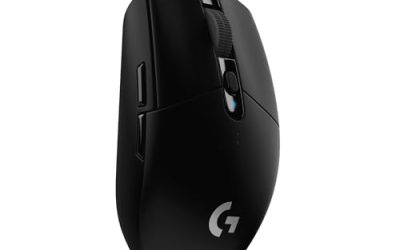
The G305 LIGHTSPEED is the lowest-cost wireless pick in this guide, and the lightest mouse here at 99 grams. Its HERO 12K sensor tracks up to 12,000 DPI with a 1 ms LIGHTSPEED report rate, so wireless play feels as quick as a cable. Six programmable buttons and on-board memory cover the basics, and the receiver stores inside the mouse for travel.
Battery life is the headline: a single AA cell runs up to 250 hours of continuous play in performance mode, and an endurance mode stretches that to up to nine months. There is no charging cable to pack and no charging pause mid-game — when the cell runs out, a fresh AA brings it back. G HUB runs on macOS for button setup and DPI steps.
The catch is the connection. The G305 talks only through its USB receiver — there is no Bluetooth — and the receiver is USB-A, so a modern MacBook Pro needs a USB-C adapter or a hub. Once connected, though, it is a simple, light, long-running wireless mouse that suits small to medium hands.
Specs
- Sensor: HERO 12K optical, 200 to 12,000 DPI
- Buttons: 6 programmable, on-board memory
- Connection: LIGHTSPEED wireless USB receiver, 1 ms report rate
- Battery: 1 AA cell, up to 250 hours in performance mode, up to 9 months in endurance mode
- Weight: 99 g
- Tracking: Up to 400 IPS
- Model: 910-005280
Best for: Budget wireless gaming, travel, and small to medium hands.
Watch out for: No Bluetooth — USB receiver only, and the receiver is USB-A, so a USB-C adapter or hub is needed on a modern MacBook Pro; no RGB lighting.
5. Logitech Lift Vertical Ergonomic Mouse — Best for Wrist Comfort
The Lift takes a different path: a 57-degree vertical shell that holds the hand in a handshake posture instead of flat on the desk. For long sessions, that angle takes pressure off the wrist and forearm, and the textured grip keeps the hand in place. It is built for small to medium hands, and the right-handed shape fits a natural palm rest.
The sensor reaches 4,000 DPI, adjustable in small steps through Logi Options+ on macOS, which is enough for most games outside fast-paced shooters. Four buttons cover the basics, clicks are quiet, and a single AA cell runs up to 24 months. It pairs over Bluetooth or the Logi Bolt receiver, and the listing names macOS 10.15 or later.
The 4,000 DPI ceiling is the honest limit: competitive shooter players who flick across a large display will want a higher ceiling. The vertical shape also takes a few days to feel natural. For comfort-first players, though, it is the easiest mouse in this guide to use for hours at a time.
Specs
- Sensor: High-precision optical, 400 to 4,000 DPI
- Buttons: 4, quiet clicks
- Angle: 57-degree vertical design
- Connection: Bluetooth, Logi Bolt USB receiver
- Battery: 1 AA cell, up to 24 months
- Weight: 125 g
- Dimensions: 108 x 70 x 71 mm
- Model: 910-006466
Best for: Wrist comfort, long sessions, and small to medium hands.
Watch out for: 4,000 DPI ceiling is low for fast-paced shooters; vertical shape takes getting used to; right-handed shape only.
Which One Fits Your Setup
For a desk setup where the MacBook Pro stays put, take the MX Master 3S. For a bag that travels, take the MX Anywhere 3S. For games with a dozen commands, take the G502 HERO and accept the cable. For a light wireless mouse on a tight budget, take the G305 LIGHTSPEED and a USB-C adapter. For wrists that ache after long sessions, take the Lift and give the vertical shape a few days.
If two picks tie, let the connection decide. Bluetooth picks need nothing extra. Receiver and wired picks need a USB-C adapter or a hub on a modern MacBook Pro. Buy the adapter with the mouse, not after it arrives.
Common Mistakes
- Buying a Windows-only mouse: check that the maker’s app runs on macOS before you buy, or the extra buttons stay at their defaults.
- Forgetting the adapter: USB-A receivers and cables need a USB-C adapter or hub on a modern MacBook Pro.
- Chasing DPI alone: a 25,600 DPI ceiling means little if the shell fights your hand. Shape and grip matter as much as the sensor.
- Skipping on-board memory: mice with on-board memory keep button maps and DPI steps when they move between computers. Mice without it need the app running.
- Ignoring weight: a heavy mouse tires the wrist in long sessions, while a light mouse can feel skittish for precise aiming. Match the weight to your grip.
FAQ
Do gaming mice work on a MacBook Pro?
Yes. Any mouse that pairs over Bluetooth or USB works with macOS for pointing and clicking. The catch is setup software: pick a mouse whose app runs on macOS, like Logi Options+ or G HUB, if you want to remap buttons or change DPI steps.
Is Bluetooth fast enough for gaming on a MacBook Pro?
For casual play and most single-player games, yes. Bluetooth adds a small amount of input lag next to a dedicated receiver or a cable. For ranked or fast-paced shooters, a LIGHTSPEED receiver or a wired mouse is the safer call.
Do I need a USB-C adapter for a gaming mouse?
It depends on the connection. Bluetooth mice need nothing extra. Mice with a USB-A receiver or a USB-A cable need a USB-C adapter or a hub on a MacBook Pro with USB-C ports only.
Can I use one mouse for work and gaming on a MacBook Pro?
Yes. The MX Master 3S and MX Anywhere 3S are built for exactly that, with quiet clicks, multi-device pairing, and macOS apps. The G502 HERO also covers both, with on-board memory that keeps work and game profiles on the mouse.
Conclusion
A MacBook Pro does not need a special mouse — it needs a mouse that respects macOS. The five picks above all pair over Bluetooth or USB, run with macOS software, and cover the main shapes, weights, and budgets. Match the connection to your ports, the shell to your hand, and the sensor to your games, and the trackpad can go back to being a backup.
As an Amazon Associate, we earn from qualifying purchases.
Related guides
More from Amazon
Programs that pair well with the guide above. Offers and eligibility are set by Amazon and may change.
Free shipping on eligible items, Prime Video and more. Eligible new members can start with a free trial.
Start a Prime free trialAd-free music streaming. Eligible new subscribers can start with a free trial.
Try Music Unlimited freeA Prime membership for ages 18-24 with a trial period. Eligibility is set by Amazon.
See Prime for Young AdultsAudiobooks and podcasts to listen to on the go. Eligible new members can start with a free trial.
Try Audible freeAs an Amazon Associate we earn from qualifying purchases.