A loud mouse rarely matters when you play alone in the middle of the day. It matters a lot at midnight in a shared apartment, in a dorm room while a roommate sleeps nearby, or on a stream where every sharp click lands in the microphone. Standard gaming mice use crisp mechanical switches that snap on every press, and in a fast shooter or a MOBA team fight you might press those buttons hundreds of times in a session. That tapping travels through thin walls and straight into voice chat.
The best silent gaming mouse solves that problem without turning into a sluggish office accessory. Modern quiet models use dampened or silent mechanical switches, or designs where every button is built for low noise, while keeping the parts that decide your aim: a gaming-grade optical sensor, a responsive polling rate, a shape that fits your grip, and enough programmable buttons for your games. Silence should change what other people hear, not how your cursor moves.
Noise claims vary widely, so this guide starts with how to judge a quiet gaming mouse. Some mice silence only the left and right buttons while the side buttons and wheel stay audible. Others quiet nearly every input. After the buying guide, you will find five gaming mice sold on Amazon US that are marketed around silent or quiet clicking, from a compact dual-wireless Razer to a wired specialist with silent buttons throughout.
Top 3 picks at a glance

How to Choose a Silent Gaming Mouse
Switch Type and Noise
The switch under each main button creates almost all of the sound a mouse makes. A conventional mechanical switch snaps metal contacts together, and that impact produces the familiar sharp tick. Silent designs cushion that impact. Dampened mechanical switches add a rubber or silicone layer that absorbs the high-frequency part of the sound, leaving a soft, low thock instead of a crack. Silent mechanical switches built for productivity lines, such as the ones in the Razer Pro Click Mini, keep a clear tactile point while removing most of the audible snap. A small group of gaming mice, including the MOJO Pro Performance model in this guide, take the idea further and use quiet construction for every button, not just the two main clicks.
Read noise claims carefully. Many listings state plainly that only the left and right clicks are silent, while side buttons, the DPI button, and the middle click keep a normal sound. That is fine for most players, since the main buttons account for most presses. If you bind abilities to side buttons and press them constantly, quieter side buttons matter more. Your desk changes what you hear too: a thin hollow desk amplifies clicks, a thick desk mat absorbs them, and a nearby microphone picks up far more than a person across the room.
Sensor Performance
Quiet switches should never be an excuse for a weak sensor. Look for an optical sensor with a DPI range that covers your play style, clean tracking at the speeds you actually use, and a polling rate of 1000 Hz if you play competitive titles. The picks in this guide span a wide range, from 2400 DPI models aimed at casual play and smaller displays to a 12,000 DPI PixArt PMW3336 in the MOJO Pro and a 12,000 DPI optical sensor in the Razer Pro Click Mini. Higher headline DPI numbers matter less than smooth, predictable tracking without obvious smoothing or jitter at your chosen setting.
Think about sensitivity too. Low-sensitivity shooter players sweep across a large pad and need a sensor that stays accurate during fast flicks, while high-sensitivity players benefit from fine DPI steps. Several preset DPI levels, switched from a button on the shell, let you adjust between games and desktop work without opening software each time.
Shape, Size, and Grip
A silent mouse still has to fit your hand for hours. Compact symmetrical shapes, like the Pro Click Mini, suit fingertip and claw grips, smaller hands, and travel setups, for both left and right hands. Larger right-handed ergonomic shells, like the VEGCOO C10 and the MOJO Pro, fill the palm and support a relaxed palm grip, with sculpted sides and thumb rests.
Weight matters as well. Heavier wireless models feel planted and deliberate, which many strategy and MMO players prefer, while lighter mice feel quicker in shooters. Check button layout against your games too: six or seven buttons cover shooters and MOBAs, while nine programmable buttons, as on the MOJO Pro, give MMO players room for macros and extra commands.
Wired vs Wireless
Wired and wireless silent mice serve different rooms. A wired model such as the MOJO Pro never needs charging, adds no battery weight concerns beyond its fixed build, and keeps a constant connection for a desk that never moves. It suits a dedicated gaming corner where the cable can be routed once and forgotten. Wireless models free the desk and travel easily between a gaming PC, a laptop, and a work machine. The Razer Pro Click Mini connects through both Bluetooth and a 2.4 GHz receiver, so you can use the low-latency receiver for play and Bluetooth for a second device without swapping hardware.
Battery approach matters too. Rechargeable models from VEGCOO and TENMOS charge over a cable, while models on AA cells, like the Pro Click Mini, let you swap in fresh batteries in seconds. Many wireless mice also sleep after several minutes away from the desk and wake with a press, saving power at the cost of a brief pause.
Scroll Wheel Noise
Clicks get the attention, but the scroll wheel can be the loudest part of a quiet setup. A notched wheel produces a rattling tick as it turns, and weapon switching or inventory scrolling can set off a burst of that noise. Some wheels reduce this with smoother detents or a free-spinning mode. The Pro Click Mini uses a multi-function wheel that switches between tactile scrolling and free spin and can tilt for side inputs. When you compare models, check wheel design alongside the click claims, especially if you zoom constantly in strategy games or switch weapons on the wheel in shooters.
1. Razer Pro Click Mini

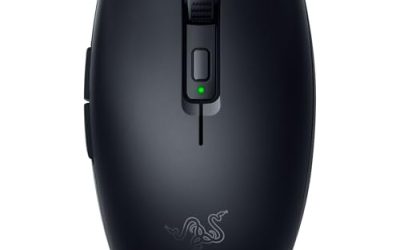
The Razer Pro Click Mini is the strongest fit for players who want genuine quiet clicking from a major gaming brand, in a mouse that still carries proper gaming hardware. Razer built this model with silent mechanical switches for the main buttons, rated for up to 15 million clicks in listing and brand material, and the result is a muted, soft press with a clear tactile point rather than a sharp snap. In a shared room or on a microphone, that difference is the whole point: your inputs stay private while your play stays responsive.
Under the shell, the Pro Click Mini uses an optical sensor reaching 12,000 DPI, which gives it far more headroom than a typical quiet office mouse. Seven programmable buttons cover the needs of shooters, MOBAs, and action games, and settings can be adjusted through Razer software. The compact symmetrical shape suits fingertip and claw grips and smaller to medium hands, and it travels well between a home desk, an office, and a laptop bag.
Connectivity is a highlight. The mouse links through Bluetooth and a 2.4 GHz receiver and can connect with several devices, making it a practical single mouse for a gaming PC and a work laptop. It runs on AA batteries, with the option to use one or two cells to adjust weight and runtime, and Razer positions battery life in the hundreds of hours depending on mode. The multi-function scroll wheel adds tilt inputs and can move between tactile steps and free spin, keeping wheel noise down during long scrolling.
Choose this mouse if you stream, share a room, or play late and want the quietest mainstream option that still feels like gaming gear. Players with very large hands may find the compact shell small, but for most grips the balance of silence, sensor performance, and dual wireless is hard to match.
- View on Amazon: https://www.amazon.com/dp/B09J6RF5TV
2. MOJO Pro Performance Silent Gaming Mouse
The MOJO Pro Performance Silent Gaming Mouse takes the most direct approach in this guide: silence is the main design goal, applied across the whole mouse. Listing material describes all of its buttons as silent, rather than only the primary pair, and pairs that quiet construction with a hand-sculpted ergonomic shape for right-handed players. For gamers who use side buttons constantly, or who find any remaining click noise distracting, that full coverage is a meaningful distinction.
Performance comes from a PixArt PMW3336 optical sensor with up to 12,000 DPI and a 1000 Hz polling rate. Nine programmable buttons include a dedicated sniper key for dropping sensitivity while aiming, and button actuation force can be adjusted to tune how firm each press feels. Downloadable software handles assignments, macros, DPI settings, and custom gamer profiles.
This is a wired mouse with a 1.8 meter cable, listed at 130 by 72 by 41 millimeters and about 127 grams, so it has the planted feel of a classic ergonomic gaming mouse. It needs no charging and suits a fixed desk where late sessions are routine. Compatibility in listing material covers Windows 7 and above.
Choose the MOJO Pro if you want the most silence-focused design here, with a wired connection, a larger shell, and deep customization. For quiet buttons on every input, this model stands apart.
- View on Amazon: https://www.amazon.com/dp/B07Z81WS5L
3. T-DAGGER Wireless Gaming Mouse
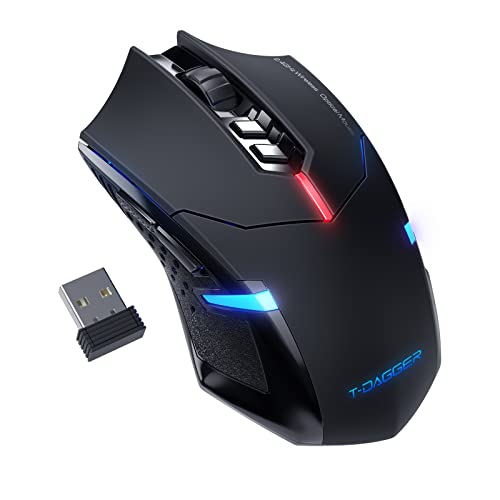
The T-DAGGER Wireless Gaming Mouse is built for players who want silent main clicks, simple wireless freedom, and a straightforward setup with no software routine to learn. Listing material highlights silent left and right clicks, with the switches described as durable across millions of presses, and a total of seven buttons including side controls. The quiet main buttons handle the presses you make most, which keeps late-night sessions and dorm play from disturbing anyone nearby.
Sensitivity adjusts across five steps, listed as 1000, 1500, 2000, 2400, and 4000 DPI, for careful aiming or fast movement across a large display. Connection runs through a plug-and-play USB receiver, and the mouse carries LED backlighting with a control on the underside that also handles power. An energy saving mode sleeps the mouse after about eight minutes without use.
The ergonomic shape is made for right-handed use, and listing material notes compatibility across Windows versions and macOS, with the caveat that side buttons do not function on macOS 10.X. The receiver stored by the battery compartment keeps the setup tidy for a laptop or small desk.
Choose the T-DAGGER if you want an uncomplicated wireless mouse with quiet main clicks and enough DPI steps for casual and mid-paced play: connect the receiver, set your DPI, and play without the click track a standard mouse adds to a quiet room.
- View on Amazon: https://www.amazon.com/dp/B09QS2GS2H
4. VEGCOO C10 Wireless Gaming Mouse

The VEGCOO C10 is a long-running silent wireless design that pairs quiet clicking with a relaxed ergonomic shape and colorful lighting for players who like some style at the desk. Listing material states that the left and right buttons reach a silent click standard, aimed at gaming or working at night without disturbing family members or roommates, while the other buttons keep a conventional feel. For most games, quieting those two primary buttons removes the bulk of the noise.
The C10 connects through a nano USB receiver and runs on a built-in 400 mAh rechargeable lithium battery, so there are no disposable cells to manage. Sensitivity adjusts across three levels, 800, 1600, and 2400 DPI, covering desktop play, casual shooters, strategy games, and MOBA titles. Six buttons include side controls, and the shell lighting cycles through several colors for late sessions in a dark room.
At roughly 13 by 7 by 3.5 centimeters in listing specifications, the C10 is a full-size right-handed mouse that supports a palm grip through longer sessions. Compatibility spans Windows versions and Mac OS X, and the package includes the mouse, charging cable, USB receiver, and manual.
Choose the C10 if you play casual games, prefer a larger rechargeable wireless mouse, and want silent main clicks without giving up side buttons or lighting. For everyday quiet play, it covers the essentials cleanly.
- View on Amazon: https://www.amazon.com/dp/B077TRZG6C
5. TENMOS T12 Wireless Gaming Mouse

The TENMOS T12 rounds out this guide as a simple, rechargeable wireless option for quiet play on a laptop or desktop. Its Amazon listing describes the mouse as a silent optical model with a soundless design among its headline features, and a maximum sensitivity of 2400 DPI across three adjustable levels. Seven buttons give you side controls and a DPI switch alongside the main pair, which is enough for shooters at a casual level, strategy games, and everyday play after work or class.
Connection runs over 2.4 GHz wireless through a USB receiver, and listing material emphasizes fast transmission for normal gaming distances. The built-in battery recharges over a cable, with the listing advising an initial charge of about two hours before first use. Changeable LED lighting and an ergonomic shape complete a simple setup.
The T12 is listed in a silver finish in the variant used for this guide. Its specification set is modest next to the 12,000 DPI models above, and that is the honest trade: you give up extreme sensitivity range and advanced software, and in return you get quiet clicking, wireless convenience, and a rechargeable design that fits a dorm desk or travel laptop kit.
Choose the T12 if your games are casual and your priority is a quiet mouse that simply works without extra setup, while keeping real gaming controls.
- View on Amazon: https://www.amazon.com/dp/B07VHCDH85
Silent Gaming Mouse at a Glance
| Mouse | Switch Approach | Sensor and Max DPI | Connection | Buttons | Best For |
|---|---|---|---|---|---|
| Razer Pro Click Mini | Silent mechanical switches | Optical, 12,000 DPI | Bluetooth and 2.4 GHz wireless | 7 programmable | Streaming, shared rooms, dual-device setups |
| MOJO Pro Performance Silent | Silent buttons throughout | PixArt PMW3336, 12,000 DPI | Wired, 1.8 m cable | 9 programmable | Maximum quiet coverage and customization |
| T-DAGGER Wireless Gaming Mouse | Silent left and right clicks | Optical, up to 4,000 DPI | 2.4 GHz USB receiver | 7 | Simple plug-and-play wireless play |
| VEGCOO C10 | Silent left and right clicks | Optical, up to 2,400 DPI | 2.4 GHz USB receiver, rechargeable | 6 | Larger palm grip and casual mixed play |
| TENMOS T12 | Silent optical design | Optical, up to 2,400 DPI | 2.4 GHz USB receiver, rechargeable | 7 | Casual laptop and dorm gaming |
Frequently Asked Questions
Are silent gaming mice slower than standard gaming mice?
No. Click noise comes from switch construction, not from sensor speed or latency. A silent model with a 1000 Hz polling rate and a gaming optical sensor, such as the MOJO Pro, reports movement and presses at the same pace as a louder mouse with the same specification. What changes is the sound and, slightly, the feel of the press.
Which buttons are actually silent on most models?
On most models, only the left and right main buttons use silent switches. Side buttons, the DPI button, and the middle click often keep a standard sound, and many listings state this directly, as the VEGCOO C10 does. The main buttons account for most presses in nearly every genre, so the practical reduction is still large. If you rely heavily on side buttons, look for a model that quiets every button.
Do silent switches feel mushy?
Dampened switches feel softer than standard mechanical switches, and that softness is how they absorb sound. Quality silent mechanical switches, such as those in the Razer Pro Click Mini, keep a defined tactile point so you can still feel each press register. The sensation is different rather than vague, and most players adjust within a few sessions.
Can a silent mouse still be heard on a stream?
It depends on microphone placement and gain. A silent mouse removes the sharp click that microphones capture most easily, which makes a clear difference in a quiet room. A sensitive microphone inches from the mouse can still pick up soft presses and wheel movement, so pair a quiet mouse with a desk mat and sensible placement for the cleanest result.
What else can I do to keep my setup quiet at night?
A thick desk mat absorbs clicks and the sound of the mouse base moving. Lowering microphone gain and moving the microphone closer to your mouth reduces every desk sound at once. A smooth or free-spinning wheel mode cuts scrolling noise, and a solid desk keeps vibrations from traveling into the next room.
Disclosure: As an Amazon Associate, we earn from qualifying purchases.
Related guides
More from Amazon
Programs that pair well with the guide above. Offers and eligibility are set by Amazon and may change.
Free shipping on eligible items, Prime Video and more. Eligible new members can start with a free trial.
Start a Prime free trialAd-free music streaming. Eligible new subscribers can start with a free trial.
Try Music Unlimited freeA Prime membership for ages 18-24 with a trial period. Eligibility is set by Amazon.
See Prime for Young AdultsAudiobooks and podcasts to listen to on the go. Eligible new members can start with a free trial.
Try Audible freeAs an Amazon Associate we earn from qualifying purchases.