Finding the best gaming mouse for Xbox starts with understanding how mouse support works on a console. Unlike a PC, where almost any mouse works in almost any game, Xbox mouse support depends on the game itself. Only supported titles accept mouse input, so a mouse that feels perfect on a desk may sit idle in a game that was built for a controller only. That distinction shapes every choice in this guide, from wired versus wireless to sensor strength and button layout.
The good news is that mice generally work for basic input on Xbox One and Xbox Series X/S. Plug a compatible wired mouse into a USB port, or connect a wireless model through its receiver, and the console can recognise it for navigation and for play in supported games. The experience is not identical to a PC, because console games set their own limits on sensitivity, button mapping and menu control, but for the titles that do support a mouse, the added precision of a pointer can change how aiming, selecting and managing inventory feel. This guide compares three mice that work with Xbox, explains what to look for before choosing one, and answers the most common questions about console mouse use.
Our Top Picks


Top 3 picks at a glance


What to Look For
Wired versus wireless on console. A wired mouse connects directly through USB and draws power from the console, so there is no battery to charge and no receiver to keep track of. That simplicity suits a fixed setup where the console sits close to the couch or desk. A wireless mouse gives more freedom of movement and keeps the cable out of the way, which matters when the console is across the room, but it needs a charged battery and a clear path between the receiver and the mouse. On Xbox, a wireless model that relies on its own USB receiver is the practical choice, because console support for direct Bluetooth mouse connections is limited.
Sensor accuracy. The sensor determines how faithfully the mouse tracks movement across a pad or a desk surface. A higher maximum DPI gives more room to set a fast pointer speed, while a modern optical sensor also tracks more cleanly at low speeds, which helps with fine aiming in supported shooters and careful selection in strategy and simulation titles. Look for a sensor with a wide DPI range and a clean, consistent feel rather than chasing the largest number alone, because the game and the console cap how much of that range you can actually use.
Button count. Extra buttons can hold useful actions such as reloading, crouching, switching weapons or opening a map, but only when the game lets you use them. On Xbox, many supported games accept the standard left and right clicks, the scroll wheel and a small number of side buttons, while deeper remapping often needs a PC. A mouse with a moderate number of programmable buttons gives flexibility without clutter, and a layout where the side buttons fall naturally under the thumb is easier to learn than a crowded grid.
Weight. A lighter mouse moves faster with less effort, which suits quick flicks and long sessions, while a heavier mouse can feel steadier and more planted for slow, deliberate aiming. Some mice include adjustable weights so the balance can be tuned to the hand, and that adjustability is a genuine advantage when one household shares a single mouse. Try to match the weight to the grip style and the length of a typical session rather than assuming lighter is always better.
Cable length. For a wired mouse, cable length decides where the console can sit relative to the player. A short cable forces the console close to the seat, while a longer, flexible cable reaches across a coffee table or along the edge of a desk without tugging at the hand. A braided or low-friction cable resists snagging and drags less across a surface, which keeps small movements smooth. Measure the distance from the console USB port to the playing position before choosing.
On-board memory for settings. On-board memory stores sensitivity levels, button assignments and lighting settings inside the mouse itself, so those settings travel with the device from a PC to a console. That matters on Xbox, where there is no companion software running in the background to apply a profile. A mouse with on-board memory keeps its DPI steps and button layout ready the moment it is plugged in, instead of reverting to factory defaults.
Grip shape. Grip shape decides comfort over a long session more than any single specification. A larger, right-handed ergonomic shape supports the palm and suits a palm grip, while a slimmer, symmetrical shape suits claw and fingertip grips and smaller hands. The thumb rest, the curve of the shell and the texture of the side grips all shape how secure the mouse feels during quick movements. Comfort is personal, so the shape that fits the hand and the grip style matters more than the shape that looks most aggressive.
Xbox-designed features. Some mice and mouse sets are built with Xbox in mind, carrying design choices such as a dedicated Xbox key, a layout tuned for living-room play, or a bundle that pairs the mouse with a keyboard and a lap mat. Those features do not change whether a game accepts mouse input, but they make the setup feel at home on a console, especially for players who sit on a couch rather than at a desk. When a product is described as designed for Xbox One and Xbox Series X/S, that signals the maker built it around console use from the start.
Top Picks
1. Logitech G502 HERO High Performance Wired Gaming Mouse
Check on Amazon
ASIN: B07GBZ4Q68
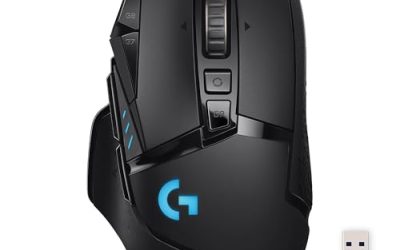
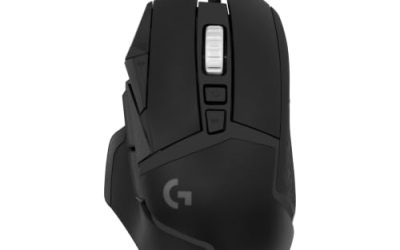
The Logitech G502 HERO High Performance Wired Gaming Mouse, model 910-005469, is a strong wired choice for Xbox players who want a full-featured mouse with a proven shape and a deep set of controls. Its HERO 25K sensor reaches up to 25,600 DPI, giving a wide range of sensitivity settings to work with, and the sensor tracks cleanly across a broad span of speeds, from slow, careful movements to fast sweeps. That range leaves room to find a sensitivity that feels natural on a console.
Eleven programmable buttons give this mouse more input options than most console mice, with side buttons, a DPI shift button and additional controls placed around the shell. On Xbox, how many of those buttons a game will use depends on the title, so the extra inputs are best seen as flexibility rather than a guarantee, but the layout itself is thoughtful, with the main side buttons falling under the thumb and the DPI controls within easy reach of the index finger. The adjustable weights add another layer of tuning, letting the balance shift toward the front or the rear and the overall heft rise or fall to suit the hand.
The wired USB connection keeps the setup simple on Xbox: plug it into a USB port and the console can recognise it for basic input in supported games, with no battery to charge and no receiver to manage. One caution is size: the G502 HERO is a substantial mouse, and players with smaller hands or a fingertip grip may find it broad. It is also a wired-only design, so players who want to sit well away from the console may prefer a wireless model or a longer cable run.
2. Razer DeathAdder V2 Wired Gaming Mouse
Check on Amazon
ASIN: B082G5SPR5
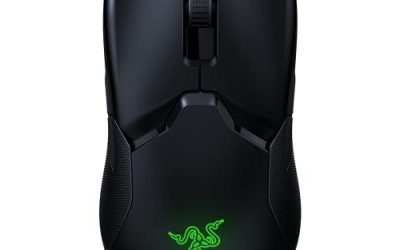
The Razer DeathAdder V2 Wired Gaming Mouse, model RZ01-03210100-R3U1, is a lighter, simpler wired mouse that suits Xbox players who value comfort and clean tracking over a large button count. Its Focus+ 20,000 DPI optical sensor tracks movement with precision across a wide sensitivity range, and the sensor holds its accuracy during fast flicks as well as slow, controlled aiming. The DeathAdder shape is one of the most familiar ergonomic designs in gaming, with a gentle curve that supports the palm and a thumb rest that keeps the hand relaxed.
Eight programmable buttons cover the essentials and a little more: left and right click, a clickable scroll wheel, two side buttons and DPI controls. At 82 g, the mouse is light enough to move quickly without tiring the wrist, and the low weight pairs well with the smooth, low-friction feet that glide across a pad. The 2.1 m Speedflex cable is long and flexible, reaching from a console to a couch or across a desk without dragging, and the cable design resists snagging on edges, which keeps small movements free.
The mouse is listed as compatible with Xbox One for basic input, which means it works for navigation and for play in supported games, while games without mouse support will not accept its input. A caution is that players who want many extra buttons for complex bindings will find the count modest, and the right-handed ergonomic shape does not suit left-handed players. For a comfortable, lightweight wired mouse with a strong sensor and a generous cable, however, the DeathAdder V2 is a straightforward pick.
3. Razer Turret Wireless Mechanical Gaming Keyboard and Mouse Combo
Check on Amazon
ASIN: B07QXLC24V
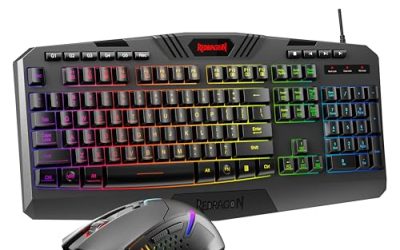
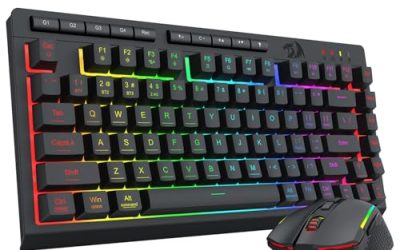
The Razer Turret Wireless Mechanical Gaming Keyboard and Mouse Combo, model RZ84-02820200-B3U1, is a keyboard-and-mouse combo, and the mouse is the Xbox-designed part of the set. This distinction matters: the product is a complete living-room set rather than a standalone mouse, built around the idea of playing from a couch with the keyboard on the lap and the mouse on a mat beside it. It is designed for Xbox One and Xbox Series X/S, and it carries a dedicated Xbox key, which gives quick access to console functions without reaching for a controller.
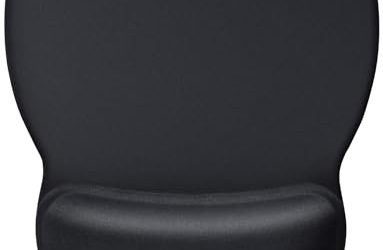
The mouse in the set uses a 16,000 DPI 5G optical sensor, which tracks cleanly across the sensitivity range most console players will use, and the wireless connection frees the hand from a cable entirely. The wireless link also keeps the setup tidy on a couch, with no cable running back to the console. A 40-hour battery keeps the mouse running through many sessions before a recharge is needed, and the retractable magnetic mouse mat slides out from under the keyboard to give the mouse a firm, stable surface on the lap, then retracts for storage.
There are cautions to weigh. Because this is a combo, the mouse cannot be bought on its own as part of this set, and the overall footprint is larger than a single mouse, since the keyboard and the lap board travel together. For couch players who want an Xbox-designed wireless mouse with a lap mat, a long battery life and a dedicated Xbox key, the Razer Turret set is the most console-focused choice in this guide.
Comparison at a Glance
| Mouse | Connection | Sensor | Buttons | Weight |
|---|---|---|---|---|
| Logitech G502 HERO | Wired USB | HERO 25K, up to 25,600 DPI | 11 programmable | Adjustable weights |
| Razer DeathAdder V2 | Wired USB, 2.1 m Speedflex cable | Focus+ 20,000 DPI optical | 8 programmable | 82 g |
| Razer Turret mouse (combo) | Wireless | 16,000 DPI 5G optical | Mouse in keyboard-and-mouse combo | Battery powered, 40-hour battery |
FAQ
Does any mouse work on Xbox?
Not every mouse will work in every situation, but mice generally work for basic input on Xbox One and Xbox Series X/S. A standard wired USB mouse, or a wireless mouse that connects through its own USB receiver, can usually be recognised by the console for navigation and for play in supported games. The real limit is the game: only titles that include mouse support accept mouse input during play, so a mouse that works perfectly in one game may do nothing in another. Checking whether a specific game supports a mouse before buying is the most reliable step.
Do wireless mice work on Xbox?
Yes, wireless mice can work on Xbox when they connect through a USB receiver. The receiver plugs into a USB port on the console, and the mouse communicates with that receiver rather than with the console directly. That setup works for navigation and for supported games, and it gives more freedom of movement than a wired mouse, which helps in a living room. Keep the battery charged and keep the receiver in a clear spot near the playing position. Direct Bluetooth mouse connections are a different matter, and support for them on console is limited, so a receiver-based wireless mouse is the safer choice.
Which games support mouse input on Xbox?
Mouse support varies by title, and the list changes as developers add or update support, so there is no single fixed catalogue to rely on. Supported games tend to include shooters, strategy titles, simulation games and some role-playing games where a pointer adds precision or makes menus easier to manage. The surest way to confirm support is to check the game listing, the developer notes, or the in-game settings menu, where supported titles usually show mouse sensitivity or key binding options. If a game shows no mouse settings, it most likely accepts controller input only.
Is a wired or wireless mouse better for Xbox?
The better choice depends on the setup. A wired mouse is simpler: it draws power from the console, needs no charging, and has no receiver to lose, which suits a fixed desk or a console that sits close to the seat. A wireless mouse gives freedom of movement and keeps cables out of the way, which suits a couch setup where the console is across the room. A long, flexible cable can close much of the gap for wired models, while a long battery life and a stable receiver connection close it for wireless models. Match the connection to the distance between the console and the seat.
Can I use a mouse and a keyboard together on Xbox?
Yes, in supported games a mouse and a keyboard can be used together, and some games are designed around that pairing. The keyboard handles movement and actions while the mouse handles aiming and selection, much like play on a PC. The same limit applies: the game must support mouse and keyboard input, and the specific keys and buttons it accepts are set by the game. A combo set such as the Razer Turret, with a keyboard, a mouse and a lap mat, is built for exactly this style of play from a couch, while a desk setup can pair any compatible wired or wireless mouse with a compatible keyboard.
Conclusion
Choosing the best gaming mouse for Xbox comes down to matching the mouse to the games and the room where it will be used. Start by confirming that the games you play support mouse input, because that single fact decides whether a mouse will be useful at all. Then weigh the practical choices: a wired mouse such as the Logitech G502 HERO or the Razer DeathAdder V2 keeps the setup simple and the tracking steady, while a wireless, Xbox-designed set such as the Razer Turret frees the couch setup and adds a lap mat and a dedicated Xbox key. Sensor strength, button count, weight, cable length, on-board memory and grip shape all shape comfort and control, but none of them matters more than a shape that fits the hand and a connection that reaches the seat. Pick the mouse that fits the space, the grip and the games, and the console setup will feel more precise and more comfortable from the first session.
Disclosure: As an Amazon Associate, gamingpcgadgets.com earns from qualifying purchases.
Related guides
More from Amazon
Programs that pair well with the guide above. Offers and eligibility are set by Amazon and may change.
Free shipping on eligible items, Prime Video and more. Eligible new members can start with a free trial.
Start a Prime free trialAd-free music streaming. Eligible new subscribers can start with a free trial.
Try Music Unlimited freeA Prime membership for ages 18-24 with a trial period. Eligibility is set by Amazon.
See Prime for Young AdultsAudiobooks and podcasts to listen to on the go. Eligible new members can start with a free trial.
Try Audible freeAs an Amazon Associate we earn from qualifying purchases.