Choosing the best asus rog wireless gaming mouse starts with an honest look at how you play, how you hold a mouse, and how long your sessions usually last. ASUS ROG includes several wireless models that share a family look and a focus on fast, precise tracking, yet each one leans toward a different kind of player. Some are feather-light and built for quick flicks, while others carry more buttons and a heavier body for players who want extra control at their fingertips.
This guide compares five ASUS ROG wireless gaming mice side by side. You will find notes on sensor strength, weight, battery life, button layout, grip shape, connection modes, and charging, so you can match a mouse to your hand and your favorite games. Every model here connects without a cable, and each one brings a different balance of lightness, endurance, and extra features.
Our Top Picks


Top 3 picks at a glance

What to Look For
- Sensor accuracy: A strong optical sensor tracks fast movement without skipping or smoothing, which matters in fast shooters and any game where small aim adjustments decide the outcome. Look for a high maximum DPI figure and a sensor name you recognize, such as the ROG AimPoint sensor found in several models here, and remember that most players use only a fraction of the maximum DPI in daily play.
- Weight: Light mice, often under 60 grams, suit fast flicks and long sessions because the hand tires less quickly. Heavier mice, above 120 grams, can feel steadier and more planted for players who like a solid feel. Try to match the weight to your grip style and to how much you lift and reposition the mouse during play.
- Battery life: Wireless freedom only helps when the battery lasts through your sessions. A mouse with a 90-hour battery figure can go many days between charges for most players, while a shorter span means you should keep a cable or a charging dock close by. Check whether the stated figure applies to the wireless mode you plan to use most.
- Grip shape and size: Palm, claw, and fingertip grips each favor a different shell shape. A low, slim body often suits claw and fingertip grips, while a taller, fuller body supports a palm grip. Length and width matter too, so compare the shape with the size of your hand and the grip you naturally use.
- Button count and placement: Extra side buttons help in games with many commands, and a well placed button is one you can reach without shifting your grip. Too many buttons can cause accidental clicks, while too few can leave you reaching for the keyboard. Count the programmable buttons and think about which commands you would assign to each one.
- Wireless connection modes: Tri-mode connectivity, covering 2.4 GHz wireless, Bluetooth, and a wired connection, gives you the most flexibility. A 2.4 GHz link usually feels the most responsive for gaming, Bluetooth works well for travel and everyday use, and a wired mode lets you keep playing while the battery charges.
- Switch type and hot-swappability: The switches under the main buttons shape the click feel, the sound, and how long the buttons last. Hot-swappable switches let you change the switch type without soldering, so you can tune the click to your taste or replace a worn switch instead of replacing the whole mouse.
- Charging options: A mouse that charges over a standard cable is simple to keep topped up, while a magnetic charging dock adds convenience by giving the mouse a home on your desk. Docks also keep the mouse visible and ready, which helps if you often forget to plug in a cable at the end of a session.
Top Picks
1. ASUS ROG Harpe Ace Aim Lab Edition Wireless Gaming Mouse, Black
Check on Amazon
ASIN: B0BSKX9V7C
The ASUS ROG Harpe Ace Aim Lab Edition is the lightest mouse in this lineup at 54 grams, and that low weight shapes almost everything about how it feels in the hand. Quick flicks take less effort, long sessions place less strain on the wrist, and lifting the mouse to reposition it feels almost effortless. Players who favor claw or fingertip grips will likely enjoy the nimble feel most, since a light body rewards fast, precise hand movement and makes it easier to make small aim corrections without dragging a heavier shell across the pad.
At the heart of the mouse sits the 36,000 DPI ROG AimPoint sensor, a strong tracking unit that follows fast movement with accuracy and consistency. High DPI headroom means the sensor can track rapid swipes without losing its place, and players who favor low sensitivity settings will appreciate the steady tracking during wide arm movements. The sensor pairs well with the light body, since the combination of low weight and accurate tracking suits fast-paced shooters and any game where aim speed matters. Aim Lab Edition branding points toward players who take aim practice seriously and want a mouse built around precision.
Battery life reaches up to 90 hours, which covers many days of regular play before a recharge becomes necessary. Tri-mode connectivity covers 2.4 GHz wireless, Bluetooth, and a wired connection, so you can switch between a responsive gaming link, a convenient Bluetooth link for travel or a second machine, and a wired link while charging. Players who prefer a heavier, more planted mouse, or who have large hands and a full palm grip, should check the shape carefully before committing. For players who want speed above all else, though, this model is a strong match.
2. ASUS ROG Keris Wireless AimPoint Gaming Mouse, Black
Check on Amazon
ASIN: B0CNL46V1R
The ASUS ROG Keris Wireless AimPoint Gaming Mouse weighs 75 grams, placing it in a comfortable middle ground between ultra-light designs and heavier, button-laden models. That weight gives it a balanced feel that works across grip styles, with enough substance to feel steady in the hand while remaining light enough for quick movement.
Its 36,000 DPI sensor is the same high grade AimPoint unit found in the lightest model in this guide, so tracking accuracy stays strong even during fast swipes and sudden direction changes. The sensor gives you plenty of headroom for both high sensitivity play and low sensitivity arm aiming, and it holds its tracking line well when you move quickly across the pad. For players who want consistent aim in competitive games without giving up comfort in longer sessions, this sensor is a reassuring core feature. The Keris name has long been linked with a comfortable, ergonomic shape, and this wireless version carries that idea forward.
Battery life reaches up to 119 hours, a long stretch that means fewer interruptions for charging and more time spent playing. Tri-mode connectivity covers 2.4 GHz wireless, Bluetooth, and a wired connection, giving you a responsive link for gaming, a handy Bluetooth link for laptops and travel, and a wired link for charging while you play. The Keris does not carry the extra programmable buttons or the detachable joystick found on larger models here, so players who want many commands under the thumb may prefer a different pick. For a dependable, well rounded wireless mouse, however, the Keris is easy to recommend.
3. ASUS ROG Gladius III Wireless AimPoint Gaming Mouse, White
Check on Amazon
ASIN: B0BRTJNQQ8
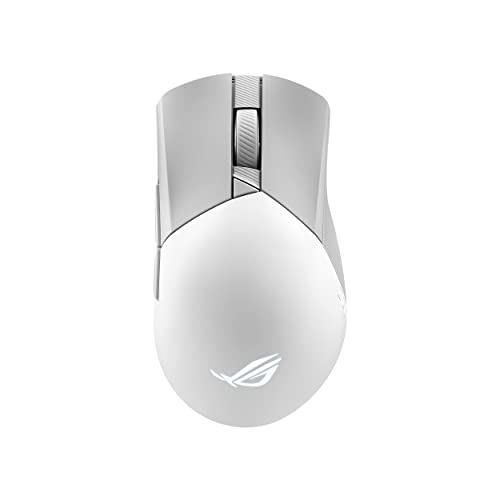
The ASUS ROG Gladius III Wireless AimPoint Gaming Mouse in white brings a classic ergonomic shape together with a feature that tinkerers will love: hot-swappable switches. If you enjoy tuning the feel of your clicks, this mouse lets you change the switches under the main buttons without soldering, so you can try a different click feel or replace a worn switch and keep using the same mouse. That flexibility makes the Gladius III a good match for players who like to adjust their gear over time rather than settling for one fixed click from the start.
Weighing 79 grams, the Gladius III sits close to the Keris in heft, with a balanced feel that suits palm and claw grips well. Its shape is fuller than the ultra-light Harpe Ace, which gives the palm more support during long sessions and helps the hand rest in a relaxed position. The 36,000 DPI sensor provides accurate tracking for fast movement and fine aim adjustments alike, so competitive shooters and precise aiming games both feel well served.
Battery life reaches up to 119 hours, matching the Keris and giving you a long run between charges. Tri-mode connectivity covers 2.4 GHz wireless, Bluetooth, and a wired connection, so you can pick the link that fits the moment, whether that is a responsive wireless link for gaming, Bluetooth for a second device, or a wired link while the battery tops up. The fuller shape may feel large for players with small hands or a fingertip grip, so hand size is worth considering. For players who want a comfortable shape, a strong sensor, and the freedom to swap switches, the Gladius III is a compelling pick.
4. ASUS ROG Spatha X Wireless Gaming Mouse
Check on Amazon
ASIN: B09726KT4R
The ASUS ROG Spatha X Wireless Gaming Mouse takes a very different path from the light, minimalist models in this guide, and that difference is its main strength. With 12 programmable buttons, it gives players who juggle many commands a full set of controls within easy thumb reach. Strategy games, massively multiplayer online games, and any title with a long list of abilities benefit from this layout, since you can assign key commands to the mouse and keep your other hand free for movement.
At 168 grams, the Spatha X is by far the heaviest mouse here, and that weight is a deliberate part of its character. A heavier body can feel steadier and more planted, which some players prefer for deliberate, controlled movement, though it demands more effort for fast flicks and frequent lifting. The 19,000 DPI optical sensor tracks well for the games this mouse targets, where command access and control matter at least as much as raw flick speed. Fast competitive shooter players may find the weight slows them down, while command-heavy players will likely value the button layout more than the extra grams.
Battery life reaches up to 67 hours, a shorter span than the lighter models in this guide, yet the included magnetic charging dock helps make charging a simple habit. You set the mouse on the dock when you finish playing, and it is ready for the next session without hunting for a cable. Dual-mode connectivity covers wired and 2.4 GHz wireless links, giving you a responsive wireless connection for play and a wired link for charging or a direct connection. The Spatha X is a specialist pick, and it shines brightest for players who want many programmable buttons and a large, supportive shape.
5. ASUS ROG Chakram X Origin Wireless Gaming Mouse

Check on Amazon
ASIN: B0BRTK8YPN
The ASUS ROG Chakram X Origin Wireless Gaming Mouse is the most feature-rich model in this guide, and its headline extra is a detachable joystick built into the body. That joystick can be set up for movement, for quick commands, or for other in-game actions, giving you an extra input that sits right under your thumb. With 11 programmable buttons as well, the Chakram X Origin gives command-heavy players a generous set of inputs without forcing them to reach for the keyboard as often.
Weighing 123 grams, the Chakram X Origin sits between the light models and the heavy Spatha X, with a solid, substantial feel that suits palm and claw grips. The 36,000 DPI sensor delivers accurate tracking for fast movement and fine aim work, so the mouse handles both competitive shooters and slower, more deliberate games with confidence. Battery life reaches up to 150 hours, the longest span in this guide, which means you can go for many days of regular play before thinking about a recharge.
Tri-mode connectivity covers 2.4 GHz wireless, Bluetooth, and a wired connection, giving you a responsive link for gaming, a convenient Bluetooth link for travel or a second machine, and a wired link while charging. The joystick and the extra buttons add complexity, so players who want a simple, minimal mouse may find this model busier than they need. The 123 gram weight may also feel heavy for players who favor ultra-light designs and fast flicks. For players who want the longest battery life here, a strong sensor, and a joystick for extra control, the Chakram X Origin is the most versatile pick in the lineup.
Comparison at a Glance
| Mouse | Weight | Sensor | Battery Life | Connectivity |
|---|---|---|---|---|
| ROG Harpe Ace Aim Lab Edition | 54 g | 36,000 DPI ROG AimPoint | Up to 90 hours | 2.4 GHz, Bluetooth, wired |
| ROG Keris Wireless AimPoint | 75 g | 36,000 DPI AimPoint | Up to 119 hours | 2.4 GHz, Bluetooth, wired |
| ROG Gladius III Wireless AimPoint | 79 g | 36,000 DPI AimPoint | Up to 119 hours | 2.4 GHz, Bluetooth, wired |
| ROG Spatha X | 168 g | 19,000 DPI optical | Up to 67 hours | 2.4 GHz, wired |
| ROG Chakram X Origin | 123 g | 36,000 DPI | Up to 150 hours | 2.4 GHz, Bluetooth, wired |
FAQ
How do I choose the best ASUS ROG wireless gaming mouse for my grip?
Start with your grip style and hand size. A light, slim mouse such as the Harpe Ace often suits claw and fingertip grips, while a fuller body such as the Gladius III or the Chakram X Origin gives a palm grip more support. If you can, compare the shape and weight with a mouse you already use, and think about whether you lift the mouse often or keep it planted on the pad.
Is a lighter gaming mouse always better?
Not always. A light mouse helps with fast flicks and reduces wrist strain during long sessions, which is why the 54 gram Harpe Ace appeals to competitive shooter players. A heavier mouse can feel steadier and more controlled, and players who favor a palm grip or play command-heavy games may prefer the planted feel of a heavier body such as the Spatha X.
What does tri-mode connectivity mean?
Tri-mode connectivity means the mouse can connect in three ways: through a 2.4 GHz wireless link, through Bluetooth, and through a wired connection. The 2.4 GHz link is usually the most responsive choice for gaming, Bluetooth is handy for laptops and travel, and the wired link lets you keep playing while the battery charges.
How long should the battery last on a wireless gaming mouse?
It depends on how often you play and which wireless mode you use. The mice in this guide span from up to 67 hours on the Spatha X to up to 150 hours on the Chakram X Origin. A longer battery span means fewer charging breaks, and a magnetic charging dock, as included with the Spatha X, can make topping up a simple daily habit.
Are extra programmable buttons worth it?
Extra buttons help when a game has many commands, since you can assign abilities, items, or macros to the mouse and keep your keyboard hand focused on movement. The Spatha X has 12 programmable buttons and the Chakram X Origin has 11, which suits command-heavy games. If you mainly play shooters with few commands, a simpler mouse with fewer buttons may feel cleaner and lighter in the hand.
Conclusion
The best ASUS ROG wireless gaming mouse is the one that matches your grip, your games, and your habits. The Harpe Ace Aim Lab Edition leads on lightness and speed, the Keris and Gladius III balance comfort with strong sensors and long battery life, the Spatha X serves command-heavy players with its many programmable buttons and charging dock, and the Chakram X Origin brings the longest battery life plus a detachable joystick for extra control. Compare the weight, sensor, battery life, and button layout against how you play, and you will find a wireless ROG mouse that feels like a natural fit for your setup.
Disclosure: As an Amazon Associate, gamingpcgadgets.com earns from qualifying purchases.
Related guides
More from Amazon
Programs that pair well with the guide above. Offers and eligibility are set by Amazon and may change.
Free shipping on eligible items, Prime Video and more. Eligible new members can start with a free trial.
Start a Prime free trialAd-free music streaming. Eligible new subscribers can start with a free trial.
Try Music Unlimited freeA Prime membership for ages 18-24 with a trial period. Eligibility is set by Amazon.
See Prime for Young AdultsAudiobooks and podcasts to listen to on the go. Eligible new members can start with a free trial.
Try Audible freeAs an Amazon Associate we earn from qualifying purchases.