Minecraft asks more from a mouse than most block games suggest. Placing blocks quickly, bridging across a gap, and landing repeated clicks in a Bedwars fight all reward a button that registers cleanly and a shape your hand can flick without thinking. Creative builders care about something quieter: steady cursor control during long sessions, plus side buttons that keep favourite blocks and tools within easy reach.
The four mice below cover different kinds of players, from drag-click specialists to survival regulars who simply want wireless freedom on a shared family computer. Each selection comes from the names and specifications on its Amazon listing, so the weight, sensor ceiling, and switch type quoted here match what the seller actually states rather than community folklore or borrowed figures from a different model in the same range.
Top 3 picks at a glance


Quick Picks
As an Amazon Associate we earn from qualifying purchases.
| Product | Best for | Key spec from title |
|---|---|---|
| Glorious Model O Wired Gaming Mouse | Lightweight wired control | 67g superlight honeycomb design |
| Bloody A70x Optical Gaming Mouse | Drag clicking | Light Strike switch and scroll |
| Logitech G305 Lightspeed Wireless Gaming Mouse | Wireless survival and creative play | 250h battery life |
| Razer Viper Mini Wired Gaming Mouse | Smaller hands and fingertip grip | Ultralight 61g design |
How to Choose
Click Style and Switch Behaviour
Start with how you actually click in game. Normal clicking suits almost any gaming switch, while butterfly clicking favours buttons with enough width for two fingers to alternate comfortably. Drag clicking is stricter: it relies on friction across the button surface and on switches that register those brief contacts, which is why the Bloody A70x listing highlights its Light Strike system and why matte finishes get mentioned so often for this technique. Check whether a server permits the method before building your whole purchase around it.
Weight and How It Changes Aim
A lighter shell lets you stop and restart the cursor with less effort, which matters when you are snapping between blocks, chests, and inventory slots. The Glorious Model O listing states 67 grams and the Razer Viper Mini states 61 grams, while the wireless Logitech G305 states 99 grams because it carries a battery inside. None of those figures is automatically superior. Players who make broad sweeping turns sometimes prefer a little extra mass for steadiness, whereas fingertip players usually welcome the lightest body they can control.
Sensor Range Versus Useful Sensitivity
Listings advertise maximum DPI figures loudly, yet Minecraft rarely needs the top of that range. What matters more is a sensor that tracks smoothly at the moderate settings most players settle on, without skipping when you move quickly across a pad. The mice here span 8,000 to 12,000 DPI at their ceilings, which leaves plenty of headroom for adjusting sensitivity in small steps. Set your in-game sensitivity first, then tune DPI around it, instead of chasing the largest number printed on a box and playing at an unusable speed.
Buttons, Cable, and Everyday Practicality
Side buttons earn their place when they carry actions you repeat constantly, such as switching to a specific hotbar slot or toggling perspective. Count the programmable buttons on the listing and picture where your thumb naturally rests. Connection style shapes daily use too: a flexible wired cable never needs charging, while the G305 removes cable drag entirely and stores its receiver inside the body for travel. Also confirm the shape suits your hand size, because a compact mouse that fits a smaller hand can cramp a larger one during a long build.
The 4 Best Options
Glorious Model O Wired Gaming Mouse

Builders and PvP players who want a light wired mouse often land here. The listing describes a 67 gram honeycomb body in matte black, an ambidextrous shape, and Omron switches, a combination that suits quick repositioning when you are bridging or turning to face an opponent. Its matte surface is also the finish players tend to seek for drag clicking, although the listing itself makes no CPS promise, so treat any click-rate expectation as technique dependent rather than guaranteed by the hardware alone.
Specs
- Brand: GLORIOUS
- Colour: Matte Black
- Weight: 67 grams
- Sensor: Pixart PMW-3360
- Maximum DPI: 12,000 DPI
- Switches: Omron switches
- Buttons: 6 buttons, ambidextrous design
- Design: Honeycomb shell, RGB lighting
Best for: Players wanting a light wired mouse with a matte finish for fast Minecraft movement.
Watch out for: The honeycomb shell has open cutouts, so check that you are comfortable with dust reaching the inside and cleaning it.
ASIN: B07LDH3TWM
Bloody A70x Optical Gaming Mouse
This is the specialist option for players whose Minecraft routine centres on drag clicking for bridging and rapid block placement. Bloody builds the listing around its Light Strike switch and scroll system, a stated 0.2ms key response, and a matte black finish, all of which speak directly to that click style. Eight programmable buttons give room for hotbar and utility bindings, and the right-handed shape with side controls suits players who keep a firmer palm or claw hold during tense fights on busy servers.
Specs
- Brand: Bloody
- Colour: A70x-MatteBlack
- Sensor: BC3332-S precision engine
- Maximum sensitivity: 8,000 DPI, adjustable 100 to 8,000 CPI
- Switches: Light Strike (LK) infrared switches, 0.2ms response
- Click rating stated on listing: Over 20 million clicks
- Buttons: 8 programmable buttons
- Scroll wheel: Infrared wheel, over 1 million scrolls stated
Best for: Drag-click players who want a mouse built and described around that technique.
Watch out for: Confirm your favourite servers allow drag clicking, and check the right-handed shape fits your hand before ordering.
ASIN: B09FYK7X4M
Logitech G305 Lightspeed Wireless Gaming Mouse
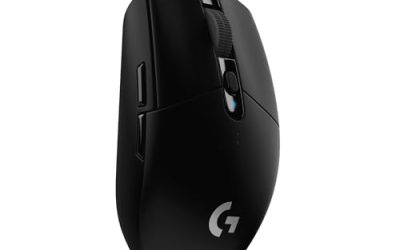
Survival and creative players who dislike cable drag will appreciate this wireless route. The listing states a HERO sensor up to 12,000 DPI, LIGHTSPEED wireless with a 1ms report rate, and 250 hours of continuous gameplay from a single AA battery, so long building sessions do not revolve around charging. At 99 grams it feels steadier than the ultralight wired picks, and six programmable buttons cover hotbar shortcuts without crowding the shell. Built-in receiver storage also helps laptop players who move between desks.
Specs
- Brand: Logitech G
- Colour: Black
- Model number: 910-005280
- Sensor: HERO, up to 12,000 DPI
- Connectivity: LIGHTSPEED wireless via USB receiver, 1ms report rate
- Weight: 99 grams
- Battery: 1 AA battery, up to 250 hours stated
- Buttons: 6 programmable buttons, on-board memory
Best for: Wireless players who want long battery life for survival and creative sessions.
Watch out for: It runs on a replaceable AA battery rather than a rechargeable cell, so check you are happy keeping a spare ready.
ASIN: B07CMS5Q6P
Razer Viper Mini Wired Gaming Mouse

Smaller hands and fingertip players get a compact option here. Razer lists this model at 61 grams, the lightest figure in this group, with an 8,500 DPI optical sensor, optical switches, and a Speedflex cable designed to reduce drag across the desk. That small footprint helps when your Minecraft play involves constant micro-adjustments, such as lining up precise block placements or tracking a moving target at close range. Chroma RGB underglow lighting appears on the listing too, for players who like matching a setup theme.
Specs
- Brand: Razer
- Model number: RZ01-03250100-R3U1
- Weight: 61 grams, excluding cable
- Sensor: Optical sensor, up to 8,500 DPI
- Switches: Razer Optical Mouse Switches
- Buttons: 6 programmable buttons
- Cable: Speedflex cable
- Lighting: Chroma RGB underglow lighting
Best for: Players with smaller hands who use a fingertip or claw grip and want the lightest pick here.
Watch out for: The compact body can feel cramped under a large palm grip, so compare its size against your current mouse first.
ASIN: B084RPZD6T
Which One Fits Your Situation
You Mainly Play Bedwars and Bridge a Lot
Choose between the Bloody A70x and the Glorious Model O. The A70x listing is written around Light Strike switches and rapid response, which aligns with drag-click bridging, while the Model O gives you a lighter matte honeycomb body for general fast clicking. Either way, practise the technique in a single-player world first and confirm the rules of the servers you frequent.
You Build for Hours in Creative or Survival
The Logitech G305 suits long, calmer sessions because its wireless connection removes cable pull while you sweep across large builds, and the stated 250 hour battery life means charging rarely interrupts. Its six programmable buttons can hold the actions you repeat most, and the steadier 99 gram body helps when movements are slow and deliberate rather than frantic.
Your Hands Are Small or You Use Fingertip Grip
The Razer Viper Mini was shaped for this situation, with a compact body and a stated 61 gram weight that fingertip players can nudge precisely. Its optical switches and flexible cable keep each input feeling direct during close work like redstone layouts. Measure your current mouse before switching, because moving to a noticeably smaller shell takes a short adjustment period.
You Share a Family or School Computer
A wired pick such as the Model O or Viper Mini avoids receiver mix-ups and flat batteries when several people use the same machine. Both plug in and work without charging routines, and their programmable buttons can be set up per player through software profiles. Keep the cable routed so it does not snag during play, especially on crowded desks where younger players are reaching across.
Common Mistakes
- Buying purely for drag clicking without checking whether your regular servers restrict the technique or cap clicks per second.
- Assuming the highest DPI figure means better Minecraft control, then playing at a sensitivity too fast to place blocks accurately.
- Ignoring hand size and grip style, so a compact or ambidextrous shape feels uncomfortable after an hour of building.
- Forgetting that a wireless mouse needs battery planning, whether that means a spare AA cell or a charging routine.
- Leaving side buttons unassigned instead of mapping hotbar actions you reach for dozens of times per session.
Frequently Asked Questions
Does Minecraft need a high DPI mouse?
No. Minecraft rewards controlled sensitivity far more than a huge DPI ceiling. Every mouse here offers at least 8,500 DPI at its maximum, which is more headroom than most players use. Pick a comfortable in-game sensitivity, set DPI to match it, and focus on a sensor that tracks smoothly during quick turns and slow building alike.
Is drag clicking allowed on Minecraft servers?
Rules differ by server, and some networks restrict drag clicking or cap the clicks per second they accept, particularly in competitive modes. Read the published rules for the servers you play on before choosing a mouse for that technique. Single-player worlds carry no such restriction, so they are the safest place to learn and practise it.
Should I choose wired or wireless for Minecraft?
Both work well. Wired models such as the Model O and Viper Mini never need charging and tend to weigh less, while the G305 uses LIGHTSPEED wireless with a stated 1ms report rate and removes cable drag entirely. Decide based on your desk setup, how much you travel with a laptop, and whether you prefer the lightest possible body.
How many side buttons are useful for Minecraft?
Two side buttons already cover common shortcuts, and the mice here offer six to eight programmable buttons in total. Map the actions you repeat most, such as a favourite hotbar slot or perspective toggle, and leave the rest alone. Cramming every possible command onto the mouse usually slows you down rather than helping during a fight.
Related guides
More from Amazon
Programs that pair well with the guide above. Offers and eligibility are set by Amazon and may change.
Free shipping on eligible items, Prime Video and more. Eligible new members can start with a free trial.
Start a Prime free trialAd-free music streaming. Eligible new subscribers can start with a free trial.
Try Music Unlimited freeA Prime membership for ages 18-24 with a trial period. Eligibility is set by Amazon.
See Prime for Young AdultsAudiobooks and podcasts to listen to on the go. Eligible new members can start with a free trial.
Try Audible freeAs an Amazon Associate we earn from qualifying purchases.