StarCraft II is won on speed and precision: you are constantly boxing units, clicking minimap positions, and jumping between bases while your army fights elsewhere. The real decision is not which mouse looks fastest on a spec sheet, but which one lets you keep that pace for a full ladder session without misclicks or hand fatigue. A precise sensor matters most, then enough programmable buttons for control groups and camera hotkeys, then a shape you can hold for hours.
This guide is for ladder players who want faster control-group access, campaign and co-op players who play long sessions, and returning players setting up a dedicated StarCraft II setup. Every mouse below is a gaming mouse with a precise sensor and programmable buttons, chosen from the names and specifications shown on its Amazon product page, with one still-selling ASIN listed for each pick.
Our Top Picks


Top 3 picks at a glance

Quick Picks
As an Amazon Associate we earn from qualifying purchases
| Product | Best for | Key spec from title |
|---|---|---|
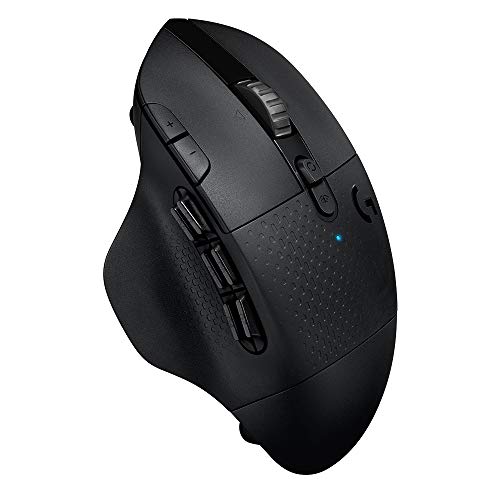
| Logitech G604 LIGHTSPEED Wireless Gaming Mouse | Wireless macro control for long sessions | 15 programmable controls, up to 240-hour battery |
| SteelSeries Rival 5 Gaming Mouse | Light, precise play with a few side buttons | 18,000 CPI sensor, 9 programmable buttons |
| CORSAIR Scimitar RGB Elite Gaming Mouse | Full side-button grid for control groups | 17 programmable buttons, 18,000 DPI sensor |
| Logitech G600 MMO Gaming Mouse | Maximum buttons for hotkey-heavy play | 20 programmable buttons, 8,200 DPI laser sensor |
| UtechSmart Venus Pro RGB Wireless Gaming Mouse | Wireless grid mouse for long sessions | 16 programmable buttons, up to 70-hour battery |
How to Choose
Sensor Precision and DPI Range
StarCraft II rewards small, exact movements: selecting a single worker from a mineral line, clicking a precise spot on the minimap, or boxing a handful of units without grabbing the ones beside them. A high-DPI optical or laser sensor with clean tracking at low speeds matters more than the maximum DPI number on the box, because most players use a modest sensitivity and lift the mouse often. Look for a sensor that holds its line during slow drags and fast flicks alike, and a mouse that lets you switch DPI steps on the fly when you move from base building to a battle.
Programmable Buttons and Macros
StarCraft II gives you more commands than your keyboard hand can comfortably reach, so extra mouse buttons earn their place fast. Map them to control groups, camera locations, or the commands you use every minute, such as attack move, stop, or hold position. A thumb grid suits players who want a dozen commands under one thumb, while two or three well-placed side buttons suit players who only need a few. Check that the mouse software lets you save profiles on the mouse itself, so your setup survives a move to another computer.
Shape, Weight, and Grip for Long Sessions
A StarCraft II session can run for hours, and a shape that fights your hand will cost you games late in the night. Palm-grip players usually want a taller, fuller shell that supports the whole hand, while claw and fingertip players want a lower shell with a clear place to rest the thumb. Weight matters too: a lighter mouse is easier to flick across the screen again and again, while a heavier mouse can feel steadier for slow, deliberate selections. If you can, compare the length and width in the listing against the mouse you already use.
Wired or Wireless, and Software Support
Wired mice never need charging and never drop a connection mid-fight, which is why many ladder players still prefer a cable. Modern wireless mice with a dedicated receiver are fast enough for StarCraft II, and they suit players who hate cable drag or move between a desk and a couch. The trade is battery care: a wireless mouse needs a battery swap or a recharge, so check the listed battery life and whether it works while plugged in. Either way, confirm the software runs on your system and lets you remap buttons without a fight.
The 5 Best Options
Logitech G604 LIGHTSPEED Wireless Gaming Mouse
The G604 is built for players who want a lot of buttons without giving up wireless freedom. Its 15 programmable controls include six thumb buttons, so control groups, camera jumps, and common commands can all live under your thumb instead of stretching your left hand across the keyboard. The HERO sensor tracks cleanly at the low sensitivities most StarCraft II players use, and the hyper-fast scroll wheel makes long jumps through menus and replays quick. Dual wireless modes let you switch between a dedicated receiver and Bluetooth, which is handy if you also use the mouse on a laptop.
Specs
- 15 programmable controls, including 6 thumb buttons
- HERO 25K sensor after the free G HUB update, with 100 to 25,600 DPI
- Up to 240 hours of battery life in LIGHTSPEED mode
- Dual connectivity: LIGHTSPEED wireless and Bluetooth
- Hyper-fast scroll wheel
- Runs on 1 AA battery, included
Best for: Ladder players who want wireless play with a full set of thumb buttons.
Watch out for: It runs on a replaceable AA battery rather than a built-in rechargeable pack, and the 5.11-inch shell suits medium and large hands best.
SteelSeries Rival 5 Gaming Mouse
The Rival 5 is the lightest mouse in this list, and it suits players who would rather keep the mouse simple and fast. Its five quick-action side buttons cover the commands you reach for most, such as control groups and camera locations, without the learning curve of a full thumb grid. The TrueMove Air sensor holds its line during the slow drags of base building and the fast flicks of a battle, and the 85-gram shell stays easy to move through a long session. It is a wired mouse, so there is nothing to charge and nothing to drop mid-game.
Specs
- 9 programmable buttons, including 5 quick-action side buttons
- TrueMove Air optical sensor with 18,000 CPI, 400 IPS, and 40G acceleration
- 85-gram lightweight shell
- Golden Micro IP54 switches rated for 80 million clicks
- 10-zone PrismSync RGB lighting
- Wired USB connection with a right-handed ergonomic shape
Best for: Players who want a light, precise mouse with a few well-placed side buttons.
Watch out for: It is wired and right-handed only, and nine buttons will not suit players who want a full command grid.
CORSAIR Scimitar RGB Elite Gaming Mouse
The Scimitar RGB Elite is the pick for players who want every command on the mouse. Its 12-button side panel holds control groups, camera locations, and production hotkeys, and the patented Key Slider lets you shift the whole panel forward or back to match your thumb. The 18,000 DPI sensor adjusts in single-DPI steps, so you can fine-tune sensitivity until small selections feel exact. At 122 grams it is heavier than the light mice in this list, which some players prefer for steady, deliberate clicks during base building.
Specs
- 17 programmable buttons, including 12 side buttons
- Patented Key Slider control system repositions the side buttons
- Custom PixArt PMW3391 native 18,000 DPI optical sensor, adjustable in 1 DPI steps
- 50 million click-rated Omron switches
- Braided cable with onboard profile storage
- iCUE software for macros and lighting control
Best for: Players who want a full side-button grid they can slide to fit their thumb.
Watch out for: The 122-gram weight and wide grid take practice, and the shape is right-handed only.
Logitech G600 MMO Gaming Mouse

The G600 is the veteran of this list, and it still makes sense for StarCraft II players who want the most buttons possible. Its dual-dish thumb panel puts 12 buttons under your thumb in two sets of six, so you can learn each button by feel and hit it without looking away from a battle. The G-Shift button doubles what every other button can do, and up to five DPI levels per profile let you drop to a slow, exact sensitivity for precise selections. It is a wired mouse with a laser sensor, so it is best for players who value buttons over the newest sensor.
Specs
- 20 programmable buttons, including a 12-button dual-dish thumb panel
- G-Shift button doubles the actions on every other button
- Up to 5 DPI levels per profile with on-the-fly DPI shifting
- Gaming-grade laser tracking up to 8,200 DPI
- Primary buttons rated to 20 million clicks
- RGB backlit thumb panel with a braided USB cable
Best for: Hotkey-heavy players who want the largest button count in this list.
Watch out for: It is an older design with a laser sensor, so confirm the listing shows the black wired version in stock before ordering.
UtechSmart Venus Pro RGB Wireless Gaming Mouse
The Venus Pro is the wireless grid mouse in this list, and it suits players who want thumb buttons without a cable. Its 16 programmable buttons include a 12-button side panel for control groups and camera locations, and the 2.4 GHz wireless mode keeps the connection steady while the wired mode works as a backup. The optical sensor reaches 16,000 DPI, and the battery lasts up to 70 hours in wireless mode, so a full week of evening sessions is realistic between charges. It is a wide ergonomic shell, so it fits palm-grip players best.
Specs
- 16 programmable buttons, including 12 side buttons
- Custom PixArt PMW3335 optical sensor with up to 16,000 DPI
- Dual modes: 2.4 GHz wireless and wired
- Up to 70 hours of battery life in wireless mode
- 1000 Hz polling rate
- 16M Chroma RGB lighting with an ergonomic design
Best for: Players who want a wireless mouse with a full side-button panel.
Watch out for: UtechSmart is a lesser-known brand, so read the listing details carefully and confirm you are ordering the wireless Venus Pro model.
Which One Fits Your Situation
You Play Ranked Ladder Most Nights
If your evenings are mostly ladder games, pick the Logitech G604. Its 15 programmable controls put control groups and camera jumps under your thumb, and the wireless connection keeps your desk clear for fast mouse movement. The long battery life means you are not swapping a battery mid-session, and the precise HERO sensor holds up at the low sensitivities ladder players usually favor for exact selections.
You Want Every Control Group Under Your Thumb
If you run many control groups and camera locations, pick the CORSAIR Scimitar RGB Elite. Its 12-button side panel holds your whole command set, and the Key Slider moves the panel to fit your thumb instead of forcing you to stretch. The single-DPI sensor steps let you fine-tune sensitivity until small selections feel exact. Give yourself a few days to learn the grid before judging it.
You Play Long Campaign or Co-op Sessions
If your sessions run for hours, comfort and battery life matter more than raw button count, so pick the UtechSmart Venus Pro. Its wide ergonomic shell supports a palm grip through long missions, and the wireless battery lasts up to 70 hours between charges. The 16 programmable buttons still cover your control groups and camera locations, and the wired mode is there if the battery ever runs low mid-game.
You Are Returning to StarCraft II on a Fresh Setup
If you are coming back to the game and want a simple, dependable first mouse, pick the SteelSeries Rival 5. It is light, precise, and easy to learn, with five side buttons that cover the commands you will actually use while you rebuild your habits. There is no battery to manage and no grid to memorize, so you can focus on your build orders and your mechanics instead of your hardware.
Common Mistakes
- Buying for the highest DPI number instead of a sensor that tracks cleanly at the sensitivity you actually use.
- Filling a 12-button grid with commands you never use, then misclicking the ones that matter in a fight.
- Picking an ultralight mouse for fast flicks when your grip and hand size suit a fuller, steadier shell.
- Ignoring software support and finding out too late that your profiles do not save to the mouse.
- Choosing a wireless mouse without checking battery life or whether it keeps working while plugged in.
Frequently Asked Questions
How many buttons do I need for StarCraft II?
Most players do fine with five to nine programmable buttons covering control groups, camera locations, and a few common commands. A 12-button grid helps if you run many control groups or play other games with heavy hotkey use, but it takes time to learn. Start with the commands you press every minute and add more only when you keep reaching for the keyboard.
Is a wireless mouse fast enough for StarCraft II?
Yes, a modern wireless mouse with a dedicated receiver is fast enough for StarCraft II, where steady tracking matters more than the last fraction of a millisecond. Keep the receiver close to the mouse, keep a spare battery or a charging cable nearby, and use wired mode during important matches if your mouse supports it. Bluetooth alone can feel less responsive than a dedicated receiver.
What DPI should I use for StarCraft II?
There is no single best DPI, because it depends on your screen size, your sensitivity setting, and how far you move your hand. Many players use a moderate DPI with a low in-game sensitivity so small selections stay exact. Set a DPI that lets you cross the screen in one comfortable sweep, then add a lower DPI step for precise worker and unit selection.
Do I need a special mouse pad for StarCraft II?
You do not need a special pad, but a large, consistent surface helps a lot. StarCraft II uses long sweeps across the screen, so a pad that gives your mouse room to move without running off the edge is worth having. Pick a cloth surface for control and steady tracking, keep it clean, and replace it when the glide turns uneven.
Related guides
More from Amazon
Programs that pair well with the guide above. Offers and eligibility are set by Amazon and may change.
Free shipping on eligible items, Prime Video and more. Eligible new members can start with a free trial.
Start a Prime free trialAd-free music streaming. Eligible new subscribers can start with a free trial.
Try Music Unlimited freeA Prime membership for ages 18-24 with a trial period. Eligibility is set by Amazon.
See Prime for Young AdultsAudiobooks and podcasts to listen to on the go. Eligible new members can start with a free trial.
Try Audible freeAs an Amazon Associate we earn from qualifying purchases.