In a simulator, your eyes do the work. You scan instruments, check mirrors, watch the track ahead, and judge distance by the edges of your vision. The best wide-field-of-view VR headsets for VR simulation give you that peripheral information, so a cockpit feels like a space rather than a picture, and a corner arrives with the cues you need to take it well.
Field of view is only half the story. A sim headset also needs high resolution, so distant objects stay legible, and a stable, uncompressed image, so the view never softens at the wrong moment. The three picks below cover the wide end of the market, from a 140-degree ultrawide PC headset to a wireless standalone headset that also connects to a PC.
Our Top Picks


Top 3 picks at a glance

What to Look For in a Simulation Headset
Simulation rewards clarity and breadth above all else. Judge a sim headset by how much you can see, and how clearly you can see it.
-
Field of view: a 120-degree view covers most cockpit needs, and a 140-degree view adds the peripheral cues that help with spatial awareness in flight and racing sims.
-
Resolution per eye: high pixel counts keep distant runways, braking markers, and dashboard text legible. This is the single most important specification for a sim headset.
-
Connection type: a wired DisplayPort connection gives an uncompressed image, which keeps fine detail sharp. A wireless headset can still work for sims, but it applies compression to the image.
-
Refresh rate: a steady 90 Hz or 120 Hz keeps fast-moving scenery smooth, which matters when the world rushes past the canopy or the windscreen.
-
Eye tracking: in compatible sims, eye tracking supports foveated rendering, which concentrates detail where you look and eases the load on the GPU.
-
Tracking stability: seated sims need tracking that never drifts. Both base-station and inside-out tracking work, as long as the play space is set up correctly.
The Picks
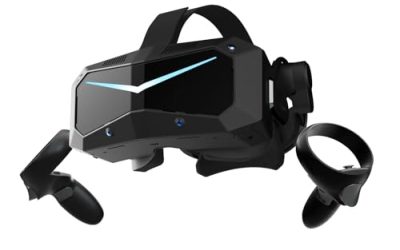
Pimax Crystal Super VR Headset

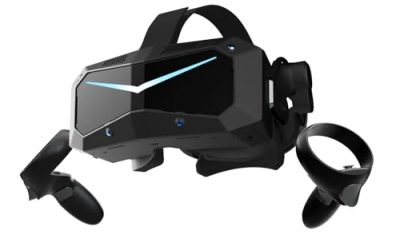
The Crystal Super is the simulation pick, with a 140-degree ultrawide view and the highest per-eye resolution here.
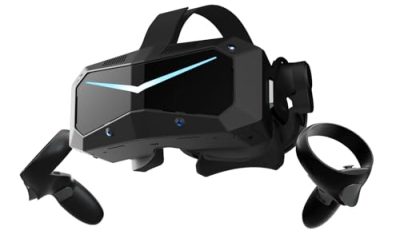
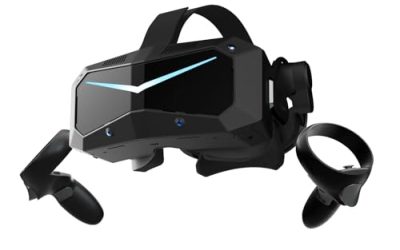
The Pimax Crystal Super is a PC VR headset built for visual breadth. The full payment version in the listing pairs 3840 x 3840 pixels per eye with an ultrawide 140-degree field of view, QLED panels with Mini-LED local dimming, and built-in eye tracking with automatic IPD adjustment from 58 to 72 mm. A DisplayPort cable is included in the box, and the headset connects to a Windows PC over DisplayPort 1.4a with USB.
Eye tracking here does more than move a cursor. It supports foveated rendering in compatible software, so the area you are looking at can be rendered in full detail while the periphery is rendered more lightly. Lighthouse tracking is available as an option for users who already own base stations, and the headset works with SteamVR and OpenXR content.
Best for: simulation and high-end PC VR users who want the widest field of view in this group and built-in eye tracking.
Keep in mind: this is a demanding headset that asks for a strong GPU, and the ultrawide view and high resolution need a PC that can drive them.
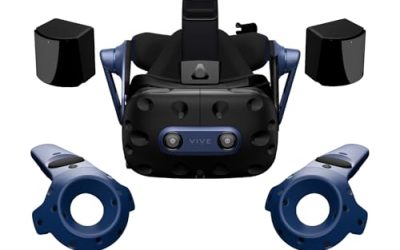
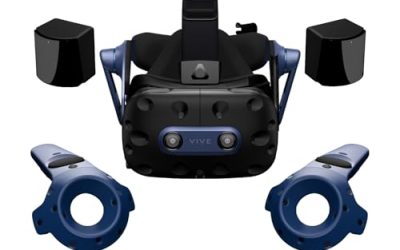
HTC VIVE Pro 2 Virtual Reality System
The Vive Pro 2 is the proven simulation pick, with a 120-degree view, 120 Hz, and base-station tracking.
The HTC VIVE Pro 2 is a full PC VR system built around two LCD panels with a combined 4896 x 2448 resolution, a 120-degree field of view, and a 120 Hz refresh rate. It connects to a Windows PC over DisplayPort and USB, and it works with SteamVR. The full system in the listing includes the headset, two Base Station 2.0 units, and two wireless controllers, so the tracking setup is the familiar outside-in SteamVR arrangement with sub-millimetre tracking accuracy.
Comfort and fit get real attention here. The headset uses a balanced construction with an IPD adjustment dial, and it fits a wide range of head sizes and vision types, including glasses wearers. Built-in Hi-Res headphones provide 3D spatial sound without a separate headset, which keeps the cable run simpler on a desk.
Best for: PC VR users who want a wired DisplayPort connection, high resolution, and SteamVR tracking.
Keep in mind: this is a wired, base-station system, so it needs a clear play area, mounted or placed base stations, and a PC with a DisplayPort output.
Meta Quest 3 512GB
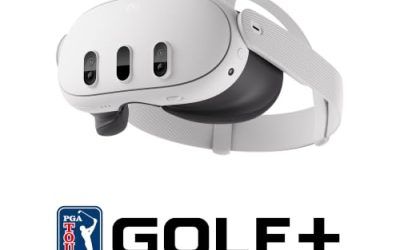
The Quest 3 is the flexible simulation pick, with a 110-degree view and both standalone and PC-connected play.
The Meta Quest 3 512GB is a standalone mixed reality headset with 2064 x 2208 pixels per eye, a 110-degree field of view, and a refresh rate of up to 120 Hz. It runs on the Snapdragon XR2 Gen 2 processor with 8GB of RAM and 512GB of storage, and it ships with two Touch Plus controllers, a charging cable, and a power adapter. Full-colour passthrough blends virtual objects with the room around you.
Because it needs no PC and no external sensors, it is the simplest headset in this group to set up in a living room. It can also connect to a PC over USB-C or wirelessly for PC VR content, which makes it a flexible second option for households that already own a gaming PC.
Best for: home VR users who want a wireless, standalone headset with mixed reality and a large content library.
Keep in mind: it has no DisplayPort input and no built-in eye tracking, and battery life is around two hours per charge.
Comparison Table
| Product | Key features | Best for |
|---|---|---|
| Pimax Crystal Super VR Headset | DisplayPort, 140-degree FOV, 3840 x 3840 per eye, eye tracking | Wide-view simulation and eye tracking |
| HTC VIVE Pro 2 Virtual Reality System | DisplayPort, 120-degree FOV, 4896 x 2448, 120 Hz, SteamVR | Wired PC VR with SteamVR tracking |
| Meta Quest 3 512GB | Standalone, 110-degree FOV, 2064 x 2208 per eye, up to 120 Hz | Wireless home VR and mixed reality |
Frequently Asked Questions
Why does field of view matter so much in simulation?
Because sims are about looking around a cockpit, not about running through a world. A wide view lets you check mirrors, side windows, and instruments with a glance, and it gives you the peripheral motion cues that help you judge speed and position.
Is 140 degrees noticeably wider than 120 degrees?
Yes. The extra width shows at the edges of the scene, where wing views, side mirrors, and peripheral motion live. It is the difference between seeing a mirror and turning your head to find it.
Do I need a powerful PC for a wide-view sim headset?
Yes. Wide views and high resolutions ask a lot of a graphics card, especially at 90 Hz or 120 Hz. Match the headset to a GPU that can hold a steady frame rate at its resolution, and use foveated rendering where the sim and the headset support it.
Can a standalone headset work for simulation?
Yes, when it connects to a PC. The Quest 3 runs standalone games on its own, and it also connects to a PC over USB-C or wirelessly for PC sims. The image is compressed over those links, so it will not look as sharp as a wired DisplayPort headset, but it is a practical way to try sims without a dedicated wired headset.
What peripherals work alongside these headsets?
Standard USB wheels, pedals, flight sticks, throttles, and button boxes all work alongside VR headsets. Set your seating position in the sim first, place the controls where your hands fall naturally, and keep the VR controllers aside once you are seated.
Conclusion
For VR simulation, the Pimax Crystal Super is the strongest choice, because its 140-degree view and 3840 x 3840 pixels per eye keep a cockpit readable and immersive at the same time. The Vive Pro 2 is the proven alternative, with a 120-degree view, a 120 Hz refresh rate, and base-station tracking that never drifts mid-session. The Meta Quest 3 is the flexible way in, with standalone play and PC-connected sims in one wireless box. Choose the widest view your GPU can drive, set your seating position carefully, and let the sim fill your vision.
Disclosure: As an Amazon Associate, we may earn from qualifying purchases.
Related guides
More from Amazon
Programs that pair well with the guide above. Offers and eligibility are set by Amazon and may change.
Free shipping on eligible items, Prime Video and more. Eligible new members can start with a free trial.
Start a Prime free trialAd-free music streaming. Eligible new subscribers can start with a free trial.
Try Music Unlimited freeA Prime membership for ages 18-24 with a trial period. Eligibility is set by Amazon.
See Prime for Young AdultsAudiobooks and podcasts to listen to on the go. Eligible new members can start with a free trial.
Try Audible freeAs an Amazon Associate we earn from qualifying purchases.