Field of view decides how much of the virtual world you can see without turning your head, and it is the first thing you notice when you put a headset on in your living room. The best wide-field-of-view VR headsets for home VR setups open up the edges of the scene, so a room, a landscape, or a cockpit feels wide rather than framed by a narrow window. A headset with a 110-degree view already feels open, and the 120-degree and 140-degree models in this guide go further still.
Home use adds its own demands. A headset for the living room should be easy to set up after work, comfortable for an hour-long session, and simple enough that other people in the house can use it too. The picks below cover both ends of that trade: wireless standalone headsets that need no PC, and wired PC headsets that give you the widest possible view when you want it.
Our Top Picks


Top 3 picks at a glance

What to Look For in a Home VR Headset
Judge a home headset by how it fits your room and your routine, not only by its specification sheet. A wide view is wasted if the headset is uncomfortable or hard to set up.
-
Field of view: 110 degrees is a wide view by current standalone standards, 120 degrees is noticeably wider, and 140 degrees is the widest in this group. Compare like with like, because manufacturers measure the figure differently.
-
Standalone or tethered: a standalone headset needs no PC and no cables, which suits a shared living room. A tethered PC headset needs a gaming PC and a cable, and it gives you higher resolution and a wider view.
-
Resolution per eye: higher pixel counts keep text and distant objects sharp, which matters in home environments, menus, and media apps as much as in games.
-
Comfort and weight: a headset that presses on the forehead or the cheeks will end a session early. Check the strap design, the facial interface, and the balance of the weight.
-
Tracking: inside-out tracking uses cameras on the headset and needs no external sensors, which keeps a living room free of extra hardware.
-
Content library: a headset is only as useful as the games and apps it can run, so check that the titles you want are available on its store.
The Picks
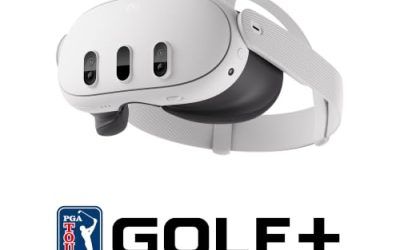
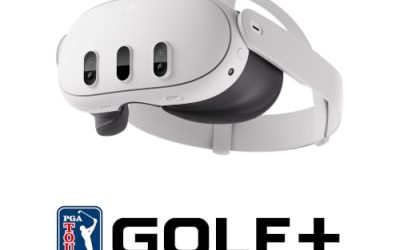
Meta Quest 3 512GB

The Quest 3 is the most versatile home headset here, because it needs no PC, no cables, and no sensors.
The Meta Quest 3 512GB is a standalone mixed reality headset with 2064 x 2208 pixels per eye, a 110-degree field of view, and a refresh rate of up to 120 Hz. It runs on the Snapdragon XR2 Gen 2 processor with 8GB of RAM and 512GB of storage, and it ships with two Touch Plus controllers, a charging cable, and a power adapter. Full-colour passthrough blends virtual objects with the room around you.
Because it needs no PC and no external sensors, it is the simplest headset in this group to set up in a living room. It can also connect to a PC over USB-C or wirelessly for PC VR content, which makes it a flexible second option for households that already own a gaming PC.
Best for: home VR users who want a wireless, standalone headset with mixed reality and a large content library.
Keep in mind: it has no DisplayPort input and no built-in eye tracking, and battery life is around two hours per charge.
Meta Quest 3S 256GB
The Quest 3S is the shared-household pick, with the same processor as the Quest 3 and a simpler optical design.
The Meta Quest 3S 256GB uses the same Snapdragon XR2 Gen 2 processor and 8GB of RAM as the Quest 3, with 256GB of storage and Touch Plus controllers. It is a standalone headset with full-colour passthrough, and it runs the same Meta Horizon OS library, so most of the content available for the Quest 3 is available here too.
The main differences sit in the optics. The Quest 3S uses Fresnel lenses and a lower-resolution panel than the Quest 3, which keeps the headset simpler and lighter on the budget while keeping the same processor and tracking. Battery life is listed at more than two hours, and the headset charges over USB-C.
Best for: households that want the Quest 3 experience at a lower entry point, and for shared family use.
Keep in mind: the Fresnel lenses and lower resolution show a narrower sweet spot than the Quest 3, and there is no DisplayPort input or eye tracking.
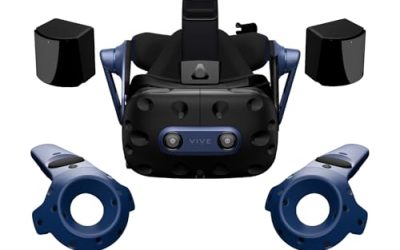
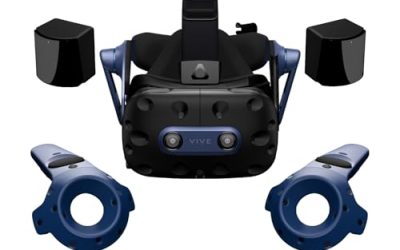
HTC VIVE Pro 2 Virtual Reality System
The Vive Pro 2 is the wide-view PC option for a home that already has a gaming PC and a dedicated play space.
The HTC VIVE Pro 2 is a full PC VR system built around two LCD panels with a combined 4896 x 2448 resolution, a 120-degree field of view, and a 120 Hz refresh rate. It connects to a Windows PC over DisplayPort and USB, and it works with SteamVR. The full system in the listing includes the headset, two Base Station 2.0 units, and two wireless controllers, so the tracking setup is the familiar outside-in SteamVR arrangement with sub-millimetre tracking accuracy.
Comfort and fit get real attention here. The headset uses a balanced construction with an IPD adjustment dial, and it fits a wide range of head sizes and vision types, including glasses wearers. Built-in Hi-Res headphones provide 3D spatial sound without a separate headset, which keeps the cable run simpler on a desk.
Best for: PC VR users who want a wired DisplayPort connection, high resolution, and SteamVR tracking.
Keep in mind: this is a wired, base-station system, so it needs a clear play area, mounted or placed base stations, and a PC with a DisplayPort output.
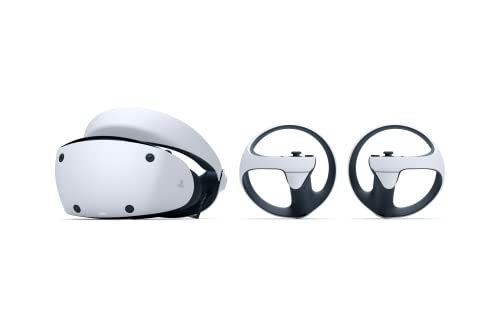
PlayStation VR2 (PSVR2)
The PSVR2 is the console pick, built for PlayStation 5 owners who want a wide view and eye tracking in the living room.
The PlayStation VR2 pairs 2000 x 2040 pixels per eye with a 110-degree field of view and 4K HDR visuals. Its PlayStation VR2 Sense technology includes eye tracking, headset feedback, and 3D Audio, and the Sense controllers add haptic feedback, adaptive triggers, and finger touch detection. The headset connects to a PlayStation 5 console with a single cable.
For PC use, Sony provides a separate PlayStation VR2 PC Adapter, which connects the headset to a Windows PC for SteamVR, and that adapter uses a DisplayPort connection. Confirm the adapter is included in the listing you choose, because the standard headset box on its own is built around the console connection.
Best for: PlayStation 5 owners who want eye tracking and strong haptics, and PC users willing to add the separate PC Adapter.
Keep in mind: PC use needs the separate adapter, and eye-tracking features depend on software support in each title.
Comparison Table
| Product | Key features | Best for |
|---|---|---|
| Meta Quest 3 512GB | Standalone, 110-degree FOV, 2064 x 2208 per eye, up to 120 Hz | Wireless home VR and mixed reality |
| Meta Quest 3S 256GB | Standalone, XR2 Gen 2, 8GB RAM, 256GB, Fresnel lenses | Shared family use and casual play |
| HTC VIVE Pro 2 Virtual Reality System | DisplayPort, 120-degree FOV, 4896 x 2448, 120 Hz, SteamVR | Wired PC VR with SteamVR tracking |
| PlayStation VR2 (PSVR2) | Eye tracking, 110-degree FOV, 2000 x 2040 per eye, PS5 and PC with adapter | PS5 play and PC VR with the separate adapter |
Frequently Asked Questions
How wide is a wide field of view in a VR headset?
Around 110 degrees is a wide view by current standards, and it covers most of what you see when you look ahead without moving your eyes. A 120-degree view adds visible width at the edges, and a 140-degree view is closer to the natural spread of human vision, so the edges of the scene feel less like a frame.
Is a standalone headset good enough for home VR?
For most living-room use, yes. A standalone headset runs its own games and apps, sets up in minutes, and needs no PC or cables. A tethered PC headset still gives you higher resolution and more demanding games, so the choice depends on whether you already own a gaming PC and how much setup you will tolerate.
Do I need a large room for home VR?
No. Seated and standing VR work in a small space, and many home titles are designed for a couch or a chair. Room-scale play needs a clear area of a few steps in each direction, so move coffee tables and lamps before you begin, and use the headset guardian boundary to mark the safe area.
Can several people share one home VR headset?
Yes, with a little care. Most headsets support multiple user profiles, and the facial interface can be wiped between users. Adjust the strap and the lens spacing for each person, because a poor fit is the most common cause of a blurry first session.
Does a wider field of view cause motion sickness?
A wider view can feel more immersive, which some people find more intense at first. Short sessions, a comfortable frame rate, and games with smooth locomotion options help. If you feel unwell, pause the session and return to it later rather than pushing through.
Conclusion
For most homes, the Meta Quest 3 is the right place to begin, because it needs no PC, sets up quickly, and covers games, media, and mixed reality in one wireless box. The Quest 3S is the sensible second headset for a shared household, and the PSVR2 is the natural choice if your living room already centres on a PlayStation 5. Choose the Vive Pro 2 when you already own a gaming PC and want the widest wired view for a dedicated play space. Whichever you pick, measure your play area, set the guardian boundary, and let the wide view do its work.
Disclosure: As an Amazon Associate, we may earn from qualifying purchases.
Related guides
More from Amazon
Programs that pair well with the guide above. Offers and eligibility are set by Amazon and may change.
Free shipping on eligible items, Prime Video and more. Eligible new members can start with a free trial.
Start a Prime free trialAd-free music streaming. Eligible new subscribers can start with a free trial.
Try Music Unlimited freeA Prime membership for ages 18-24 with a trial period. Eligibility is set by Amazon.
See Prime for Young AdultsAudiobooks and podcasts to listen to on the go. Eligible new members can start with a free trial.
Try Audible freeAs an Amazon Associate we earn from qualifying purchases.