Eight hours of spreadsheets, email, and design reviews put a mouse under a very different kind of load than a gaming session. The grip stays in one position, the clicks are repetitive, and the pointer travels across two or three screens. That is why the question behind this search is less about speed and more about posture, switching convenience, and noise: does the mouse sit the hand in a handshake-style position, does it hop between a work laptop and a personal tablet, and will the clicks irritate a shared office or a sleeping household?
This guide is for people in 2026 who spend long days at a desk and want a mouse built around comfort features, mostly vertical shapes, quiet switches, and multi-device pairing. It is not medical advice, and no mouse should be regarded as a complete answer to discomfort; anyone with persistent hand or wrist symptoms should talk to a healthcare professional. The comparisons below rely only on what each listing title states, such as connection type, DPI steps, button count, charging method, and the angle of the vertical design, with other details left for the buyer to confirm on the listing.
Our Top Picks
 Anker 2.4G Wireless Ergonomic Mouse4.72"L x 2.94"W3.98 x 3.23 x 3.15 inches0.28 poundsCheck on Amazon

Top 3 picks at a glance
Quick Picks
As an Amazon Associate we earn from qualifying purchases at no extra cost to you.


| Product | Best for | Key spec from the title |
|---|---|---|
| Logitech Lift Vertical Wireless Mouse | Brand-name office standard | Bluetooth or Logi Bolt receiver, quiet clicks |
| UGREEN Ergonomic Wireless Mouse | Switching between three devices | Bluetooth and 2.4G, 1000/1600/2000/4000 DPI, 6 buttons |
| ProtoArc EM11 NL | Steeper vertical posture | 58-degree vertical design, rechargeable, 3 devices |
| Anker 2.4G Wireless Ergonomic Mouse | Right-handed vertical shape on a budget | 800/1200/1600 DPI, USB receiver |
| TECKNET Wired Ergonomic Mouse | No batteries, no pairing | Wired, 6400 DPI, silent click |
| Nulea Vertical Wireless Mouse | Light, rechargeable everyday use | 2.4G, 6 buttons, 3 adjustable DPI |
How to Choose
Vertical angle and hand size
A vertical mouse tilts the hand toward a handshake position instead of palm-down. Gentle angles are easier to adapt to, while steeper ones, such as a design advertised at 58 degrees, feel more dramatic and may need a week or two of adjustment. Hand size matters just as much. A mouse that is too small forces a claw grip, and one that is too large makes the fingers stretch, so check whether the listing mentions small, medium, or large hands and compare with the length of the palm.
Connection and multi-device pairing
Office workers often bounce between a desktop, a laptop, and a tablet. Bluetooth plus a USB receiver gives two ways to connect, and a mouse that remembers up to three devices lets a button press switch between them. A receiver is the safer choice on locked-down work machines that restrict Bluetooth. Wired models avoid pairing entirely and never need charging, which suits a fixed desk, but the cable can drag across a small mouse pad. Wireless models in this guide connect through either a USB receiver, Bluetooth, or both, so confirm which one the work computer allows before ordering.
Clicks, buttons, and DPI
Quiet or silent switches matter in shared spaces and during video calls. DPI steps in the 800 to 1600 range are plenty for office work, and the very high numbers printed on some listings mostly help on large multi-monitor layouts or high-resolution screens. Extra side buttons are useful for back and forward in browsers, but only if the drivers or default behavior support them. Ignore headline DPI as a quality signal, because comfort and button feel matter more.
Power, build, and where budget models cut corners
Rechargeable models using USB-C remove the battery swap routine, while AA or AAA models can run a long time but need spares on hand. Lightweight bodies reduce fatigue over long sessions. Budget models usually cut corners on scroll wheel feel, plastic finish, and software support, and some skip a power switch, which drains the battery faster. Look at warranty terms and whether the receiver can be stored inside the mouse, because a lost dongle turns a good mouse into a paperweight. Setting the desk height so the forearm sits level and keeping the mouse close to the keyboard matters more than any single feature, so think of the mouse as one piece of the setup alongside chair height, screen position, and regular breaks.
The 6 Best Options
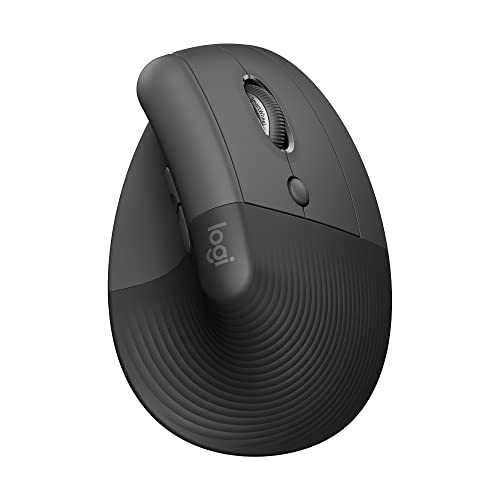
Logitech Lift Vertical Ergonomic Wireless Mouse
This is the familiar-brand pick for an office that wants something dependable and low-drama. The title describes a vertical ergonomic wireless design in graphite, connecting by Bluetooth or the included Logi Bolt USB-A receiver, with quiet clicks and a button count printed in the listing. It suits employees who move between a managed work computer and a personal device and want a mouse that does not announce every click to the room.
- Two connection paths, Bluetooth or a receiver, cover most work and personal machines.
- Quiet clicks keep shared offices and video calls more pleasant.
- Trade-off: the title does not state hand-size guidance, so confirm sizing on the listing before ordering for a large hand.
Skip it if the hand is on the large side and the listing offers no sizing detail, or if a wired model is required for a locked-down machine.
UGREEN Ergonomic Wireless Mouse
A flexible multi-device choice. The title lists Bluetooth and 2.4G connectivity, quiet clicks, four DPI steps from 1000 to 4000, support for up to three devices, six buttons, and multi-system compatibility. It fits someone with a desktop, a laptop, and a tablet who wants one mouse that follows along without hunting for another dongle.
- Up to three device connections make it easy to switch between work and personal gear.
- Four DPI steps give control for both small and wide displays.
- Trade-off: the title does not describe the angle of the shape, so check the listing photos for how steep it is.
Skip it if a steep vertical angle is the main goal, since the shape is not described by a stated degree of tilt.
ProtoArc EM11 NL Wireless Ergonomic Mouse
The pick for people who want a pronounced vertical posture. The title states a 58-degree vertical design intended to support a natural wrist position, a rechargeable battery, and connectivity to three devices through Bluetooth and a receiver. It suits a long-day desk worker who is ready for a steeper learning curve and wants charging by cable instead of buying batteries, and who regularly alternates between a laptop at the kitchen table and a desktop in an office.
- The clearly stated 58-degree angle sets expectations before ordering.
- Rechargeable design removes battery swaps.
- Trade-off: a steeper angle takes longer to adapt to, and precise drawing work may feel awkward at first.
Skip it if gentle angles feel more natural, if drawing precision is critical, or if the wrist needs an easy transition from a flat mouse.
Anker 2.4G Wireless Ergonomic Mouse
A simple right-handed vertical mouse from a known accessory brand. The title lists 2.4G wireless with a USB receiver, multi-device connectivity, and DPI steps of 800, 1200, and 1600, and it states the shape is for the right hand. That DPI range is well matched to everyday office work on one or two monitors, which keeps the pointer from feeling twitchy, and the brand is a familiar name for charging and computer accessories.
- A modest DPI range suits spreadsheet and document work.
- Right-hand vertical shape is clearly stated up front.
- Trade-off: it is built for right-handed users only, so left-handed buyers have to look elsewhere.
Skip it if the user is left-handed, needs very high DPI, or wants a mouse that connects over Bluetooth alone.
TECKNET Wired Ergonomic Mouse
A wired option with no batteries, no pairing, and no wireless dropouts. The title lists 6400 DPI, plug-and-play setup, four adjustable DPI levels, silent click, and a vertical shape compatible with laptops and desktops. It makes sense on a fixed desk where the mouse never moves and a cable is not a problem, such as a reception counter, a shared workstation, or a call-center style setup where nobody wants to hunt for spare batteries. The 6400 DPI figure is far above what office work needs, but the four adjustable levels let it be dialed down.
- Wired connection removes charging and latency worries.
- Silent click and four DPI levels cover office needs.
- Trade-off: the cable limits movement and does not suit multi-device switching.
Skip it if the setup is wireless-only or involves several computers.
Nulea Ergonomic Vertical Wireless Mouse
A lightweight, rechargeable pick for everyday office tasks. The title describes six buttons, three adjustable DPI levels, 2.4G wireless, a rechargeable battery, long battery life, and a lightweight design. It suits someone who wants to charge occasionally and otherwise forget about the mouse, particularly a person who carries a laptop between rooms and wants a light pointing device in the bag. The six buttons leave room for browser navigation shortcuts once the default behavior is confirmed.
- Lightweight body reduces fatigue over long sessions.
- Rechargeable battery and six buttons keep daily use convenient.
- Trade-off: the title mentions 2.4G only, so there is no stated Bluetooth fallback for locked-down machines.
Skip it if the work computer blocks USB receivers, or if switching between several machines is a daily need.
Which One Fits Your Situation
Shared office with open-plan seating
The Logitech Lift and TECKNET both emphasize quiet or silent clicking, with the Logitech adding wireless freedom and the TECKNET offering a cable and no charging.
Hybrid worker with several devices
The UGREEN supports up to three devices, which fits a rotation of work laptop, home desktop, and tablet.
First-time vertical mouse user
Start with the Anker or Nulea, which describe conventional vertical shapes without stating a steep angle, and move to the ProtoArc later if comfort suggests it.
Desk worker who wants a pronounced tilt
The ProtoArc EM11 NL states its 58-degree design and offers rechargeable convenience.
Common Mistakes
- Choosing the steepest angle on day one and giving up before the adjustment period ends.
- Ignoring hand size and ending up with a mouse that forces a cramped grip, or one so large the fingers have to stretch for the buttons.
- Buying a receiver-only model for a work laptop that blocks USB devices.
- Reading huge DPI numbers as a measure of comfort or quality.
- Expecting any mouse to resolve ongoing discomfort without a break routine and a proper desk setup.
Related guides
- What Is The Best Budget Most Responsive Gaming Mouse Wired
- Low Latency Gaming Headphones Usb-C 2.4 Ghz Wireless
- Mechanical Gaming Keyboards Competitive Pc Gaming
Frequently Asked Questions
Are vertical mice better for office work?
They are designed to place the hand in a handshake position, which some people find more comfortable. Comfort is personal, and persistent symptoms should be discussed with a healthcare professional.
How long does it take to adjust to a vertical mouse?
Plan on a few days to a couple of weeks of adjustment, since the hand has to relearn small movements. Steeper designs generally take longer than gentle angles, and swapping back and forth with a flat mouse can slow the process.
Is Bluetooth or a USB receiver better?
Bluetooth saves a port, while a receiver works on machines that restrict Bluetooth. Models offering both give the most flexibility.
Do quiet clicks reduce performance?
Quiet switches have a softer feel but work the same way. They mainly help in shared spaces, on calls, and in quiet homes, and the lighter sound is usually the only difference noticed in daily use.
Related guides
More from Amazon
Programs that pair well with the guide above. Offers and eligibility are set by Amazon and may change.
Free shipping on eligible items, Prime Video and more. Eligible new members can start with a free trial.
Start a Prime free trialAd-free music streaming. Eligible new subscribers can start with a free trial.
Try Music Unlimited freeA Prime membership for ages 18-24 with a trial period. Eligibility is set by Amazon.
See Prime for Young AdultsAudiobooks and podcasts to listen to on the go. Eligible new members can start with a free trial.
Try Audible freeAs an Amazon Associate we earn from qualifying purchases.