Two terabytes has become the practical floor for a gaming or creative desktop. Modern game installs run large, an operating system plus a few big titles can fill a smaller drive quickly, and a 2TB NVMe SSD gives room for a library, capture files and work projects without juggling uninstalls. The real decision is not capacity but which interface generation, memory type and price tier fit your motherboard and habits.
This guide is for desktop builders and upgraders choosing a 2TB M.2 drive in 2026. It compares eight models using only the specs in their titles: interface generation, listed read and write speeds, form factor and flash type. Then it explains how to check slot compatibility, why headline speeds rarely decide real-world feel, and where cheaper drives cut corners. If a spec such as endurance or cache size is not in the title, confirm it on the listing.
Our Top Picks



Top 3 picks at a glance
Quick Picks
As an Amazon Associate we earn from qualifying purchases at no extra cost to you.


| Product | Best for | Key spec from the title |
|---|---|---|
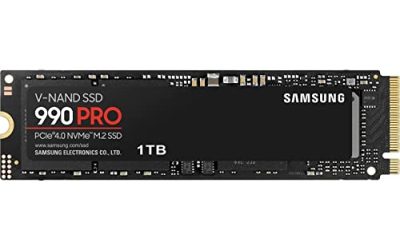
| Samsung 990 PRO 2TB | High-end Gen4 desktop builds | PCIe 4.0 M.2 2280, up to 7,450 MB/s |
| Samsung 9100 PRO 2TB | PCIe 5.0 motherboards | PCIe 5.0×4, up to 14,700 MB/s |
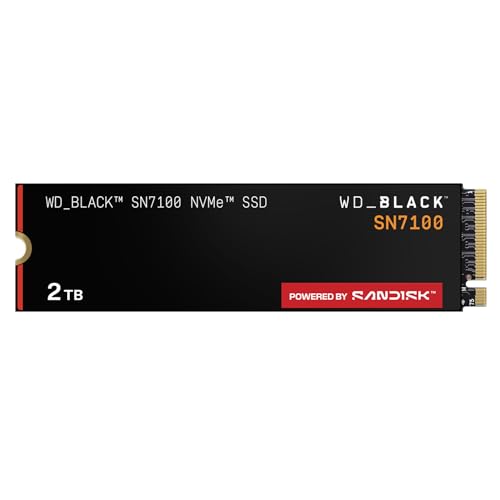
| WD_Black SN7100 2TB | Gen4 gaming and handhelds | Up to 7,250 MB/s read, 6,900 MB/s write, TLC 3D NAND |
| Crucial P310 2TB | Everyday Gen4 value | PCIe Gen4, up to 7,100 MB/s, includes Acronis recovery software |
| Silicon Power 2TB NVMe | Budget Gen3 upgrade | PCIe Gen3x4, M.2 2280 |
| Samsung 990 EVO Plus 2TB | Flexible Gen4 or Gen5 x2 slots | PCIe Gen 4×4 or 5×2, up to 7,250 MB/s, HMB |
| WD Green SN350 2TB | Light-duty storage on a tight budget | Gen3 PCIe, QLC, up to 3,200 MB/s |
| KingSpec 2TB M.2 NVMe | Entry-level laptop or PC upgrade | Gen3, 3,500 MB/s read, 3D NAND |
How to Choose
Interface generation and slot compatibility
Every drive here uses the M.2 2280 form factor, which is 22mm wide and 80mm long, and the NVMe protocol. Check your motherboard manual for which M.2 slots run at PCIe Gen3, Gen4 or Gen5, and whether they share lanes with SATA ports. A Gen4 drive works in a Gen3 slot but is limited to Gen3 speeds, and a Gen5 drive in a Gen4 slot behaves the same way. Heatsinks matter too: some boards ship with a cover, and fast Gen4 or Gen5 drives generate heat that can lead to throttling in cramped cases.
Speed claims versus real use
Maximum read and write numbers are sequential best-case figures. Game loading, operating system boot and app launches depend more on random performance and controller behavior than on the largest number on the box. A mid-range Gen4 drive feels similar to a flagship in many everyday tasks. Spend extra for a faster tier only if you move large files often, work with video or datasets, or plan to use a Gen5 board anyway.
Flash type, cache and endurance
TLC flash holds three bits per cell and is the common choice for balanced performance and endurance. QLC stores four bits, lowers cost, but slows down more once the drive’s fast cache fills and generally offers lower endurance. DRAM or Host Memory Buffer (HMB) designs affect how well the drive handles small random writes. Titles that state TLC 3D NAND or HMB provide a hint, but the full picture lives in the datasheet. Where a title is silent on endurance ratings, check the listing before assuming.
Software, warranty and extras
Some brands bundle cloning or recovery software, and some add a heat spreader. Cloning tools make an operating system migration simpler. Warranty length varies by maker, so compare it. Budget no-name drives may skip a detailed endurance rating or support pages, and long-term firmware updates are rarer. Always back up important data regardless of drive tier.
Capacity planning is worth a minute. A 2TB drive feels roomy at first, but installed games, shader caches and recorded clips grow steadily. Leave at least a tenth of the drive empty, because SSDs slow down when nearly full and have less space to manage wear. If you work with large media files, consider a second drive for projects rather than filling the boot drive.
Thermal behavior deserves attention on Gen4 and Gen5 models. Motherboards often provide a metal cover for the first slot, but secondary slots can sit under a graphics card with little airflow. A drive that overheats lowers its speed to protect itself, and that shows up as stutters during long transfers. A simple heatsink and a case fan pointed at the board’s lower half is an inexpensive fix. Some drives ship with their own heat spreader, which may not fit under a motherboard cover, so check clearance before ordering.
Finally, think about migration. Cloning an existing system drive takes less time than reinstalling everything, and bundled tools such as the recovery software mentioned in one listing can help. If you skip cloning, install the operating system on the new drive first, then move games over with the launcher’s library tools. Keep the old drive until the new one has proven stable.
Warranty and backup habits finish the decision. Most makers publish a warranty period and a total bytes written figure for each drive, and those two numbers say more about long-term value than a headline speed. Keep an external or cloud backup for irreplaceable files, because even a reliable SSD can fail without warning. Check for firmware updates through the maker’s utility after installation, and avoid filling the drive to the brim, which leaves the controller little room to work.
The 8 Best Options
Samsung 990 PRO 2TB
This listing names PCIe 4.0 on an M.2 2280 module with speeds up to 7,450 MB/s, aimed at high-end computing, gaming and heavy duty workloads. It sits at the upper end of the Gen4 range, making it appealing for a main system drive where performance headroom matters more than cost.
- Strength: Top-tier Gen4 speed in the title.
- Strength: Positioned for gaming and heavy workloads.
- Trade-off: Premium tier, and a Gen4 drive cannot use Gen5 bandwidth.
Skip it if your slot is Gen3 or your workload is light enough that a cheaper Gen4 drive feels identical.
Samsung 9100 PRO 2TB
The 9100 PRO steps up to PCIe 5.0×4, with speeds up to 14,700 MB/s listed and a pitch toward AI computing, gaming and heavy duty work. It suits builders with a Gen5 M.2 slot who move very large files regularly.
- Strength: Gen5 interface with a very high listed ceiling.
- Strength: Designed for demanding workloads.
- Trade-off: Gen5 drives run warmer and need good cooling, and the benefit is limited outside heavy transfers.
Skip it if your motherboard lacks a Gen5 slot or you mostly load games.
WD_Black SN7100 2TB
The WD_Black SN7100 lists Gen4 PCIe, up to 7,250 MB/s read and up to 6,900 MB/s write, along with next generation TLC 3D NAND. It is marketed for laptops and handhelds as well as desktops, which makes it a flexible choice for people who might move the drive between devices.
- Strength: Strong listed write speed alongside TLC flash.
- Strength: Works across desktops, laptops and handhelds per the title.
- Trade-off: Gen4 only, so it cannot push past Gen4 limits.
Skip it if you want to future-proof for a Gen5 build.
Crucial P310 2TB
The P310 lists PCIe Gen4 NVMe M.2 2280 with speeds up to 7,100 MB/s and says it works for laptops, desktops and handheld consoles. The listing also mentions Acronis data recovery software, which helps when cloning an older drive.
- Strength: Gen4 speeds at a mid-range tier.
- Strength: Includes recovery software for migration.
- Trade-off: Write speed and flash type are not visible in the title.
Skip it if you need written endurance details before purchase.
Silicon Power 2TB NVMe M.2 PCIe Gen3x4
This listing is plain: a Gen3x4 NVMe module at 2TB on the M.2 2280 form factor. It is meant for upgrading an older board where Gen4 would run at Gen3 anyway. Budget buyers adding bulk storage can find it appealing.
- Strength: A budget path to 2TB capacity on a Gen3 slot.
- Strength: Standard M.2 2280 fit.
- Trade-off: The title gives no speed or flash type, so check the listing.
Skip it if you plan to move to a Gen4 or Gen5 board soon.
Samsung 990 EVO Plus 2TB
The 990 EVO Plus lists PCIe Gen 4×4 or 5×2 on M.2 2280, speeds up to 7,250 MB/s and HMB technology. The dual interface wording means it can fit certain Gen5 x2 setups, which suits builders with less standard slot arrangements.
- Strength: Flexible slot support is stated in the title.
- Strength: Gen4 class speed up to 7,250 MB/s.
- Trade-off: HMB designs borrow system memory rather than using onboard DRAM.
Skip it if you want a drive with dedicated onboard cache.
WD Green SN350 2TB
The SN350 is a Gen3 PCIe NVMe drive using QLC flash, with speeds up to 3,200 MB/s. It is aimed at light daily use and bulk storage rather than heavy workloads. Capacity at a low tier is the main selling point.
- Strength: Low-cost way to add 2TB.
- Strength: Plain Gen3 interface works in older boards.
- Trade-off: QLC can slow notably under sustained writes.
Skip it if you capture video, install large games often or want a boot drive with room to grow.
KingSpec 2TB M.2 NVMe Gen3 SSD
KingSpec lists a Gen3 PCIe 3.0 module with 3,500 MB/s read speed, 3D NAND and use in laptops and PCs. It is an entry-level pick for refreshing an older system or adding extra capacity.
- Strength: Stated read speed on a Gen3 interface.
- Strength: Targets both laptop and desktop upgrades.
- Trade-off: Lesser-known brand, so check warranty and support terms.
Skip it if you need established brand support and detailed endurance documentation.
Which One Fits Your Situation
You have a modern Gen4 board and want the safe choice
The Samsung 990 PRO and WD_Black SN7100 both sit squarely in Gen4 territory. Pick whichever you find at a better tier.
You own a Gen5 slot and move big files
The Samsung 9100 PRO is the only Gen5 option here. Pair it with a heatsink and good case airflow.
You are cloning an old drive
The Crucial P310 bundles recovery software that helps with migration, which speeds up the swap.
You want storage space at the lowest cost
The WD Green SN350, Silicon Power and KingSpec are Gen3 options. They fit older systems and bulk libraries rather than demanding work.
Common Mistakes
- Paying for Gen5 on a board with only Gen4 slots.
- Judging a drive by sequential speed alone.
- Ignoring QLC behavior when the drive will see heavy writes.
- Forgetting that a shared M.2 slot can disable SATA ports.
- Skipping a heatsink on a fast drive in a tight case.
Related guides
- What Is The Best Budget Most Responsive Gaming Mouse Wired
- Low Latency Gaming Headphones Usb-C 2.4 Ghz Wireless
- Mechanical Gaming Keyboards Competitive Pc Gaming
Frequently Asked Questions
Will a Gen4 drive work in a Gen3 slot?
Yes. It runs at the slower generation’s speed. Check your board manual for the exact slot rating.
Is a heatsink necessary?
Many boards include one for the primary slot. Fast Gen4 and Gen5 drives can run hot, so airflow or a heatsink helps avoid throttling.
Is QLC bad?
No, but it is best for lighter workloads and bulk storage. Sustained writes can slow it once the fast cache fills.
Can the same drive go in a handheld?
Some listings, such as the WD_Black SN7100 and Crucial P310, mention handhelds. Verify the form factor and the device’s slot support before buying.
Related guides
More from Amazon
Programs that pair well with the guide above. Offers and eligibility are set by Amazon and may change.
Free shipping on eligible items, Prime Video and more. Eligible new members can start with a free trial.
Start a Prime free trialAd-free music streaming. Eligible new subscribers can start with a free trial.
Try Music Unlimited freeA Prime membership for ages 18-24 with a trial period. Eligibility is set by Amazon.
See Prime for Young AdultsAudiobooks and podcasts to listen to on the go. Eligible new members can start with a free trial.
Try Audible freeAs an Amazon Associate we earn from qualifying purchases.