Most gaming mice are sculpted for a right hand. The hump sits on the wrong side, the thumb buttons land under the wrong finger, and the cable or receiver exits where a left-handed player does not want it. The keyword here is a decision about shape first and specs second: do you need a mouse molded for the left hand, or will a symmetrical body with buttons on both sides do the job? Both approaches show up in the lineup below, and they suit different grips and different games.
This guide is for left-handed players who are tired of adapting to right-handed shells, and for right-handed players who simply prefer a symmetrical or thumb-driven layout. In 2026, the useful choices range from an MMO mouse with a full thumb grid to a thumb trackball, a vertical ergonomic mouse, and a featherweight shell for fast shooters. The sections below explain how to match the shape to your grip before you worry about sensor numbers.
Our Top Picks
 Logitech Left Handed Lift Vertical Ergonomic Wireless MouseMouse5.9 x 3.5 x 3 inches0.3 poundsCheck on Amazon


Top 3 picks at a glance
Quick Picks
As an Amazon Associate we earn from qualifying purchases at no extra cost to you.





| Product | Best for | Key spec from the listing |
|---|---|---|
| Razer Naga Left-Handed | MMO and macro-heavy games | 12 programmable thumb buttons, 8,200 adjustable DPI |
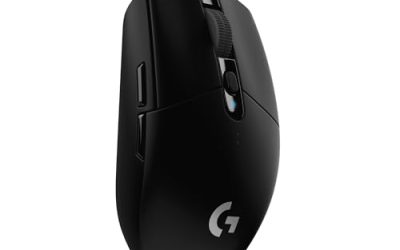
| Logitech G PRO 2 Lightspeed | Competitive shooters, either hand | Ambidextrous wireless, symmetrical design, USB-C charging |
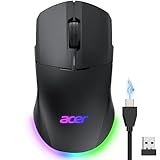
| Acer Dual-Mode Wireless Gaming Mouse | Budget-minded wired or wireless play | 24,000 DPI, 8 programmable buttons, left and right handed |
| Logitech G903 Lightspeed | Long sessions without charging | 140+ hour rechargeable battery, Powerplay compatible |
| ELECOM EX-G Left Handed Trackball | Thumb control, desk-space savers | 2.4 GHz wireless, thumb-operated roller ball |
| Pulsar X3 LHD Mini | Small hands, fast aim | 1.51 oz (43g) ultra lightweight shell |
| Logitech Lift Left-Handed Vertical | Wrist comfort and mixed work | Bluetooth or Logi Bolt receiver, quiet clicks |
How to Choose
Left-handed shell or ambidextrous shell
A true left-handed shell has its hump, thumb rest, and side buttons mirrored for the left hand, so your thumb finds the buttons without stretching. An ambidextrous mouse is symmetrical, which means the shape is neutral rather than molded, and buttons often appear on both sides. If you use a palm grip with a large hand, a mirrored shell usually feels better. If you use a fingertip or claw grip, a symmetrical body is often perfectly comfortable, and it gives you more options.
Weight and grip size
Check the weight on the spec sheet, because it changes how tiring a long ranked session feels. Ultra-light shells in the 40 to 60 gram range suit fast flick aiming, while mice packed with thumb buttons or a big battery run heavier and favor steady tracking. Match the footprint to your hand: measure from wrist crease to middle fingertip, and treat a small mouse as a claw or fingertip tool rather than a palm-grip one. Ignore marketing terms such as “pro-grade shell” and look for dimensions instead.
Connection, battery, and buttons
For competitive play, a 2.4 GHz dongle or a wired cable is the safer pick; Bluetooth is better for casual and office use. Look for rechargeable batteries with a stated runtime in hours, plus USB-C charging so you can keep playing on a cable. Count the buttons you will actually bind, since unused buttons are only extra places for a stray thumb to click. Two side buttons are enough for most shooters, while MMO and strategy players benefit from a dozen or more.
DPI numbers and where budget models cut corners
Sensor ceilings of 8,000 or 24,000 DPI are mostly bragging rights; most players settle between 400 and 3,200. What matters more is switch quality, scroll wheel feel, and how the shell is built. Budget models tend to trim the software, skip onboard memory for profiles, and use thinner feet that wear faster. If a left-handed mouse is rare in your price tier, a well-built ambidextrous model is a better buy than a poorly built mirrored one.
The 7 Best Options
Razer Naga Left-Handed
This is the mouse for left-handed MMO and MOBA players who live on hotkeys, and for anyone who has spent years remapping a right-handed Naga-style panel with the wrong thumb. The listing describes an ergonomic body with 12 programmable thumb buttons and 8,200 adjustable DPI, built specifically for the left hand, which is uncommon among thumb-grid mice. Buyers who bind healing, buffs, and inventory shortcuts to a numbered grid get the clearest benefit, because the layout mirrors what right-handed players have enjoyed for years.
- Strength: twelve thumb buttons put abilities, macros, and modifiers under one digit.
- Strength: it is a true left-handed design rather than a symmetrical compromise.
- Trade-off: a large thumb panel suits palm grips and gets in the way of fast, minimal shooter movements.
Skip it if you mainly play fast shooters, where a smaller, lighter shell makes more sense.
Logitech G PRO 2 Lightspeed
The G PRO 2 is a wireless mouse with a symmetrical shape, customizable magnetic side buttons, and USB-C charging according to the listing. Because the body is ambidextrous, lefties get an esports-oriented shape without hunting for a rare mirrored model. It fits players who value a clean, low-clutter design and want the same mouse to follow them between a desk setup and a laptop bag.
- Strength: a symmetrical design works for left-handed and right-handed players alike.
- Strength: wireless play with USB-C charging keeps the setup simple.
- Trade-off: the side buttons are removable and magnetic, so you must decide which side to equip and leave the other side blank.
Skip it if you want a thumb grid for macros or a sculpted palm rest.
Acer Dual-Mode Wireless Gaming Mouse
Acer positions this mouse for players who want one device for both wired and 2.4 GHz wireless use. The listing highlights a left and right handed layout, 24,000 DPI, and 8 programmable buttons, which makes it a flexible entry into ambidextrous gaming. It suits students, secondary setups, and players who want to test whether a symmetrical shape works before spending on a premium model.
- Strength: dual-mode connection lets you plug in when the battery runs low.
- Strength: eight programmable buttons cover most shooter and strategy binds.
- Trade-off: a headline DPI figure that high is rarely usable, and brand software and switch refinement usually trail the premium names.
Skip it if you want a feather-light shell or proven esports-grade clicks.
Logitech G903 Lightspeed
The G903 is a wireless gaming mouse with an ambidextrous design, a 140+ hour rechargeable battery, LIGHTSYNC RGB, and Powerplay compatibility. It is built for players who want a wireless mouse they rarely have to think about, such as someone who streams or plays long strategy sessions and hates battery warnings mid-match.
- Strength: the listed 140+ hour battery means long stretches between charges.
- Strength: Powerplay compatibility allows charging while you play on a compatible mat.
- Trade-off: it is an older, heavier design than the newest ultra-light shells, which fast flick-aimers may notice.
Skip it if you prefer a minimal, very light shape.
ELECOM EX-G Left Handed Trackball
This is a different animal: a left-handed thumb-control trackball with 2.4 GHz USB wireless and a tracking roller ball. Your hand stays still while the thumb moves the cursor, which cuts desk space and arm movement. Left-handed office workers, designers, and players of slow strategy games are the natural audience, since the left-hand thumb layout removes the awkward reach a right-handed trackball forces.
- Strength: the left-handed thumb layout fits a left hand without mirroring tricks.
- Strength: stationary hand placement suits cramped desks and tired wrists.
- Trade-off: trackballs are slower to master for twitch aiming, so expect a learning curve in fast shooters.
Skip it if your main games demand rapid 180-degree flicks.
Pulsar X3 LHD Mini
The LHD in the name signals a left-handed design. The listing describes an ultra-lightweight 1.51 oz (43g) mini shell with an ergonomic inward side and a moderate back hump, aimed at small-to-medium hands and fast aim. Players coming from claw or fingertip grips on a compact shell will recognize the format immediately.
- Strength: very low weight makes quick flicks and micro-adjustments easier.
- Strength: a left-handed shape in a lightweight format is rare.
- Trade-off: the mini footprint cramps large hands and palm grips.
Skip it if you have large hands or want a bundle of programmable thumb buttons.
Logitech Lift Left-Handed Vertical
The Lift is a vertical ergonomic mouse made for the left hand, connecting over Bluetooth or the included Logi Bolt USB-A receiver, with quiet clicks. Its upright grip reduces forearm twist, which helps during long workdays. It makes sense for a left-handed buyer who splits time between spreadsheets, editing, and casual games and wants one tidy device for all of it.
- Strength: a vertical posture spares the wrist during long sessions.
- Strength: quiet clicks and flexible connection suit shared spaces.
- Trade-off: it is a comfort mouse rather than an esports tool, and fast aiming is awkward in a vertical grip.
Skip it if your priority is competitive shooters.
Which One Fits Your Situation
You main an MMO or MOBA
The Razer Naga Left-Handed is the obvious pick because the thumb grid replaces a keyboard row of hotkeys and it is built for the left hand.
You play competitive shooters
The Logitech G PRO 2 Lightspeed suits a symmetrical, esports-style shape, while the Pulsar X3 LHD Mini is a stronger fit for small hands that prefer a light, mirrored shell.
Your wrist or forearm hurts after long days
The Logitech Lift Left-Handed Vertical is the comfort-first option, and the ELECOM EX-G trackball is the answer if shoulder and arm movement are the problem.
You want wireless that rarely needs charging
The Logitech G903 Lightspeed leads here with its listed 140+ hour battery, with the Acer Dual-Mode as the budget alternative that falls back on a cable.
Common Mistakes
- Assuming every “ergonomic” mouse is made for the left hand; many are right-handed shells only.
- Buying on DPI alone while ignoring weight, shape, and switch quality.
- Choosing a large thumb-grid mouse for a claw grip, then struggling with finger reach.
- Skipping a measurement of hand length before picking a mini or full-size shell.
- Forgetting that a trackball or vertical mouse needs a few weeks of adjustment before judging it.
Frequently Asked Questions
Is an ambidextrous mouse as good as a left-handed one?
It depends on your grip. Symmetrical shells work well for claw and fingertip grips, but palm-grip users usually prefer a mirrored left-handed body. Check where the side buttons are placed before buying.
How much DPI does a gaming mouse really need?
Most players use between 400 and 3,200 DPI, so very high ceilings are rarely required. Sensor accuracy and a stable connection matter more than the maximum number.
Can I use a trackball for gaming?
Yes, for strategy, simulation, and slower games a thumb trackball works well. For fast shooters, most players find a traditional mouse easier to aim with.
Wired or wireless for competitive play?
Modern 2.4 GHz wireless is fast enough for most players, and a wired cable removes battery worries entirely. Bluetooth is better kept for office and travel use.