Playing shooters on an Xbox with a keyboard and mouse sounds simple until the shopping starts: one combo says it works with Xbox in the title, another is built for Windows only, and a third pairs over Bluetooth, which most consoles cannot use. The core decision is connection type. A wired USB combo plugs in and works, while a wireless set needs a 2.4GHz dongle that the console recognizes. Everything else, from layout to DPI, is secondary to getting that part right.
This guide is for console players who want a keyboard and mouse for supported shooters, chat, or browsing in 2026 without paying for a premium mechanical setup. Seven combos are compared, spanning full-size wired sets, compact 60 percent boards, a four-in-one bundle with a headset, and two wireless options. Use the table to see how each is positioned, then follow the checklist to avoid the mistakes that make a combo unusable on a console.
Our Top Picks
 Keyboard and Mouse Gaming LED Wired Combo with17.5*5.3*1.25 in204 x 60.48 x 15 InchesCheck on Amazon




Top 3 picks at a glance
Quick Picks
As an Amazon Associate we earn from qualifying purchases at no extra cost to you.






| Product | Best for | Key spec from the title |
|---|---|---|
| TKL Gaming Keyboard and Mouse | Compact wired starter | 87 keys, 800-3200 DPI mouse |
| CHONCHOW Combo | Full-size layout | 104 keys, 3600 DPI, 2 side buttons |
| Redragon S101-3 PRO | Macros and software control | Programmable, independent macro record keys |
| 4-in-1 Gaming Bundle | Setting up from scratch | Keyboard, mouse, mouse pad, and headset |
| 60% Wireless Combo | Cable-free play | 60 percent layout, rechargeable, wireless mouse |
| Redragon S101M-KS Wireless | Flexible wireless use | Tri-mode, 4800 DPI, 10 multimedia keys |
| RedThunder 60% Combo | Small desks | 61 keys, 7200 DPI honeycomb mouse |
How to Choose
Connection type and console compatibility
Wired USB combos are the safest bet, because the Xbox treats them like any other plug-in keyboard and mouse. Wireless sets should use a 2.4GHz USB receiver; Bluetooth-only accessories generally cannot pair with a console. Also confirm that your favorite game supports keyboard and mouse at all, since support depends on the developer, and some titles will ignore them completely.
Layout and desk space
A full-size board with 104 keys keeps the number pad and arrows, while tenkeyless boards with 87 keys and 60 percent boards with 61 keys shrink the footprint to leave room for a mouse. Play with a controller on your lap, or a lapboard or small desk, and a compact layout helps. If you also type long messages in party chat, favor a board that includes arrow keys.
Mouse sensor, DPI, and buttons
DPI is often overstated. Anything between 800 and 3200 DPI works for console shooters, and a 7200 DPI figure matters only if you can adjust it with on-mouse buttons. Look for a lightweight shell, two side buttons, and an optical sensor that does not spin out on a basic mouse pad. Programmable buttons help with weapon swaps, but only if the console accepts the mapping.
Lighting, macros, and where budget combos cut corners
RGB effects and mechanical feeling labels are cosmetic or approximate. Many budget combos use membrane keys, loose cables, and plastic stabilizers that rattle. Software for macros usually runs on a PC, so settings you configure there may not stick on the console. Treat lighting as a bonus and spend your attention on layout, connection, and sensor quality.
The 7 Best Options
TKL Gaming Keyboard and Mouse Combo
This wired set pairs an 87-key tenkeyless keyboard with a mouse offering 800 to 3200 DPI, and the title names PS4, Xbox, PC, and Mac. It suits players who want a smaller desk footprint without losing the arrow keys, which makes it comfortable for browsing the console store, typing messages, and moving through menus as well as playing.
- Strength: the 87-key layout frees up space for mouse movement.
- Strength: the DPI range suits console shooters without becoming overly sensitive.
- Trade-off: the generic branding offers little detail about switches or long-term support.
Skip it if you want a number pad for chat or spreadsheets. Players who want software control over macros will also find this set basic, and buyers who dislike generic packaging may prefer a brand with a clearer support page and a longer track record in this price tier.
CHONCHOW Gaming Keyboard and Mouse
The CHONCHOW is a wired, backlit set with 104 keys, a 3600 DPI mouse, and two side buttons. Its mechanical feeling label points to a membrane design with a springy response, suited to players who want a full layout and a familiar typing experience across games, chat, and everyday browsing.
- Strength: 104 keys include the number pad and full arrow cluster.
- Strength: two side buttons add shortcuts on the mouse.
- Trade-off: the full-size body takes a lot of room on a lap tray or small desk.
Skip it if you play from a couch with limited space. Anyone seeking true mechanical switches should look elsewhere. Because the title is cut off before the full console list, confirm Xbox support on the product page before ordering, and expect a basic cable and plastic case at this tier.
Redragon S101-3 PRO
This Redragon bundle lists a programmable keyboard and mouse with software control and independent macro record keys. It fits players who like to set up custom actions and want a recognized brand in the budget tier, particularly those who also use the same set on a PC where the companion software can be installed and used properly.
- Strength: macro record keys and software support allow customization.
- Strength: it is positioned as a value combo set from a known brand.
- Trade-off: the software runs on a PC, so you may need to configure settings before connecting to the console.
Skip it if you want a compact board or wireless freedom. Buyers who never plan to use macros will pay for features they will not touch. The title also stops before listing console support, so confirm Xbox compatibility in the full description, since console menus may ignore extra keys and software-based settings.
4-in-1 Gaming Keyboard, Mouse, Pad, and Headset Bundle
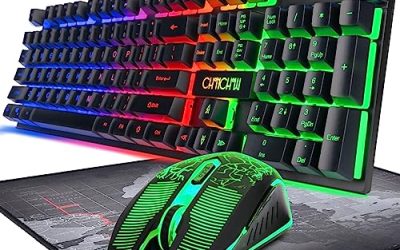
This wired bundle combines an RGB keyboard, mouse, mouse pad, and gaming headset for PC, Xbox, and PS4 users. It is aimed at players building a first setup who want every piece in one box, such as a younger gamer or anyone moving from controller play who has no desk accessories yet and wants a matching look.
- Strength: four pieces cover keyboard, mouse, surface, and audio together.
- Strength: RGB backlighting gives a consistent look across the set.
- Trade-off: bundled headsets and mouse pads are usually basic, so quality is spread thin.
Skip it if you already own a good headset. Players who care about audio or sensor quality should buy individual pieces instead. A bundled headset is also a weak spot for comfort over long sessions, so serious voice-chat users usually upgrade that piece first and keep the rest of the set.
60% Wireless Gaming Keyboard and Mouse Combo
The wireless combo pairs a rechargeable 60 percent RGB keyboard with a wireless mouse, listed for Xbox, PS4, and PS5. It suits couch players who want to cut cables and keep a clean space, since a rechargeable keyboard and wireless mouse can sit on a lapboard and reach the console without any cord stretching across the room.
- Strength: a rechargeable 60 percent board saves space and removes cable clutter.
- Strength: the wireless mouse allows free movement away from the console.
- Trade-off: wireless sets add charging chores and may suffer a little latency compared with wired ones.
Skip it if you need arrow keys or a number pad. Competitive players sensitive to input lag should prefer a wired combo. Anyone who forgets to charge devices will also dislike the extra upkeep, since a dead keyboard in the middle of a match is a bigger problem than a tangled cable.
Redragon S101M-KS Wireless Combo
A tri-mode keyboard with a 4800 DPI mouse and 10 independent multimedia keys, the S101M-KS gives options beyond a single connection method. It fits people who want one keyboard for a console, a PC, and a laptop, and who like having dedicated media keys for volume and playback while streaming music or video during longer gaming sessions.
- Strength: tri-mode connections let you switch between devices.
- Strength: 10 multimedia keys control media and volume without alt-tabbing.
- Trade-off: Bluetooth mode will not work on a console, so you must use the 2.4GHz receiver on the Xbox.
Skip it if you want a compact layout. Players who only use a console may not need the extra connection modes, and the title does not spell out console support, so confirm Xbox compatibility with the 2.4GHz receiver before ordering. A simple wired set is cheaper if you never leave the living room.
RedThunder 60% Gaming Keyboard and Mouse Combo
This compact set offers a 61-key RGB backlit mini keyboard and a lightweight honeycomb optical mouse rated for 7200 DPI. The wired design suits console players with limited desk or lap space, and the plug-in connection avoids pairing steps, battery charging, and dongle conflicts that sometimes appear with wireless accessories.
- Strength: the 61-key body leaves lots of room for mouse sweeps.
- Strength: the lightweight honeycomb shell helps with fast aiming.
- Trade-off: a 60 percent layout drops arrow keys, which can slow chat and menu navigation.
Skip it if you use the number pad or arrows often. The 7200 DPI label is also more than most console shooters need, and extremely light mice can feel twitchy for players who prefer slow, deliberate aim with a heavier mouse in their hand.
Which One Fits Your Situation
You play from a couch with limited space
The RedThunder or the 60% Wireless Combo fits a lapboard or a coffee table. Choose the wired RedThunder for reliability, or the wireless set to avoid cable drag.
You want to build a setup from scratch
The 4-in-1 bundle supplies a keyboard, mouse, pad, and headset, though quality of each piece is basic.
You like customizing buttons and macros
The Redragon S101-3 PRO is the strongest match, thanks to its programmable keys and macro record controls.
You share a keyboard between console and PC
The Redragon S101M-KS tri-mode set gives flexibility, as long as you use the 2.4GHz receiver for the Xbox.
Common Mistakes
- Buying a Bluetooth-only combo and discovering the console cannot pair with it.
- Assuming every game on the Xbox supports a keyboard and mouse.
- Choosing a 60 percent board and then missing the arrow keys in menus and chat.
- Chasing the highest DPI number instead of a comfortable, controllable sensor.
- Counting on PC-only software to hold settings after plugging into the console.
Related guides
- What Is The Best Budget Most Responsive Gaming Mouse Wired
- Low Latency Gaming Headphones Usb-C 2.4 Ghz Wireless
- Low Latency Gaming Headphones Usb-C Dongle 2.4 Ghz
Frequently Asked Questions
Does an Xbox work with any USB keyboard and mouse?
Many wired USB combos work for menus and supported games, but support varies by title. Check that the games you play allow keyboard and mouse before buying.
Can a wireless combo work on Xbox?
Yes, when it uses a 2.4GHz USB receiver. Bluetooth-only models generally cannot pair with a console, so look for a dongle in the listing.
Is a 60 percent keyboard good for console gaming?
It saves space and works well for movement and actions. The missing arrow keys and function row make chat and menu navigation slower.
How much DPI is enough?
Between 800 and 3200 DPI suits most console shooters. Higher figures help only if you can adjust them easily and your aim feels stable at those speeds.