
Standing all day sounds healthier than sitting until your heels, calves, and lower back start filing complaints around hour two. An anti-fatigue mat is the cheap fix that makes a standing desk actually usable, because it encourages the tiny postural sway that keeps blood moving and takes the edge off a hard floor. Not all mats are equal, though—thickness, firmness, and surface shape change how they feel over a six-hour day.
Our Top Picks
 Ergohead Anti Fatigue Kitchen Floor Mat Comfort Standing22"L x 17"W x 0.75"Th17 x 22 x 0.75 inches1.9 PoundsCheck on Amazon
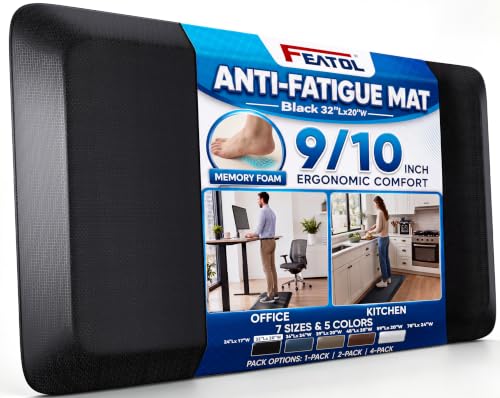

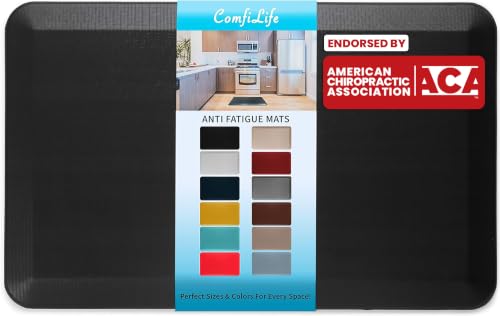


Top 3 picks at a glance
What separates a good mat from a bad one
The three things that matter are material density, thickness, and edge profile. Polyurethane (PU) mats are firmer and springier and hold their shape for years; cheaper PVC or gel mats compress and stay compressed within months. Thickness of 18–25mm is the sweet spot: thinner than 15mm and you feel the floor, thicker than 30mm and it gets tippy and hard to push a chair over. Contoured mats with mounds, edges, and a calf bar give your feet somewhere to shift, which beats a flat slab for genuinely long sessions.
As an Amazon Associate we earn from qualifying purchases at no extra cost to you.






| Mat type | Thickness | Best for | Price tier |
|---|---|---|---|
| Flat PU cushion | 18–20mm | All-day mixed sit/stand | Budget to mid-range |
| Contoured active mat | 20–25mm | 4+ hour standing blocks | Mid-range to premium |
| Budget gel/PVC | 15–18mm | Light, occasional standing | Budget |
More standing desk mats worth considering
The picks above cover the core of the market, from the Topo terrain mats to budget flat foam. But a few common needs are not fully served by that list: a contoured mat that costs less than the Topo, a flat mat you can slide aside with your foot, a balance board for people who cannot stand still, and long runner-style mats for wide desks. The six options below fill those gaps. Specs are taken from each maker’s published listing, and the comparisons are made against the main picks so you can see where each one fits.
Uncaged Ergonomics Active Standing Desk Mat (ASM-B)

The Uncaged Ergonomics Active Standing Mat is the most direct alternative to the Ergodriven Topo. Like the Topo, it is deliberately not flat: one-piece polyurethane with raised foot zones, calf-stretch bevels, and a built-in massage ball you can roll under your arch while you work. The idea is the same as any terrain mat. Instead of planting your feet in one spot for an hour, the shape invites you to prop a foot up, take a wider stance, or stretch a calf, and those small changes are what keep long standing blocks comfortable.
Published dimensions are roughly 32 by 20 inches with a cushioned 1-inch floor and raised contours that reach about 3.5 inches at the highest point. The mat weighs around 8 pounds, which helps it stay put on hard floors, and the one-piece molded construction has no seams or covers to peel. Because it is polyurethane rather than PVC, it should keep its rebound far longer than budget foam mats.
The trade-offs are the same as for every terrain mat. You cannot roll a chair over it, so on sit-stand days you will need to push it aside, and the raised edges take a few days to get used to. Compared with the Topo, it has a slightly different terrain layout and a built-in massage ball, while the Topo has a long track record and a strong reputation. If you want an active mat and the Topo does not suit your foot shape or budget, this is the first one to consider.
Best for: people who stand in long uninterrupted blocks and want terrain, not just cushioning. Skip it if: you switch between sitting and standing every 30 minutes and want to roll your chair over the mat.
UPLIFT Desk Standing Desk Mat with Heel Grab

The most annoying part of using a standing mat with a sit-stand desk is moving it. Every time you sit down, the mat is in the way of the chair; every time you stand, you have to bend over and drag it back. UPLIFT’s answer is a small raised tab, the heel grab, on one edge. You hook it with your heel and slide the mat in or out without bending down, which sounds minor until you do it eight times a day.
UPLIFT lists the mat at 30 by 18 inches and 0.75 inches thick, with a rubberized gel foam core and a closed-cell surface that wipes clean with soap and water. Edges are beveled to reduce trip risk, the surface is textured for grip, and the mat weighs about 4 pounds. UPLIFT backs its products with a long warranty, which is reassuring for a mat you will step on every day.
The footprint is the main limitation. At 30 by 18 inches it is smaller than the 32 by 20 inch mats in our main list, so taller users or anyone who likes a wide stance may find themselves hunting for the edge. The gel-foam feel is also softer and less springy than dense polyurethane. Compared with the ComfiLife or the 3/4-inch rectangular mat in the main list, the UPLIFT trades a bit of size for that convenient heel grab and a stronger warranty.
Best for: frequent sit-stand switchers who want to slide the mat with one foot. Skip it if: you are tall or prefer a wide, roomy stance.
Vari Standing Mat 32×20

Vari, the company behind the Varidesk converters, makes a straightforward flat mat that matches the standard 32 by 20 inch footprint most standing desks are designed around. Vari lists it at 0.75 inches thick and about 3 pounds, so it is light enough to move easily but thick enough to take the edge off a hard floor during a typical sit-stand day.
This is a deliberately simple product. There are no massage bumps or terrain, just an even cushion with beveled edges and a non-slip base. That simplicity is a strength if you split your day between sitting and standing, because a flat 0.75-inch mat is low enough to roll a chair over in a pinch and does not demand that you change how you stand. It also looks tidy in an office or a clean gaming setup.
The downside of any flat mat is that it does nothing to encourage movement on its own. You still need to shift your weight and change position, as the common-mistakes section of this guide explains. Compared with the FEATOL 9/10-inch mat in our main list, the Vari is slightly thinner and comes from a brand that focuses on standing desk gear. Compared with the ComfiLife, it is a similar size and thickness, so the choice often comes down to which finish and edge profile you prefer.
Best for: mixed sit-stand days, offices, and anyone who wants a plain, clean-looking mat. Skip it if: you stand for hours at a time and want terrain to keep your feet moving.
FEZIBO Standing Desk Mat Balance Board
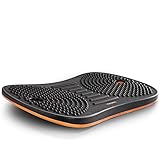
A balance board is not an anti-fatigue mat in the usual sense, but for some people it solves the same problem better. Instead of cushioning, it gives you constant small movement. The FEZIBO board rocks side to side on a curved wooden base, and keeping it level engages your ankles, calves, and core in a low-effort way that most people stop noticing after a few days.
The medium board is listed at about 20 by 12 inches and 2.2 inches high, with a hardwood core, a high-density latex top deck for grip and cushioning, and a maximum tilt of 8.5 degrees. FEZIBO rates it for up to 320 pounds. Most of the movement happens below the hips, so typing and mousing stay accurate, which is important if you game or work at the desk while using it.
A balance board is a supplement, not a full-day replacement for a mat. Few people want to rock for six straight hours, and the small footprint means you cannot shift into a wide stance. The best setup for many people is a flat mat for most of the standing time and the board for 15 to 30 minute stretches when energy dips. Also check your desk height. Because the board lifts you about two inches, you may need to raise the desk slightly to keep your elbows at the right angle.
Best for: fidgety standers and anyone who wants light activity while working. Skip it if: you want a mat you can forget about and stand on all day.
Ergohead 1-Inch Anti-Fatigue Mat with Massage Ball

Ergohead’s portable 17 by 22 inch mat is already in our main list. This is its bigger and thicker sibling: a 1-inch thick polyurethane memory foam mat measuring 17 by 28 inches, with raised massage points on the surface and a separate massage ball in the box. It sits between flat budget mats and full terrain mats. You get some texture under your feet and something to roll your arch on during a break, without the steep contours that make terrain mats awkward around a chair.
At 1 inch, it is near the top of the comfortable thickness range discussed earlier in this guide. Memory foam feels plush when you first step on it, which many people like, though it gives a softer, slower rebound than the firmer polyurethane in the Topo or the Uncaged mat. The non-slip bottom is designed to keep it planted on tile and hardwood.
The 17-inch depth is the main thing to watch. It is narrower front to back than the 20-inch standard mats, so make sure your heels land on it at your normal standing distance from the desk. For most people of average height that is fine, but if you stand far back from the desk or have large feet, a 20-inch-deep mat is a safer choice.
Best for: people who want a soft, thick feel with some massage texture at a moderate price. Skip it if: you prefer a firm, springy surface or need a deep mat.
StepRite 4/5-Inch Thick Anti-Fatigue Mat

StepRite’s mat is marketed for kitchens, but its spec sheet suits a standing desk well: a 0.8-inch memory foam core, a water- and stain-resistant surface, beveled edges, and a textured non-slip base. It is sold in several sizes, including 17 by 28 inches and a long 17 by 47 inch runner, and in colors beyond the usual black. The long size is the reason it earns a place here. If you have a wide gaming desk and like to slide between two monitors, or you share an L-shaped desk, a long runner covers far more ground than a standard rectangle.
The surface is PVC over memory foam rather than solid polyurethane. That keeps the cost firmly in the budget tier and makes spills easy to wipe off, but as the main guide points out, cheaper foam mats tend to compress faster than dense PU. Expect it to feel great at first and to lose some bounce over a year or two of daily use. The seller notes that mats can arrive with creases from shipping, which usually relax after a day or with a little warmth.
Compared with the KitchenClouds and 1-inch kitchen mats in our main list, StepRite plays in the same budget space. Its main advantage is the runner length, and its main disadvantage is the same as every budget foam mat: durability under heavy daily standing.
Best for: wide desks, shared desks, and budget buyers who want a long mat. Skip it if: you want a mat that keeps its rebound for many years.
Flat mat, terrain mat, or balance board?
Standing mats fall into three broad families, and picking the right family matters more than picking the right brand.
Flat cushion mats are a single even slab of foam, usually 0.6 to 1 inch thick. They are the cheapest, the easiest to slide aside, and the only type that works reasonably well with a rolling chair. They reduce pressure on heels and knees but do nothing on their own to make you move. They suit people who stand for 20 to 60 minutes at a time and sit the rest of the day.
Terrain or contoured mats such as the Topo and the Uncaged Active Mat add ridges, mounds, and slopes. The point is not extra softness; it is giving your feet places to go. Most terrain mat users find they naturally shift stance every few minutes without thinking about it, which is exactly what reduces fatigue over long standing blocks. They cost more and get in the way of a chair.
Balance and wobble boards such as the FEZIBO replace cushioning with motion. They are best used in shorter sessions alongside a regular mat rather than as the only standing surface.
Comparison of the additional picks
Price tiers here are relative within standing mats: budget covers basic foam mats, mid-range covers branded flat mats and balance boards, and premium covers terrain mats.
| Mat | Type | Size | Thickness | Material | Chair-friendly | Price tier |
|---|---|---|---|---|---|---|
| Uncaged Ergonomics Active Mat | Terrain with massage ball | About 32 x 20 in | 1 in floor, contours to 3.5 in | Polyurethane | No | Premium |
| UPLIFT Mat with Heel Grab | Flat | 30 x 18 in | 0.75 in | Gel foam | Partly, easy to slide | Budget to mid-range |
| Vari Standing Mat 32×20 | Flat | 32 x 20 in | 0.75 in | Cushion foam | Partly | Mid-range |
| FEZIBO Balance Board | Wobble board | About 20 x 12 in | 2.2 in high | Hardwood with latex deck | No | Mid-range |
| Ergohead 1-inch with Massage Ball | Flat with massage points | 17 x 28 in | 1 in | PU memory foam | Partly | Budget to mid-range |
| StepRite 4/5-inch | Flat | 17 x 28 in or 17 x 47 in | 0.8 in | Memory foam with PVC surface | Partly | Budget |
“Partly” means you can roll a chair onto the mat, but the casters will dig in and the foam will wear faster where they sit. For daily sit-stand use, sliding the mat aside or pairing it with a chair mat is kinder to both.
Mat materials explained
Listings throw around terms like PU, gel, memory foam, and PVC without explaining what they mean for comfort and lifespan. Here is what to expect from each.
- Polyurethane (PU) foam, especially with an integral skin. Dense, springy, and durable. A molded PU mat pushes back when you shift your weight instead of simply squashing, and it keeps that rebound for years. Most premium mats, including the Topo and the Uncaged Active Mat, are PU. It costs more, but it is the material to choose if you stand daily.
- Memory foam. Soft and plush on first contact, with a slow rebound. It feels luxurious in the first few weeks, but it can feel less stable for long standing and tends to flatten sooner than dense PU. Often paired with a PVC or fabric top layer.
- Gel foam. Usually a foam core with gel or a rubberized gel layer. It spreads pressure well and stays cool, with a softer, more damped feel than PU. Quality varies widely between brands.
- PVC surface mats. Common in budget kitchen-style mats. PVC is water- and stain-resistant and cheap, which is why it dominates the budget tier, but these mats can smell when new and generally compress faster.
- Wood and latex boards. Balance boards use a rigid wooden base with a grippy latex or rubber deck. They do not cushion so much as move, so they complement a mat rather than replace it.
Quick selection checklist
- How long do you stand at a stretch? Under an hour: a flat mat is enough. Over an hour: consider terrain.
- Do you roll a chair over it? If yes, choose a thin flat mat, ideally one you can slide aside with your foot.
- What is underneath? Carpet needs a firmer mat; tile and hardwood need a reliable non-slip base.
- What size is your stance? 32 by 20 inches suits most people; size up if you are tall or share the desk.
- How long should it last? For daily use over several years, dense polyurethane is worth the higher price tier.
How to pick for your setup
Match the mat to how long you stand
If you split the day roughly 60/40 sitting to standing and switch every 30–60 minutes, a simple flat PU mat around 18mm is plenty and stays low enough to roll a chair onto. If you stand in long unbroken blocks—coding sprints, editing marathons—a contoured mat earns its higher price by giving your feet massage points and a calf bar to stretch against.
Size and floor type
Look for a footprint around 50×80cm so you can step and shift without hunting for the edge. On carpet, a firmer mat prevents the sinking, unstable feeling; on hardwood or tile, check for a non-slip backing so it does not skate when you lean. A beveled edge under about 20 degrees stops you catching a toe and reduces the trip hazard.
Size the mat to your height and stance
Mat size is easy to overlook. A good rule is that the mat should be wide enough for your normal stance plus room to shift a foot sideways, and deep enough that your heels and toes both land on it when you stand at your usual distance from the desk. For most adults, 32 by 20 inches covers this well. Shorter users can do fine on a smaller mat like the Topo Mini, while tall users and people who like a wide stance should look at 36-inch-wide mats or a long runner. If you share the desk with someone of a very different height, size for the taller person.
Shoes, socks, or barefoot
What you wear on your feet changes how a mat feels. Supportive shoes add their own cushioning and stability, so a firmer, thinner mat often feels best with them. In socks or barefoot, a slightly thicker mat feels more comfortable, but very soft foam can feel unstable because your foot sinks and rolls. If you work from home in socks, terrain mats and dense polyurethane mats tend to feel better than plush memory foam, because they support the arch instead of letting it collapse.
Matching desk height after adding a mat
A mat raises you by its thickness, and a balance board by two inches or more. That is enough to shift your elbow angle at the keyboard. After you add a mat, stand on it in your normal shoes and raise or lower the desk until your forearms are roughly level with the desk surface and your shoulders are relaxed. Save that height as a preset if your desk supports it, and set a separate preset if you use a balance board.
Mats in a gaming setup with a chair mat or carpet
Gaming desks often already have a chair mat or a rug underneath, which changes how a standing mat behaves. On a hard chair mat, a standing mat can slide easily, so a heavier mat or one with a grippy base works best; some people lay the standing mat beside the chair mat rather than on top so each stays in place. On thick carpet, soft foam sinks and feels wobbly, so choose a firmer polyurethane mat or place a thin rigid board beneath it. If you use a large desk pad and RGB lighting under the desk, keep cables clear of the mat edge so you do not snag them with a heel when stepping on and off.
Reading thickness specs: inches vs millimeters
This guide recommends a thickness range in millimeters, but most mats are listed in fractions of an inch, which makes comparison awkward. Here is a quick conversion for the sizes you will see most often.
| Listed thickness | Approx. millimeters | Where it sits |
|---|---|---|
| 5/8 in | 16 mm | Thin flat mat, easy to roll a chair over |
| 3/4 in | 19 mm | The most common flat-mat thickness and a solid all-rounder |
| 4/5 in (0.8 in) | 20 mm | Slightly plusher flat mat |
| 9/10 in | 23 mm | Thick flat mat, still stable |
| 1 in | 25 mm | Top of the comfortable range for flat mats |
| Contoured, peaks 2.5 in or more | Varies | Terrain mats, measured at the highest ridge, not the standing area |
Remember that thickness alone says little about comfort. A dense 3/4-inch polyurethane mat can feel more supportive over a long session than a soft 1-inch memory foam mat, because it pushes back rather than bottoming out. For terrain mats, the headline height describes the tallest contour; the flat standing zone is much thinner.
Density is the spec most listings leave out, so look for clues in the material and weight. Two mats of the same size and thickness can differ a lot in weight, and the heavier one is usually the denser foam that will hold its shape longer. A mat that feels feather-light for its size is more likely to compress into a permanent dip where you stand.
Care and longevity
PU mats wipe clean with a damp cloth and mild soap and shrug off dropped pens and chair scuffs. Avoid harsh solvents, which dry out the foam and cause cracking. A quality mat holds its rebound for 3–5 years; if you press a thumb in and the dent stays, the foam has fatigued and it is time to replace.
FAQ
Is a thicker mat always more comfortable?
No. Past about 25mm, comfort plateaus and stability drops—you wobble slightly and it feels harder to stand still. For most people 18–22mm of dense PU is the comfort peak without the instability.
Can I use one mat for both sitting and standing?
Yes if it is thin and flat enough (around 18mm) to roll a chair over without a lip. Contoured mats with raised bumps are awkward under a chair, so those suit people who mostly stand.
Do anti-fatigue mats actually work?
For most people, yes, for the specific problem they target. Standing still on a hard floor loads the same small areas of the feet and keeps the leg muscles locked in one position, which is what makes standing tiring. A cushioned or contoured surface spreads pressure and encourages tiny shifts in balance and stance, and research in occupational settings has generally linked mats with less reported discomfort during prolonged standing. A mat will not make all-day standing comfortable, though; it makes reasonable standing blocks noticeably easier.
How long should I stand at a standing desk each day?
There is no single magic number, and the goal is variety rather than maximum standing time. A common starting point is alternating every 30 to 60 minutes, with short standing blocks at first and longer ones as your feet and legs adapt. Many people settle into roughly two to four hours of standing spread across the day. If you feel aching feet, knees, or lower back, that is a sign to sit down sooner, not to push through.
Can I use a kitchen mat as a standing desk mat?
Often, yes. Several mats in this guide are sold for both kitchens and desks. The things to check are footprint, because kitchen runners can be too narrow front to back for a desk stance, and surface texture, because a heavily textured kitchen mat can grip socks uncomfortably. A desk-specific mat usually adds a beveled edge designed for chair casters and a size matched to standard desks.
Why does my new mat smell, and is it safe?
Many foam mats have a mild off-gassing smell when first unpacked. Leaving the mat flat in a ventilated room for a day or two usually clears it. If the smell is strong or lasts more than a week, check whether the mat is PVC, which tends to smell more than polyurethane, and look for a maker that states it is free of PVC or phthalates if that matters to you.
Will a standing mat damage hardwood floors?
Most quality mats are safe on sealed hardwood. Problems come from trapped moisture under cheap rubber backings or from grit caught underneath that scratches as the mat shifts. Lift the mat and wipe the floor beneath it every few weeks, and avoid mats with a strong rubber smell on delicate finishes.
Is a standing mat worth it if I only stand for short periods?
For a few minutes at a time, a mat is a nice-to-have rather than a necessity, especially on carpet. Once standing blocks reach 20 to 30 minutes or more on a hard floor, most people notice the difference quickly in their heels and lower back. A budget flat mat is a low-risk way to find out whether you will use one; if you start standing longer, you can step up to a denser polyurethane or terrain mat later and keep the cheap one for a kitchen or workshop.
Common mistakes that ruin comfort
Even a good mat disappoints if you use it wrong. The biggest error is standing dead still on it—the mat only works when you let your weight shift and sway, so treat it as a cue to move rather than a soft spot to plant your feet. The second mistake is standing barefoot or in socks; a thin sole plus a soft mat can actually feel less stable, and supportive shoes still help even on cushioning. Finally, people put the mat too far forward and end up with heels on the hard floor and toes on the mat, which is worse than no mat at all—center it so your whole foot lands on the cushion at your normal standing distance from the desk. Rotate the mat 180 degrees every few weeks so wear spreads evenly, and pair it with a sit/stand cadence rather than trying to stand for the entire day; even the best mat cannot make eight straight standing hours comfortable.
Building a standing routine around your mat
A mat is only one piece of a comfortable standing setup. The way you structure your day and the rest of your desk matter just as much, especially for long gaming or work sessions where it is easy to lose track of time.
Start short and build up
If you are new to a standing desk, begin with 15 to 30 minute standing blocks a few times a day. Your feet, calves, and lower back need time to adapt, and pushing straight to multi-hour standing is the fastest way to decide standing desks are not for you. Add time gradually over a few weeks. Many people find a natural rhythm of standing for email, browsing, or menu-heavy tasks and sitting for focused work or competitive matches.
Use cues to switch position
The simplest habit is to tie position changes to events rather than the clock. Stand up between matches, after a meeting, or every time you refill a drink. A desk with memory presets makes switching take seconds, and a mat with a heel grab or light enough to slide with one foot removes the last bit of friction.
Keep your monitor and keyboard right in both positions
When standing, the top of the monitor should still sit around eye level, and your elbows should be close to 90 degrees with relaxed shoulders. Many people forget to raise the monitor relative to the desk when standing, because the desk moves both together. If you use a monitor arm, a small adjustment between sitting and standing can save your neck. Wrist rests are less useful standing; keep wrists neutral and let the forearms float.
Move on the mat
Shift weight from one foot to the other, rock gently from heels to toes, and put one foot on a raised part of a terrain mat or a small footrest from time to time. These small movements are the main reason mats help, so give yourself permission to fidget. If you notice you have been standing perfectly still for a long stretch, that is a cue to move or sit.
Mind the rest of your body
Supportive footwear, regular breaks to walk around, and simple calf and hip stretches all add up. Persistent foot, knee, or back pain that does not ease when you sit is worth discussing with a physiotherapist or doctor, since a mat can ease ordinary fatigue but cannot fix an underlying problem.
Bottom line
Buy a dense PU mat in the 18–25mm range: flat and low if you switch often, contoured with a calf bar if you stand in long blocks. Confirm a beveled edge and a non-slip base, and you will comfortably add hours to your standing time without your feet staging a revolt.


