
The choice between an under desk cable tray and a cable raceway for your desk usually comes down to one simple question: do you want to hide a bundle of cords in one place, or guide them neatly along a path? Both solve cable clutter, but they do it in very different ways. A tray sits underneath your desktop and acts like a basket for power strips, chargers, and excess cable length. A raceway mounts along the surface or leg of your desk or wall and encloses one or two cords inside a slim channel. If your home office has a power strip, a monitor cable, a laptop charger, and a few peripherals all converging under the desk, the right pick will affect how your setup looks, how easy it is to clean, and how often you need to crawl under the desk to fix something.
Top 3 picks at a glance

Quick Verdict
Choose an under desk cable tray if you have multiple cords, a power strip, or a standing desk where cables need slack to move. It holds more, keeps weight off the floor, and makes future changes easy. Choose a cable raceway for desk if you need a clean, finished line for one or two visible cables running down a desk leg, along the back edge, or to a wall outlet. For many home offices, the best result in 2026 is actually using both: a tray to collect the bulk under the desk and a short raceway to cover the final vertical drop to the outlet.
As an Amazon Associate we earn from qualifying purchases at no extra cost to you. Product prices and availability are accurate as of the date shown and are subject to change.


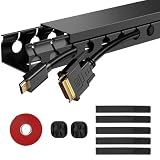
If you are deciding on budget first, both options are inexpensive. Metal mesh trays and plastic raceway kits typically fall between $14 and $22 for a single desk setup, with multi-packs offering better value if you are outfitting more than one workstation. For example, you will find options like the Mzmaxy Cable Management 25” Cable Tray around $21.59 for a longer single tray, while a clamp-mount metal mesh tray around $13.99 is common for a no-drill installation. On the raceway side, kits like the ENONCI Cable Raceway 77in 5-Pack near $19.99 or the YECAYE Cable Management 6 Pack near $16.98 give you enough channel to cover several desks or a longer wall run.
Side by Side
| Feature | Under Desk Cable Tray | Cable Raceway for Desk |
|---|---|---|
| How It Works | Open basket or mesh shelf mounted under the desktop; cables and power strip sit inside | Enclosed plastic channel with base and snap-on cover; cables lay inside the channel |
| Look | Hidden from eye level; clean from the front and sides but visible if you look underneath | Visible but very tidy; creates a straight, paintable line along desk edge, leg, or wall |
| Capacity | High; holds 4 to 10 cables plus a standard 6-outlet power strip and adapters | Low to moderate; holds 1 to 3 cables per channel, typically up to 0.6 to 0.9 inches wide |
| Space Needed | Requires 2 to 4 inches of clearance under the desk; tray sizes commonly 15 to 25 inches long, 4 to 6 inches wide | Very low profile; channel is about 0.6 to 1.1 inches wide and 0.4 to 0.7 inches tall, sits flat against surface |
| Durability | Powder-coated steel mesh or solid steel; supports 10 to 20 pounds; clamp mounts avoid drilling | PVC or ABS plastic; impact resistant but can crack under heavy pressure; adhesive holds 2 to 5 pounds per foot |
| Price Range | $13 to $26 for a single tray; $24 to $45 for a 2-pack with clamps | $14 to $22 for a multi-pack kit covering 60 to 130 inches total length |
| Maintenance | Dust collects in open mesh; vacuum or wipe every 2 to 4 weeks; easy to add or remove cables | Enclosed cover keeps dust out; must unsnap cover to change cables; adhesive may need re-taping in heat |
| Best For | Home offices, gaming setups, standing desks with moving parts and many devices | Minimalist desks, rental-friendly vertical drops, hiding a single monitor or lamp cord |
| Resale and Rental Impact | Clamp-mount trays leave no holes; screw-mount may leave small holes to patch | Adhesive-backed raceways are generally rental safe; may leave residue if removed quickly or in heat |
Where Under Desk Cable Tray Wins
A cable tray is built for volume and flexibility, which is why it is the default for most home offices.
First, it handles the real-world mess. A typical work-from-home desk has a surge protector, a laptop charger at 45 to 100 watts, a monitor power cable, a USB hub, and maybe a lamp or speaker. Instead of zip-tying each one, you drop the entire power strip into the tray and coil excess length out of sight. A 25-inch tray like the Mzmaxy option spans most of the desk width, while a compact 15 to 17-inch tray fits smaller 40 to 48-inch desks without overhang.
Second, it protects movement. If you use a standing desk that travels 14 to 26 inches between sitting and standing height, cables need slack. A tray keeps that slack suspended and prevents snagging, whereas a fixed raceway along the leg can pull if not planned with extra loop. Metal mesh trays also dissipate heat better than an enclosed plastic channel, which matters when you have multiple warm adapters together. Keep at least 1 inch of space around large power bricks for airflow.
Third, it makes changes effortless. Need to swap a dock or add a second monitor? You lift the cables out, reroute, and you are done. With a raceway, you have to pop the cover, reseat each cable, and snap it closed without pinching. For households that upgrade gear frequently, that convenience adds up. No-drill clamp mounts are especially useful on solid wood, particleboard, or glass tops where you do not want to drill. Most clamps fit desktops 0.4 to 1.2 inches thick and tighten by hand.
Where Cable Raceway for Desk Wins
A cable raceway is about precision. It does not hold your power strip, but it makes a single exposed run disappear.
The biggest advantage is the finished line. If your desk faces the room and the outlet is 3 to 6 feet away on the wall or baseboard, a tray alone still leaves a vertical cord dangling down the desk leg. A raceway covers that drop with a straight, paintable channel that blends into white, black, or gray furniture. Kits such as the ENONCI 77-inch 5-pack give you about 154 to 385 inches total depending on configuration, enough to run along the back edge of the desk and down one leg with spare pieces for future moves.
Raceways also win on dust and visual discipline. The snap-on cover fully encloses the cable, so you do not see the texture of braided cords or the sheen of plastic jackets. That matters in living rooms, bedrooms, or shared spaces where the desk is part of the decor. Smaller 6-pack sets like the YECAYE option are useful when you want short 15-inch segments to bridge gaps neatly rather than cutting one long channel.
Finally, raceways are the better choice for simple setups. If your desk only has one monitor cable and one lamp cord, a full-size tray is overkill and takes up under-desk clearance you might want for a drawer or CPU mount. A single 15 to 30-inch raceway along the rear edge can be installed in under 15 minutes with adhesive tape, no tools required, and it leaves the underside completely open.
Cost Over 5 Years
Both systems are low-cost and rarely need replacement if installed correctly. Here is how the math typically breaks down for one desk.
An under desk cable tray at $13.99 to $21.59 is often a one-time purchase. Powder-coated steel does not degrade with normal indoor use, and clamp hardware can be reused if you change desks. Over five years, your cost is essentially the initial purchase plus maybe $5 to $8 for replacement cable ties or adhesive cable clips if you reconfigure. Even if you buy a 2-pack for a larger L-shaped desk, you are at $28 to $45 total and likely set for the life of the desk.
A cable raceway kit at $16.98 to $19.99 for a multi-pack also lasts several years, but adhesive is the variable. In warm rooms above 78 degrees or on textured walls, pre-applied tape may loosen after 12 to 24 months, especially on the vertical leg run that bears slight weight. Re-taping with a roll of strong double-sided mounting tape at $8 to $12 usually solves it, and you will have leftover channel for a second desk. If you cut channels to size, keep one spare piece; replacing a cracked cover is cheaper than buying a whole new kit.
Energy and weight costs are negligible for both. Neither product draws power. Trays should not be overloaded beyond their rated 10 to 20 pounds; a typical power strip plus six cables weighs 2 to 4 pounds total, well within limits. Raceways should not be used to support heavy extension cords or coiled heaters; they are covers, not hangers.
Bottom line: expect $14 to $26 for either path over five years if you install once and leave it. If you move or redesign yearly, budget an extra $10 for tape, ties, and touch-up paint.
Which One for Your Home
The right choice depends more on your room and habits than on the products themselves.
Small Apartment
In a studio or one-bedroom where the desk is in the living area, pick based on cable count. If you have more than three devices, use a compact under desk cable tray around 15 to 17 inches to contain the bundle without taking over the small desktop. Pair it with a 15 to 20-inch raceway segment to hide the single cord that runs to the wall outlet so the living room still looks intentional. If you have a very minimal 40-inch desk with just a laptop and lamp, skip the tray and use only raceway along the back edge to save under-desk space for storage bins.
Family With Kids or Pets
Safety and durability come first. An enclosed raceway is excellent for any cord that hangs within reach, such as the vertical drop down a desk leg at 28 to 30 inches high, because it prevents chewing, pulling, and snagging by small hands or pets. Use a tray for the bulk under the desk, but make sure the tray is screw-mounted or tightly clamped so a curious child cannot dislodge it, and keep the power strip fully inside the tray rather than on the floor. Choose a metal mesh tray with rolled edges to avoid sharp points.
Rental
Rental-friendly means no holes and no wall damage. A clamp-mount tray that grips the desktop edge requires no drilling and leaves no marks when removed. Look for models that specify no-drill clamp installation and fit your top thickness. For raceways, use adhesive-backed channels on the desk itself rather than on the wall, since desk surfaces are easier to clean than painted drywall. If you must run a raceway on the wall, test a small piece of the adhesive in a hidden spot and remove slowly at a low angle to reduce residue. Avoid screw-in raceway anchors entirely.
Long-Term Home
If you own and plan to keep the desk for five or more years, screw-mount a full-length tray for maximum stability and add a painted raceway for the final run to the outlet. Screw mounting into solid wood or plywood holds stronger than clamps over time and will not shift when you vacuum. You can paint PVC raceways with latex paint to match wall color after a light sand and wipe, creating a built-in look. This hybrid setup also makes it easy to add a future printer, second monitor, or standing desk converter without redoing cable management.
FAQ
Can I use a cable tray and a cable raceway together?
Yes, and this is often the cleanest solution. Use the tray under the desk to hold the power strip and excess length, then use a short raceway to cover the 24 to 36-inch vertical run from the tray to the floor outlet. Keep the raceway run as short as possible and leave a small service loop of 4 to 6 inches inside the tray so you can raise or lower a standing desk without tension.
Will a cable tray fit any desk?
Most trays fit desktops 0.4 to 2 inches thick when using clamp mounts, or any wood top when screw mounting. Measure the underside clearance and check for crossbars, drawers, or keyboard trays that could block a 4 to 6-inch deep basket. For glass tops, use only clamp mounts with rubber pads and avoid drilling. For desks with a thin particleboard top under 0.6 inches, a clamp is safer than screws which may not hold.
Do cable raceways damage paint or leave marks?
Adhesive raceways can leave residue, especially if removed quickly or after long exposure to heat and sunlight. To minimize marks, clean the surface with isopropyl alcohol before applying, press firmly for 30 seconds, and wait 24 hours before loading cables. When removing, warm the adhesive with a hair dryer on low for 30 seconds and peel slowly parallel to the surface. Any remaining residue usually lifts with a small amount of adhesive remover.
How many cables can I safely put in a tray or raceway?
A standard under desk tray can safely hold a power strip plus 6 to 8 low-voltage cables without crowding. Do not bundle high-wattage heater cords or tightly coil extension cords in an enclosed space; heat needs airflow. A single raceway channel should hold 1 to 3 cables that fit without forcing the cover closed. If you have to force the lid, split the bundle into two parallel channels instead of overstuffing one.
