
A glass desk looks clean until the cables ruin it. With no wood to screw into and every wire visible from above and below, even a single power strip and laptop charger can turn a minimalist setup into a tangled mess. Adhesive strips that work fine on wood often peel off glass, and any drilling is out of the question if you want to keep the tempered surface intact and your security deposit safe.
That is why no-drill systems built for glass matter. Clamp-on trays, edge-mounted baskets, and low-profile raceways can hide power bricks, route charging cables, and keep everything off the floor without a single screw. We focused only on kits that install with clamps or adhesive and actually hold up under a glass top, comparing fit, capacity, and long-term stability so you can pick the right level of concealment for your space.
As an Amazon Associate we earn from qualifying purchases at no extra cost to you. Product prices and availability are accurate as of the date shown and are subject to change.





Top 3 picks at a glance
Quick Picks
| Product | Best for | Price |
|---|---|---|
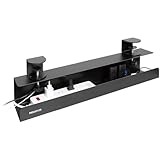
| Mount-It! Under Desk Cable Management Tray – Clamp-On No-Drill Metal Cable Management Tray for Desk & Standing Desk, Wire & Cord Organizer for Power Strips, Glass Desks – 23.6” Black | Best Overall for Glass Desks | $39.99 |
| Cable Management, 25.3” Under Desk Cable Management Tray No Drill | Best Value Wide Tray | $23.99 |
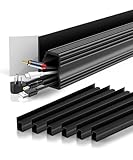
| EVEO Cable Management Under Desk Kit (6 Units) – Under Desk Cable Management Cord Hider, Cable Hider Cord Management, Cable Organizer, Cable Raceway | Self-Adhesive 96” J Channel 6X16 – Black | Best J-Channel System for Multiple Runs | $16.97 |
| Univivi Under Desk Cable Management Tray, Cable Management, 32 inch, Black | Best Extra-Long Tray for Power Strips | $38.69 |
| Delamu 2 Pack Safe & Tidy Cable Management Solution – Protect Kids & Pets with Home & Office Cable Management Under Desk, Cable Organizer, Cable Management Kit, Cord Organizer for Desk, 15.7in x 2 | Best Budget Two-Pack for Light Setups | $9.99 |
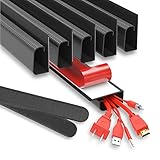
| 6 Pack Under Desk Cable Management Kit, J Channel Cable Raceway with Double Side Tape, Cord Organizer Tray for Desk, Easy Install, No Drilling, Cable Hider for Home & Office, Child & Pet Proof | Best 6-Pack Kit for Full Coverage | $14.90 |
| Cable Management ProOffice 96in J Channel Cable Raceways – 6X 16in Black No Screw/No Drill Computer Cord Organizer – Cable Channels for Wire Management Under Desk with Adhesive | Best Adhesive Raceway for Renters | $15.99 |
| NoetixCo Cable Management Under Desk, 25.3” No Drill Desk Cable Management Tray with Clamp, Metal Cord Organizer for Standing Desk, Computer Wire Management for Home Office & Gaming Setup, Black | Best Clamp Tray for Standing Desks | $20.99 |
How We Picked
Glass desks change the rules for cable management. You cannot rely on screw-in trays, and suction or weak adhesive often fails on slick, non-porous surfaces. We prioritized kits that use a true no-drill attachment: sturdy edge clamps with felt or rubber padding to protect glass edges, or high-bond double-sided tape rated for smooth surfaces, with no tools beyond a clamp turn or peel-and-stick application.
We then sorted by real-world usability for glass. Capacity mattered, so we checked tray length and depth for standard 6-outlet power strips measuring 10 to 12 inches long and power bricks up to 3 inches wide. For raceways, we looked at channel length per pack, from 31.4 inches total in the Delamu 2-pack to 96 inches in the EVEO and ProOffice kits, and whether the profile would stay hidden under 0.3 to 0.5 inch thick glass without blocking legroom. Finally, we weighed stability, ease of removal, and value at the listed prices from $9.99 to $39.99.
The 8 Best Picks
1. Mount-It! Under Desk Cable Management Tray – Clamp-On No-Drill Metal Cable Management Tray – 23.6” Black
For most glass desk owners, this is the most secure no-drill option. The 23.6-inch steel tray clamps to desks from 0.4 to 1.6 inches thick, which covers the majority of tempered glass tops with an edge frame or support bar, and the 4.7-inch width easily holds a full-size surge protector plus two or three adapters. At $39.99, it costs more than adhesive kits but avoids any risk of tape failure on glass.
- Pro: All-metal construction supports up to 10 pounds without sagging
- Pro: Clamp-on install leaves no residue and is fully removable for moves
- Con: Requires a clampable edge or frame; not for frameless floating glass with no lip
When to skip: If your glass desk has a beveled, rounded, or frameless edge with nowhere to seat a clamp, choose a stick-on raceway instead.
2. Cable Management, 25.3” Under Desk Cable Management Tray No Drill
This 25.3-inch tray is for anyone who wants a single, wide basket for a cleaner look. At $23.99 it stretches more than an inch and a half longer than the Mount-It! tray, so you can lay a 12-inch power strip horizontally and still have room for excess cable loops. The low-profile mesh design keeps ventilation open around power bricks and stays discreet when viewed through clear glass.
- Pro: Extra width organizes a full workstation without stacking
- Pro: No-drill clamp or adhesive options depending on seller configuration
- Con: Open mesh hides less than a solid J-channel if you view from the side
When to skip: If you only need to hide two or three thin charging cords, a smaller raceway kit will look slimmer and cost less.
3. EVEO Cable Management Under Desk Kit (6 Units) – 96” J Channel 6X16 – Black
The EVEO kit is ideal when you have cables running in different directions. You get six 16-inch J-channels for a total of 96 inches, so you can create separate lanes for monitor, lamp, and charger cables rather than bundling everything together. At $16.97 the per-foot cost is among the lowest here, and the self-adhesive backing installs in minutes under glass or a glass-support frame.
- Pro: Modular 16-inch sections are easy to trim and route around legs
- Pro: 96-inch total length covers L-shaped and double-wide desks
- Con: Adhesive bond needs 24 hours to cure and can weaken on dusty glass undersides
When to skip: If you need to store a bulky power strip, pair this with a tray; J-channels alone are for cords, not bricks.
4. Univivi Under Desk Cable Management Tray, 32 inch, Black
When one power strip is not enough, the Univivi 32-inch tray gives you the longest single span in this roundup. At $38.69 it handles two compact power strips end-to-end or one strip plus a large 65 to 100 watt laptop brick with room to spare. The extended length is especially useful for 48 to 60 inch wide glass desks where you want one continuous channel instead of two smaller trays.
- Pro: 32-inch length is the best for dual-strip or docking station setups
- Pro: Sturdy steel span resists bowing even when fully loaded
- Con: Needs more clearance and a longer clampable edge than 15 to 25 inch models
When to skip: If your desk is 42 inches wide or smaller, a 23 to 25 inch tray will fit better and leave legroom.
5. Delamu 2 Pack Safe & Tidy Cable Management Solution – 15.7in x 2
The Delamu 2-pack is the light-touch fix. For $9.99 you get two 15.7-inch channels totaling 31.4 inches, just enough to hide the two most visible runs, like a monitor cable and a charger. The narrow, enclosed design also keeps cords away from kids and pets, which is a real benefit if the glass desk sits in a living room or family office.
- Pro: Lowest price entry point at under $10 for two channels
- Pro: Enclosed channel fully conceals cords from view through glass
- Con: Total length is short for full-desk coverage; you will need more kits for large setups
When to skip: If you need to manage a power strip or more than three cables, move up to a 6-pack raceway or a metal tray.
6. 6 Pack Under Desk Cable Management Kit, J Channel Cable Raceway – $14.90
This 6-pack kit hits the sweet spot between price and coverage. At $14.90 you get six channels with double-sided tape, no drilling required, and a child and pet proof enclosed design that keeps cords off the floor. It is a good middle ground if the EVEO or ProOffice 96-inch kits are more length than you need but the 2-pack is not enough.
- Pro: Six separate raceways allow clean separation of power and data cables
- Pro: Easy peel-and-stick install works on glass, metal frames, and wood supports
- Con: Channels are sized for cords, not for hiding power strips or large adapters
When to skip: If your glass desk has a textured or frosted underside, test adhesion first or choose a clamp-on tray.
7. Cable Management ProOffice 96in J Channel Cable Raceways – 6X 16in Black
The ProOffice kit mirrors the popular 96-inch format with six 16-inch raceways for complete under-desk routing. At $15.99 it is priced just a dollar above the similar 6-pack kit and a dollar below EVEO, making it an easy renter-friendly pick when you want adhesive-only installation with no screws. The black PVC blends into dark frames commonly found on glass desks as we head through 2026.
- Pro: 96-inch total length handles complex setups with multiple peripherals
- Pro: No-screw adhesive is fully removable with careful heating and leaves no holes
- Con: Adhesive performance drops if the glass underside has condensation or oil residue
When to skip: If you plan to reposition cables often, a clamp tray lets you lift and reroute without replacing tape.
8. NoetixCo Cable Management Under Desk, 25.3” No Drill Desk Cable Management Tray with Clamp, Black
The NoetixCo 25.3-inch tray blends the best of both approaches: the length and openness of a basket with the security of a clamp. At $20.99 it is $19 less than the Mount-It! clamp tray and $3 less than the similar 25.3-inch no-drill tray, while still offering enough depth for a standard power strip and brick. The metal build and clamp mount make it a natural fit for glass-top standing desks that move up and down.
- Pro: Clamp mount stays secure during height adjustments with no adhesive to fail
- Pro: 25.3-inch width balances capacity and leg clearance
- Con: Clamp hardware adds slight weight compared to ultra-light raceways
When to skip: If your glass desk is permanently fixed and you prefer invisible cord channels, J-channel raceways will be more discreet.
Buying Guide
Clamp vs. Adhesive on Glass: Which Holds Better?
Glass needs a different attachment strategy. Clamp-on trays grip the desk edge or frame and do not rely on stickiness, so they are the safest choice for pure glass tops where tape can release, especially in warm or humid rooms. Measure edge thickness first; most clamps fit 0.4 to 1.6 inches and need at least a 0.75-inch flat lip to seat securely. Adhesive J-channels work best when you can stick them to a metal frame, support beam, or the underside edge trim rather than directly to slick glass. If you must stick to glass, clean with isopropyl alcohol, let it dry fully, press firmly for 30 seconds, and avoid loading cables for 24 hours.
Size and Capacity: Match the Kit to Your Gear
Start with your power strip. A typical 6-outlet strip is 10 to 12 inches long and 2 to 2.5 inches wide, and a laptop brick adds another 2.5 to 3 inches. A 15.7-inch raceway will hide cords but not that hardware, while a 23.6 to 25.3 inch tray holds one strip plus bricks, and a 32-inch tray holds two. For raceways, add up your runs: a single monitor plus charger setup usually needs 30 to 40 inches total, while a gaming setup with speakers and lighting can need the full 96 inches. Leave at least 2 inches of clearance between the tray bottom and your knees, which on most glass desks means choosing a tray depth of 3.5 to 4.7 inches rather than deeper baskets.
Transparency and Aesthetics: Staying Invisible
Clear glass shows everything. Black trays and raceways disappear best against black frames and when viewed from a seated position, but they can be visible through the top in bright light. Mount trays and channels as close to the back edge as possible, at least 1 inch inset, so the front remains see-through. Enclosed J-channels hide individual cords more completely than open mesh trays, so many people combine both: a central tray for the power strip and one or two raceways to guide thin cables from the tray to each device. Avoid overfilling; a tray loaded above its rim or a raceway packed tight will bulge and become more noticeable.
Our Verdict
For a glass desk with no drilling, start with how you need to hide power. If you have a power strip or bulky adapters, a clamp-on metal tray is the most reliable, and the Mount-It! 23.6-inch tray at $39.99 is the most secure overall, with the NoetixCo 25.3-inch clamp tray at $20.99 as the best value alternative. If your main problem is visible cords rather than bricks, choose a multi-pack J-channel kit; the EVEO 96-inch 6-pack at $16.97 and ProOffice 96-inch kit at $15.99 both offer full-desk coverage at a low cost, while the Delamu 2-pack at $9.99 is perfect for a minimal two-cord fix.
FAQ
Will adhesive cable raceways stick to glass desks?
They can, but adhesion is weaker on smooth glass than on wood or metal. For best results, stick raceways to the desk’s metal frame or support rails if available. If you apply directly to glass, clean the surface with isopropyl alcohol, dry completely, apply firm pressure for 30 seconds, and wait 24 hours before adding cables. In warm rooms or on dusty undersides, a clamp-on tray will be more reliable long term.
Do I need a tray or just J-channels for a glass desk?
Use a tray if you have a power strip, surge protector, or large power bricks that need to be lifted off the floor and hidden. J-channels are designed for thin cords like USB, HDMI, and lamp wires and will not fit a power strip. Many glass desk setups use both: a 23 to 32 inch tray for power and 30 to 96 inches of raceway to route individual cords cleanly.
How do I measure my glass desk for a clamp-on tray?
Measure three things: edge thickness, available flat lip depth, and clearance to your knees. Most clamp trays need an edge thickness between 0.4 and 1.6 inches and at least 0.75 inches of flat surface to clamp onto. Also check that the tray depth of 3.5 to 4.7 inches will not hit your legs when seated, especially on compact 42-inch desks.
Can I remove these kits without damaging a glass desk?
Yes. Clamp-on trays remove without residue by loosening the clamps, though you should add felt pads to prevent edge marks on glass. Adhesive raceways can be removed by warming the tape with a hair dryer on low for 20 to 30 seconds and peeling slowly, then cleaning any remaining adhesive with isopropyl alcohol. Avoid pulling straight off cold tape, which increases the risk of leaving residue.
