
Choosing the right gaming headset can genuinely transform your experience. Whether you need to hear footsteps before they hear you, want comfortable wear through a six-hour session, or simply need a mic that your teammates can actually understand, the market has matured considerably. That said, it has also become crowded, and plenty of headsets look similar on a spec sheet but feel very different on your head. Here is a straightforward guide to the best options available right now, based on what each product line does well and where it falls short.
As an Amazon Associate we earn from qualifying purchases at no extra cost to you.


Our Top Picks
 Logitech G PRO X 2 Lightspeed Wireless GamingWireless3.74 x 6.92 x 7.44 inches0.76 poundsCheck on Amazon
 Razer BlackShark V2 Pro Wireless Gaming HeadsetStandard6.47 x 3.9 x 7.5 inches0.73 PoundsCheck on Amazon
 SteelSeries Arctis Nova Pro Wireless Multi-System Gaming HeadsetWireless7.58 x 7.37 x 3.44 inches3 poundsCheck on Amazon
 Corsair HS80 MAX Wireless Bluetooth PC PS5 SwitchWireless8.07 x 3.81 x 7.2 inches0.8 poundsCheck on Amazon
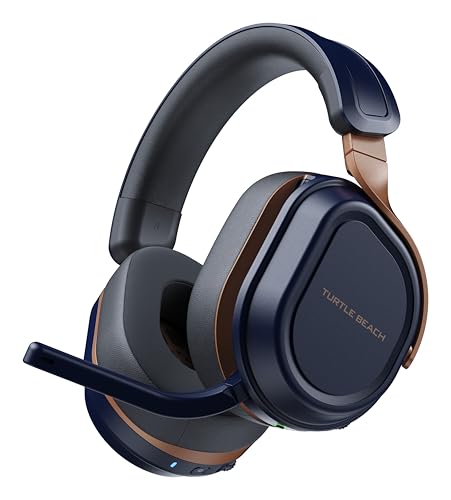 Turtle Beach Stealth 700 Wireless Gaming Headset forStandard7.87 x 6.81 x 3.7 inches0.9 poundsCheck on Amazon

Top 3 picks at a glance
What to Look for in a Gaming Headset
Before jumping into specific picks, it helps to understand which factors matter most for your situation:
- Driver type and sound signature: Closed-back dynamic drivers dominate gaming headsets. Some are tuned for punchy bass (good for explosions, bad for footsteps), others for a flatter response. If competitive FPS matters to you, lean toward neutral or slightly bright tunings.
- Connection type: USB wired, 2.4 GHz wireless dongle, Bluetooth, or 3.5mm analog each carry trade-offs. 2.4 GHz wireless offers the lowest latency without cables. Bluetooth is convenient for phones but generally unsuitable for gaming due to latency and codec limitations.
- Microphone quality: Detachable boom mics tend to outperform built-in arrays. Look for cardioid or supercardioid pickup patterns that reject keyboard noise.
- Comfort and build: Weight, clamping force, ear pad material (protein leather vs. fabric vs. memory foam), and headband suspension all affect long-session comfort. No single material is universally best.
- Platform compatibility: Some wireless headsets work across PC, PlayStation, and Xbox natively. Others require separate dongles or firmware updates. Verify before buying if you play on multiple platforms.
- Software and features: Proprietary EQ software, surround processing, and companion apps add value but also add complexity and potential bloat.
Reading a headset spec sheet: what matters and what does not
Gaming headset boxes are full of numbers, and only some of them predict how a headset will sound or feel. Here is how to interpret the most common ones.
- Driver size: larger drivers, such as 50 or 60 mm, are often marketed as better, but tuning and driver quality matter far more than diameter. Sony’s INZONE H9 II uses 30 mm drivers and is regarded as a strong performer, while some large-driver budget headsets sound muddy.
- Frequency response: figures like 20 Hz to 20 kHz or 10 Hz to 35 kHz describe the extremes a driver can reproduce, not how evenly it does so. Two headsets with identical ranges can sound completely different. Independent frequency response graphs are far more informative.
- Impedance and sensitivity: most gaming headsets are 32 ohms with high sensitivity, so any controller, laptop or phone can drive them. Higher impedance studio-style headphones may need a dedicated amplifier, as explained in our headphone amplifier guide.
- Sample rate and bit depth: 24-bit/48 kHz is more than enough for games. Claims of very high sample rates matter little in practice, since game audio is rarely produced above 48 kHz.
- Virtual 7.1 surround: this is processing, not extra drivers. It can help or hurt depending on the game, so treat it as an optional feature rather than a reason to buy.
- Battery life: manufacturers usually rate it at moderate volume with lighting and noise cancelling off. Expect less in real use, especially with RGB lighting enabled.
- Microphone pickup pattern: cardioid, supercardioid and hypercardioid mics focus on your voice and reject keyboard noise better than omnidirectional mics. This spec is worth reading closely if you stream or play team games.
Comfort tips for long sessions and glasses wearers
Comfort determines whether you actually enjoy a headset after the first week. A few adjustments make a large difference:
- Glasses: thin, flexible temple arms reduce pressure where ear pads press against them. Softer memory foam and fabric pads conform around frames better than firm leatherette, and a headset with lower clamping force is generally kinder to glasses wearers.
- Heat: leatherette pads seal well and boost bass but get warm. Fabric or velour pads breathe better in summer or on long sessions. Some headsets include both, and replacement pads are widely available for popular models.
- Clamping force: new headsets often loosen slightly over the first few weeks. If a headset feels tight, stretching it gently over a box or stack of books overnight can help, but never bend an all-plastic band hard enough to stress it.
- Headband position: on suspension-band designs, adjust the strap so weight sits on the top of the head rather than the forehead or crown. On padded bands, make sure the earcups center over your ears rather than pulling them down.
- Volume and breaks: keep game volume at a level where you can still hear normal speech when not playing, and take short breaks every hour or so. Your ears and your aim will both benefit.
Logitech G Pro X Series
The G Pro line has become something of a reference point for wireless gaming headsets. The current generation uses a Lightspeed 2.4 GHz connection that delivers genuinely low latency, and the Blue VO!CE mic technology lets you dial in broadcast-quality vocal processing without external hardware. The build feels premium without being excessively heavy, and the ear pads swap easily between leather and fabric options.
Where it falls short: sound quality out of the box leans slightly bass-forward, which you will want to correct with the included software. The headset is comfortable for average head sizes but people with larger heads may find the clamp force tight initially. It also carries a premium price, and the Blue VO!CE features require Logitech G HUB, which is not the lightest software suite.
This suits: competitive players who want a do-it-all wireless headset with a strong mic and don’t mind running companion software.
- Excellent wireless latency via Lightspeed
- Blue VO!CE mic processing is genuinely useful
- Swappable ear pads included in most bundles
- Bass-heavy default tuning requires EQ adjustment
- Premium pricing
- Relies on G HUB software for full features
SteelSeries Arctis Nova Series
SteelSeries redesigned the Arctis line around a new driver architecture called the Nova Acoustic System, and the result is noticeably cleaner and more detailed than older Arctis models. The ComfortBand headband suspension remains one of the most comfortable solutions in the industry, distributing weight so evenly that many people forget they are wearing it. The retractable ClearCast mic is convenient and sounds natural for voice chat.
The trade-off: the Nova line has expanded into many tiers (Nova, Nova Pro, Nova Ultra), and the differences between them can be confusing. The higher-end models add features like active noise cancellation or swappable battery systems that, while nice, push the price into territory where audiophile headphones plus a separate mic become a better value. The default sound tuning is bright, which some find fatiguing over long periods.
This suits: anyone who prioritizes comfort above all else and wants a headset that looks and feels modern without a massive software footprint.
- Outstanding comfort from the suspended headband design
- New Nova drivers are a real improvement over predecessors
- Retractable mic stays out of the way
- Product lineup is confusing with too many tiers
- Slightly bright tuning can cause listening fatigue
- Higher tiers are expensive relative to added features
HyperX Cloud III Series
HyperX has built its reputation on simple, comfortable headsets that do a lot right without fuss. The Cloud III continues that tradition with a comfortable memory foam design, a clear mic, and a plug-and-play wired connection with 3.5mm, USB-C and USB-A options that works on almost any device. No dongles and no battery anxiety, while the optional NGENUITY app adds EQ over USB. For people who want reliability and simplicity, this is hard to beat.
The limitation of the standard Cloud III is the cable, which some players dislike; HyperX sells wireless versions such as the Cloud III S at a higher tier. The sound is good but not exceptional, and its mic processing is simpler than on premium wireless competitors. However, the value proposition is strong, and the Cloud line has a strong reputation for durability.
This suits: budget-conscious gamers, console players who want a simple analog connection, and anyone who values durability and comfort over cutting-edge features.
- Plug-and-play 3.5mm works everywhere
- Excellent comfort with memory foam pads
- Proven durability track record
- Standard model is wired; wireless versions cost more
- Sound quality is solid but not class-leading
- EQ and spatial audio need the NGENUITY app over USB
Razer BlackShark V2 Series
The BlackShark V2 line has quietly become one of the most popular headsets in esports, and for good reason. It is lightweight, comfortable for hours, and has a tuning that emphasizes mid-range clarity and high-frequency detail over bass thump, which is exactly what you want when tracking footsteps. The detachable Superwide ClearVoice mic is genuinely one of the better mics on any gaming headset.
Downsides: the all-plastic construction, while keeping weight down, does not feel as premium as metal-framed alternatives. Razer Synapse software is required for full EQ and THX Spatial Audio, and Synapse has a history of bugs and resource usage that frustrates some users. The wireless variant (V2 Pro) costs significantly more and the feature jump is debatable at that price.
This suits: FPS-focused players who prioritize positional audio clarity and mic quality over bass response.
- Lightweight and comfortable for extended sessions
- Mid-forward tuning ideal for competitive FPS
- Excellent detachable boom mic
- Plastic build feels less premium
- Razer Synapse software required for best results
- Wireless model is a steep price jump
Audeze Maxwell Series
Audeze brought planar magnetic drivers to the gaming headset space, and the Maxwell line benefits enormously from that technology. The level of detail, separation, and bass quality is in a different class from virtually every dynamic-driver gaming headset. Bluetooth plus a 2.4 GHz wireless connection gives you dual-mode flexibility, and the battery life is exceptional.
The honest downsides: weight. Planar drivers are heavier than dynamic ones, and the Maxwell reflects that. At roughly 490 grams, it is one of the heaviest gaming headsets you can buy, and that matters over long sessions. The price is also a significant step above mainstream options. And if you already own high-end audiophile headphones, you might get better sound from those plus a dedicated mic setup.
This suits: audiophiles who game and want single-headset convenience without sacrificing sound quality, and who can tolerate the weight.
- Planar magnetic drivers deliver exceptional sound detail
- Very long rated battery life of up to 80 hours
- Dual wireless connectivity (2.4 GHz + Bluetooth)
- Notably heavy compared to dynamic-driver alternatives
- Premium pricing
- Not ideal for users who prioritize lightweight comfort
More gaming headsets worth considering in 2026
The five product lines above are the names most people start with, but several other headsets solve specific problems better: switching between a console and a PC, blocking out a noisy room, keeping the weight down, or getting studio-style sound from a simple wired connection. The six models below cover those needs, from budget wired to premium wireless.
Corsair HS80 MAX Wireless
The HS80 MAX is Corsair’s mid-range wireless headset for PC and PlayStation, and its strongest selling point is battery life for the tier. Corsair rates it at up to 65 hours over its 2.4 GHz Slipstream connection with RGB lighting off, about 24 hours with lighting on, and up to 130 hours over Bluetooth. It uses custom 50 mm neodymium drivers, weighs about 352 g, and has a broadcast-style omnidirectional boom mic that flips up to mute.
The design uses a floating fabric headband and plush memory foam pads, a comfort approach similar in spirit to SteelSeries’ suspension band. On PC, Corsair’s iCUE software adds EQ, Dolby Atmos support and Sonarworks SoundID, which builds a personalized tuning from a short listening test.
Who it suits: PC and PlayStation players who want long battery life, a comfortable fit and a broadcast-style mic without stepping up to premium pricing.
Strengths: long battery life, comfortable suspension headband, Dolby Atmos and SoundID personalization on PC, Bluetooth for phones and handhelds.
Drawbacks: the original HS80 MAX cannot use 2.4 GHz and Bluetooth at the same time; Bluetooth is basic SBC only; no wired mode; omnidirectional mic picks up more room noise than a cardioid design. A newer HS80 v2 MAX adds simultaneous dual wireless and a longer rated battery, so check which version you are buying.
Compared with the HyperX Cloud III, the HS80 MAX trades the simplicity of a cable for wireless freedom and software tuning. Compared with the Logitech G Pro X line, it is less focused on competitive esports and more on comfort and battery endurance.
Turtle Beach Stealth 700 Gen 3

The third-generation Stealth 700 is built for people who play on more than one platform. Its CrossPlay system uses two USB wireless transmitters, so you can leave one plugged into an Xbox or PlayStation and the other into a PC, then switch between them with a button on the headset. It also supports simultaneous 2.4 GHz and Bluetooth 5.2, with separate volume levels, so a phone call or Discord on a phone can mix with game audio.
Turtle Beach uses 60 mm Eclipse dual dynamic drivers, with separate elements for lows and highs, and rates battery life at up to 80 hours. The headset weighs around 400 g and uses a steel-reinforced headband with metal yokes, plus a flip-to-mute boom mic. Reviewers generally describe a lively, V-shaped tuning with strong bass and treble.
Who it suits: players who switch between an Xbox or PS5 and a PC and want one wireless headset for both, with long battery life.
Strengths: dual transmitters for console and PC switching, simultaneous Bluetooth mixing, long rated battery life, sturdy metal-reinforced build.
Drawbacks: heavier than most rivals here; the companion software has drawn criticism from reviewers; V-shaped tuning needs EQ if you want more neutral footstep clarity; cannot play two 2.4 GHz sources at once.
Next to the SteelSeries Arctis Nova range, which requires the right model for each console, the Stealth 700 Gen 3’s two-dongle approach is a simpler way to cover Xbox and PC in one purchase.
Sony INZONE H9 II

The INZONE H9 II, released in late 2025 and developed with esports team Fnatic, is the headset to consider if you play in a noisy room. It brings Sony’s noise cancelling expertise to a gaming design, with dual noise sensors and switchable noise cancelling, ambient and off modes. Unusually, the noise cancelling works in both wireless and wired modes.
It is also remarkably light for a premium wireless model, at about 260 g without the mic and around 273 g with it. The drivers are 30 mm carbon composite units shared with Sony’s WH-1000XM6 headphones, and the detachable cardioid boom mic uses AI-based noise reduction. Connections include a 2.4 GHz USB-C dongle, Bluetooth 5.3 and a 3.5 mm cable, with support for PC, PS5, Switch and mobile, and Sony’s 360 Spatial Sound can be personalized to your ear shape.
Who it suits: players in shared homes, dorms or loud rooms who want strong noise cancelling, low weight and a high-quality mic.
Strengths: effective noise cancelling, very light weight, comfortable fit with gentle clamping, good detachable mic, wired and wireless options.
Drawbacks: rated battery life of up to 30 hours is short next to rivals here; premium tier; no official Xbox wireless support.
Against the Audeze Maxwell above, the H9 II is roughly half the weight, which makes it the better choice for long sessions if you prioritize comfort and isolation over planar driver detail.
Logitech G Astro A50 (Gen 5)

The fifth-generation Astro A50 is the convenience pick for a living room or desk with several systems. Its base station accepts USB-C audio connections from up to three platforms, such as an Xbox, a PS5 and a PC, and PLAYSYNC lets you switch between them from the headset. The base also charges the headset magnetically, so it is always ready when you set it down.
The headset uses 40 mm PRO-G Graphene drivers, weighs about 363 g and supports 2.4 GHz wireless plus Bluetooth 5.2 with mixing. Logitech rates battery life at around 24 hours. Audio runs at up to 24-bit on PC and 16-bit on consoles, and Dolby Atmos and Windows Sonic spatial audio are supported.
Note the difference from the more expensive A50 X: the X model adds HDMI 2.1 passthrough and video switching, while this Gen 5 model switches audio only over USB-C. For most people with one display per system, audio switching is the useful part.
Who it suits: people who play on two or three platforms from one seat and want a headset that charges itself and switches sources without unplugging anything.
Strengths: three-platform switching, magnetic charging dock, graphene drivers, Bluetooth mixing, works with Xbox, PS5, PC and Switch.
Drawbacks: rated battery life is modest, the base station takes desk space, premium tier, and the mic is integrated rather than a detachable boom.
Compared with the Logitech G Pro X line covered above, the A50 targets multi-platform convenience rather than esports focus. If you only play on a PC, the G Pro X is simpler; if you switch between consoles, the A50 removes most of the friction.
Audio-Technica ATH-GL3

The ATH-GL3 is a wired, closed-back gaming headset from a company better known for studio headphones, and it shows in the tuning and the specs. It uses 45 mm drivers with a quoted frequency response of 10 Hz to 35 kHz, 45-ohm impedance and 98 dB/mW sensitivity, which means it can be driven well by a console controller, a laptop jack or a budget DAC. It weighs only about 230 g, or around 237 g with the mic attached.
The detachable mic is a hypercardioid electret condenser, a tighter pickup pattern than most gaming headsets use, which helps reject keyboard and room noise. Two detachable cables are included: a long split cable for PCs and a short four-pole 3.5 mm cable for controllers on PS5, Xbox and Switch. Ear pads and the headband pad are replaceable.
Who it suits: players who want accurate, studio-style sound, light weight and a directional mic in a simple wired headset that works on every platform.
Strengths: very light, natural tuning, hypercardioid mic, two cables for PC and console, replaceable pads, no software or battery to manage.
Drawbacks: wired only; no built-in surround processing; closed-back design gets warmer than open-back alternatives (Audio-Technica’s ATH-GDL3 is the open-back sibling).
The GL3 is the most natural alternative to the HyperX Cloud III for buyers who want a wired headset. It gives up some of the HyperX’s ruggedness for lighter weight and a more refined, less bass-heavy tuning.
beyerdynamic MMX 150 Wireless

beyerdynamic’s MMX 150 Wireless brings the German brand’s headphone experience to a mid-range wireless gaming headset. It uses 40 mm dynamic drivers, connects over a 2.4 GHz USB-C dongle, Bluetooth 5.3 with LC3 support, or a 3.5 mm cable, and is rated for up to 50 hours of battery life with fast charging. It weighs around 336 g.
The detachable META VOICE boom mic includes sidetone, so you can hear your own voice in the earcups and avoid shouting. beyerdynamic’s companion app offers a five-band EQ and ten sound presets. It works wirelessly with PC, PS5 and Switch, and with Xbox through the analog cable.
Who it suits: PC and PlayStation players who want a balanced, well-built wireless headset with a good mic and flexible connectivity.
Strengths: three connection modes, solid battery life, sidetone, app EQ, comfortable build from an established headphone brand.
Drawbacks: cannot use 2.4 GHz and Bluetooth simultaneously; Xbox support is wired only; less spatial-audio software than Razer or SteelSeries.
Compared with the Razer BlackShark V2 line, the MMX 150 adds Bluetooth and a wired fallback in one headset, while the BlackShark keeps the edge for competitive-focused tuning and very light weight.
Comparison of the additional picks
| Headset | Connection | Drivers | Approx. weight | Rated battery | Standout feature | Price tier |
|---|---|---|---|---|---|---|
| Corsair HS80 MAX Wireless | 2.4 GHz, Bluetooth | 50 mm dynamic | 352 g | Up to 65 h (RGB off) | Long battery, SoundID tuning | Mid-range |
| Turtle Beach Stealth 700 Gen 3 | 2.4 GHz (two dongles), Bluetooth | 60 mm dual dynamic | 400 g | Up to 80 h | Console and PC switching | Mid-range |
| Sony INZONE H9 II | 2.4 GHz, Bluetooth, 3.5 mm | 30 mm carbon composite | 273 g with mic | Up to 30 h | Noise cancelling, low weight | Premium |
| Logitech G Astro A50 Gen 5 | 2.4 GHz base station, Bluetooth | 40 mm graphene | 363 g | About 24 h | Three-platform switching dock | Premium |
| Audio-Technica ATH-GL3 | 3.5 mm wired | 45 mm dynamic | 237 g with mic | Not applicable | Studio-style tuning, hypercardioid mic | Budget to mid-range |
| beyerdynamic MMX 150 Wireless | 2.4 GHz, Bluetooth, 3.5 mm | 40 mm dynamic | 336 g | Up to 50 h | Three connection modes, sidetone | Mid-range |
Platform compatibility explained
Compatibility is the most common reason people return a gaming headset, especially wireless models. The rules are simpler than they look:
- PC: virtually every headset works, whether wired, USB or 2.4 GHz wireless. Software features such as EQ and spatial audio usually require the PC companion app.
- PlayStation 5: supports most USB and 2.4 GHz USB dongle headsets, plus any 3.5 mm headset through the DualSense controller. Bluetooth headsets do not connect to the PS5 directly.
- Xbox Series X|S: wireless headsets must use Microsoft’s Xbox Wireless protocol or an Xbox-specific dongle. A generic 2.4 GHz PC dongle will not work. Any 3.5 mm headset works through the controller jack. Many headsets sell separate Xbox and PlayStation versions, so check the exact model name.
- Nintendo Switch and Switch 2: 3.5 mm in handheld mode, USB dongles in the dock on many models, and Bluetooth audio on supported firmware, though Bluetooth latency is noticeable in fast games.
- Phones and handhelds: Bluetooth is the convenient route. Headsets that mix Bluetooth with 2.4 GHz let you take calls or chat while playing on another system.
How to choose by budget and use
| Your priority | What to look for | Good matches in this guide |
|---|---|---|
| Lowest cost, works everywhere | Wired 3.5 mm, comfortable pads, detachable mic | HyperX Cloud III, Audio-Technica ATH-GL3 |
| Competitive FPS | Mid-forward tuning, low weight, low-latency wired or 2.4 GHz | Razer BlackShark V2, Logitech G Pro X, ATH-GL3 |
| Long sessions and comfort | Suspension headband, low clamp, light weight | SteelSeries Arctis Nova, Sony INZONE H9 II, Corsair HS80 MAX |
| Console plus PC | Dual dongles, base station or a model built for your console | Turtle Beach Stealth 700 Gen 3, Astro A50 Gen 5 |
| Noisy room | Active noise cancelling, closed-back design, directional mic | Sony INZONE H9 II |
| Best possible sound | Planar drivers or a studio-tuned design | Audeze Maxwell, ATH-GL3 |
Setup tips for better game audio and voice chat
- Use one spatial audio system at a time. If a game has its own headphone mode or HRTF option, try it before enabling Windows Sonic, Dolby Atmos or a brand’s virtual surround. Stacking them smears positional cues.
- Tune EQ for footsteps carefully. A gentle cut in the deep bass and a small lift in the upper mids, roughly 2 to 5 kHz, often makes footsteps and reloads clearer. Large boosts cause fatigue and distortion.
- Turn on sidetone if your headset has it. Hearing your own voice prevents shouting and makes you sound calmer to teammates.
- Position the mic correctly. Place the boom about two finger-widths from the corner of your mouth, slightly off-axis to avoid breath noise. Most mic problems are placement, not hardware.
- Set mic levels in software, not just on the headset. In Windows or Discord, set input gain so your normal speaking voice peaks well below clipping, then enable noise suppression only if needed.
- Update firmware on wireless headsets. Updates frequently fix connection drops, battery reporting and console compatibility.
- Keep the dongle in line of sight. A 2.4 GHz dongle plugged into the back of a PC under a metal desk can drop out. A short USB extension that places it on the desk improves range and stability.
Frequently Asked Questions
Is a gaming headset better than audiophile headphones plus a separate mic?
For most people, yes and no. Dedicated gaming headsets offer convenience, integrated mic quality good enough for team chat, and features like low-latency wireless that are harder to assemble separately. However, if you are audio-focused and have the budget, a pair of quality open-back headphones plus a USB condenser mic will almost always sound better than any single gaming headset. The right answer depends on whether you value simplicity and portability or pure audio fidelity.
Do I need surround sound for gaming?
Virtual surround processing (THX Spatial, DTS Headphone:X, Windows Spatial Sound) can enhance positional awareness, but results vary wildly by implementation and by game. Many competitive players disable surround entirely and rely on stereo with good EQ. If you play story-driven games with cinematic audio design, surround processing can add immersion. It is a nice-to-have feature, not a must-have.
Is wireless worth the extra cost over wired?
For PC gamers who sit in a fixed position, a good wired headset can deliver identical audio quality for less money. Wireless becomes genuinely worthwhile if you play on consoles, move between rooms, or simply value the freedom of no cables. Modern 2.4 GHz wireless has essentially eliminated the latency concerns that plagued older Bluetooth headsets, so the experience is now very close to wired.
Will a wireless headset for PlayStation work on Xbox?
Usually not wirelessly. Xbox consoles require headsets that support the Xbox Wireless protocol or include an Xbox-certified dongle, so a PlayStation or PC wireless model will typically only work on Xbox through a 3.5 mm cable plugged into the controller. Multi-platform models such as the Turtle Beach Stealth 700 Gen 3 or the Astro A50 handle this with separate transmitters or a base station; otherwise, buy the Xbox-specific version.
Are open-back headsets good for gaming?
Open-back designs often sound more spacious and can make it easier to judge the direction and distance of sounds, and they run cooler on long sessions. The trade-offs are that they leak sound into the room and let outside noise in, so they suit quiet private spaces rather than shared rooms. Closed-back headsets are the better choice if others are nearby or you stream with a sensitive microphone.
How important is headset weight?
Weight matters more over long sessions than in a quick try-on. Headsets around 250 to 300 g, such as the Sony INZONE H9 II or the Audio-Technica ATH-GL3, tend to stay comfortable for hours, while models above 400 g rely heavily on headband design to spread the load. Clamping force and pad material can matter as much as the number on the scale.
Should I buy a headset with active noise cancelling?
Noise cancelling is worthwhile if you play near fans, air conditioning, traffic or other people. It reduces constant low-frequency noise so you can play at lower volume, which is better for your hearing. In a quiet room it adds cost and some battery drain without much benefit.
How long should a gaming headset last?
A well-built headset commonly lasts several years. Ear pads usually wear first, so models with replaceable pads, such as the ATH-GL3, extend useful life considerably. On wireless headsets, battery capacity slowly declines with charge cycles, so a headset with a long rated battery will still provide useful runtime after years of use.
Can I use simultaneous Bluetooth and 2.4 GHz for Discord on my phone?
Yes, if the headset supports simultaneous dual wireless. Models such as the Turtle Beach Stealth 700 Gen 3 and the HyperX Cloud Alpha 2 can play game audio over the 2.4 GHz dongle while a phone streams chat or music over Bluetooth, mixing both in your ears. Some headsets, including the original Corsair HS80 MAX and the beyerdynamic MMX 150, switch between the two modes instead, so check the specifications if this matters to you.
Does a USB headset sound better than a 3.5 mm one?
Not automatically. A USB headset contains its own digital-to-analog converter and amplifier, which bypasses noisy motherboard audio and enables software features like EQ and surround. A good 3.5 mm headset plugged into a clean source, such as a controller, a quality onboard audio chip or an external DAC, can sound just as good. If you hear hiss or buzzing from your PC’s headphone jack, a USB headset or an inexpensive USB DAC is the simplest fix.
Is it worth replacing ear pads instead of buying a new headset?
Usually, yes. Worn pads lose their seal, which reduces bass, changes the tuning and lets in more outside noise. Fresh pads often make an older headset sound close to new again, and they cost far less than a replacement. Check that the pads are designed for your exact model so the fit and acoustic seal are correct.
Final Thoughts
There is no single best gaming headset because priorities vary so much. If comfort is king, SteelSeries and HyperX deserve serious attention. If you play competitive shooters, the Razer BlackShark line gives you a tuning advantage out of the box. If you want a dependable, comfortable all-rounder that works on almost any device, the HyperX Cloud III is the safe bet, while the Logitech G Pro X 2 is the strongest wireless package. And if sound quality is your top concern and budget is flexible, the Audeze Maxwell offers a listening experience nothing else in the gaming space matches. Start with what matters most to you, and the right choice becomes clear.









