A 32GB flash drive is the workhorse of portable storage — large enough to hold a season of shows, a full software backup, or thousands of high-resolution photos, yet small and cheap enough that losing one is an inconvenience rather than a disaster. The problem is that the market has flooded with options that look identical in a product listing but diverge wildly in real-world performance, connector speed, and build quality. A buyer comparing a around $9 single drive against a $60 ten-pack is not just comparing prices; they are comparing USB generations, controller quality, and whether the housing will survive being tossed into a laptop bag alongside a set of keys.
What separates a good budget thumb drive from a disappointing one comes down to a handful of concrete factors: the USB generation (2.0 versus 3.0 versus 3.2 Gen 1), write speeds that sustain long file transfers without throttling, and physical durability like swivel covers or capless designs. This roundup compares published specs and aggregated owner feedback across eight popular 32GB options available in 2026, so you can match the right drive to the right use case without overpaying for features you will never notice.
As an Amazon Associate we earn from qualifying purchases at no extra cost to you.




Our Top Picks




Top 3 picks at a glance
Quick Picks
| Product | Best For | Price |
|---|---|---|
| SamData 2 Pack | Lowest-cost dual color option | Check on Amazon |
| PNY Turbo Attaché 3 5-Pack | USB 3.0 value in a small batch | Check on Amazon |
| Generic 10 Pack Swivel | Bulk distribution for schools or offices | Check on Amazon |
| SANDISK Cruzer Blade | Single reliable name-brand drive | Check on Amazon |
| PNY Turbo Attaché 3 10-Pack | Highest USB 3.0 quantity per dollar | Check on Amazon |
| SIMMAX Swivel | Cheapest single-drive entry point | Check on Amazon |
| Lexar A30E 3-Pack | Modern USB 3.2 Gen 1 with brand trust | Check on Amazon |
| PNY Attaché X 5-Pack | USB 3.2 Gen 1 speed at a mid-range price | Check on Amazon |
How We Compared
We narrowed this list using four criteria drawn from published specifications and patterns in owner reviews. First, interface generation: USB 3.0 and above deliver meaningfully faster sustained writes than USB 2.0, so drives stuck on the older standard only make sense when price or brand reputation justifies the trade-off. Second, value per unit for multi-packs, since the entire appeal of a ten-pack is spreading cost across many users. Third, physical design choices like swivel mechanisms that protect the connector without requiring a cap you will inevitably lose. Fourth, brand consistency — whether owners report the drive performing near its rated speed over months of repeated use rather than degrading after a handful of cycles.
The 8 Best 32Gb Flash Drive in 2026
SamData 2 Pack 32GB with LED Light
This two-pack is the entry point for buyers who need a basic 32GB flash drive with no frills beyond a confirmation LED that blinks during data transfer. The LED is genuinely useful in dim server rooms or when you need to verify activity without watching a progress bar. Two color options (black and blue) let you assign one drive to each project or person. The main limitation is that SamData does not publish a USB generation rating here, and owner feedback suggests transfer speeds sit firmly in USB 2.0 territory. Skip this if you routinely move files larger than a few gigabytes, since the wait will feel long compared to any 3.x drive on this list.
- LED activity indicator confirms transfers without screen monitoring
- Two-pack price undercuts most single-brand drives
- Performance consistent with USB 2.0, noticeably slower for large files
PNY Turbo Attaché 3 USB 3.0 5-Pack
The five-pack format hits a sweet spot for small teams, student groups, or families who each want a dedicated thumb drive without committing to a ten-unit order. PNY Turbo Attaché 3 drives use a USB 3.0 interface, which means sustained write performance roughly triple that of the 2.0 options here for large sequential transfers. The slim stick design slides into crowded laptop ports without blocking adjacent ones, a small but real convenience. The trade-off is PNY’s unadorned plastic housing, which owners describe as adequate but not rugged. If your use case involves rough handling — construction sites, outdoor events — you may want a metal-bodied or rubberized drive instead.
- USB 3.0 interface delivers substantially faster bulk transfers
- Slim profile fits in tight port layouts without blocking neighbors
- Plastic shell offers minimal impact protection
USB Drive 10 Pack Swivel Memory Sticks
At roughly five dollars per drive, this ten-pack targets buyers who need maximum unit count for a fixed budget — think teacher distributing homework drives, IT department stocking loaners, or a business handing branded storage to clients at a trade show. The swivel design is the standout feature here: a rotating cover protects the connector without a detachable cap. Owner reviews consistently praise the quantity-to-price ratio but flag that the generic branding means no published speed ratings and variable quality control across batches. If you need guaranteed USB 3.0 performance or vendor accountability, the known-brand options above justify their modest premium.
- Lowest per-unit cost of any option on this list
- Swivel cap eliminates the risk of losing a separate cover
- No published interface rating and inconsistent batch quality
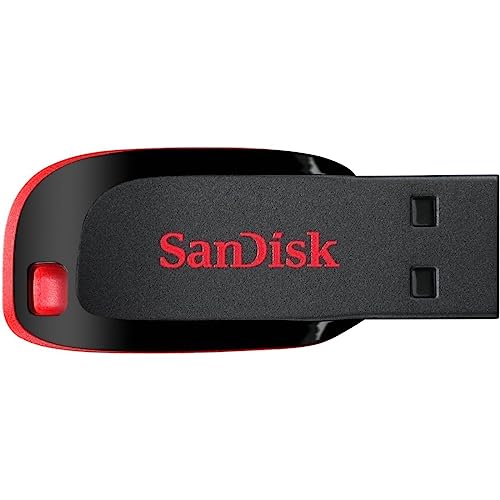
SANDISK Cruzer Blade USB 2.0
The Cruzer Blade is arguably the most recognizable budget 32GB flash drive ever made, and SanDisk’s long track record with NAND controllers gives it credibility that generic packs lack. Its compact, cap-less form factor is pocketable and durable enough for daily commuting. The honest limitation is USB 2.0: at this price, SanDisk is selling you reliability and brand assurance rather than speed. Owners who primarily store documents, small software installers, or photos for printing rarely complain. If you need to write a 20GB video file, look elsewhere. For simple, dependable single-drive use at an accessible price, it remains a safe default.
- SanDisk brand reputation and consistent NAND quality
- Ultra-compact form factor fits anywhere
- USB 2.0 ceiling limits large-file transfer speed
PNY Turbo Attaché 3 USB 3.0 10-Pack
Same USB 3.0 controller and form factor as the five-pack above, but at a per-unit cost that edges even closer to generic alternatives while retaining PNY’s quality-control consistency. This is the best option when you need ten fast drives and want a recognized manufacturer standing behind the product. Owners report solid sustained write performance across repeated large-file transfers, which matters more than peak burst speed quoted on spec sheets. The one caveat is that ten identical black drives can become difficult to tell apart without labeling, so budget a moment for a marker or colored stickers.
- USB 3.0 speed combined with bulk-pack value
- PNY brand backing and consistent performance across units
- Uniform black housing requires manual labeling for differentiation
SIMMAX 32GB USB 2.0 Swivel in Purple
As the cheapest single drive on this list, the SIMMAX serves buyers who need one thumb drive immediately and cannot justify even the modest premium of a SanDisk. The swivel design is a genuine usability plus at this price point, protecting the connector without a cap. The purple housing adds a splash of personality, useful in shared environments where visual identification matters. Naturally, USB 2.0 means slow writes for anything beyond small files, and the unnamed brand carries less warranty confidence. For occasional document transfer or a quick giveaway, it works. For regular use, the small additional cost of a 3.0 drive pays for itself in time saved.
- Absolute lowest single-drive price with a functional swivel cover
- Distinctive color helps with identification in shared settings
- USB 2.0 speed and limited brand warranty coverage
Lexar A30E USB 3.2 Gen 1 3-Pack
Lexar brings current-generation USB 3.2 Gen 1 connectivity to a three-unit pack, making it the best choice for buyers who want modern interface speed without committing to five or ten drives. The A30E line has a reputation among owners for meeting or exceeding rated sequential read performance, which matters when loading game installs, video projects, or large archives. The three-pack is ideal for a small household or a two-person workstation setup. The trade-off is that 32GB is modest for USB 3.2 Gen 1’s throughput — you may hit capacity before you fully leverage the interface’s bandwidth. If your files routinely exceed 30GB, consider a larger capacity from the same family.
- USB 3.2 Gen 1 represents the newest interface standard here
- Lexar’s consistent controller tuning yields reliable sustained reads
- 32GB capacity may bottleneck before the interface is fully utilized
PNY Attaché X USB 3.2 Gen 1 5-Pack
The Attaché X is PNY’s answer to the modern-interface demand, pairing USB 3.2 Gen 1 with a five-pack format at a price that keeps per-unit cost competitive with the Turbo Attaché 3 above. Owners highlight the updated connector as the key upgrade: on recent motherboards with USB 3.2 Gen 1 or Gen 2 ports, the Attaché X negotiates the faster link where the older 3.0 drive may fall back. The housing is slightly more angular and robust than the Turbo line. If you are buying drives for machines purchased in the last two years, this future-proofs your peripheral investment better than any USB 3.0 option on this list.
- USB 3.2 Gen 1 matches current and recent host port standards
- Five-pack keeps per-unit cost low while upgrading interface generation
- 32GB fill rate means the full speed potential is short-lived on large files
Buying Guide
USB Generation Is the Single Biggest Speed Factor
Interface generation determines your theoretical bandwidth ceiling. USB 2.0 tops out around 480 Mbps, which translates to roughly 30-40 MB/s in real sequential transfers. USB 3.0 raises that to 5 Gbps and real-world sustained writes in the 80-120 MB/s range. USB 3.2 Gen 1 uses the same electrical specification as 3.0 but guarantees the host handshake on newer platforms. When comparing 32GB flash drives, the jump from 2.0 to 3.x cuts large-file transfer time by more than half. A three-dollar-per-unit premium is often recovered within the first week of use if you handle files regularly.
Pack Size and Per-Unit Cost Matter More Than Total Price
A around $49 ten-pack at five dollars per drive beats a around $12 single drive if you need ten units. But if you only need one, that single drive costs less out of pocket even if its per-unit price is higher. Multi-packs also reduce packaging waste and let you designate drives by color, location, or project. When evaluating any 32GB flash drive listing, mentally divide total price by unit count before comparing against alternatives.
Physical Design Affects Longevity in the Field
Cap-less, swivel, and retractable designs each solve the lost-cap problem differently. Swivel drives rotate a metal or plastic shroud over the connector, adding a moving part that can wear after thousands of rotations. Cap-less drives rely on a recessed or shielded connector that stays exposed. For occasional desk use, either works fine. For drives that live in bags and pockets, owner feedback consistently favors swivel designs as the most cap-resistant without introducing fragility.
Our Verdict
Our top pick is the PNY Turbo Attaché 3 USB 3.0 5-Pack, which balances current-generation speed, recognized brand quality control, and a per-unit cost low enough to make it practical for small teams or households. The budget pick goes to the SIMMAX Swivel at around $9 — if you only need one drive for light tasks and want the cheapest functional option, it delivers without requiring you to buy a pack you will not use. That said, if every machine you connect to has USB 3.2 Gen 1 or Gen 2 ports, the Lexar A30E three-pack wins on interface compatibility, because the PNY Turbo Attaché 3 will negotiate down and leave performance on the table.
FAQ
Is a 32GB flash drive enough for gaming peripherals or firmware updates?
Yes. Most firmware files for keyboards, mice, and headsets are under 50 MB, and even a full RGB software suite with presets rarely exceeds 2-3 GB. A 32GB drive leaves ample headroom for multiple device updates, driver packages, and configuration backups simultaneously.
Why do two drives with the same USB 3.0 rating perform differently?
The USB specification sets the interface ceiling, but actual throughput depends on the NAND flash type, controller quality, and firmware tuning. A drive using slower TLC NAND with a budget controller will underperform its USB 3.0 rating in sustained writes, which is why owner-reported real-world numbers matter more than the interface label alone.
Should I buy a single drive or a multi-pack?
Buy a multi-pack if you need two or more units or want spares for travel, since the per-unit cost is almost always lower. Buy a single drive if you only ever need one device and prefer a higher-tier brand or interface that may not be available in pack format at the same price point.
Do these drives work with USB-C laptops?
All drives listed here use USB Type-A connectors. Most modern laptops with only USB-C ports ship with or include an adapter, and a basic Type-A to Type-C adapter adds negligible cost. If you want native USB-C without an adapter, you would need to look at a different product category entirely.