
Our Top Picks

The Short Answer
Yes, but with one major condition: a monitor bias lighting RGB strip is only worth it for your eyes if you configure it to emit a static, neutral color temperature that matches your environment, rather than using flashing, highly saturated, or rapidly changing colors. When asking is monitor bias lighting rgb strip worth it for eyes, the core benefit lies in reducing the extreme contrast between a bright display and a dark room.
If you set the strip to a solid, calibrated white or a soft, warm hue, it significantly reduces eye strain, headaches, and fatigue. However, if you run the strip on dynamic “rainbow” or music-sync modes while working or gaming, the constant color shifts can actually increase visual fatigue and cognitive load. For eye health, static lighting is the key; the RGB aspect is simply a bonus for personalization when you are not actively focusing on high-intensity tasks.
As an Amazon Associate we earn from qualifying purchases at no extra cost to you.

What You Actually Get
To understand what you get with an RGB bias lighting strip, it helps to look at the optical science. When you stare at a bright monitor in a dark room, your pupils constantly dilate and constrict as your eyes adjust to the average light level of your field of view. This biological struggle is known as transient adaptation, and it is a primary cause of computer-induced eye strain and dry eyes.
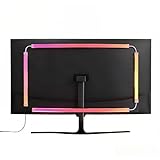
A bias lighting strip mounts directly to the back of your monitor casing, projecting a soft glow onto the wall behind the screen. This increases the ambient light in your peripheral vision without throwing light directly onto the screen surface, which would cause screen glare.
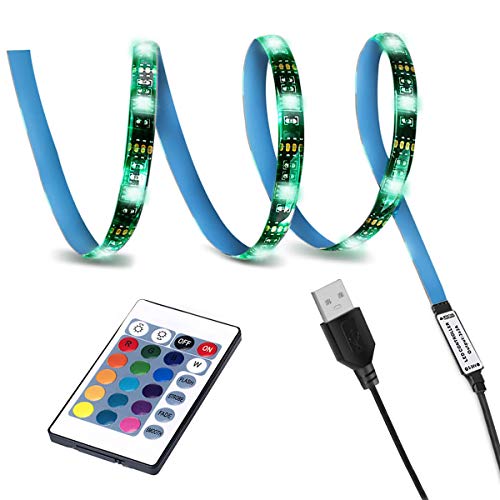
Hardware-wise, a typical setup consists of a flexible, adhesive-backed LED strip that draws power from a standard 5V USB port. These strips consume very little power, usually between 5 to 10 watts depending on their length and brightness settings. For a smaller 24-inch to 27-inch monitor, a basic 3.28-foot (1-meter) strip is often sufficient to cover the top or sides. For larger setups, such as a 32-inch display, a multi-sided kit with up to 9 feet of LED stripping is required to ensure an even, four-sided glow.
Depending on your budget, these kits offer different tiers of control:
- Basic RGB Strips (approx. $10 – $15): These budget kits use a simple inline controller or a wireless RF remote. They allow you to choose from a selection of static colors (such as red, green, blue, warm white, and cool white) and adjust the brightness manually.
- Screen-Sync RGB Kits (approx. $30 – $60): These advanced kits plug into your computer via USB and use desktop software or an external camera to read the colors on the edges of your screen in real time. The LEDs then dynamically mimic those colors on the wall behind the monitor, expanding your perceived field of view.
Pros
- Significant Reduction in Eye Strain: By raising the ambient light level directly behind the monitor, the contrast gap between the screen and the dark room is bridged. Your pupils can remain at a stable, comfortable size, reducing fatigue during long sessions.
- Improved Perceived Contrast: Thanks to an optical illusion, adding a light source behind your display makes the blacks on your monitor look deeper and the colors look richer. This is especially helpful for entry-level IPS and TN monitors that naturally struggle with low contrast ratios.
- Versatility for Work and Play: Unlike single-color white bias lights, an RGB strip gives you options. You can use a clean, focused white light for daytime office work, and then switch to a deep amber, purple, or screen-synced color profile for immersive gaming or movie nights.
- Low Power and Easy Installation: Drawing only 5V of power via USB, these strips plug directly into your monitor’s USB hub or your PC tower. The peel-and-stick adhesive backing makes installation a quick 10-minute DIY project.
- Cost-Effective Ergonomics: Compared to expensive ergonomic office upgrades, a basic RGB bias strip is incredibly affordable, with entry-level options starting under $15.
Cons
- Inaccurate White Balance on Cheap Strips: True bias lighting should ideally match the industry-standard D65 white point (6500 Kelvin). Cheap RGB strips struggle to create a pure, high-CRI (Color Rendering Index) white, often leaning too blue or too green, which can distort your eyes’ perception of color on the screen.
- Potential for Distraction: Dynamic modes, flashing lights, and music-rhythm modes are fun novelty features, but they are highly distracting. When used during work or fast-paced gaming, they can actually worsen eye strain rather than relieve it.
- Adhesive Degradation: Monitors generate heat, with back panels regularly reaching temperatures between 95°F and 110°F. Over time, this heat can dry out the cheap adhesive backing on budget LED strips, causing them to sag or peel off.
- Added Cable Clutter: Though powered by USB, the strip still adds another cable to your desk setup, requiring careful routing to keep your workspace looking clean.
Who Should Buy It
You should buy an RGB bias lighting strip if you frequently use your computer in a dark or dimly lit room and suffer from eye fatigue, dry eyes, or tension headaches. It is an excellent purchase for gamers and media consumers who want to increase immersion via screen-syncing technology. If you appreciate a clean, modern aesthetic and want to customize your workspace color palette to match your keyboard and mouse peripherals, an RGB strip offers the perfect blend of ergonomic utility and visual style.
Who Should Skip It
You should skip RGB strips if you are a professional photo editor, video colorist, or graphic designer. For color-critical work, the shifting hues or inaccurate white points of RGB LEDs will ruin your color perception. Instead, you should purchase a dedicated, calibrated 6500K white bias light with a high CRI rating of 90 or above. Additionally, if your home office is always brightly lit by natural sunlight or strong overhead fixtures, the subtle glow of a bias light will be completely washed out, making the purchase unnecessary.
Cheaper Alternatives
If you are not convinced that an RGB strip is the right fit for your workspace, there are several other ways to manage eye strain and ambient lighting. As we look at office design trends heading into 2026, many users are mixing and matching different light sources to find their perfect ergonomic balance.
| Alternative Option | Estimated Cost | Trade-off |
|---|---|---|
| around $15 – around $30 | Takes up physical desk space; can cause uneven lighting hotspots on the wall if not positioned carefully. | |
| around $30 – around $80 | Clips to the top of the monitor to illuminate your desk surface; does not provide the same rear-wall glowing effect to reduce contrast. | |
| around $8 – around $12 | Inexpensive and highly accurate for eye strain, but lacks the color customization and gaming immersion of RGB. | |
| around $10 – around $25 | Highly customizable color and brightness, but cannot target the specific space directly behind the monitor screen. |
FAQ
Is it better for your eyes to have a warm or cool light behind the monitor?
For daytime productivity, a cool white light (around 6500K) is ideal because it matches daylight and keeps you alert. However, for late-night use, a warmer, amber tone (around 2700K to 3000K) is much easier on the eyes, as it reduces exposure to blue light which can disrupt your sleep cycle.
Can I power a monitor LED strip directly from my PC or monitor USB port?
Yes, most standard bias lighting strips are designed to run on 5V USB power. A typical USB 2.0 or 3.0 port on your PC or monitor provides between 0.5A and 0.9A of current, which is plenty of power to run a standard 3-foot to 6-foot LED strip without issues.
Do screen-syncing RGB lights cause more eye strain?
They can if the transition speed is set too high. Rapidly flashing colors that match fast-paced action movies or shooters can cause visual fatigue. To protect your eyes, set the software sync transition speed to “smooth” or “slow” so the colors fade gently rather than flashing abruptly.
How do I choose the right length of LED strip for my monitor?
Measure the perimeter of your monitor. If you only want a top-and-sides glow (3-sided), a 3.28-foot (1-meter) strip works well for 24-inch to 27-inch monitors. If you want full 4-sided coverage on a larger 32-inch monitor, you will need a kit that is at least 6.5 to 9 feet in length to ensure the light spreads evenly to all four corners.
Related guides
- Best Ultrawide Gaming Monitors: Six Screens Sized Against Real Desks: 6 Compared (2026)
- Best Game Room Neon Lights: Ten Signs and Icon Lamps Compared: 10 Compared (2026)
- 10 Best 75% Hot-Swappable Mechanical Keyboards (October 2026)
- Best Mini-LED Monitor: Five Listings From a Renewed KTC to a 5K LG, Compared by Pixels and Ports (2026)









