Vertical monitor stacking has quickly transitioned from a niche power-user layout to a mainstream ergonomic solution for home offices and creative studios alike. By placing one screen directly above another, you save valuable horizontal desk real estate while keeping your primary focus centered. However, the most common roadblock when building this setup is choosing the wrong hardware—specifically, a support pole that is too short.
If your mounting pole lacks the necessary height, your top monitor will end up overlapping with the bottom one, or worse, you will be forced to slam your bottom monitor flat against your desk surface, ruining your ergonomics. This guide will walk you through exact pole measurements, how to calculate your specific space requirements, and how to select the right mount for your daily workflow.
As an Amazon Associate we earn from qualifying purchases at no extra cost to you.


Our Top Picks
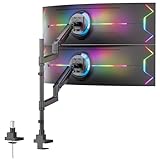
 VIVO Black Long Pole Mount Monitor Arm17 to 32" screens29.5 x 4.5 x 9 inches4.12 PoundsCheck on Amazon
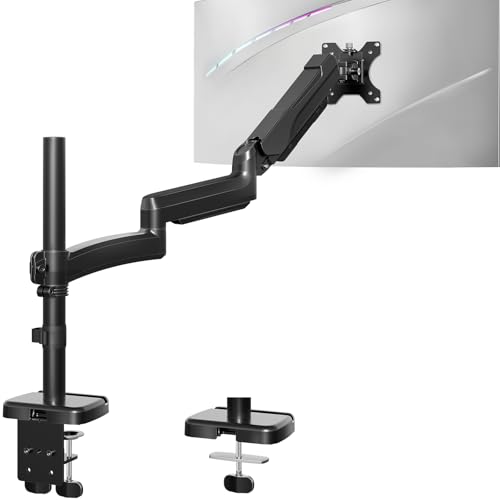
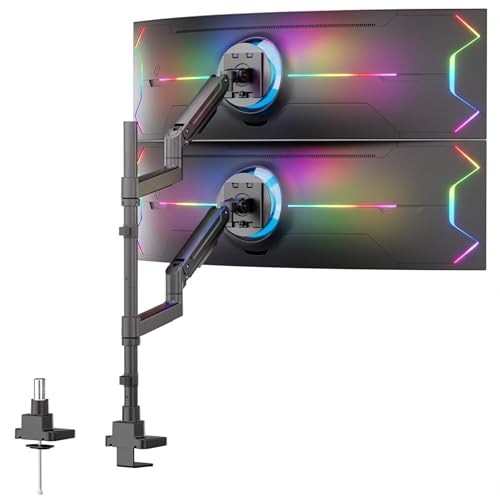
Top 3 picks at a glance
The Short Answer
To vertically stack two standard 24-inch to 27-inch monitors, you need a monitor arm mount pole that is at least 28 to 32 inches tall. This height provides enough clearance to raise the bottom monitor comfortably off your desk while leaving sufficient room to mount the top monitor directly above it without crowding.
If you plan to stack larger displays, such as dual 32-inch screens or a mix of a standard screen and a 34-to-49-inch ultrawide monitor, you will require an extra-tall pole measuring 35 to 39 inches. Standard monitor mount poles, which typically measure 14 to 18 inches, are designed strictly for side-by-side configurations and do not offer enough vertical travel for stacking.
Standard Sizes
When shopping for stacking mounts, you will generally encounter three categories of pole heights. The table below outlines these standard categories, their physical dimensions, and the monitor configurations they are best suited to support.
| Pole Category | Height (Inches) | Height (cm) | Best Suited For | Typical Price Range |
|---|---|---|---|---|
| Standard Stacking Pole | 24″ – 28″ | 61 cm – 71 cm | Dual 22″ to 24″ monitors; minimal desk clearance setups. | $35 – $50 |
| Tall / Long Pole | 28″ – 32″ | 71 cm – 81 cm | Dual 27″ monitors; single 32″ stacked over a laptop or 24″ display. | $40 – $70 |
| Extra-Tall / Ultrawide Pole | 35″ – 39″ | 89 cm – 99 cm | Dual 32″ monitors; 34″ to 49″ curved ultrawides stacked vertically. | $120 – $200 |
For budget-friendly setups, single-pole systems with manual clamp adjustments—such as the VIVO Black Long Pole Mount Monitor Arm (priced between around $39 and around $44) or the MOUNT PRO Single Long Monitor Arm (around $39)—offer excellent stability for displays up to 32 inches. If you are handling massive, heavy-duty displays like dual ultrawides, you will need to invest in premium gas-spring arm systems on reinforced poles, such as the Mount-It! Dual Ultrawide Monitor Desk Mount, which typically retail around $180.
How to Measure Your Space
To avoid the hassle of returning a mount that is too short, you should calculate your exact height requirements before making a purchase. Follow these five steps to determine the perfect pole length for your desk:
- Measure the physical height of your monitors: Do not rely on the diagonal screen size (e.g., 27 inches). Use a tape measure to find the actual physical height of both monitors from the top bezel to the bottom bezel. For example, a standard 27-inch monitor is usually about 15 inches tall.
- Determine your desired bottom clearance: Decide how high you want your bottom monitor to sit off the desk surface. For proper ergonomics, the bottom monitor should sit at least 4 to 6 inches off the desk so your neck remains in a neutral position.
- Calculate the cumulative height: Add the height of the bottom monitor, the height of the top monitor, and your desired bottom clearance together. For two 15-inch tall monitors with 5 inches of bottom clearance, your total vertical span is 35 inches (15 + 15 + 5 = 35).
- Account for the VESA mount offset: Look at the back of your monitors. If the VESA mounting holes are dead-center, your math remains simple. However, if the VESA holes are offset toward the bottom of the cabinet, the top monitor’s bracket will need to sit higher on the pole to support the screen, requiring you to add an extra 2 to 3 inches to your pole calculations.
- Factor in the tilt margin: Because a stacked top monitor must be tilted downward toward your face for comfortable viewing, the top edge of the screen will swing slightly forward and down, while the bottom edge pushes back toward the pole. Allocate an extra 1 to 2 inches of clearance on the pole to allow the arms to articulate and tilt without hitting each other.
By Room or Use Case
The ideal pole height and mount type can vary dramatically depending on your daily activities and how you interact with your workstation.
Home Offices and Remote Work
For general office tasks, spreadsheet management, and document editing, a standard dual 24-inch or 27-inch setup is highly effective. In these environments, ergonomics and clean desk space are the top priorities. A 28-to-31-inch pole, like the MOUNT PRO Single Long Monitor Arm, is an ideal fit. It allows you to position your primary email and browser window at a comfortable eye level while keeping your secondary communications, calendars, or reference documents stacked neatly above. This keeps your posture upright and prevents the slouching often associated with side-by-side multi-monitor setups.
Creative Studios and Video Editing
As we head into 2026, the trend of stacking ultra-wide displays has become a staple of high-end creative studios. Video editors, music producers, and graphic designers benefit immensely from having a massive, uninterrupted horizontal timeline on a bottom ultrawide screen, with secondary preview monitors or mixer panels stacked directly above. Because creative monitors are often heavy and require frequent repositioning, a heavy-duty, tall gas-spring system like the Mount-It! Dual Ultrawide Desk Mount is preferred. A 35-inch or taller pole ensures that a large 34-inch or 49-inch curved screen has enough vertical clearance to sit below a secondary display without crowding your workspace.
Gaming and Streaming Setups
Gamers and live streamers use stacked monitors to maximize their field of view without losing focus on the main action. The bottom screen is typically a high-refresh-rate gaming monitor placed at direct eye level, while the top screen displays chat feeds, broadcasting software (like OBS), or system performance metrics. Because gamers often sit in a slightly reclined position, the top monitor requires a steep downward tilt. A 32-inch pole provides the necessary room to lift the top screen high enough so it can be angled downward at 15 to 20 degrees without overlapping the lower gaming display.
Common Sizing Mistakes
To ensure a smooth installation, be on the lookout for these common pitfalls when selecting and installing your stacking mount:
- Buying a standard 16-inch dual-arm mount: Many buyers purchase a standard dual monitor mount, assuming the arms can simply be maneuvered into a stacked position. Standard poles are far too short for this; you will end up with two monitors that can only be positioned side-by-side or slightly overlapped.
- Ignoring weight distribution and desk material: A tall pole acts as a lever. If you mount two heavy monitors high up on a 39-inch pole, it exerts significant rotational force on your desk mount. If your desk is made of thin particle board, glass, or hollow-core paper (like many budget flat-pack desks), the clamp can warp or break the desktop. Always use a metal reinforcement plate or choose a grommet mount for tall setups.
- Forgetting cable length requirements: As your monitors climb higher up a vertical pole, the standard 3-foot or 5-foot cables that came with your displays will no longer reach your computer on the floor. When purchasing a tall pole mount, remember to purchase 10-foot DisplayPort, HDMI, and power cables to route cleanly through the pole’s cable management clips.
FAQ
Can I stack two 27-inch monitors on a standard 16-inch monitor pole?
No, you cannot stack two 27-inch monitors on a standard 16-inch pole. A standard 27-inch monitor has a physical cabinet height of roughly 15 inches. To stack two of them vertically, you need at least 30 inches of vertical screen space, plus additional height for desk clearance and mounting brackets. A 16-inch pole will only allow you to mount the screens side-by-side.
How do I know if my desk can support a tall stacking monitor mount?
Your desk can safely support a tall stacking mount if it is constructed from solid wood, thick plywood, metal, or dense MDF that is at least 1 inch thick. Avoid mounting tall poles to glass desks or hollow-core desks (such as paper-honeycomb filled tabletops) unless you use a wide steel reinforcement plate to distribute the clamping force across a larger surface area.
Is it better to use a single tall pole or two separate mounts for stacking?
A single tall pole is generally better because it keeps your desk clutter to a minimum with only one clamp footprint. It also ensures perfect vertical alignment. However, if your monitors are exceptionally heavy (over 20 pounds each) or if you want completely independent depth adjustment for both screens, using two separate mounts—one standard arm and one extra-tall single arm—can offer more flexibility.
What is the ideal ergonomic height for a stacked monitor setup?
For optimal ergonomics, your primary (bottom) monitor should be positioned so that the top third of the screen sits directly at your horizontal eye level when you are sitting upright. The secondary (top) monitor should be mounted directly above it, tilted downward at an angle of 10 to 15 degrees, allowing you to view its contents by glancing upward with your eyes rather than tilting your neck backward.
Related guides
- Best Mini-LED Monitor: Five Listings From a Renewed KTC to a 5K LG, Compared by Pixels and Ports (2026)
- Curved vs Flat Monitor: Which to Choose for Your Desk
- 1440p vs 4K Monitor: Which Should You Choose?
- Best Curved Monitor: Seven 24 to 34 Inch Picks Compared by Curve Radius, Resolution and Inputs (2026)