
Tempered glass desks elevate any home office or executive suite with sleek, modern minimalism. However, their defining aesthetic feature—transparency—is also their biggest organizational liability. Unlike wooden or laminate desks that easily hide heavy power strips and dangling surge protectors behind solid modesty panels, glass tops expose every tangled cord, power brick, and monitor wire from every angle in the room. Drilling into tempered glass is physically impossible without shattering the panel, making standard screw-in raceways completely unusable.
Finding the best under desk cable management raceway for glass desk setups requires non-invasive mounting solutions like heavy-duty padded clamps or industrial-grade adhesive channels. In this guide, updated for 2026, we review and rank top-rated raceways and trays that keep your glass desktop spotless, protect delicate surface edges, and conceal ugly wire clutter without requiring a single power tool.
As an Amazon Associate we earn from qualifying purchases at no extra cost to you.






Our Top Picks



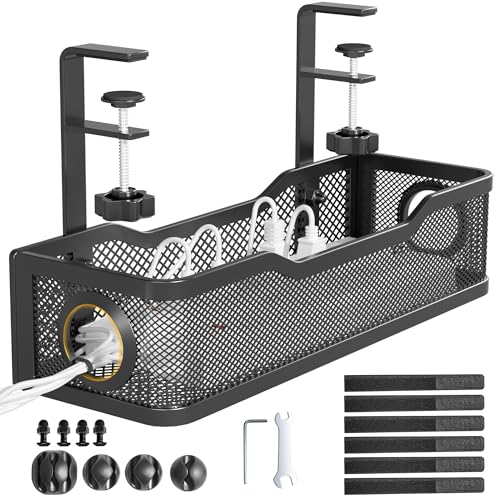
Top 3 picks at a glance
Quick Picks
| Product | Best for | Price |
|---|---|---|
| Scanfield Under Desk Cable Management Tray, No-Screw, 17-Inch, 2-Pack White | Minimalist White Glass Desks | Check on Amazon |
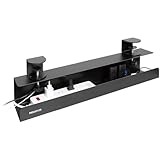
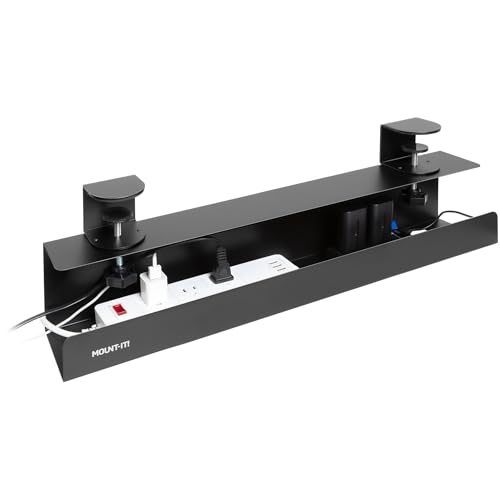
| Mount-It! Under Desk Cable Management Tray – Clamp-On No-Drill Metal Cable Management Tray (23.6” Black) | Heavy Power Strips & Surge Protectors | Check on Amazon |
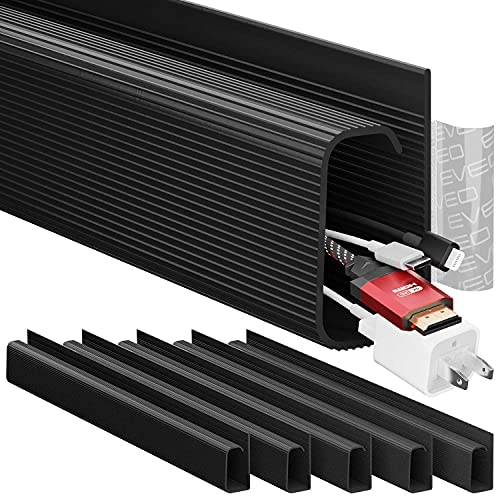
| EVEO Cable Management Under Desk Kit (6 Units, 96” J Channel 6X16 – Black) | Frameless Glass Edge-to-Edge Routing | Check on Amazon |
| VIVO Black 17 in Under Desk Cable Management Tray (DESK-AC06-1C) | Compact Single-Monitor Workstations | Check on Amazon |
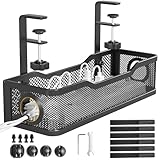
| Cotohim Under Desk Cable Management Tray (Black, 35.8″×5.6″) | Full Cable Concealment & Fabric Flex | Check on Amazon |
| Under Desk Cable Management Tray Black, Cinati Wire Organizers No Drill | Quick Clamp Budget Setups (Black) | Check on Amazon |
| Bounaspace No Drill Under Desk Cable Management Tray with Clamp | Wide Surge Protectors on a Budget | Check on Amazon |
| VIVO Black Clamp-on 17 in Cable Management Tray (DESK-CM6L-B) | Thin Glass Tops Needing a Clamp-On Steel Tray | Check on Amazon |
How We Compared
Selecting the ideal cable raceway for glass furniture demands strict criteria. Because glass surfaces cannot accept screws, we focused exclusively on clamp-on brackets, adhesive J-channels, and hanging fabric baskets that preserve glass integrity. We evaluated each design based on clamp padding material (rubber or EVA foam to prevent glass scratches), tray depth to hold bulky power adapters, and total load capacity.
We also analyzed aesthetics. Since glass reveals the underside of your desk, we evaluated how effectively each raceway masks internal wire clutter. Units with dense wire meshes, solid backing plates, or opaque fabric covers scored higher for visual tidiness. Finally, we verified structural stability under daily use to ensure no tray slips or puts unnecessary stress on glass edges.
The 8 Best Picks
Scanfield Under Desk Cable Management Tray, No-Screw, 17-Inch, 2-Pack White
The Scanfield 2-Pack offers a clean, drill-free organization system tailored for light-colored glass desks. Instead of clamps, these two 17-inch trays use a strong self-adhesive backing that sticks to the underside of the glass or to a metal frame rail, with a 3.5-inch interior sized for power strips, chargers and bundled cords. The dual-tray layout gives you 34 combined inches of storage, ideal for separating high-voltage power strips from delicate signal cables across your desk frame.
- Pro: Adhesive mounting needs no clamps, screws or desk edge, so it suits frameless glass.
- Pro: Two 17-inch trays allow modular placement along wide desk frames.
- Con: Adhesive pads and the tray stay visible from above on clear glass, and the plastic build suits light loads rather than heavy power bricks.
Skip this option if you rearrange your setup often, since adhesive trays are hard to reposition.
Mount-It! Under Desk Cable Management Tray – Clamp-On No-Drill Metal Cable Management Tray (23.6” Black)
For demanding glass desk setups loaded with wide surge protectors and heavy laptop power bricks, this 23.6-inch steel tray from Mount-It! delivers maximum stability. The clamp-on mechanism features thick protective padding designed specifically for glass and standing desk frames. Its extra-wide profile easily holds oversized power blocks side-by-side, while open side slots make routing thick display cords effortless.
- Pro: Generous 23.6-inch span accommodates wide, multi-outlet power strips.
- Pro: Heavy-gauge metal frame holds substantial weight without flexing.
- Con: Sits in a higher price tier than basic wire baskets.
Skip this pick if you have a small glass writing desk under 40 inches wide where space is tight.
EVEO Cable Management Under Desk Kit (6 Units, 96” J Channel 6X16 – Black)
If your glass desk has steel support beams underneath, the EVEO 6-piece J-channel kit provides an ultra-clean, adhesive-based solution. Offering 96 total inches of J-channel raceway across six 16-inch segments, this kit sticks directly to the metal support frame below the glass. The top-loading J-shape allows you to slide cords in and out instantly without loosening clamps or hardware.
- Pro: Strong self-adhesive backing mounts flush to metal frame components.
- Pro: Includes 96 inches of total channel for complete perimeter cord coverage.
- Con: Cannot stick directly to see-through glass without showing adhesive tape lines.
Skip this kit if your glass desktop is completely clear with no hidden metal frame underneath.
VIVO Black 17 in Under Desk Cable Management Tray (DESK-AC06-1C)
VIVO’s single 17-inch DESK-AC06-1C tray is an economical, industrial-grade steel raceway built for straightforward cord control. It is designed to screw into the underside of a desk, so on a glass desk it only works if you can bolt it to a metal frame rail. Its deep mesh trough keeps power strips off the floor and prevents cords from dangling beneath modern glass workstations.
- Pro: Sturdy commercial-grade steel construction supports dense wire bundles.
- Pro: Compact 17-inch footprint fits narrow home office desks easily.
- Con: No clamps in the box; it is a screw-mount tray.
Skip this product if you need a complete clamp-and-play solution out of the box without extra accessories.
Cotohim Under Desk Cable Management Tray (Black, 35.8″×5.6″)
The Cotohim fabric cable tray completely solves the aesthetic challenge of glass desks by fully enclosing cord clutter inside a flexible, solid black sling. Spanning an impressive 35.8 inches by 5.6 inches, this high-density flame-retardant fabric tray clamps securely onto desk edges. It masks messy power bricks and tangled cables from top view while offering flame-resistant protection for household safety.
- Pro: Solid fabric shell entirely hides wire visual clutter beneath glass tops.
- Pro: Massive 35.8-inch length spans almost the entire width of standard desks.
- Con: Fabric material can sag slightly if overloaded with ultra-heavy adapters.
Skip this model if you frequently swap out peripherals and prefer instant open-basket access.
Under Desk Cable Management Tray Black, Cinati Wire Organizers No Drill
Cinati’s black clamp-on wire organizer delivers zero-damage cable management at an accessible price point. Built with soft rubber-padded clamps that grip glass desk frames tightly without scratching, this tray requires no tools or drilling. Its ventilated wire grid promotes airflow around high-wattage power bricks while preventing power cords from sagging into view underneath your glass top.
- Pro: Rubber-padded clamp mechanism protects sensitive glass and powder coatings.
- Pro: Excellent airflow ventilation prevents power transformer heat buildup.
- Con: Compact single-tray length limits capacity for dual-monitor setups.
Skip this option if you need to conceal more than one large surge protector under your desk.
Bounaspace No Drill Under Desk Cable Management Tray with Clamp
Bounaspace’s no-drill steel tray is a budget-friendly step up from the Cinati, with a 15.7-inch powder-coated mesh body wide enough for a larger surge protector. Two clamps attach it without drilling, and the brand lists it for glass, wood and marble desktops from 0.4 to 2.4 inches thick, with a recommended load of up to 10 pounds. Because the clamp range starts at 0.4 inches, measure thin glass tops first; on a desk with a metal frame rail, clamping to the rail is the safer option.
- Pro: Budget-friendly clamp-on tray with no drilling required.
- Pro: Wider 15.7-inch body fits larger surge protectors than compact trays.
- Con: Open wire structure offers no visual masking for colored cables.
Skip this tray if your glass top is thinner than its minimum clamp range and has no frame rail to grip.
VIVO Black Clamp-on 17 in Cable Management Tray (DESK-CM6L-B)
VIVO’s DESK-CM6L-B is the clamp-on answer to the screw-mount VIVO tray above, built for desks you cannot drill. Its 17-inch steel tray attaches with padded dual C-clamps that VIVO rates for desktops from 0.2 to 2 inches thick, and it holds up to 11 pounds. A closed back section hides the power strip from the front, while the open front lets warm adapters breathe.
- Pro: Padded clamps reach down to thin glass tops that many clamp trays cannot grip.
- Pro: Steel build with a closed back hides the power strip while keeping airflow.
- Con: A single 17-inch tray holds one standard power strip, so wide setups may need two.
Skip this tray if you need to conceal several large power bricks across a wide desk.
More No-Drill Cable Management Options for Glass Desks
Clamp-on trays solve the power strip problem, but a clean glass desk usually needs more than one piece of hardware. Competitor roundups consistently add three other categories: adhesive-mount trays for desks without a usable edge, enclosed fabric trays for full concealment, and clamp-on cable spines that tame the drop from desk to floor. These five additions fill those gaps.
Scandinavian Hub Under Desk Cable Management Tray, No Drill for Glass Desk (Single 17″)

This single 17-inch carbon steel wire tray is one of the few listings explicitly designed to go straight onto glass. It ships with both screws and an adhesive mounting option, and Scandinavian Hub notes that the no-drill adhesive route lets you attach it to the underside of a glass desk without any hardware. The tray measures about 17 by 3.5 inches, deep enough for a standard power strip plus a couple of chargers, and it is sold in black, white and as a two-pack.
Adhesive mounting is the answer when a clamp is not an option: frameless glass tops, desks with a thick rolled edge, or tops where the clamp jaw would show from the front. The trade-off is visibility. On clear glass, the adhesive pads and the tray itself are visible from above, so place it toward the back edge, behind the monitor line, where your eye rarely lands. Clean the glass thoroughly with rubbing alcohol before mounting and let the adhesive cure before loading the tray.
Who it is for: frameless or edge-less glass desks where clamps will not fit.
Strengths: works directly on glass, sturdy powder-coated steel, screw option if you later move it to a wooden desk.
Drawbacks: adhesive is visible through clear glass, harder to reposition than a clamp, and weight should be kept modest to protect the bond.
Compared with the picks above: like the Scanfield 2-Pack, it mounts with adhesive where there is no edge to grip, in a sturdier steel wire body, but for desks with a frame or overhang, the clamp-on Mount-It! remains easier to install and remove.
Univivi No Drill Under Desk Cable Management Tray (36 Inch)

The Univivi 36-inch tray is a long fabric sling that clamps on without tools, and the brand lists it as suitable for wood, glass and metal desktops. It measures roughly 36 by 5.5 by 5.5 inches, built from thick 600D Oxford fabric that is flame retardant, with a bottom support that helps it hold its shape under heavier loads. Built-in straps hold power strips and adapters in place, and the tray unfolds for access when you need to add a charger.
For glass desks, its main appeal is concealment. Like the Cotohim tray above, the opaque fabric hides power bricks and cable tangles from anyone looking down through the desktop, which open wire baskets cannot do. The extra depth leaves room for oversized surge protectors and laptop power bricks side by side. It can also be screwed in if you later move to a wooden desk. Univivi does not publish an official clamp thickness range, so measure your glass and check the listing photos before buying.
Who it is for: users with several large power bricks who want everything fully hidden.
Strengths: full-length concealment, deep 5.5-inch profile, flame-retardant fabric, internal straps.
Drawbacks: fabric traps more heat around power bricks than mesh, clamp range is not officially specified, and its length needs a wide desk.
Compared with the picks above: it is the most direct alternative to the Cotohim tray, with similar length and a deeper sling. Choose it if your adapters are bulky; choose a steel tray like the VIVO clamp-on tray if ventilation matters more than concealment.
Xpatee Upgraded Under Desk Cable Management Tray (No Drill, No Screws)

Xpatee’s clamp-on metal tray is a budget-friendly alternative to the Cinati tray, built around C-clamps with anti-scratch mats on the jaws. The brand markets it for wood, glass and other desk materials, and the kit includes cable clips and ties for tidying the cords that run to the tray. The open mesh design lets warm power bricks breathe, and the clamps can slide along the edge if you rearrange your setup.
On a glass desk, the anti-scratch padding is the feature that matters most. Check that both the upper and lower jaw pads sit flat against the glass, and tighten only until the tray stops wobbling. Over-tightening any clamp on glass concentrates pressure on a small spot, which is the scenario you want to avoid. Xpatee offers several variants, including longer two-pack versions and models rated for thicker desktops, so compare clamp ranges against your glass thickness before ordering.
Who it is for: budget setups with a single power strip and a desk with a clean, clampable edge.
Strengths: no tools needed, padded clamps, ventilated mesh, cable clips and ties included.
Drawbacks: open mesh shows cables from above, single-tray capacity is modest, and clamp range varies by variant.
Compared with the picks above: it sits in the same budget tier as the Cinati and Bounaspace trays. Pick whichever clamp range best matches your desk; neither hides cables like the fabric options.
DeskLogics Clamp-On Cable Management Spine

A tray handles what sits under the desk, but the bundle of cables dropping from the desk to the wall outlet is often the most visible mess on a glass setup. The DeskLogics Clamp-On Cable Management Spine is a vertebrae-style chain, about 54 inches long, that clamps to the desk edge and runs down to the floor. The listing describes a C-clamp that fits desktops from 0.4 to 2 inches thick, with silicone padding on the jaws designed to grip slippery surfaces such as tempered glass without scratching.
The segmented spine bends and adjusts in length, so it suits both fixed glass desks and glass-top standing desks that move up and down. Cables clip into the links, turning a loose tangle into a single neat column. Be careful to buy the clamp-on version shown here: DeskLogics also sells magnetic and screw-in spines that need a steel frame or a wooden top and will not work on glass.
Who it is for: any glass desk where cables run visibly from the desk edge to the floor, especially standing desks.
Strengths: no-drill clamp with silicone padding, adjustable length, works with sit-stand desks.
Drawbacks: does not hide power strips on its own, and the clamp needs an edge within its thickness range.
Compared with the picks above: it complements rather than replaces a tray. Pair it with the Mount-It! or Cotohim tray for a complete under-desk and desk-to-floor solution.
VELCRO Brand ONE-WRAP Cable Ties (8 Inch, 100 Pack)

Every tray and spine works better when the cables going into it are bundled first. VELCRO Brand ONE-WRAP ties are reusable hook-and-loop straps, 8 inches long and half an inch wide, with one end that loops back on itself so the strap stays attached to the cable. Unlike zip ties, they can be undone and reused when you swap a monitor or add a peripheral, and they will not cut into cable jackets if pulled tight.
On a glass desk, bundling matters more than on a solid one because every stray loop is visible from above. Group cables by destination (monitor cables together, peripheral cables together, power together), wrap each group every 8 to 12 inches, and route the bundles along the steel frame or the back edge before they drop into the tray. The black color also blends with most dark frames and spines.
Who it is for: everyone, as a finishing step for any of the trays above.
Strengths: reusable, gentle on cables, large pack covers a full setup.
Drawbacks: does not mount anything by itself, and black straps contrast with white cables on light setups.
Compared with the picks above: it costs a fraction of any tray and makes each one look tidier, so it belongs in the cart alongside whichever raceway you choose.
Buying Guide
1. Mounting Mechanisms: Clamps vs. Adhesives on Glass
When selecting a cable raceway for glass furniture, traditional wood screws are completely out of the question. You must choose between C-clamp brackets and self-adhesive channels. Clamp-on raceways are generally superior for glass desks because they distribute mechanical pressure over padded pads without applying direct force to the glass panel. Always ensure clamp jaws feature EVA foam or rubber liners. If using self-adhesive J-channels, mount them directly to the steel frame support beams running under the glass rather than the glass pane itself, as adhesive tape backing visible through clear glass creates an unattractive look.
2. Weight Capacity and Structural Rigidity
Glass desks often support sophisticated multi-monitor setups, docking stations, and studio lighting. The combined weight of a heavy-duty surge protector, multiple 65W to 130W laptop power bricks, and thick display cables can easily exceed 8 to 10 pounds. Steel wire trays and heavy-gauge metal channels offer high structural rigidity, keeping heavy power equipment from sagging. Fabric slings provide lighter structural weight and flexible capacity, but require tight tension adjustments to prevent bottoming out under heavy transformers.
3. Visual Profile and Cord Accessibility
Because glass is transparent or semi-translucent, visual concealment is a major factor. Open wire baskets provide maximum ventilation—which keeps power supplies running cool—but they leave brightly colored cables visible from above. Solid J-channels and fabric trays offer total opacity, concealing ugly wire nests entirely. Choose open wire designs if thermal management is your priority, or fabric raceways if you want absolute visual cleanliness beneath your glass desk top.
4. Glass Thickness and Clamp Range
Clamp-on trays and spines list a range of desktop thicknesses they can grip, commonly around 0.4 to 2 inches. Tempered glass desktops are usually much thinner than wooden tops, so the question is often whether the clamp closes far enough rather than whether it opens wide enough. Measure your glass with a ruler or caliper before buying, and add the thickness of any frame lip the clamp will also grip. If the glass sits on a metal frame, clamping to the frame rail rather than the glass itself is generally the safer option, because the frame takes the load and the glass is not stressed at all.
5. Concealment vs. Ventilation
Power bricks and surge protectors produce heat, and enclosing them in fabric limits airflow. Open steel mesh trays keep everything cool but leave cables visible through the glass. A good compromise is to put the warmest items (laptop chargers and large power bricks) in a mesh tray at the back, where they are least visible, and use a fabric tray or opaque channel for cable slack and smaller adapters. Whatever you choose, do not cover a surge protector’s indicator lights or pack bricks so tightly that they touch.
Additional Picks Compared
| Product | Mount type | Material | Hides cables from above | Best for | Price tier |
|---|---|---|---|---|---|
| Scandinavian Hub Single 17″ (No Drill) | Adhesive or screw | Powder-coated steel wire | Partly | Frameless glass with no clampable edge | Budget |
| Univivi 36″ No Drill Tray | Clamp or screw | 600D flame-retardant fabric | Yes | Bulky power bricks, full concealment | Budget to mid-range |
| Xpatee Upgraded Tray | Padded C-clamp | Metal mesh | No | Single power strip on a budget | Budget |
| DeskLogics Clamp-On Spine | Padded C-clamp | ABS, steel and TPR | Covers the floor drop | Desk-to-floor cable runs, standing desks | Budget |
| VELCRO Brand ONE-WRAP Ties | Wraps around cables | Hook-and-loop | Bundles only | Finishing any setup | Budget |
Step-by-Step: Installing Cable Management on a Glass Desk
- Clear and clean. Unplug everything, remove devices from the desktop and wipe the glass and frame with rubbing alcohol so pads and adhesives seat properly.
- Plan the layout. Decide where the power strip will sit (usually rear center or behind the main monitor) and where cables will drop to the floor, ideally at a back leg close to the wall outlet.
- Mount the tray to the frame first. If your desk has a metal rail under the glass, clamp or attach the tray there. Only clamp to the glass edge when there is no frame option, and only with padded jaws.
- Tighten gradually. Hand-tighten clamps evenly until the tray stops moving, then stop. Check that no bare metal touches the glass anywhere.
- Load the power strip and bricks. Place the heaviest items over the clamps or supports, not in the middle of an unsupported span.
- Bundle and route. Group cables with reusable ties, run them along the frame or back edge, and leave a small service loop at each device so you can move it without unplugging.
- Add the drop. Run the single power lead and any network cables from the tray down a cable spine or along a desk leg to the floor.
- Check from the user’s view. Sit down and look through the glass. Shift anything visible behind the monitor line or the frame rail.
Tricks for a Cleaner Look Through Clear Glass
- Match colors. White trays, white cables and white ties disappear against a white frame; black does the same on dark frames. Mixed colors are what make glass setups look messy.
- Use the monitor line. Anything directly behind your monitor’s base is hidden from your seated position. Route cables there first.
- Shorten cables. Excess length is the main source of visible tangles. Use shorter display and USB cables where possible, and coil and bundle the slack you cannot avoid.
- Go wireless where it makes sense. A wireless keyboard, mouse and charging pad remove several cables from the desktop entirely.
- Consider frosted film. If you cannot hide the hardware, a strip of frosted window film along the back few inches of the underside of the glass obscures it while keeping the desk’s look.
Recommended Combinations by Setup Type
- Small glass writing desk, laptop only: one budget clamp tray (Cinati or Xpatee) for the charger and a few reusable ties. Route the single power lead down the back leg nearest the outlet.
- Glass desk on a metal frame with one or two monitors: the Mount-It! or VIVO clamp-on tray attached to the rear frame rail, adhesive J-channel such as the EVEO kit along the frame for display cables, and a spine for the floor drop.
- Frameless or edge-less glass top: the adhesive Scanfield or Scandinavian Hub tray mounted behind the monitor line, plus a cable spine clamped to a leg or rear edge if the clamp range allows.
- Clear glass where appearance matters most: a fabric tray (Cotohim or Univivi) for full concealment, color-matched cables and ties, and frosted film along the back edge if anything remains visible.
- Glass-top standing desk: a tray clamped to the moving top, a flexible spine for the drop, and enough slack at maximum height so cables never pull tight.
Power Strip and Surge Protector Placement
The power strip is usually the heaviest and warmest item under the desk, so where it goes shapes the rest of the setup. Mount it so the outlets face sideways or up into the tray rather than down, which keeps plugs from working loose under their own weight. Choose a strip with a flat or right-angle plug and a cord long enough to reach the wall without stretching, and position it at the end of the tray closest to the outlet so only one cable makes the trip to the floor.
Leave the switch and any reset button reachable from your seat, or plan to use a smart plug so you never have to reach under the glass. Avoid daisy-chaining one power strip into another, and keep the total load within the strip’s rating. If you power a gaming PC, monitors and lighting from the same strip, a surge protector with a clear joule rating is a better choice than a basic splitter.
Our Verdict
For most glass desk users, the Scanfield No-Screw 2-Pack takes top honors: its adhesive mounting needs no edge, clamp or frame, and two 17-inch trays give room to split power from signal cables. For heavy surge protectors on a desk with a clampable edge or frame, the Mount-It! Clamp-On Tray (23.6-inch) is the sturdier choice. If you want to completely hide cables from being seen through clear glass, the Cotohim Fabric Cable Management Tray is the best pick thanks to its full-coverage opaque design. Budget-conscious buyers should look at the Cinati clamp-on tray or the Bounaspace tray, both offering reliable no-drill clamping in the budget tier.
FAQ
Can you drill into a glass desk to mount a cable raceway?
No, you should never attempt to drill holes into a glass desktop. Most glass office desks are made from tempered glass, which is engineered under intense internal tension. Any attempt to drill into tempered glass will cause the entire sheet to shatter instantly into thousands of small pieces. Always use padded clamps or frame-mounted adhesives instead.
Will C-clamps crack or scratch my glass desktop?
Quality clamp-on cable raceways designed for glass desks feature dense EVA foam or non-marking rubber pads on both top and bottom pressure surfaces. As long as you do not overtighten the clamp dials, these padded brackets safely distribute clamping force across the glass edge without causing scratches, micro-fractures, or structural stress.
How do you hide cables when the desktop surface is see-through?
To achieve a clean look on clear glass desks, mount opaque raceways (like solid J-channels or fabric baskets) directly behind the metal frame beams supporting the glass. Placing power strips and bundled cords behind these metal support structures blocks them from line-of-sight viewing through the top of the desk.
Are adhesive J-channels safe to remove from glass later?
Self-adhesive raceways using acrylic adhesive tape stick securely to glass and metal surfaces. To remove them safely without damaging painted frame components or scratching glass, warm the tape using a hairdryer on low heat for 30 to 60 seconds to soften the adhesive layer, then gently pry the channel off and clean remaining residue with rubbing alcohol.
Can I stick a cable tray directly to the underside of a glass desk?
Yes, with a tray designed for adhesive mounting, such as the Scandinavian Hub no-drill tray. Clean the glass with rubbing alcohol, press the adhesive firmly, allow it to cure before loading, and keep the load light. Remember that the adhesive and tray will be visible from above on clear glass, so mount it toward the back.
How much weight can a clamp-on tray hold on a glass desk?
It depends on the tray and on what the clamp is attached to. Many clamp-on trays are rated somewhere around 10 to 20 pounds, which covers a power strip, a few chargers and cable slack. Attaching to a metal frame rail spreads the load better than clamping to the glass edge, and placing heavy items over the clamps rather than mid-span reduces sagging.
How do I manage cables on a glass standing desk?
Use a tray that moves with the desktop (clamped to the top or the frame) and a flexible cable spine for the drop to the floor, such as the DeskLogics clamp-on spine. Leave enough slack at full height so nothing pulls tight when the desk rises, and check the full height range once before bundling everything permanently.
Is fabric or metal better for a glass desk cable tray?
Fabric hides cables and power bricks from view, which suits clear glass. Metal mesh runs cooler and is easier to access but shows everything inside. Many setups combine both: a mesh tray for warm chargers at the back and a fabric tray or opaque channel for everything else.
Will a cable spine clamp damage tempered glass?
A properly padded clamp, tightened by hand only until secure, should not damage tempered glass. Avoid clamps with bare metal jaws, never use tools to overtighten, and make sure the clamp’s thickness range matches your glass. If your desk has a metal frame, clamp to the frame instead.
Related guides
- Best Ultrawide Gaming Monitors: Six Screens Sized Against Real Desks: 6 Compared (2026)
- Best Game Room Neon Lights: Ten Signs and Icon Lamps Compared: 10 Compared (2026)
- 10 Best 75% Hot-Swappable Mechanical Keyboards (October 2026)
- Best Mini-LED Monitor: Five Listings From a Renewed KTC to a 5K LG, Compared by Pixels and Ports (2026)









