A touchscreen thermostat looks like an easy upgrade: swap the dial or buttons for a color panel and set a schedule with a tap. In practice the screen is the least important part of the decision. What decides whether the install goes smoothly is your wiring, your heating and cooling equipment, and whether you want the thermostat to talk to a phone, a voice assistant, or a smart-home hub. Take a photo of the wiring and note the equipment labels on the furnace or air handler before you shop; that five-minute step prevents most returns. A pretty display on a thermostat that needs a wire your wall does not have becomes a weekend project and a return label.
This guide is for homeowners who want a visible, tappable control on the wall rather than a hidden app, and for landlords or property managers who need a simple panel tenants can use. In 2026, touchscreen models span basic programmable units, Wi-Fi smart thermostats, and installer-grade controllers with multi-stage heating and cooling. The sections below explain how to check wiring, system stages, and smart-home compatibility before you pick one of six listed models.
Our Top Picks
Top 3 picks at a glance
Quick Picks
As an Amazon Associate we earn from qualifying purchases at no extra cost to you.


| Product | Best for | Key spec from the listing |
|---|---|---|
| Honeywell Vision Pro 8000 (TH8321WF1001) | Multi-stage systems | Wi-Fi touchscreen, up to 3 heat and 2 cool stages |
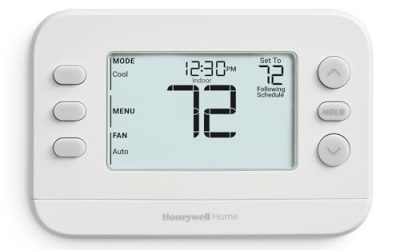
| TX9600TS Programmable | Simple scheduling on a wall panel | 7-day programmable, large touchscreen |
| Honeywell TH9320WF5003 | Wi-Fi color display, efficiency-certified | 7-day programmable, needs C wire, 3.5 by 4.5 inch display |
| Vine Touchscreen Thermostat | Voice control on a budget | Alexa and Google Assistant, 7-day, 8-period schedule |
| Sensi Touch 2 (ST76) | Easy Wi-Fi smart control | Wi-Fi, Alexa, efficiency-certified |
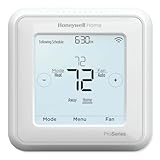
| Honeywell Home T6 Pro Z-Wave (TH6320ZW2007/U) | Z-Wave smart-home hubs | Z-Wave, low voltage, SmartStart, UWP mounting |
How to Choose
Wiring, the C wire, and voltage
Open your current thermostat and look at the wires. Most Wi-Fi touchscreen models need a common wire, usually labeled C, to supply continuous power. If your wall has only four wires and no C, check whether the thermostat includes an adapter or whether you will need to add a power-extender kit or run new cable. Confirm that the thermostat is low voltage, which covers most forced-air systems, because line-voltage baseboard heaters need a different model.
System stages and equipment type
A typical furnace and air conditioner is a single-stage system. Heat pumps and two-stage equipment need a thermostat that supports stages, reversing-valve control, and auxiliary heat. A model that lists up to 3 heat and 2 cool stages can handle a more complex setup, while a basic programmable unit works only on simpler systems. Check the listing and the manufacturer’s compatibility tool against your equipment, not just the wiring.
Smart features that matter
Wi-Fi gives you remote control and alerts, and an efficiency certification suggests the manufacturer met published criteria for scheduling features. Voice-assistant support for Alexa or Google Assistant is handy, while Z-Wave is for owners who already run a hub and want local automation. Ignore dozens of listed screen colors or themes, and treat “smart learning” claims with caution unless the listing explains what the thermostat actually learns. A 7-day schedule with multiple periods per day is more useful than extra animations.
Screen, mounting, and where budget models cut corners
Look for a screen large enough to read from across the room, with a backlight and responsive touch. A mounting plate that covers marks left by an older thermostat saves painting. Budget models tend to skimp on app polish, support for heat pumps, and long-term software updates, and some lesser-known brands offer limited documentation. If you have a complex system, favor an established brand with a compatibility checker. Also confirm that the faceplate, wall plate, and screws are included, since small missing parts can stall an install.
The 6 Best Options
Honeywell Vision Pro 8000 (TH8321WF1001)
This is a Wi-Fi touchscreen thermostat from the installer-oriented Vision Pro line, supporting up to 3 heat and 2 cool stages. It is the model for owners of multi-stage systems and for contractors who want a familiar interface. A homeowner with a heat pump and auxiliary heat, or a landlord outfitting several units with the same controller, will appreciate that the stage support is stated in the title instead of buried in a manual. Expect to spend a little time in the setup menus.
- Strength: up to 3 heat and 2 cool stages handle more complex equipment.
- Strength: a touchscreen with Wi-Fi from a long-standing thermostat brand.
- Trade-off: professional-style setup menus can be more involved than consumer smart thermostats, and first-time installers may need the manual.
Skip it if you want a quick, app-led setup with minimal menus or run a simple single-stage system that never uses the extra stages.
TX9600TS Programmable Touchscreen
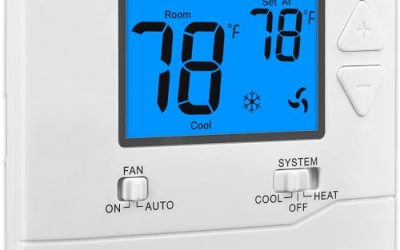
The TX9600TS is a 7-day programmable heating and cooling thermostat with a large touchscreen in a white housing. It suits buyers who want clear on-wall scheduling without a phone app. Think of a rental unit, a vacation cabin, or a household with an older relative who would rather tap a big screen than open an app. Since the title lists no Wi-Fi, it works as a stand-alone controller, and that simplicity can mean fewer accounts, fewer updates, and fewer things to troubleshoot.
- Strength: 7-day programming covers weekday and weekend routines.
- Strength: a large touchscreen is easy to read for family members of any age.
- Trade-off: the listing does not mention Wi-Fi or voice control, so expect an on-wall experience only.
Skip it if you want remote control from your phone, geofencing, or voice commands.
Honeywell TH9320WF5003
This Wi-Fi color thermostat offers 7-day programming, a 3.5 by 4.5 inch display, and an efficiency certification. The listing notes that it needs a C wire, which is the main compatibility consideration. It fits a homeowner who already has a C wire at the wall, or who is comfortable adding a power adapter, and who wants a recognizable brand with a roomy color display and remote scheduling.
- Strength: a color Wi-Fi touchscreen with 7-day programming and an efficiency certification.
- Strength: familiar Honeywell design and a sizable display.
- Trade-off: the C wire requirement can complicate installation in older homes.
Skip it if your wall does not have a C wire and you do not want to add one.
Vine Touchscreen Thermostat
The Vine thermostat combines a color touchscreen with Wi-Fi, Alexa and Google Assistant compatibility, and a 7-day, 8-period programmable schedule. It aims to add smart features at a lower tier. A budget-minded buyer who wants to say a command to a speaker and keep a fine-grained daily schedule will find the feature list appealing, though the lack of a long track record means buyers should confirm wiring support before ordering.
- Strength: both Alexa and Google Assistant are supported.
- Strength: an 8-period daily schedule allows finer control.
- Trade-off: it comes from a less-established brand, so verify equipment compatibility carefully.
Skip it if you want an established brand’s support network.
Sensi Touch 2 (ST76)
The Sensi Touch 2 is a Wi-Fi smart thermostat with Alexa support and an efficiency certification. It is meant for homeowners who want a simple setup and a tappable screen without a professional install. It suits first-time smart-thermostat buyers who want to control the house from the couch, set up schedules in a few minutes, and keep the screen on the wall as a backup when the phone is out of reach.
- Strength: Wi-Fi with Alexa support covers the common smart-home basics.
- Strength: the efficiency certification signals well-built scheduling features.
- Trade-off: the listing lists less detail on multi-stage support, so check compatibility with your system.
Skip it if you have a complex multi-stage setup or need Z-Wave.
Honeywell Home T6 Pro Z-Wave (TH6320ZW2007/U)
The T6 Pro is a programmable touchscreen thermostat with Z-Wave, SmartStart, and low-voltage operation, supplied with a UWP mounting system and cover plate. It is built for homes that already run a Z-Wave hub. Smart-home hobbyists who prefer local automation over cloud accounts, and installers who like a tidy mounting system that hides old drill marks, are the buyers this listing speaks to.
- Strength: Z-Wave and SmartStart simplify adding it to a hub-based system.
- Strength: the mounting system and cover plate aid a clean install.
- Trade-off: it needs a Z-Wave hub for smart features, which adds cost and setup.
Skip it if you want direct Wi-Fi control with no hub.
Which One Fits Your Situation
Your system has multiple stages
The Honeywell Vision Pro 8000 lists up to 3 heat and 2 cool stages, making it the natural pick for heat pumps and two-stage equipment. Whichever model you consider, match the stage count to the equipment label before ordering, because a thermostat with too few stages leaves part of the system unused.
You want voice control without fuss
The Vine and the Sensi Touch 2 both advertise voice-assistant support; the Vine lists both Alexa and Google Assistant, while the Sensi lists Alexa.
You already own a Z-Wave hub
The Honeywell Home T6 Pro Z-Wave fits straight into that setup and avoids another cloud account. Buyers without a hub should look at the Wi-Fi models instead, since the Z-Wave radio does nothing on its own.
You just want a clear on-wall schedule
The TX9600TS gives a large touchscreen and 7-day programming without apps, and the Honeywell TH9320WF5003 adds Wi-Fi if you can supply a C wire. Both let family members adjust the temperature at the wall without installing anything on their phones.
Common Mistakes
- Buying before checking for a C wire and discovering the install needs extra parts.
- Choosing a model that does not support heat pump or multi-stage equipment.
- Paying for smart features, then never connecting the thermostat to Wi-Fi.
- Forgetting to shut off power at the breaker before swapping the old unit.
- Ignoring line-voltage versus low-voltage, which can damage a thermostat.
Related guides
- What Is The Best Budget Most Responsive Gaming Mouse Wired
- Low Latency Gaming Headphones Usb-C 2.4 Ghz Wireless
- Mechanical Gaming Keyboards Competitive Pc Gaming
Frequently Asked Questions
Do I need a C wire for a touchscreen thermostat?
Most Wi-Fi touchscreen models do, because the screen and radio draw continuous power. If you lack one, look for an adapter kit or a model that explains its power options.
Will a touchscreen thermostat save energy?
A programmable schedule lowers use when nobody is home, and certified models meet efficiency criteria. Savings depend on how well you set the schedule, how well the home is insulated, and whether you actually use the away and sleep periods.
What is the difference between Wi-Fi and Z-Wave?
Wi-Fi connects directly to your router and app, while Z-Wave talks to a hub in a smart-home network. Pick the one that fits your existing equipment.
Can I install one myself?
Many homeowners can with basic tools if they label wires and shut off power. Complex systems, unfamiliar wiring, or any sign of old, brittle insulation are better handled by a professional. Take a photo of the wire labels before disconnecting anything, and double-check them against the new terminals.