
Retro gaming lives or dies by the controller. Plug-and-play sticks that promise thousands of preloaded games are everywhere, but most players do not just want a box of old games, they want controls that feel right on the systems and collections they already own. A mushy D-pad, sticky face buttons, or noticeable input delay can make even your favorite platformer unplayable, while a faithful controller makes those classics click instantly.
What separates a good retro setup from a frustrating one comes down to how the controller translates in your hands. We looked for tight, responsive directionals that handle diagonals without misses, buttons with consistent travel, a wireless link that does not drop during a boss fight, and broad TV compatibility that keeps setup simple. The controllers below come from established retro accessory brands or carry official licensing, and they nail those fundamentals in different ways, whether you prioritize authentic wired feel on original hardware or the freedom of wireless play from the couch.
As an Amazon Associate we earn from qualifying purchases at no extra cost to you.
Our Top Picks



Top 3 picks at a glance

Quick Picks
| Product | Best for | Price |
|---|---|---|
| 8BitDo SN30 Pro (Hall Effect) | Best SNES-Style Pad for PC, Switch and Emulation | Check on Amazon |
| 8BitDo M30 2.4G for Original Genesis | Best Wireless Pad for an Original Sega Genesis | Check on Amazon |
| Hyperkin Scout for SNES | Best Wired Replacement for an Original SNES | Check on Amazon |
| Hyperkin Captain for N64 | Best Replacement for Worn N64 Controllers | Check on Amazon |
| Retro-Bit SEGA Genesis 6-Button | Best Licensed Wired Genesis Pad | Check on Amazon |
| Atari 2600+ with CX40+ Joystick | Best Licensed Cartridge-Based Retro Console | Check on Amazon |
How We Compared
We focused on the factors that actually shape daily play: D-pad and button feel, connection type and stability, layout accuracy for the console you play most, and brand support. That meant prioritizing D-pads and buttons that feel accurate for classic inputs, wireless controllers with a dedicated receiver or reliable Bluetooth link, wired options that plug straight into original ports, and licensed products with a clear, legitimate game lineup. We left out unbranded game sticks preloaded with thousands of games, because their game sources are rarely disclosed.
The Best Retro Game Controllers For Classic Consoles
If you already own original hardware, an FPGA or mini console, a Switch, or a PC set up for retro gaming, a dedicated controller is a better upgrade than a plug-and-play stick with generic bundled pads. These picks are made by established retro accessory brands and are built to replicate classic layouts with modern reliability.
1. 8BitDo SN30 Pro Bluetooth Controller with Hall Effect Joysticks

The SN30 Pro is the controller most retro players reach for when they want one pad that feels like a Super Nintendo controller but works with modern systems. It keeps the compact SNES-inspired shape and a crisp, well-defined D-pad, then adds two analog sticks, shoulder buttons, and triggers so it can also handle PlayStation-era and early 3D games in emulation.
The current version uses Hall effect joysticks, which rely on magnets rather than physical contact, so they are far less prone to stick drift over time. It connects over Bluetooth or a wired USB-C cable and works with Switch and Switch 2, Windows, Android, and Steam Deck, along with many emulation setups such as Raspberry Pi. It includes rumble and motion controls, and 8BitDo’s companion software allows button remapping and stick adjustments.
The key strength for retro play is the D-pad. It handles diagonals cleanly, which matters in fighting games and platformers where the mushy pads bundled with many cheap systems often miss inputs. The compact body suits adult hands for shorter sessions, though players with large hands may find the grips small for long stints.
Strengths: excellent D-pad, Hall effect sticks, broad platform support, and a size and shape that stay true to the SNES.
Drawbacks: Bluetooth rather than a 2.4 GHz dongle, so it is not the absolute lowest-latency option, and it does not plug directly into an original SNES.
Compared with the generic 2.4 GHz pads bundled with plug-and-play game sticks, the SN30 Pro is a large step up in build quality and input accuracy. It sits in the budget to mid-range tier and is our pick for players building a retro setup on PC, Switch, or a handheld.
2. 8BitDo M30 2.4G Wireless Gamepad for Original Sega Genesis
Sega fans need a different layout, and the M30 recreates the six-button pad that made the Genesis a favorite for fighting games and arcade ports. This version is built specifically for original hardware: a 2.4 GHz receiver plugs into the console’s 9-pin controller port, so you get wireless play on an original Sega Genesis, Mega Drive 1 and 2, or Analogue Mega Sg.
The six face buttons sit in two rows of three, matching the original Sega 6-button arcade pad, and the large circular D-pad pivots smoothly for quarter-circle motions in Street Fighter II and Mortal Kombat. It runs on a 480 mAh rechargeable battery rated for up to about 35 hours, charges over Micro USB, and also works wired over USB with Switch, Windows, and Raspberry Pi.
Be careful to buy the right version. 8BitDo makes a separate M30 2.4G for the Genesis Mini and Mega Drive Mini, and the receivers are not interchangeable. This model only works wirelessly with the receiver in its own box.
Strengths: authentic six-button layout, wireless play on original Sega hardware, long battery life, and a D-pad well suited to fighting games.
Drawbacks: no analog sticks, Micro USB rather than USB-C charging, and confusing version names.
Next to the wired Retro-Bit Genesis pad below, the M30 trades a cable for wireless freedom. It sits in the budget tier and is the best way to play an original Genesis from the couch.
3. Hyperkin Scout Premium Controller for SNES
The Scout is a wired replacement controller for owners of an original Super Nintendo or SNES-compatible clone console. It plugs straight into the original controller port, so there is no receiver, battery, or pairing involved, which makes it a reliable and simple choice for anyone restoring a classic system or adding a second pad for two-player games.
Hyperkin keeps the familiar SNES shape and button layout but gives the Scout a slightly more contoured, ergonomic body. The 10-foot cable is noticeably longer than the original controller’s cord, which lets you sit at a comfortable distance from a modern TV. Hyperkin also sells a separate Scout USB version for PC, Mac, and Raspberry Pi with the same cable length.
Because it is wired directly to the console, input response is as immediate as the hardware allows, which matters in timing-sensitive classics such as Super Mario World, Super Punch-Out, and Street Fighter II Turbo. The trade-off is the cable itself, which needs a clear path across the room.
Strengths: direct original-port connection, a long cable for modern living rooms, comfortable ergonomics, and a very accessible budget tier.
Drawbacks: no wireless option, plastic and button feel are not identical to a first-party pad, and it only works with SNES-compatible hardware.
Compared with the generic wired pads bundled with plug-and-play consoles, the Scout is designed for a real SNES and built to a higher standard for daily use.
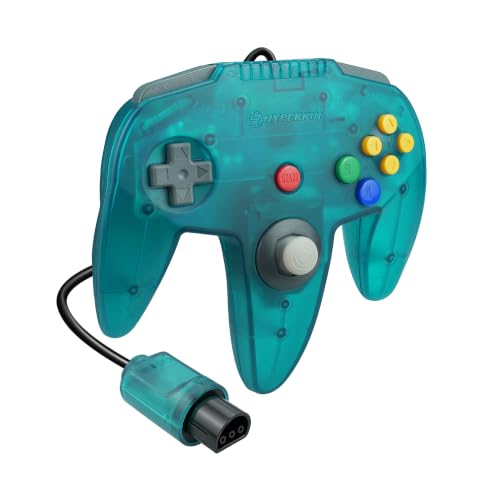
4. Hyperkin Captain Premium Controller for N64

Original Nintendo 64 controllers are now decades old, and their analog sticks are notorious for wearing loose. The Captain is Hyperkin’s answer: a wired controller for original N64 consoles and Analogue systems that keeps the N64 button layout while replacing the three-pronged shape with a more conventional two-handed design.
The standout change is the analog stick, which uses a GameCube-style design for firmer, more precise control than a worn original stick. The C-buttons, A and B, Z trigger, and shoulder buttons are all present, and the 10-foot cable gives plenty of reach. A rear expansion port accepts memory cards and Rumble Paks, so you keep save support and vibration with the right accessories, although rumble is not built in.
The modern shape is easier to hold than the original’s center-grip layout, but purists who want the exact original feel may find the stick and Z trigger placement different. Hyperkin now also sells a Captain+ variant with a Hall effect stick for those who want drift-free precision.
Strengths: firm and precise analog stick, original-port connection, expansion port for memory and rumble accessories, and a comfortable two-grip design.
Drawbacks: no built-in rumble, a feel that differs from the original controller, and wired only.
For N64 owners whose original pads have loose sticks, the Captain is one of the most practical budget replacements.
5. Retro-Bit SEGA Genesis 6-Button Wired Controller (Original Port)
Retro-Bit’s Genesis pad is an officially licensed SEGA controller that recreates the six-button arcade pad with an original 9-pin connector. It works with Sega Genesis, Sega CD, and Mega Drive consoles using the original controller port, and with Retro-Bit’s own Retro Trio systems.
It keeps the classic size, shape, and six-button layout, with the Mode button repositioned so it is harder to press by accident. The cable is 10 feet long, far more practical than the short cords on original Sega controllers, and because it is wired there is no battery to charge or receiver to lose. Some homebrew and modern cartridge releases also expect a wired controller, which makes a wired pad a sensible backup even if you prefer wireless.
Strengths: official SEGA licensing, faithful six-button layout, a long cable, and dependable wired input.
Drawbacks: wired only, and the D-pad moves more easily than an original pad, which some players like and others find less precise.
Compared with the 8BitDo M30 above, the Retro-Bit pad is the simpler and lower-tier choice for two-player setups. Buying the original-port version matters, as Retro-Bit sells a separate USB model for PC, Switch, and the Genesis Mini.
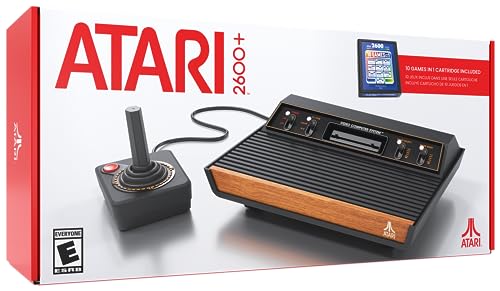
6. Atari 2600+ Console and CX40+ Joystick

If you want an official retro console rather than an unbranded game stick, the Atari 2600+ is a licensed modern remake of the classic Atari 2600. It is an 80 percent scale replica of the 1980 four-switch model and connects to modern TVs over HDMI, with a widescreen toggle and power over USB-C.
Unlike plug-and-play systems with built-in games, the 2600+ plays physical cartridges. It runs most original Atari 2600 and 7800 cartridges through emulation, and the box includes a 10-in-1 cartridge with titles such as Adventure, Combat, Missile Command, and Yars’ Revenge. The included CX40+ joystick is a wired recreation of the original with a standard DB9 connector, so original Atari joysticks and paddles also work.
Strengths: official licensing, original cartridge support, HDMI output, and an authentic joystick in the box.
Drawbacks: only one joystick is included, so two-player games need a second controller, a handful of original cartridges are not compatible, and the library is limited to Atari titles.
The 2600+ sits in the mid-range tier and suits collectors and families who want a legitimate retro console with a clear game lineup.
Buying Guide
Wired Reliability vs Wireless Convenience
Wired controllers still win for absolute input consistency and zero charging, which matters for timing-sensitive games like fighters and precision platformers. Wireless 2.4GHz controllers trade a bit of that simplicity for freedom of movement, letting you play from the couch without cable tension. If you play competitively, or with young kids who tug on cables, consider whether stability or range matters more in your room layout.
Display Connection and Setup
Original consoles output composite or other analog video, which works natively on a CRT but looks soft on large modern panels and may need an adapter on newer TVs. HDMI hardware, such as the Atari 2600+ or an FPGA system, delivers a sharper, properly scaled image. Choose a CRT or a quality upscaler for original consoles, and HDMI hardware for your primary living room TV where clarity counts.
Controllers for Emulation and Modern Platforms
If you play retro collections on a Switch, PC, or handheld, or run emulation with games you own, one modern controller can cover several classic systems. An SNES-style pad with two analog sticks, like the 8BitDo SN30 Pro, handles NES, SNES, and many PlayStation-era games, while Sega and arcade fighting games are better served by a six-button pad. Think about which systems make up most of your library and choose the layout that matches them.
D-Pad Quality Comes First
For most classic games the D-pad is the only directional control you use, so it matters more than any other feature. A good retro D-pad has a defined pivot, clear feedback on each direction, and clean diagonals without accidentally registering the neighboring direction. Cross-shaped pads like the SNES style excel in platformers, while circular or disc-style pads, as on the Sega M30, make quarter-circle and half-circle motions easier in fighting games. Generic pads bundled with low-cost systems often have soft, mushy membranes that miss diagonals, which is why a dedicated controller is the most common upgrade retro players make.
Original Port, USB, Bluetooth, or 2.4 GHz
Connection type determines where a controller works. Original-port controllers, such as the Hyperkin Scout, Hyperkin Captain, and Retro-Bit Genesis pad, plug directly into the classic console and nothing else. USB and Bluetooth controllers like the SN30 Pro work with PC, Switch, Android, Raspberry Pi, and handheld PCs, but need an adapter for original consoles. 2.4 GHz controllers with a dedicated receiver, like the M30 for original Genesis, offer low-latency wireless play on specific systems, but the receiver usually only works with the console it was designed for. Decide which system you play most and buy for that connection first.
Button Layout Should Match the Console
Classic games were designed around specific layouts. Sega Genesis fighting games expect six face buttons, SNES games use four face buttons and two shoulders, and N64 games rely on C-buttons and a Z trigger. Emulating one system with another system’s controller works, but remapping is often awkward. If most of your library comes from one console, a controller that mirrors that console’s layout will feel noticeably more natural.
Licensed Hardware and Legitimate Game Sources
Official and licensed products, such as the Atari 2600+ and SEGA-licensed Retro-Bit controllers, come with clear game lineups and manufacturer support. Many inexpensive plug-and-play sticks advertise tens of thousands of preloaded games without stating where those games come from, and their quality and update support vary widely. If you want a long-term retro setup, consider licensed mini consoles, cartridge-based remakes, original hardware, or official retro collections and subscription services on modern platforms, and use emulation with games you own.
Display Lag and Picture Settings
Controller latency is only part of the equation. Modern TVs add processing delay that can make classic games feel sluggish no matter which controller you use. Switch the TV to Game Mode, disable motion smoothing and noise reduction, and use the shortest path from console to TV. For original consoles on HDMI TVs, a quality upscaler or HDMI adapter produces a sharper picture and usually lower lag than the TV’s own analog input processing.
Comparison of the Picks
| Controller | Works With | Connection | Best For | Price Tier |
|---|---|---|---|---|
| 8BitDo SN30 Pro (Hall Effect) | Switch, Switch 2, Windows, Android, Steam Deck | Bluetooth, USB-C | SNES-style play on modern systems and emulation | Budget to mid-range |
| 8BitDo M30 2.4G for Original Genesis | Original Genesis, Mega Drive, Analogue Mega Sg; USB on PC and Switch | 2.4 GHz receiver, USB | Wireless Sega play on original hardware | Budget |
| Hyperkin Scout | Original SNES and SNES-compatible consoles | Wired original port | Replacing or adding SNES pads | Budget |
| Hyperkin Captain | Original N64 and Analogue consoles | Wired original port | Replacing worn N64 controllers | Budget |
| Retro-Bit SEGA Genesis 6-Button | Genesis, Sega CD, Mega Drive | Wired original port | Licensed wired Sega pad | Budget |
| Atari 2600+ with CX40+ | HDMI TVs; plays 2600 and 7800 cartridges | Wired DB9 joystick | Licensed cartridge-based retro console | Mid-range |
Setup Tips for Retro Controllers
- Update firmware on wireless controllers. 8BitDo and similar brands release updates that improve compatibility and fix input issues, so install the latest version before your first session.
- Use wired mode for timing-critical games. If a wireless pad offers a USB connection, use it for fighting games, rhythm games, and speedrunning practice.
- Map buttons by position, not label. In emulators, map controls to match the original console’s physical layout so muscle memory carries over.
- Keep receivers close and unobstructed. Place 2.4 GHz receivers and Bluetooth devices in line of sight and away from metal TV stands for a stable link.
- Clean original-port connectors. On older consoles, gently clean controller ports with isopropyl alcohol and a soft brush if inputs cut out.
- Use extension cables carefully. Original-port extension cables help in large rooms, but buy quality ones, since poor shielding can cause intermittent inputs.
Our Verdict
For most players, the 8BitDo SN30 Pro is the top pick: a crisp SNES-style D-pad, Hall effect sticks, and broad support for Switch, PC, Android, and Steam Deck make it the most versatile retro controller here. If you play on original hardware, match the pad to the console: the Hyperkin Scout for an SNES, the Hyperkin Captain for an N64, and the 8BitDo M30 2.4G or the licensed Retro-Bit six-button pad for a Sega Genesis, depending on whether you want wireless or wired play. If you would rather have a licensed retro console with real cartridges, the Atari 2600+ is the pick.
FAQ
Do wireless retro controllers add noticeable lag?
Modern 2.4GHz wireless controllers in this category are generally responsive for casual and even demanding retro play, and they eliminate cable drag. If you are highly sensitive to timing for fighting games, a wired controller will still feel slightly more immediate, but most players will not notice a meaningful difference.
Will original retro consoles work on a modern 4K TV?
Hardware with HDMI output, such as the Atari 2600+, connects directly to modern TVs for a sharp picture. Original consoles with analog AV output may need an adapter or upscaler on many newer sets and will look softer without one, though they still play correctly.
Should I buy a game stick with thousands of preloaded games?
Those sticks rarely state where their preloaded games come from, and their bundled controllers are usually generic. For a long-term setup, a quality controller paired with original hardware, a licensed mini console or remake, or official retro collections on modern platforms is the more dependable route.
Are two controllers included for multiplayer?
The standalone controllers here are sold individually, so buy two for head-to-head play. The Atari 2600+ includes one CX40+ joystick, and two-player games need a second compatible joystick. Wired pads keep both players close to the console, while wireless options let you spread out comfortably.
Can I use a modern controller on an original retro console?
Not directly in most cases. Original consoles use proprietary controller ports, so you need either a controller built for that port, such as the Hyperkin Scout or Retro-Bit Genesis pad, or a wireless controller with a matching receiver, such as the 8BitDo M30 2.4G for original Genesis. Adapters are available for some systems that let Bluetooth controllers connect to original ports.
What is the best controller for retro emulation on PC?
A controller that mirrors the layout of the systems you play most. For a broad SNES, NES, and Game Boy library, an SNES-style pad like the 8BitDo SN30 Pro is a strong all-rounder. For Sega and arcade fighting games, a six-button pad works better. For N64 and PlayStation-era games, choose a pad with two analog sticks and enough shoulder buttons.
Are third-party retro controllers as good as originals?
The best ones are, and some are better in practical ways, such as longer cables, wireless options, or analog sticks that do not wear loose. Quality varies widely across low-cost generic pads, so it is worth choosing an established retro accessory brand or an officially licensed product.
Do retro game sticks with thousands of games include licensed games?
Listings for many plug-and-play game sticks do not state whether the preloaded games are licensed. Official mini consoles, cartridge-based remakes like the Atari 2600+, and retro collections on modern platforms come with clearly licensed libraries. If licensing and long-term support matter to you, choose one of those routes.
Why does a retro game feel laggy even with a wired controller?
The TV is usually the cause. Modern displays add image processing that delays the picture. Enable Game Mode, turn off motion smoothing, and use an HDMI connection or a quality upscaler for original consoles. If lag persists, test with a different display to isolate whether the controller or the screen is responsible.









