The best modular power supplies for most gaming PCs are 850W ATX 3.1 units with 80 PLUS Gold efficiency, a native 12V-2×6 GPU cable, and enough case space to route the cables without sharply bending them. Choose 750W for a typical midrange build, 1,000W for a high-end GPU and CPU combination, and more only when the actual parts or planned upgrades justify it.
Our Top Picks




Top 3 picks at a glance

Best modular power supplies by build type
These recommendations focus on established models with useful combinations of wattage, current standards, and modular cabling. Check the exact model revision and included cables before buying: manufacturers sometimes sell variants with different connectors or ATX specifications.
| Build or priority | Good fit | Why it fits | Check before buying |
|---|---|---|---|
| Most gaming PCs; balanced headroom | be quiet! Pure Power 13 M 850W | Fully modular, 80 PLUS Gold, and ATX 3.1 compliant, with a native 12V-2×6 cable plus 6+2-pin PCIe leads for older cards. | Confirm the listing specifies the 850W model and check whether its GPU cable matches the graphics card’s socket. |
| High-end gaming build | MSI MPG A1000G PCIE5 | 1,000W of modular capacity, Gold efficiency, and a native PCIe 5 GPU connection. | It is an ATX 3.0-era model; compare its connector and transient-load requirements with the card and motherboard you plan to use. |
| Premium 850W option | Corsair RM850x (2024) | Fully modular, 80 PLUS Gold, and designed to meet ATX 3.1 requirements, including support for newer GPU cabling. | Verify the exact 2024 model and included cable set; names that differ by a suffix may describe a different PSU. |
| Quiet-focused premium build | Seasonic Vertex GX-850 | Fully modular, 80 PLUS Gold, and ATX 3.0 compliant, with a native 12VHPWR cable on the applicable package. | Check the product revision and cable specification rather than assuming all Vertex GX packages are identical. |
| High-end system needing more reserve | be quiet! Straight Power 12 1000W | Fully modular, 80 PLUS Platinum, and ATX 3.0 compliant; useful when a powerful CPU and GPU leave limited room in an 850W budget. | Platinum efficiency does not replace a wattage check. Confirm the PSU fits the case and its GPU lead reaches safely. |
More modular power supplies worth shortlisting in 2026
The table above focuses on established models, several of them from the ATX 3.0 generation. The following units add current ATX 3.1 options with native 12V-2×6 cables across 750W, 850W and 1,000W, plus a compact SFX unit for small builds. As before, check the exact revision on the listing, because several of these product names have been reused across generations.
Corsair RM750e (2025): best 750W choice for midrange builds
As an Amazon Associate we earn from qualifying purchases at no extra cost to you.

The 2025 RM750e is the type of power supply this guide recommends for a typical midrange gaming PC: 750W, fully modular, ATX 3.1 and PCIe 5.1 compliant, with a native 600W-capable 12V-2×6 cable for current graphics cards. Efficiency is rated Cybenetics Gold, and Corsair lists 105°C-rated capacitors, Modern Standby support, a Zero RPM fan mode and a 7-year warranty.
Its compact 140mm length is a practical advantage. Shorter units leave more room behind the PSU in a basement shroud for spare cables and drive cages, which makes the “case layout” checks earlier in this guide easier to satisfy. The 120mm fan stays off at light loads, so a system idling on the desktop or browsing can run with the PSU silent.
Who it is for: builders pairing a midrange GPU with a mainstream CPU, where the worked example in this guide shows that 750W covers the expected load with reasonable headroom.
Drawbacks: the warranty is shorter than the 10-year coverage on several rivals, and the 120mm rifle-bearing fan is a step below the larger fluid-dynamic-bearing fans in Corsair’s RMx line. A 750W unit also leaves less margin for a future high-power GPU upgrade.
How it compares: versus the Pure Power 13 M 850W covered below, it shares the ATX 3.1 standard but offers less capacity in a shorter body. If you expect to move to an upper-tier graphics card later, an 850W unit from this list is the safer long-term buy.
MSI MAG A850GL PCIE5: value 850W with a 10-year warranty

The MSI MAG A850GL PCIE5 is one of the most frequently recommended value 850W units, and the current listing explains why: fully modular, 80 PLUS Gold, ATX 3.1 and PCIe 5.1 ready, with a native dual-colour 12V-2×6 cable whose contrasting tip makes it easier to see whether the plug is fully seated. MSI’s US listing gives a 10-year warranty, and the unit uses a 120mm fluid-dynamic-bearing fan in a 140mm-long body.
That combination fits the 850W recommendation at the top of this guide for upper-midrange and many high-end gaming builds. The shorter body is helpful in compact mid-towers, and MSI lists the usual protections (over-current, over-voltage, over-power, over-temperature, short-circuit and under-voltage).
Who it is for: builders who want a modern 850W ATX 3.1 unit with a native GPU cable and a long warranty at a mid-range price.
Drawbacks: the older ATX 3.0 version of the same name is still sold in some regions, sometimes with a shorter warranty, so confirm “ATX 3.1” and the warranty length on the listing. Flat cables are easy to route but less tidy-looking than sleeved sets in a glass-sided case.
How it compares: it costs less than the Corsair RM850x (2024) in the table above and offers a similar feature set for most builds; the RM850x adds a larger fan and is often quieter under heavy load.
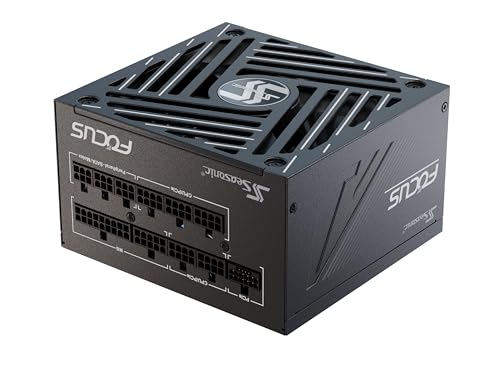
Seasonic Focus GX-850 (ATX 3.1): best compact 850W for quiet builds
The current Focus GX-850 is Seasonic’s ATX 3.1 update to a long-standing favourite. It is fully modular, 80 PLUS Gold, ATX 3.1 and PCIe 5.1 compliant, and comes with a 12V-2×6 cable. Seasonic lists Japanese 105°C capacitors, a 135mm fan with hybrid fan control, and a 10-year warranty, all in a 140mm-deep body.
Seasonic designs and manufactures its own units, which is unusual in a market where many brands rely on contract manufacturers. The larger 135mm fan in a short body is a good recipe for low noise, and the compact length makes it well suited to Micro-ATX and smaller ATX cases where cable space is tight.
Who it is for: builders who want a quiet, compact 850W unit from a manufacturer with a strong reputation, especially in smaller cases.
Drawbacks: it usually sits at the upper end of the mid-range tier for 850W units. Older Focus GX-850 revisions (ATX 2.x and ATX 3.0) remain on sale, so confirm the ATX 3.1 model and its cable set.
How it compares: it is the more compact, lower-tier sibling of the Seasonic Vertex GX-850 in the table above. If you do not need the Vertex specifically, the Focus GX-850 ATX 3.1 offers a newer standard in a shorter body.
be quiet! Pure Power 13 M 850W: quiet ATX 3.1 upgrade

The Pure Power 13 M replaces the older ATX 3.0 Pure Power 12 M, and it moves the line to ATX 3.1. The 850W version is fully modular, 80 PLUS Gold and independently rated Cybenetics Platinum for efficiency, with a native 12V-2×6 connector plus four 6+2-pin PCIe connectors for cards that still use conventional 8-pin power. be quiet! states that it can handle power excursions up to twice its rated output.
As the brand name suggests, noise is the focus. A 120mm fan with semi-passive operation stays off at lower loads and temperatures, and Cybenetics gives it its top A++ noise rating. be quiet! backs it with a 10-year warranty.
Who it is for: gamers who want a quiet 850W unit that supports both new 12V-2×6 graphics cards and older 8-pin cards without adapters.
Drawbacks: at about 160mm long, it is deeper than the 140mm Corsair RM750e, MSI A850GL and Seasonic Focus GX, which matters in compact cases. The cable set mixes sleeved and flat cables.
How it compares: versus the Pure Power 12 M, it offers ATX 3.1, the revised 12V-2×6 connector and better measured efficiency. Versus the MSI A850GL, it typically trades a slightly longer body for quieter operation.
Corsair RM1000x (ATX 3.1): best 1,000W for high-end GPUs

For builds where the wattage estimate in this guide lands close to 850W, or where the CPU and GPU are both high-power parts, the RM1000x is a strong 1,000W option. It is fully modular, Cybenetics Gold, ATX 3.1 and PCIe 5.1 compliant, and includes a native 12V-2×6 cable. Corsair uses a 140mm fluid-dynamic-bearing fan with a Zero RPM mode, 105°C Japanese capacitors, and a 10-year warranty.
The extra capacity is not about running at 1,000W continuously. It gives more headroom for transient spikes, overclocking and future upgrades, and it lets the PSU run at a lower percentage of its capacity, where fans spin slower. Four 6+2-pin PCIe connectors also make it flexible for cards that use traditional power plugs.
Who it is for: high-end gaming builds with top-tier graphics cards, overclocked CPUs, or a planned upgrade path that would push an 850W unit close to its limit.
Drawbacks: its 160mm length needs more space than compact 850W units, and it sits in the premium tier. For a midrange system it is unnecessary.
How it compares: it competes with the MSI MPG A1000G PCIE5 and be quiet! Straight Power 12 1000W in the main table. Versus the MSI, it adds the newer ATX 3.1 standard; versus the Straight Power, it trades Platinum efficiency for a lower tier price and the newer standard.
Lian Li SP850 V2: best SFX unit for small form factor builds

Compact gaming PCs need SFX power supplies, and the Lian Li SP850 V2 brings 850W to that small form factor. It is fully modular, 80 PLUS Gold and ATX 3.1 compliant, with a native 12V-2×6 cable. The V2 uses a 92mm fluid-dynamic-bearing fan with a zero-RPM mode, and its listings give a 10-year warranty, double that of the original SP850.
The SFX format (roughly 125 x 63.5 x 100mm) fits small cases that cannot accept a standard ATX unit, and many ATX cases can also mount it with an SFX-to-ATX adapter bracket. 850W in this size is enough for a powerful GPU and CPU combination in a compact build.
Who it is for: small form factor and ITX builders who need a high-capacity, modern ATX 3.1 power supply.
Drawbacks: SFX units generally cost more per watt than ATX equivalents and use smaller fans that can be louder under heavy load. Cable lengths are designed for small cases and may be short in a large ATX tower. The original V1 SP850 is still sold, so look for “V2” and model numbers SP850G.B or SP850G.W.
How it compares: none of the ATX units in this guide fit a true SFX case. In a large case, a standard ATX unit such as the MSI A850GL or Seasonic Focus GX-850 offers better value and usually lower noise.
Choose wattage from the parts, not the GPU label
A GPU’s recommended PSU rating is a useful starting point, not a complete calculation. The CPU, power limits, other components, and the way the system handles brief power spikes all matter. For a quick estimate, add the GPU’s board-power rating to the CPU’s maximum package-power limit, then allow roughly 100–150W for the motherboard, memory, storage, fans, and USB devices. Treat the result as a planning estimate, not a substitute for a manufacturer’s system recommendation.
Worked example: a 750W versus 850W decision
Suppose a gaming PC has a 320W graphics card and a CPU that can draw up to 170W. Adding 120W for the rest of the system gives an estimated 610W of peak component draw (320 + 170 + 120). An 850W PSU leaves about 240W of nominal capacity, while a 750W unit leaves about 140W.
For a stock system with a reputable ATX 3.0 or 3.1 unit, 750W may be enough if the GPU maker’s recommendation allows it. The 850W choice gives more room for sustained heavy loads, future upgrades, and quieter fan operation at a given system draw. If the CPU or GPU is overclocked, use the higher power limits in your estimate and consider 1,000W if the resulting headroom is tight.
Sizing a PSU by build tier
The worked example earlier shows how to estimate load from your own parts. If you are still choosing components, these build tiers give a realistic starting point. Always confirm against the graphics card maker’s recommendation and the CPU’s configured power limit, because both vary between models and factory overclocks.
| Build tier | Typical components | Sensible PSU range | Notes |
|---|---|---|---|
| Entry gaming | Budget or previous-generation GPU, six-core CPU at stock settings | 550-650W Gold | Modular cabling is a convenience here rather than a necessity; a quality semi-modular unit is fine. |
| Midrange gaming | Mainstream current GPU, six- to eight-core CPU | 650-750W Gold, ATX 3.1 | A 750W unit such as the Corsair RM750e leaves room for a moderate GPU upgrade. |
| Upper-midrange and high-end | Upper-tier GPU, eight-core or higher CPU | 850W Gold, ATX 3.1 | The most common sweet spot; MSI A850GL, Seasonic Focus GX-850 and Pure Power 13 M all fit here. |
| Enthusiast | Flagship GPU, high-power CPU, overclocking | 1,000W or more | Use the GPU maker’s figure as a minimum and keep headroom for transient spikes. |
| Compact SFF | Midrange to high-end GPU in an ITX case | 750-850W SFX | Check case clearance and cable routing before choosing wattage. |
Running a PSU somewhere between roughly 40% and 70% of its capacity during gaming usually keeps fans slow and efficiency high. That is why the guide favours a little headroom rather than buying the smallest unit that technically works, but it does not mean doubling the wattage is beneficial; very oversized units cost more and can be slightly less efficient at the light loads where a gaming PC spends most of its time.
Noise: what actually makes a PSU quiet
Power supply noise comes mostly from the fan, with coil whine as a secondary source under certain loads. Three factors decide how loud a unit is in practice:
- Load relative to capacity: a PSU working at a moderate share of its rating spins its fan slowly or not at all. This is the practical reason an 850W unit can be quieter than a 750W unit in the same system.
- Fan design and curve: larger fans with fluid-dynamic or quality rifle bearings and a conservative fan curve stay quieter. Semi-passive (zero-RPM) modes keep the fan stopped at idle and light gaming loads.
- Case placement: a bottom-mounted PSU drawing air through a clean filter runs cooler and quieter than one starved of air on carpet or behind a clogged filter. Clean the PSU intake filter as part of regular dust maintenance.
Cybenetics noise ratings are the most useful single indicator when comparing quietness, because they are measured across a range of loads rather than inferred from efficiency.
Cable management tips for modular units
- Connect only the cables you need, and store the rest in the original bag with the PSU model written on it.
- Use separate PCIe leads for each 8-pin GPU socket on high-power cards rather than a single cable with a daisy-chained second plug, unless the PSU maker explicitly rates that cable for the load.
- Route the GPU cable so it approaches the card straight on, with gentle curves further away from the connector.
- Use the case’s tie-down points and Velcro straps rather than tight zip ties, so cables can be adjusted during future upgrades.
- Keep cables out of the path of intake fans in front of and beneath the GPU, where they can disrupt airflow.
ATX 3.0, ATX 3.1, and GPU connectors
ATX 3.0 and ATX 3.1 are power-supply design standards intended to handle modern system behavior, including short GPU power excursions. ATX 3.1 updates the GPU power connection to 12V-2×6, which revises the earlier 12VHPWR connector and cable design. Either standard can suit a current gaming build, but the actual cable included with the specific PSU matters more than the label alone.
For a graphics card with a 12V-2×6 or 12VHPWR socket, a native PSU cable avoids the extra bulk and connection points of a multi-plug adapter. Seat the plug fully and route the cable so it does not pull sideways at the socket. Follow the graphics-card maker’s bend-clearance guidance; when none is provided, avoid a tight bend immediately at the connector and leave enough space for the case side panel to close without pressure.
If a card uses conventional 8-pin PCIe power, make sure the PSU has enough separate PCIe leads for the card’s requirements. Do not use a CPU/EPS cable in a GPU socket, and never reuse modular cables from another PSU unless the manufacturer confirms they are compatible. Modular PSU-side pinouts are not universally standardized.
Efficiency and modularity: what they change in practice
80 PLUS Gold and Platinum describe efficiency under specified test conditions; they do not directly tell you whether a PSU is quiet, durable, or electrically well-designed. A higher efficiency rating can mean less wasted energy and heat at comparable load, but a quality Gold unit is often the better value than paying extra for Platinum. Look for the standard, wattage, warranty, protections, and independent technical assessments together.
Fully modular units let you attach only the cables your build needs. That can clear space behind the motherboard tray, reduce cable bundles in front of fans, and make later upgrades easier. Semi-modular models keep essential cables attached, while non-modular units can leave unused leads to store. The practical benefit depends on the case: a cramped PSU shroud or short cable-routing channel can make even a fully modular unit awkward.
Use your case layout to decide between two otherwise suitable PSUs
Before ordering, check the PSU’s length, the case’s maximum PSU clearance, and the space available between the PSU and drive cages. Then account for the cable plugs themselves: a compact case may have enough room for the PSU body but not for a stiff GPU lead to exit and turn gently.
- Compact case or tight shroud: Prefer a PSU that fits with several centimetres of routing room, and check cable lengths. A shorter PSU can leave more space for excess cable and drive bays.
- Large case with a high-end GPU: Prioritize adequate wattage and a native GPU cable long enough to route without extensions or tension.
- Frequent upgrades: Fully modular cabling makes it easier to replace only the leads needed, but keep the original cables labeled and stored with that PSU.
- Small or glass-sided build: Plan the cable path before installation. Modular connections help most when the rear routing channel can hide unused leads without forcing the side panel against them.
Comparison of the additional modular PSUs
| Model | Wattage | Form factor | Standard | Efficiency | Warranty | Price tier |
|---|---|---|---|---|---|---|
| Corsair RM750e (2025) | 750W | ATX, 140mm | ATX 3.1, 12V-2×6 | Cybenetics Gold | 7 years | Budget to mid-range |
| MSI MAG A850GL PCIE5 | 850W | ATX, 140mm | ATX 3.1, 12V-2×6 | 80 PLUS Gold | 10 years (US listing) | Mid-range |
| Seasonic Focus GX-850 (ATX 3.1) | 850W | ATX, 140mm | ATX 3.1, 12V-2×6 | 80 PLUS Gold | 10 years | Mid-range |
| be quiet! Pure Power 13 M 850W | 850W | ATX, about 160mm | ATX 3.1, 12V-2×6 | 80 PLUS Gold, Cybenetics Platinum | 10 years | Mid-range |
| Corsair RM1000x (ATX 3.1) | 1,000W | ATX, 160mm | ATX 3.1, 12V-2×6 | Cybenetics Gold | 10 years | Premium |
| Lian Li SP850 V2 | 850W | SFX | ATX 3.1, 12V-2×6 | 80 PLUS Gold | 10 years | Premium |
What to compare beyond wattage and efficiency
Once wattage and connector type are settled, several models will usually meet your needs. These secondary criteria help separate them.
- Cybenetics ratings: 80 PLUS only grades efficiency at a few load points. Cybenetics measures efficiency across a wider range of loads and also publishes a separate noise rating (from Standard up to A++). A unit with a good Cybenetics noise rating is a better guide to quietness than the efficiency badge alone.
- Warranty length: manufacturers generally match warranty length to their confidence in components. Seven to ten years is typical for quality Gold units; a short warranty on an expensive PSU is a warning sign.
- Fan size and bearing: larger fans move the same air at lower speeds, and fluid-dynamic bearings typically last longer and run quieter than sleeve bearings. A zero-RPM or semi-passive mode keeps the PSU silent at idle.
- Capacitor quality: 105°C-rated capacitors, especially Japanese-made parts, tolerate heat better over a long service life.
- Protections: look for over-current (OCP), over-voltage (OVP), under-voltage (UVP), over-power (OPP), over-temperature (OTP) and short-circuit (SCP) protection. Reputable units list these clearly.
- Connector count: count the EPS (CPU) and PCIe leads you need. High-end motherboards may want two EPS connectors, and older GPUs may need two or three separate 8-pin leads.
- Cable style: flat cables bend and route easily in tight spaces; sleeved cables look tidier in glass-sided cases but are stiffer.
- Independent reviews: specialist reviewers measure ripple, voltage regulation and transient response. When two units look identical on paper, those measurements are the best tie-breaker.
Quick decision matrix
| Your situation | Starting point | Reason |
|---|---|---|
| Midrange GPU, mainstream CPU, no major overclock | 650–750W Gold, preferably ATX 3.0 or 3.1 | Often enough for this class of build; verify the GPU maker’s recommendation and the CPU’s power limit. |
| Upper-midrange or high-end GPU with a powerful CPU | 850W Gold ATX 3.0 or 3.1 | Balances headroom and cost for many current gaming configurations. |
| Very high-power GPU, CPU overclocking, or planned top-tier upgrade | 1,000W or higher, based on component limits | Provides more reserve when combined CPU and GPU demands are high; confirm the case can fit the unit. |
| Older GPU with 8-pin connectors and no near-term upgrade | Quality modular Gold PSU sized to the system | A native 12V-2×6 cable may not be necessary, but enough correct PCIe leads are. |
How to install a modular power supply
Modular units make installation easier, but the order of operations still matters. These steps assume a standard ATX case with a bottom-mounted PSU.
- Plan the cables first. Lay out the PSU’s cables and identify exactly which you need: the 24-pin motherboard cable, one or two EPS CPU cables, the GPU cable (12V-2×6 or separate PCIe leads), and SATA or Molex cables for drives, fans or lighting controllers. Put the rest back in the box, labelled.
- Attach cables at the PSU end before mounting, where space is tight. In compact cases or cases with a full shroud, connecting cables to the PSU before sliding it in is much easier than reaching into the shroud later. In roomy cases you can mount first and connect afterward.
- Orient the fan correctly. If the case has a bottom vent with a dust filter, mount the PSU fan facing down to draw cool outside air. If the PSU sits on carpet or the case has no bottom vent, mount it fan-up.
- Secure it with all four screws. Fasten the PSU to the rear of the case using the supplied screws so it cannot vibrate or shift during transport.
- Route through grommets behind the motherboard tray. Pass each cable through the nearest routing hole, leaving enough slack that connectors are not under tension.
- Seat each connector fully. The 24-pin and EPS connectors should click into place. For a 12V-2×6 GPU cable, push it in fully until it latches with no visible gap, and avoid a sharp bend immediately at the connector.
- Double-check before powering on. Confirm that you have not plugged a PCIe cable into an EPS socket or vice versa, that every cable came from this PSU’s box, and that the side panel will close without pressing on any cable.
- Turn on the rear switch and test. Boot to the BIOS first, check that the system is stable, and then run a demanding game or stress test to confirm there are no shutdowns under load.
SFX and small form factor builds
Small form factor cases change the PSU decision. Many compact cases accept only SFX or the slightly longer SFX-L format rather than ATX. These units pack similar wattage into a much smaller body, but they use smaller fans and short cables. When planning a compact build, check the case’s supported PSU format and maximum length, look at cable-routing diagrams for where the GPU cable must travel, and consider custom-length or shorter cables if the stock set leaves too much excess to hide. A modern SFX unit with ATX 3.1 support and a native 12V-2×6 cable avoids bulky adapters, which matters even more in a small case than in a full tower.
Signs your current PSU needs replacing
- Random shutdowns or restarts when gaming, especially during GPU-heavy scenes.
- A new graphics card that needs connectors or capacity the old unit cannot provide.
- Coil whine, burning smells, clicking or a fan that grinds or stops spinning.
- The unit is older than its warranty period and powering a much more demanding system than it was originally bought for.
- It lacks basic protections or comes from an unknown brand with no published specifications.
Common modular PSU mistakes to avoid
- Mixing cables between power supplies. Modular connectors may fit physically but use different pinouts at the PSU end. Using another unit’s cables can damage components immediately. Keep each PSU’s cables with it.
- Using an adapter when a native cable is included. If the PSU ships with a 12V-2×6 cable for your graphics card, use it rather than a multi-plug adapter, which adds bulk and extra connection points.
- Not seating the GPU connector fully. A partly inserted high-power connector can overheat. Push until it latches and there is no visible gap.
- Bending the GPU cable sharply at the plug. Leave a straight section before any curve, and make sure the side panel does not press against the cable.
- Buying on wattage alone. A high wattage label from an unknown brand does not guarantee stable power. Warranty length, protections, independent reviews and the correct connectors matter as much as capacity.
- Ignoring physical length. A 160mm unit may fit the case but leave no room for cables in a short shroud. Check clearance including the space needed for plugs and bends.
- Daisy-chaining high-power GPUs. On cards with several 8-pin sockets, use separate PCIe cables unless the PSU maker rates a single split cable for the card’s load.
Frequently asked questions
Is a fully modular PSU always the best choice?
No; fully modular cabling is useful, but its benefit depends on your case layout. It can clear space and make upgrades easier, while a cramped PSU shroud or short routing channel can still make installation awkward. Check whether the case has room to route and store the cables before choosing between otherwise suitable units.
Can I reuse modular cables from an older power supply?
Only if the manufacturer confirms that the cables are compatible with the exact PSU model. Modular PSU-side pinouts are not universally standardized, so cables that fit may still be incompatible. Keep each PSU’s original cables labeled and stored with it, and do not assume cables from a different unit are safe to use.
What should I do if my GPU uses 8-pin PCIe power?
Make sure the PSU has enough separate PCIe leads for the graphics card’s requirements. A native 12V-2×6 cable may not be necessary for a card with conventional 8-pin connectors. Use the correct GPU power leads, and do not use a CPU/EPS cable in a GPU socket.
Will an 850W PSU guarantee quieter operation?
No; wattage alone does not guarantee quietness. An 850W unit can allow quieter fan operation at a given system draw than a 750W unit, but efficiency ratings do not directly indicate whether a PSU is quiet. Consider the actual build and the PSU’s other specifications together.
How can I tell whether the PSU will physically fit my case?
Compare the PSU’s length with the case’s maximum PSU clearance, then check the space around drive cages and the cable-routing area. The PSU body may fit while a stiff GPU cable lacks room to exit and turn gently. Also confirm cable reach and that the side panel will close without pressing on the cables.
Is ATX 3.1 worth paying extra for over ATX 3.0?
For a new build in 2026, ATX 3.1 units are now widely available at similar price tiers, so there is usually no need to pay a premium. ATX 3.1 brings the revised 12V-2×6 connector and updated requirements. A good ATX 3.0 unit still works well with modern GPUs, but if two units are otherwise similar, choose the ATX 3.1 model.
What is the difference between 80 PLUS and Cybenetics ratings?
80 PLUS certifies efficiency at a few fixed load points. Cybenetics measures efficiency across many loads and adds an independent noise rating. Some units, such as the be quiet! Pure Power 13 M, carry an 80 PLUS Gold badge but a higher Cybenetics efficiency rating, so it is worth checking both.
How long does a modular power supply last?
A quality unit can serve through several builds, and many manufacturers offer seven- to ten-year warranties. Treat the warranty period as a reasonable service life, and replace the PSU sooner if it shows symptoms such as instability, unusual noise or failing fans.
Do I need a 1,000W PSU for a high-end GPU?
Not always. Add the GPU’s board power, the CPU’s power limit and around 100-150W for the rest of the system, then compare with the graphics card maker’s recommendation. Many high-end builds fit comfortably within 850W; 1,000W or more makes sense for the most power-hungry cards, overclocked systems or planned upgrades.
Final buying checklist
- Calculate a rough system load and compare it with the GPU manufacturer’s PSU recommendation.
- Choose ATX 3.0 or 3.1 for a new build where possible; check which GPU cable is actually included.
- Confirm the PSU’s physical dimensions, cable reach, and room for safe bends in your case.
- Use only the modular cables made for that exact PSU model or confirmed compatible by its manufacturer.
- Buy efficiency and wattage appropriate to your build rather than treating Platinum or extra capacity as automatic upgrades.