
Working from bed or the couch sounds relaxing until your laptop starts sliding off a pile of pillows, your neck cranes downward at an uncomfortable angle, and the bottom of the chassis heats up against your legs. A proper laptop stand solves all three problems at once: it puts the screen closer to eye level, gives the keyboard a stable surface, and keeps hot hardware off your skin. The catch is that stands built for a desk often fail in the living room or bedroom, where you need floor-level bases, over-bed clearance, or a surface wide enough to balance on a mattress.
We compared eight stands for three real scenarios — lying flat on your back with the stand over your chest, sitting cross-legged with it on the mattress, and upright on the couch with feet planted on the floor. Below are our picks for every setup and budget, from a budget folding tray to a fully articulated premium lying-down desk.
As an Amazon Associate we earn from qualifying purchases at no extra cost to you.




Our Top Picks
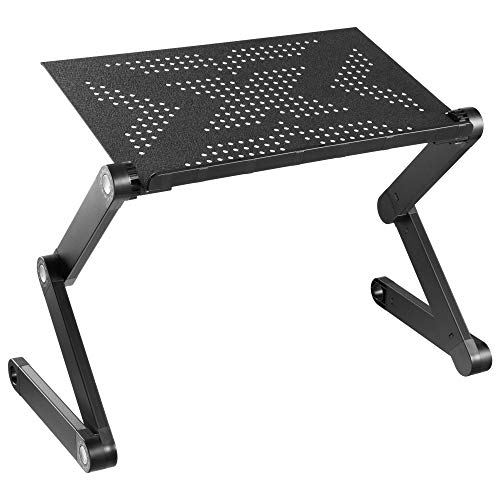 Mount-It! Adjustable Keyboard & Laptop Stand for Bed10.6 x 20.7 x 19 inches2.94 PoundsCheck on Amazon
 2026 Adjustable Height&Tilt Laptop Table14.76 x 18.5 x 15.94 inches18.5 x 14.76 x 15.94 InchesCheck on Amazon


Top 3 picks at a glance
Quick Picks
| Product | Best for | Price tier |
|---|---|---|
| BUYIFY 23.4″ Foldable Lap Desk Bed Table with Cup Holder Tray Black | Best overall for bed and couch | Budget |
| SAIJI Height & Angle Adjustable Lap Desk Laptop Stand for Bed | Best budget adjustable pick | Budget |
| Hifoxcc Foldable Laying Down Desk (Large, Black) | Best for lying flat in bed | Premium |
| Mount-It! Adjustable Keyboard & Laptop Stand for Bed, Couch, Floor | Best over-bed workstation | Budget |
| OPTIXCELL Lap Desk with Arm Rest | Best ergonomic lap desk | Mid-range |
| Portable Rolling Over Bed Laptop Desk | Best rolling stand for couch-side use | Budget |
| BUYIFY 23″ Foldable Lap Desk for Laptop Writing w/Cup Holder Black | Best ultra-budget tray | Budget |
| Laptop Desk for Bed Couch with Cup Holder (Black) | Best compact foldable table | Budget |
How We Compared
We focused on stands specifically usable outside a traditional desk: models with foldable legs that sit flat on a mattress, cantilevered bases that slide under a couch, and wheeled frames that roll alongside a bed. Each unit was judged on how its design handles a 13- to 16-inch laptop: stability on soft surfaces, height and tilt range, wobble while typing, heat clearance underneath, and how quickly it folds flat for storage. We also weighed leg clearance — if a stand’s crossbars dig into a mattress or the base won’t slide under a low couch frame, it loses points regardless of build quality. The picks span budget to premium tiers, and we’ve noted where the extra money genuinely buys more capability versus where a budget tray does the same job.
The 8 Best Picks
1. BUYIFY 23.4″ Foldable Lap Desk Bed Table with Cup Holder Tray Black
The 23.4-inch surface is the sweet spot in this lineup: wide enough for a 16-inch laptop plus a mouse, yet light enough to shift one-handed from bed to couch. The W-shaped folding legs lock firmly and collapse flat, and the integrated cup holder keeps drinks off your keyboard.
- Fits up to a 16-inch laptop with room for a mouse on the same surface
- Folds flat in seconds for under-bed or closet storage
- Legs can feel slightly loose after repeated folding cycles
Skip it if you need height adjustment — this is a fixed-height tray, not a riser.
2. SAIJI Height & Angle Adjustable Lap Desk Laptop Stand for Bed
The SAIJI delivers the two adjustments that matter most: an angle-adjustable top panel and legs that raise the surface for better typing posture. The anti-slip lip on the front edge keeps laptops from sliding when the panel tilts.
- Adjustable tilt reduces wrist strain during long sessions
- Sturdy legs hold position without slipping on sheets
- Surface is narrower than 23-inch trays, so a mouse gets tight
Pass on this one if you want to spread out with notebooks and snacks alongside your laptop.
3. Hifoxcc Foldable Laying Down Desk (Large, Black)
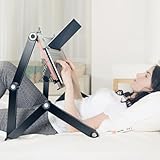
This is the premium pick for people who genuinely work lying flat. The articulated arm and large surface let you position the deck above your chest at a readable angle, with a built-in mouse pad area so you don’t need a second surface. It’s the heaviest and most expensive unit here, but nothing else in the group offers the same over-body positioning range.
- True lying-down orientation with adjustable height and tilt
- Large deck includes a dedicated mouse pad zone
- Heavy and bulky — it doesn’t fold down as compactly as budget trays
Skip it if you mostly sit up; a budget tray does that job fine.
4. Mount-It! Adjustable Keyboard & Laptop Stand for Bed, Couch, Floor
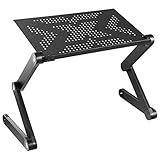
The cantilevered base slides under a bed or couch, putting the surface directly over your lap without legs digging into cushions. Height and tilt adjust independently, which makes it equally usable on the floor for low seating.
- Under-furniture base means no pressure points on your legs
- Works in bed, on the couch, and on the floor
- Takes up more floor footprint than a folding tray
Not ideal for small bedrooms where you can’t spare the floor space beside the bed.
5. OPTIXCELL Lap Desk with Arm Rest, Ergonomic 17″ Laptop Desk for Bed & Couch
The armrest is what sets this mid-range lap desk apart — it supports your forearms and reduces shoulder fatigue during long typing sessions. The 17-inch deck suits laptops up to that size, and the cushioned base sits comfortably directly on your lap.
- Built-in armrest helps reduce fatigue over multi-hour sessions
- Cushioned underside stays comfortable on bare legs
- 17-inch surface leaves little room for a mouse
Skip it if you pair your laptop with an external mouse or use a 17-inch-plus machine.
6. Portable Rolling Over Bed Laptop Desk, Adjustable Height and Tilt for Home
Wheels make this the easiest stand to reposition. Roll it up to the couch or over the bed, lock the casters, and adjust height and tilt to suit. It’s an affordable way to get over-bed functionality without a permanent desk.
- Locking casters make repositioning effortless
- Independent height and tilt adjustments for sitting or reclining
- The frame is less rigid than the pricier Hifoxcc when fully extended
Not a good fit if you have thick carpet; the casters struggle to roll and the base can wobble.
7. BUYIFY 23″ Foldable Lap Desk for Laptop Writing w/Cup Holder Black
The most affordable unit in this roundup is also one of the most practical. The 23-inch surface matches the larger BUYIFY tray, folds flat, and includes the same cup holder. Build materials are lighter, but for occasional bed and couch sessions it’s excellent value.
- Largest surface in the budget tier
- Ultra-light — easy to move between rooms one-handed
- Thinner panel may flex under a heavy 16-inch laptop
Skip it if you type hard or plan daily all-day use; step up to the sturdier 23.4-inch version.
8. Laptop Desk for Bed Couch with Cup Holder (Black)
This compact foldable bed table hits the middle of the price range with adjustable legs and a fold-flat design. It’s aimed at people who want tray-style simplicity but slightly more adjustability than a fixed-height lap desk, and the cup holder keeps drinks secure.
- Adjustable leg height works on both mattress and couch cushions
- Compact folded profile stores in a closet or under a bed
- Smaller surface limits room for a mouse and notebook
Pass if you want maximum desk real estate — the 23-inch BUYIFY trays are better for that.
More Laptop Stands and Lap Desks for Bed and Couch
The eight picks above lean toward folding bed trays and wheeled stands. Two other categories deserve attention for anyone working or gaming from the sofa or bed: cushioned lap desks, which sit directly on your legs with no folding parts, and cooling-focused stands that keep a hot gaming laptop off soft surfaces. These six additions fill those gaps.
LapGear Home Office Pro Lap Desk

The LapGear Home Office Pro is one of the most widely recommended cushioned lap desks, and it is a natural pick for couch work where a folding-leg tray would wobble on sofa cushions. The hard top measures roughly 21 by 14 inches, enough for most 15.6-inch laptops, and it adds three features that matter on the sofa: a foam wrist rest along the front edge, a built-in mouse pad of about 5 by 9 inches on the right side, and a slot that holds a phone upright for calls or two-factor codes.
The underside uses a dual-bolster microbead cushion that molds to your legs. The two bolsters leave a channel down the middle, which helps reduce heat build-up compared with a flat pillow. At around 2.8 pounds with a reinforced carry handle, it moves easily between couch, bed and car.
Who it is for: people who work sitting up on the couch or in bed and use an external mouse.
Strengths: integrated wrist rest and mouse pad, a stable cushioned base that conforms to your lap, and a phone slot.
Drawbacks: no height or tilt adjustment, a mouse area that feels small for low-sensitivity mouse users, and a laptop near the 15.6-inch limit may overlap the mouse pad slightly. The cushion does not suit lying flat.
How it compares: compared with the OPTIXCELL lap desk in the main list, the LapGear trades an armrest for a dedicated mouse pad and phone slot. Against the BUYIFY folding trays, it is more stable on soft sofa cushions but offers less surface area and no cup holder. Budget-to-mid-range pricing.
HUANUO Lap Desk with 8 Adjustable Angles

The HUANUO lap desk solves a problem flat lap desks ignore: screen angle. Its 14.8 by 11 inch platform tilts through eight positions, letting you raise the laptop toward your eyes for reading and video or flatten it for typing. A plastic ledge along the bottom keeps the laptop or a tablet from sliding when tilted, and the platform is large enough for most 15.6-inch laptops, or a big tablet in portrait for reading.
Underneath, two detachable cushions conform to your lap, and the desk weighs under two pounds with a built-in handle. The same tilt that helps with screen height also makes it a capable reading stand and sketching board in bed.
Who it is for: students and remote workers who sit up in bed or on the couch and want a better screen angle without a folding-leg table.
Strengths: eight tilt settings, a non-slip ledge, light weight and removable cushions.
Drawbacks: the platform is smaller than the 23-inch trays above with no room for a mouse, and steep angles make typing awkward without an external keyboard. The plastic build is functional rather than premium.
How it compares: it gives you the tilt adjustment of the SAIJI height and angle desk in a lighter, cushioned form, but without height adjustment. It sits in the budget tier.
SONGMICS Bed Laptop Desk with 120-Degree Stepless Tilt
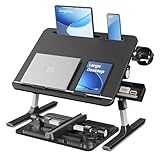
For those who want a folding bed table with more adjustment than a basic tray, the SONGMICS desk is a strong alternative. The 22 by 15.7 inch top is one of the larger surfaces in this guide, and it tilts steplessly through a 120-degree range, both upward for reading and downward, with movable anti-slip guards holding devices in place. The legs adjust to eight heights between about 10 and 14.2 inches.
Reinforced aluminum legs on a T-shaped base support a listed static load of about 55 pounds, and a locking lever holds the top at the chosen angle. Practical extras include a swivel cup holder that doubles as a phone stand, a retractable side tray for small items and slots for a tablet and phone. It folds flat for storage.
Who it is for: people who work sitting up in bed for long stretches and want both height and angle control on a large surface.
Strengths: stepless tilt, eight heights, a large top, sturdy aluminum legs and thoughtful storage features.
Drawbacks: the cup holder and phone slot should not be used when the top is tilted, it is bulkier than a cushioned lap desk, and like all leg-based tables it can sink slightly into very soft mattresses.
How it compares: it covers the same ground as the SAIJI adjustable desk and the compact folding table in the main list, but with a larger, steplessly tilting surface. A good step up from the fixed-height BUYIFY trays at mid-range pricing.
SAIJI Laptop Desk for Bed with Cooling Fan

Gaming laptops and high-performance machines run hot, and beds and couches block the intake vents that keep them cool. This SAIJI desk combines an adjustable bed table with a built-in USB cooling fan under the laptop area, powered from the laptop’s own USB port. The surface measures about 20.5 by 11.8 inches, which SAIJI says suits laptops up to 17 inches.
The legs offer five heights between roughly 9.4 and 12.6 inches, and the top tilts through four angles up to 36 degrees. A soft wrist rest pad and a retractable stopper are included, so the laptop stays put when tilted, and the desk folds flat for storage.
Who it is for: gamers and creators who use a powerful laptop in bed or on the couch and want help managing heat.
Strengths: integrated cooling fan, height and angle adjustment, wrist rest and room for larger laptops.
Drawbacks: the fan uses a USB port, it is heavier than a simple tray at around 2 kilograms, and a single fan helps airflow but is not as effective as a dedicated multi-fan cooling pad.
How it compares: it is a cooling-focused cousin of the SAIJI adjustable desk in the main list. If heat is your main concern, it is a better choice than any of the original eight. Mid-range pricing.
Targus 17-Inch Dual Fan Lap Chill Mat

Not everyone needs a full lap desk. The Targus Lap Chill Mat is a slim cooling pad designed to sit on your lap rather than on a desk, combining a soft neoprene base with an angled, open-mesh top and two USB-powered fans. It fits laptops up to 17 inches, and four rubber stops on the top hold the laptop in place.
The fans draw power from a USB-A port on the laptop, and the open design lets heat escape away from the machine and your legs. The tilt gives a slightly better typing angle than a flat surface, and at around two pounds and about an inch thick, it slides into a backpack sleeve alongside the laptop.
Who it is for: laptop users who game or work on the couch and want cooling and heat protection without bulk.
Strengths: dual fans, a comfortable neoprene base, room for 17-inch laptops and slim portability.
Drawbacks: no mouse surface, no height adjustment, fans that are moderate rather than powerful, and the neoprene can feel warm after hours on bare legs.
How it compares: it is the portable alternative to the SAIJI cooling desk: less adjustment and no legs, but much easier to carry. It sits in the budget tier.
AboveTEK Portable Laptop Lap Desk with Retractable Mouse Pad

The AboveTEK lap desk targets people who need a mouse but want something thinner and lighter than a cushioned desk. The 14 by 9.7 inch laptop tray fits devices up to 15.6 inches, and a 7.4 by 6.1 inch mouse pad slides out from either side, so it works for left- and right-handed users. Raised edges help keep the mouse from sliding off.
It is only about 0.6 inches thick and weighs around 2.2 pounds, with a heat shield layer between the laptop and your lap, a textured non-slip top and rubber strips on the bottom for grip.
Who it is for: commuters, travelers and couch workers who want a slim, mouse-friendly surface that fits in a bag.
Strengths: ambidextrous slide-out mouse pad, very slim profile and a heat-shielding layer.
Drawbacks: no cushion, so it is less comfortable on bare legs over long sessions, no tilt or height adjustment, and the mouse tray can drop the mouse if the desk is tipped too far.
How it compares: it offers a larger mouse area than the LapGear Home Office Pro in a thinner design, but gives up the cushion and wrist rest. Budget tier.
Buying Guide
Surface Size and Clearance
Match the deck to your laptop plus extras. A 17-inch panel fits a laptop alone; a 23-inch panel adds room for a mouse. If you’ll use the stand over your chest while lying down, check the clearance between surface and base — you need several inches of torso room, which is why articulated stands like the Hifoxcc command a premium.
Stability on Soft Surfaces
Mattresses and couch cushions shift under weight. Wide-set folding legs distribute load better than narrow ones, and cantilevered bases that slide under furniture sidestep the problem entirely. If you type heavily, prioritize rigid leg locks over lightweight panels — flex in the deck translates directly to keyboard wobble.
Adjustability and Ergonomics
Two adjustments matter: tilt angle for wrist comfort and height for neck position. Fixed trays are fine for casual browsing, but if you work an hour or more daily, spend a little more on tilt and height adjustment, or add an armrest as the OPTIXCELL does. Expect basic trays in the budget tier, with adjustable or articulated models running from mid-range to premium.
Materials and Build Quality
Lap desks and bed tables use a handful of materials, and each affects weight, stability and comfort:
- MDF and engineered wood tops are rigid and inexpensive, and they resist flex under heavy laptops, but they add weight and can swell if drinks are spilled.
- Bamboo is light, attractive and fairly stiff, which suits bedroom furniture, but thinner bamboo panels can flex under heavy typing.
- Plastic platforms, used on many tilting lap desks, keep weight low and are easy to clean, though they feel less premium.
- Aluminum legs and frames offer the best strength-to-weight ratio for folding tables and resist wobble better than thin steel tubing.
- Microbead and foam cushions conform to your lap. Microbead cushions shape themselves more closely, while foam stays cooler and more consistent over time.
Check the hinges and locking points on folding designs. Leg locks and tilt levers are the parts most likely to loosen over time, so metal hinges and positive-click locks are worth paying a little more for if you will fold and unfold the table daily.
Heat Management on Soft Surfaces
Most laptops pull cool air through vents on the bottom. A duvet, blanket or couch cushion can block those vents completely, which makes the fans run louder and can cause performance throttling during games or video exports. Any hard surface helps, but gaming laptops benefit from a stand with a built-in fan, like the SAIJI cooling desk, or a cooling pad such as the Targus Lap Chill Mat. Avoid placing a laptop directly on bedding, even briefly, while it is under heavy load.
Cushioned Lap Desk vs. Folding Bed Table
The two main styles suit different habits:
- Cushioned lap desks (LapGear, HUANUO, OPTIXCELL) rest directly on your legs. They conform to the sofa and move with you, but they offer limited height adjustment and keep the screen low.
- Folding bed tables (BUYIFY, SAIJI, SONGMICS) stand on legs over your lap. They offer more surface area and height, and keep heat off your body, but they need a reasonably firm surface and take up more room.
- Floor and rolling stands (Mount-It!, rolling over-bed desk) avoid both your lap and the mattress, which suits long sessions but requires floor space.
Comparison Table: Additional Lap Desks and Stands
| Product | Style | Laptop fit | Adjustment | Key extra | Price tier |
|---|---|---|---|---|---|
| LapGear Home Office Pro | Cushioned lap desk | Up to 15.6 inches | None | Wrist rest, mouse pad, phone slot | Budget to mid-range |
| HUANUO Lap Desk | Cushioned tilting lap desk | Up to 15.6 inches | 8 tilt angles | Anti-slip ledge, detachable cushions | Budget |
| SONGMICS Bed Laptop Desk | Folding bed table | Most laptops, 22-inch top | 8 heights, 120-degree stepless tilt | Cup holder, side tray | Mid-range |
| SAIJI Desk with Cooling Fan | Folding bed table | Up to 17 inches | 5 heights, 4 angles | USB cooling fan, wrist rest | Mid-range |
| Targus Lap Chill Mat | Cooling lap pad | Up to 17 inches | Fixed tilt | Dual USB fans | Budget |
| AboveTEK Lap Desk | Slim lap desk | Up to 15.6 inches | None | Slide-out ambidextrous mouse pad | Budget |
Posture Tips for Working in Bed or on the Couch
- Support your lower back. Put a firm pillow or wedge behind your lower back when sitting up in bed. Slouching against a soft headboard is the main cause of neck strain.
- Raise the screen, not your chin. Tilt or raise the laptop so you look slightly down rather than sharply down. Tilt-capable desks like the HUANUO and SONGMICS help here.
- Keep wrists neutral. If the screen is tilted up, use an external keyboard on your lap so your wrists stay flat. A wrist rest, like the one on the LapGear Pro, helps on flat desks.
- Bend your knees slightly. On a sofa, rest your feet on the floor or an ottoman. In bed, a pillow under the knees reduces lower-back pressure.
- Take short breaks. Change position every 30 to 45 minutes: stand, stretch and look into the distance for a moment to relax your eyes.
- Light the room. Working in the dark with a bright screen tires the eyes. A bedside lamp or a dim ambient light reduces contrast.
- Keep cables tidy. Use a long charging cable routed along the bed frame or couch arm so the laptop is not pulled toward the edge of the stand.
Matching the Stand to How You Use It
- Sitting up in bed for work: a height- and tilt-adjustable folding table such as the SONGMICS or SAIJI.
- Couch browsing and email: a cushioned lap desk like the LapGear Home Office Pro or HUANUO.
- Gaming on a laptop in bed: the SAIJI cooling desk, or a stand plus a Targus chill mat for extra airflow.
- Working lying down: an articulated stand like the Hifoxcc from the main list; lap desks are not designed for this.
- Travel and commuting: a slim desk like the AboveTEK that fits into a laptop bag.
How to Use a Laptop Comfortably While Lying Down
Working while lying flat is the hardest position to make ergonomic, and most lap desks are not designed for it. If you need to work lying down, for example during recovery from an injury or with chronic back pain, follow a few principles:
- Use an articulated stand. Stands with an arm or a frame that positions the screen above your chest, such as the Hifoxcc in the main list, are the only designs that handle this well. Lap desks and bed trays simply slide off.
- Angle the screen toward your face. The screen should face you directly at a comfortable reading distance, usually an arm’s length, rather than forcing you to tilt your head forward.
- Separate the keyboard. A small wireless keyboard resting on your torso keeps your arms relaxed, rather than reaching up to a keyboard attached to a raised screen.
- Prop your head and knees. A thin pillow under your head and another under your knees keeps your spine neutral.
- Limit session length. Even with the right stand, lying-down work strains the neck and shoulders over time. Alternate with sitting-up sessions when possible.
Our Verdict
For most people, the BUYIFY 23.4″ Foldable Lap Desk is the best laptop stand for bed and couch use — it balances surface size, foldability, and value better than anything else here. Budget shoppers should grab the lighter BUYIFY 23-inch, and anyone who works lying flat should invest in the premium Hifoxcc. Rolling-stand fans will prefer the Portable Rolling Over Bed Desk for its casters, and long-session typists should consider the mid-range OPTIXCELL for its armrest.
FAQ
Can I use a laptop stand on a soft mattress?
Yes, but choose a model with wide-set folding legs or a cantilevered base. Wide legs distribute weight across the mattress instead of sinking, and under-furniture bases avoid the issue entirely. Thin-legged trays can sink into plush mattresses and become unstable.
What size laptop do these stands fit?
Most trays in this roundup accommodate laptops from 11 to 16 inches. The OPTIXCELL’s 17-inch deck tops out at 17 inches, while the 23-inch and 23.4-inch BUYIFY trays leave room for a 16-inch laptop plus a mouse.
Are rolling laptop stands worth it?
If you move between a bed and a couch regularly, yes. The rolling model repositions in seconds and locks in place. On thick carpet, though, casters lose their advantage and a folding tray is often the more stable choice.
How much should I spend?
For casual use, a budget folding tray is enough. For daily work sessions with height and tilt adjustment, plan on a budget to mid-range model. Only spend premium money on an articulated lying-down desk if you genuinely work while flat on your back — otherwise the extra money goes unused.
Is it bad to use a laptop on a bed without a stand?
It can be. Bedding blocks the bottom air vents on most laptops, which raises internal temperatures, makes fans louder and can slow performance. Over time, sustained heat also stresses the battery. Any hard surface helps, and a stand with ventilation or a cooling fan is best for demanding tasks.
Do lap desks protect against laptop heat?
Yes, to a degree. A lap desk puts a barrier between the laptop and your legs, and cushioned designs with channels, like the LapGear’s dual-bolster base, reduce heat transfer. For gaming laptops that run hot, a desk with a cooling fan or a cooling pad provides better protection.
Can I use a lap desk with a gaming laptop?
Yes, but check size and weight first. Many gaming laptops are 16 or 17 inches and heavier than ultrabooks. Choose a surface rated for larger laptops, such as the SAIJI cooling desk or Targus Lap Chill Mat, and avoid lap desks with solid tops that block bottom intake vents.
Should I get a lap desk with a mouse pad?
If you use an external mouse, yes. Balancing a mouse on a cushion or blanket is frustrating. The LapGear Home Office Pro has a built-in mouse pad, and the AboveTEK has a slide-out pad on either side. Folding trays with wide tops, like the 23-inch BUYIFY, also leave room for a mouse.
What is the most ergonomic way to work in bed?
Sit upright with lower-back support, put the screen as close to eye level as possible and keep your wrists neutral. A height-adjustable bed table with a tilting top gets closest to a desk setup. For long daily sessions, a separate keyboard and a raised screen are better than any lap desk.
Related guides
- Best Cheap Tablets for Kids: Eight Listings Sorted by Age, Controls and Storage: 8 Compared (2026)
- Best Ultrawide Gaming Monitors: Six Screens Sized Against Real Desks: 6 Compared (2026)
- Best Game Room Neon Lights: Ten Signs and Icon Lamps Compared: 10 Compared (2026)
- 10 Best 75% Hot-Swappable Mechanical Keyboards (October 2026)









