An all-in-one desktop folds the monitor, processor, memory, storage, speakers and webcam into a single slab, which means one power cable and no tower under the desk. That tidy footprint is the whole appeal, and it also defines the trade-offs: the parts inside are rarely upgradeable, the screen cannot be swapped for a better panel later, and a failure in one component can sideline the entire machine. Choosing the right model is less about chasing the biggest spec list and more about matching memory, storage and display size to the work you actually do.
This guide is for households, home offices and small shops picking an all-in-one in 2026 for browsing, video calls, spreadsheets, homework, light photo editing and streaming. It is not a gaming shortlist: these machines list integrated graphics or entry-level processors, so demanding titles are out of scope. It compares eight models using only the details in their titles and explains which numbers deserve attention, such as RAM, SSD size, screen panel type and wireless standard, and which are decoration. If a title omits something like port selection or panel brightness, confirm it on the listing.
Our Top Picks
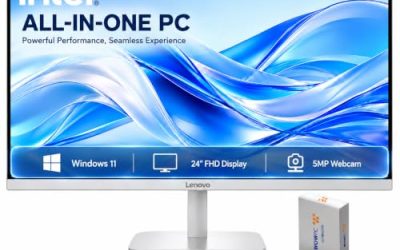
 Lenovo 24" FHD All-in-One Desktop Computer for Office16GB RAM | 256GB SSD7.3 x 21.23 x 16.65 inches15.2 poundsCheck on Amazon


Top 3 picks at a glance
Quick Picks
As an Amazon Associate we earn from qualifying purchases at no extra cost to you.


| Product | Best for | Key spec from the title |
|---|---|---|
| Qehi 24-Inch AIO | Home office with video calls | Core i5, 23.8 inch FHD, 16GB RAM, 256GB SSD, HD webcam |
| Lenovo IdeaCentre AIO | Everyday family computer | 8GB DDR5, 512GB SSD, 24 inch FHD anti-glare IPS, Wi-Fi 6 |
| HP OmniStudio 24 | More memory and mixed storage | 16GB DDR5, 640GB storage, 24 inch FHD, Wi-Fi 6 |
| HP 21.5-Inch AIO | Small desk and light tasks | 21.5 inch FHD, 8GB DDR5, 384GB storage, Intel N100 |
| Lenovo 24-Inch AIO | Office and home multitasking | 24 inch FHD, 16GB RAM, 256GB SSD, HDMI, Wi-Fi 6 |
| MECHAZER 19-Inch AIO | Smallest space-saving option | 19 inch, Core i5, 8GB RAM, 256GB SSD, Wi-Fi 6, Bluetooth 5.3 |
| Apple iMac with M6 chip | Creative work and a polished display | 10-core CPU, 10-core GPU, 24 inch Retina display, 16GB |
| 24-Inch i5 AIO, 3.3 GHz listing | Memory-first budget pick | i5 up to 3.3 GHz, 16GB RAM, 256GB SSD, Windows 11 Home |
How to Choose
Memory and storage thresholds
Sixteen gigabytes of RAM is the sensible target for a machine you expect to keep for several years, because browsers with many tabs, video calls and office apps add up quickly. Eight gigabytes still works for light use but leaves little headroom. For storage, 256GB is enough for the operating system, apps and a modest document library, while 512GB gives breathing room for photos and downloads. Watch listings that combine storage types: a headline of 640GB made from an external drive plus a small flash module is not the same as a single 640GB internal SSD. Ask what is actually inside the case.
Screen size, panel and webcam
The common sizes here are 19, 21.5 and 24 inches. A 24 inch full HD panel gives comfortable room for two windows side by side, while smaller screens suit a kitchen counter or kid’s desk. IPS panels offer wider viewing angles and steadier color than TN, so a listing that names IPS is a plus. Anti-glare coatings help in bright rooms. For video calls, check the webcam: some titles mention privacy features such as a shutter. If you plan to do photo work, look for a screen described by its color capabilities, not only its resolution.
Processor naming and what to ignore
Processor wording in these titles varies widely. Core i5 and N100 are not interchangeable: the N100 is an entry-level chip suited to light tasks, while an i5 should handle heavier multitasking, though the generation matters and is often not stated. Phrases like “up to 3.3 GHz” describe a peak boost, not sustained speed, and they say little about real responsiveness. Apple’s M-series chips are designed around efficiency and a unified memory design. Ignore decorative extras such as bundled mouse sets when comparing, and focus on the memory, storage and display.
Connectivity, upgrades and support
Wi-Fi 6 and Bluetooth 5.2 or 5.3 are the current norms in this tier. Count ports before you buy, especially HDMI for a second display, USB-A for older peripherals and a card reader if you handle photos. Most all-in-ones allow little or no internal upgrading, so buy the memory you need now. Warranty and software support differ by brand, and well-known makers generally offer clearer service channels than unfamiliar sellers. Consider a stand with tilt or height adjustment if you sit for long periods, since fixed stands can force poor posture.
Setup matters more than most buyers expect. Place the screen so the top edge sits at or slightly below eye level, keep the webcam clear of tape or stickers if it has a privacy shutter, and leave a few inches of space behind the unit for ventilation. All-in-ones pack heat-producing parts behind a thin panel, so blocking the vents with a wall or a stack of papers can raise fan noise. Run the initial Windows updates before loading personal files, and set up a backup routine early, because a single internal drive is the only copy of your work until you do.
Finally, think about how long you want the machine to last. Memory and storage cannot be expanded in most designs, so a listing with 16GB and a larger SSD usually ages better than a cheaper one with 8GB. That is the main reason this guide leans toward models with more memory, even when the processor name looks modest.
The 8 Best Options
Qehi All-in-One Desktop Computer
The Qehi listing pairs a Core i5 with a 23.8 inch full HD screen, 16GB of RAM and a 256GB SSD, along with an HD webcam for clear calls and Wi-Fi 6. It targets home offices and small businesses that want a ready-to-use machine for meetings and spreadsheets without paying for a tower setup. The generous memory is the standout.
- Strength: 16GB RAM supports many open tabs and calls.
- Strength: HD webcam and Wi-Fi 6 suit remote work.
- Trade-off: Unfamiliar brand, so review the warranty terms.
Skip it if you want a major-brand service network or a larger SSD.
Lenovo IdeaCentre All-in-One
This Lenovo model lists 8GB of DDR5 memory, a 512GB SSD, a 24 inch FHD anti-glare IPS display, Wi-Fi 6 and Bluetooth 5.2, with an Intel 4-core processor. The roomy SSD and IPS anti-glare panel make it a good fit for a family desk in a bright room, with email, streaming and homework as typical jobs.
- Strength: IPS anti-glare screen and 512GB of storage.
- Strength: DDR5 memory type is named.
- Trade-off: Only 8GB of RAM limits heavy multitasking.
Skip it if you keep dozens of tabs open or want a big memory buffer.
HP OmniStudio 24-Inch All-in-One
The OmniStudio lists a 24 inch FHD display, an Intel quad-core processor, 16GB DDR5 RAM and 640GB of combined storage made from a 512GB external drive and 128GB of UFS. That mix means the main internal storage is small, so the external piece matters. It suits buyers who want memory and a recognizable brand.
- Strength: 16GB of DDR5 RAM for multitasking.
- Strength: Wi-Fi 6 and a 24 inch FHD screen.
- Trade-off: Storage split between external and internal parts is less convenient than one internal SSD.
Skip it if you want a single large internal drive.
HP 21.5-Inch All-in-One
This smaller HP lists a 21.5 inch FHD screen, 8GB DDR5, 384GB total storage made up of a 128GB SSD and a 256GB docking station set, and an Intel N100 quad-core processor with Windows 11. It is an entry-level pick for browsing, streaming and basic documents on a compact desk.
- Strength: Compact screen suits tight spaces.
- Strength: Windows 11 is preinstalled per the title.
- Trade-off: N100 is an entry-level chip, and the internal SSD is only 128GB.
Skip it if you plan on heavier multitasking or large file storage.
Lenovo 24-Inch All-in-One for Office and Home
The Lenovo listing names a 24 inch FHD screen, Intel processor, 16GB RAM, 256GB SSD, HDMI, Wi-Fi 6 and Bluetooth 5.2, with wireless peripherals mentioned. It is geared toward office and home use where memory matters more than raw storage. The HDMI mention signals an extra display connection.
- Strength: 16GB RAM and HDMI in a major-brand package.
- Strength: Business-oriented design for office use.
- Trade-off: 256GB SSD fills up with large media libraries.
Skip it if you need bulk local storage and no external drive.
MECHAZER 19-Inch All-in-One
The MECHAZER is the smallest option, with a 19 inch 1080p TN screen, Core i5, 8GB RAM, 256GB SSD, Wi-Fi 6 and Bluetooth 5.3, plus a mouse and keyboard in the bundle. It fits a kids’ homework corner or a retail counter where space is tight and viewing angles are not critical.
- Strength: Very compact, with Bluetooth 5.3.
- Strength: Peripherals included in the package.
- Trade-off: TN panels have narrower viewing angles than IPS.
Skip it if you want a larger, wider-angle display.
Apple iMac with M6 Chip
The iMac listing highlights an M6 chip with a 10-core CPU and 10-core GPU, a 24 inch Retina display and 16GB of memory, pitched as a platform for AI work. It is the premium tier in this group and suits creative users who value display quality and an integrated design.
- Strength: Retina display and a 10-core CPU and GPU.
- Strength: Silver, polished design with 16GB of memory.
- Trade-off: Premium tier, and Apple hardware is not user-upgradeable.
Skip it if you depend on Windows-only software or have a tight budget.
24-Inch i5 All-in-One, up to 3.3 GHz
This unbranded listing offers an i5 CPU described as up to 3.3 GHz, 16GB of RAM, a 256GB SSD, an external Wi-Fi 6 and Bluetooth adapter, integrated graphics and Windows 11 Home. It is a memory-first budget buy for general use.
- Strength: 16GB RAM at a modest tier.
- Strength: Windows 11 Home included.
- Trade-off: External wireless adapter and an unnamed brand raise support questions.
Skip it if you want established brand service and an internal wireless card.
Which One Fits Your Situation
You run a home office with daily video calls
The Qehi 24-Inch AIO combines 16GB of RAM with an HD webcam, which covers meetings and spreadsheets without extra hardware.
You need a shared family computer
The Lenovo IdeaCentre has a 512GB SSD and an IPS anti-glare panel, which suits mixed use by several people in a bright room.
Your desk is tiny
The MECHAZER 19-Inch or the HP 21.5-Inch both shrink the footprint. Accept lower screen real estate in exchange for space.
You do creative work and value the display
The Apple iMac stands out for its Retina screen and unified chip design, provided your software runs on macOS.
Common Mistakes
- Counting external drives as if they were internal storage.
- Buying 8GB of RAM and expecting years of comfortable multitasking.
- Ignoring panel type; TN screens can look washed out off-axis.
- Assuming an all-in-one can be upgraded later like a tower.
- Expecting integrated graphics to handle modern 3D games.
Related guides
- What Is The Best Budget Most Responsive Gaming Mouse Wired
- Low Latency Gaming Headphones Usb-C 2.4 Ghz Wireless
- Mechanical Gaming Keyboards Competitive Pc Gaming
Frequently Asked Questions
Can an all-in-one handle gaming?
Models with integrated graphics suit casual and older titles at best. Demanding games call for a desktop with a dedicated graphics card.
Is 8GB of RAM enough?
It works for light browsing and documents, but 16GB gives far more headroom for calls, tabs and office apps running together.
Can the memory be upgraded?
Often not. Many all-in-ones have soldered or hard-to-reach memory, so choose the capacity you need at purchase.
What happens if the screen fails?
Since the display is part of the computer, repair or replacement may involve the whole unit. A clear warranty helps.
Related guides
More from Amazon
Programs that pair well with the guide above. Offers and eligibility are set by Amazon and may change.
Free shipping on eligible items, Prime Video and more. Eligible new members can start with a free trial.
Start a Prime free trialAd-free music streaming. Eligible new subscribers can start with a free trial.
Try Music Unlimited freeA Prime membership for ages 18-24 with a trial period. Eligibility is set by Amazon.
See Prime for Young AdultsAudiobooks and podcasts to listen to on the go. Eligible new members can start with a free trial.
Try Audible freeAs an Amazon Associate we earn from qualifying purchases.