A gaming PC is easy to upgrade when it uses a standard-size motherboard and power supply, a current socket platform, free memory slots and M.2 slots, a roomy case with good airflow, and a power supply with spare capacity and the right connectors. Machines that rely on proprietary parts or tightly packed cases are the ones that get stuck.
As an Amazon Associate we earn from qualifying purchases at no extra cost to you.

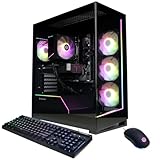


Top 3 picks at a glance
Quick Checklist
- Standard form-factor motherboard (ATX, micro-ATX or mini-ITX), not a custom shape.
- Standard-size power supply, not a proprietary unit with unusual connectors.
- A socket with a future: ask which processors the board can take after a BIOS update.
- Free DIMM slots and room for more memory.
- Extra M.2 slots and SATA ports for storage.
- Case space for a larger graphics card and radiator or cooler.
- Power supply headroom for a stronger GPU later.
Motherboard and Socket
The motherboard decides which processors and memory you can use. Current AMD Ryzen 9000 chips, including the 9800X3D, use the AM5 socket with DDR5, and Intel Core Ultra 200S processors use DDR5 as well. Older platforms such as AM4 use DDR4, and Intel Core 12th to 14th generation boards can be DDR4 or DDR5 depending on the model. A newer socket usually gives you more compatible processors to move up to, though makers differ in how long they say they will support a socket, so read the maker’s own statements and the board’s CPU support list.
| Board feature | Why it matters for upgrades |
|---|---|
| Socket and chipset | Sets the range of processors you can drop in later |
| Number of DIMM slots | Four slots let you add memory later; two slots may force replacing sticks |
| M.2 and SATA count | Determines how much storage you can add without removing a drive |
| PCIe slots and version | Affects graphics card and expansion card support |
| BIOS update method | Some boards can update without a CPU installed, which helps with newer chips |
| Standard layout | Allows swapping into any compatible case |
Memory
Start with at least 16 GB in two modules, and check whether free slots exist. If the board has only two slots and both are filled with small modules, growing capacity means replacing them. Remember that DDR4 and DDR5 are not interchangeable; the board supports one or the other. Memory speeds above the base specification generally run through an XMP or EXPO profile, which is a form of overclocking and can affect warranty terms with some makers.
Power Supply
The power supply is the most commonly overlooked limit. Check these points:
- Wattage margin. Graphics card makers publish recommended power supply wattage. Pick a unit with headroom above that figure, so a stronger card later will not force a replacement.
- Connectors. Recent graphics cards may use the 12V-2×6 connector or multiple 8-pin connectors. Make sure the power supply provides what the card you want needs, and follow the card and power supply makers’ guidance when seating the cable. Stop using the connection and contact the maker if you notice heat damage.
- Standard size. A standard ATX unit can be swapped; some prebuilt machines use smaller or custom units that are harder to replace.
- Never open a power supply. Replace the whole unit if it fails.
Case Size and Cooling
Graphics cards keep getting larger. Look at the case maker’s stated maximum graphics card length and cooler height before buying a card or tower cooler. Check the number of fan mounts, radiator support if you want liquid cooling, and drive bays. A cramped case with little airflow limits how powerful a processor and GPU you can fit without overheating.
| Case trait | What to look for |
|---|---|
| GPU clearance | Maker’s stated maximum card length and width |
| CPU cooler height | Stated maximum cooler height |
| Fan and radiator mounts | Front, top and rear support for added fans or a radiator |
| Front panel I/O | Enough USB ports, ideally including USB-C |
| Drive mounts | Spare 2.5 inch or 3.5 inch bays if you use those |
Storage
Most current boards offer at least one M.2 slot, and many offer several. Check the count and whether using one disables a SATA port, a detail many motherboard manuals describe. Leave room to add an extra NVMe drive as game sizes grow.
Prebuilt Systems: Proprietary Parts Warning
Some prebuilt machines use non-standard motherboards, power supplies or front panel connectors. These can limit future part swaps. Before buying a prebuilt, check the seller’s spec sheet or reviewers’ teardown notes for power supply wattage and form factor, board model and slot count. Consumer rules and warranty terms differ, so also read the seller’s policy on user upgrades.
Upgrade Readiness by Buyer
| Pick this if you … | Aim for |
|---|---|
| Plan to upgrade the GPU in a couple of years | Power supply with spare wattage, case with large GPU clearance |
| Plan to move to a faster CPU | A socket the maker still supports, and a board with good power delivery |
| Want to add storage over time | Board with several M.2 slots |
| Want a compact system | Mini-ITX or small-form-factor with standard parts, accepting fewer expansion options |
| Want a no-fuss system | A well-specified prebuilt, accepting limited upgrade room |
Common Mistakes
- Choosing a tight case that cannot hold a larger future graphics card.
- Buying the smallest power supply that meets today’s needs.
- Ignoring DIMM slot count and filling all slots with low-capacity modules.
- Assuming a socket will take any new processor without checking the CPU support list and BIOS version.
- Buying a prebuilt without learning the motherboard and power supply models.
Alternatives
- Build your own. You choose standard parts, so every component is replaceable.
- Buy a prebuilt with documented standard parts. Some builders publish full part lists and use standard cases.
- Plan a platform replacement. If the socket is end-of-line, a later motherboard, CPU and memory swap may be the real upgrade path.
Frequently Asked Questions
What is the first thing to check for GPU upgrades?
The power supply wattage and connectors, then the case’s stated maximum graphics card length. These two limits stop more upgrades than the motherboard does.
How many RAM slots should a gaming PC have?
Four slots give more flexibility than two, because you can add modules later. Two-slot boards are fine if you start with the capacity you want, though they require replacing modules to grow.
Can I upgrade the CPU without changing the motherboard?
Sometimes. It depends on the socket and the board’s CPU support list and BIOS version. Read the board maker’s compatibility list before buying a processor.
Are prebuilt gaming PCs hard to upgrade?
Some are, particularly those with proprietary parts. Many others use standard components. Check the power supply and motherboard specifications and the seller’s upgrade policy.
Does DDR5 make a PC more future-proof than DDR4?
DDR5 is the memory type used by current AMD and Intel desktop platforms, so a DDR5 board is generally on a newer platform. That does not guarantee any specific future support, so read the maker’s CPU support information.
Is a bigger power supply always better?
A unit with sensible headroom helps with future upgrades, but extra capacity does not improve performance by itself. Choose one that meets the graphics card maker’s recommendation with some margin.
Related guides
More from Amazon
Programs that pair well with the guide above. Offers and eligibility are set by Amazon and may change.
Free shipping on eligible items, Prime Video and more. Eligible new members can start with a free trial.
Start a Prime free trialAd-free music streaming. Eligible new subscribers can start with a free trial.
Try Music Unlimited freeA Prime membership for ages 18-24 with a trial period. Eligibility is set by Amazon.
See Prime for Young AdultsAudiobooks and podcasts to listen to on the go. Eligible new members can start with a free trial.
Try Audible freeAs an Amazon Associate we earn from qualifying purchases.