Under 1500, the sweet spot for a prebuilt is an RTX 5070 12GB system with a modern six- to eight-core CPU, 32GB of DDR5 if you can get it, and a 1TB NVMe drive, built for strong 1440p play. Skytech Gaming’s Viper and King 95 and CyberPowerPC’s GML 99684 and EVO MINI A 200 are listed by their makers with exactly that kind of specification. If your budget leans toward the upper edge, some retailers list RTX 5070 Ti systems, but those typically belong to the next tier.
As an Amazon Associate we earn from qualifying purchases at no extra cost to you.

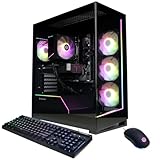


Top 3 picks at a glance
Quick Verdict
An RTX 5070 with 12GB of GDDR7 is the headline part of this class. The decisions that remain are CPU brand, memory capacity (16GB or 32GB), storage size and the quality of the supporting parts. Because makers change prices and promotions often, this guide ranks by stated specification rather than by any figure.
Current Models That Fit the Class
| System (maker listing) | CPU | GPU | RAM / storage | Best for | Limit |
|---|---|---|---|---|---|
| Skytech Viper | Core Ultra 7 265K | RTX 5070 12GB | 32GB DDR5 / 1TB NVMe | Gaming plus multitasking, memory-rich | 1TB storage fills quickly |
| Skytech King 95 | Ryzen 7 9700X | RTX 5070 12GB | 16GB DDR5 / 1TB NVMe | Pure gaming on a current AMD platform | Only 16GB of RAM as listed |
| Skytech O11 Vision | Ryzen 7 7700X | RTX 5070 12GB | 32GB DDR5 / 1TB Gen4 NVMe | Showcase case with balanced specs | Previous-generation Ryzen 7000 CPU |
| CyberPowerPC GML 99684 | Ryzen 7 8700F | RTX 5070 12GB | 32GB DDR5 / 2TB NVMe Gen4 | Storage and memory generous for the class | CPU is a notch below the newest Ryzen 9000 options |
| CyberPowerPC EVO MINI A 200 | Ryzen 5 7600 | RTX 5070 | 16GB DDR5-6000 / 1TB NVMe | Compact builds | Small case, 16GB RAM |
How the Listed Systems Differ
All five use the same graphics card, so gaming frame rates should be broadly similar when the GPU is the limit, which is common at 1440p. The differences lie elsewhere. The Viper and the O11 Vision list 32GB of DDR5, while the King 95 and the EVO MINI list 16GB. The GML 99684 lists a 2TB drive, double what the Skytech entries list. For people who install many large games, the extra storage and memory can matter as much as a slightly faster CPU.
On CPUs, the Ryzen 7 9700X is a current-generation part, the Core Ultra 7 265K belongs to Intel’s Core Ultra 200S series, and the Ryzen 7 8700F is a mid-range chip aimed at value builds. In games, reviewers generally find the GPU matters more than these CPU differences at 1440p, though high refresh rates in CPU-heavy titles can reward faster processors.
Intel or AMD in This Class
AMD’s Ryzen 7 9700X and 7700X sit on platforms that are widely regarded as friendly for upgrades, with the maker’s own AM5 socket supporting multiple generations. Intel’s Core Ultra 7 265K belongs to the newer LGA 1851 platform. Neither choice is wrong. The practical test is the motherboard and cooling the builder states, since a prebuilt with a weak board or an undersized cooler can throttle.
What 12GB of VRAM Means
The RTX 5070 carries 12GB of GDDR7 as the makers list. That is comfortable for 1440p in most current games, but some titles with maximum textures and ray tracing may use more at 4K. If 4K gaming is your main target, you probably want to step up to a 16GB card from the next tier.
Fit and Compatibility Notes
- Case size: compact designs such as the EVO MINI limit cooling headroom and later upgrades.
- Power supply: read the stated wattage and confirm the connector type for the RTX 5070; follow the card maker’s guidance.
- Memory upgrades: 16GB systems have free slots on some boards, but not all; check the motherboard layout.
- Storage: 1TB is workable, but plan for a second drive if you collect large games.
- Wi-Fi: if the listing does not mention wireless, assume wired Ethernet only.
Pick X If… Decision Table
| If you want… | Pick |
|---|---|
| The most memory and storage for the class | CyberPowerPC GML 99684 |
| A newer Ryzen 9000 CPU | Skytech King 95 |
| Memory-heavy multitasking plus gaming | Skytech Viper |
| A balanced, showpiece case | Skytech O11 Vision |
| A compact desk footprint | CyberPowerPC EVO MINI A 200 |
Common Mistakes
- Paying extra for a faster CPU while ignoring GPU class. The graphics card decides most gaming performance.
- Accepting 16GB without a plan to expand. Many buyers later wish they had 32GB.
- Overlooking the power supply and cooling. Unnamed parts can limit longevity.
- Assuming the price includes peripherals. Monitors, keyboards and mice are usually separate.
- Ignoring the warranty. Read the builder’s own terms for parts and labour.
Alternatives
- Radeon RX 9070 class systems: AMD’s current mid-range alternative; makers such as CyberPowerPC list RX 9070 XT systems higher in their ranges.
- Self-build: typically yields more storage and RAM for the same outlay, with more time spent.
- Step up to RTX 5070 Ti: 16GB cards from the next tier help at 4K.
Settings and Resolution Expectations
An RTX 5070 class system is generally positioned by reviewers for 1440p at high settings. At 1080p it should run competitive titles at very high refresh rates, so a high-refresh monitor makes sense. At 4K, expect to rely on upscaling technologies such as DLSS, which NVIDIA lists as supported on its RTX cards, and to lower a few of the heaviest settings in the newest games. Actual results depend on the title, so look up reviews for the games on your list.
Memory: 16GB or 32GB
The listings above split between 16GB and 32GB. For play-only use, 16GB works in current titles but offers less headroom when a browser, chat app and game launcher run alongside. A 32GB system leaves room for background tasks, mods and future releases. If you choose a 16GB model, check that the motherboard has free memory slots, and read the builder terms on opening the case so that an upgrade does not affect the warranty.
Storage Planning
Modern games frequently take tens of gigabytes each, and some exceed a hundred. A 1TB drive holds the operating system and a handful of large games before filling up. The CyberPowerPC GML 99684 lists a 2TB PCIe Gen4 drive, which is the more comfortable starting point. For the Skytech 1TB models, a second M.2 or SATA drive is a likely early addition, so confirm the board has a spare slot.
Noise, Heat and Case Airflow
Mid-range GPUs such as the RTX 5070 are far easier to cool than flagship cards, which makes quieter builds possible. Cases with mesh front panels generally move more air than closed glass-fronted designs, though style-focused cases like the O11 Vision are designed around showing parts, so check the fan count in the listing. A case with room for several fans, and a CPU tower cooler rather than a basic stock cooler, tends to keep temperatures and noise down.
Frequently Asked Questions
Is an RTX 5070 enough for 1440p?
Reviewers generally position the RTX 5070 as a 1440p card. Actual frame rates depend on the game and settings, so look up reviews for the titles you play.
Is 16GB of RAM acceptable?
It runs current games, but 32GB leaves headroom for multitasking and future titles. If a system lists 16GB, check whether you can add more later.
Should I choose AMD or Intel CPUs?
Either works at this tier. AMD’s AM5 platform is often praised for upgrade paths, while Intel’s Core Ultra 200S parts suit mixed workloads.
Do prebuilts at this tier have good power supplies?
It varies by builder. Look for a stated brand, wattage and efficiency rating rather than a generic listing.
Will the case allow upgrades?
Mid-tower cases usually do, while compact models such as the EVO MINI have less room. Check the case dimensions against the parts you might add.
When should I step up to an RTX 5070 Ti?
Consider it if you play at 4K or want extra video memory. The 16GB cards from Skytech and CyberPowerPC are listed at the next tier.
Related guides
More from Amazon
Programs that pair well with the guide above. Offers and eligibility are set by Amazon and may change.
Free shipping on eligible items, Prime Video and more. Eligible new members can start with a free trial.
Start a Prime free trialAd-free music streaming. Eligible new subscribers can start with a free trial.
Try Music Unlimited freeA Prime membership for ages 18-24 with a trial period. Eligibility is set by Amazon.
See Prime for Young AdultsAudiobooks and podcasts to listen to on the go. Eligible new members can start with a free trial.
Try Audible freeAs an Amazon Associate we earn from qualifying purchases.