Static discharge is one of those PC building risks that is easy to dismiss because it is invisible and usually harmless. A spark from a doorknob is barely noticeable to a person, yet components such as memory modules, graphics cards and CPUs contain circuitry that can be damaged by static in ways that may not show up until later. An anti-static wrist strap is a cheap, simple habit for anyone handling bare parts: it ties you to a common reference point so charge does not build up on your body as you work.
This guide is for first-time builders, upgraders swapping RAM or an SSD, and repair hobbyists who open laptops and consoles. It compares seven strap options using only the details in their titles, then explains the specs worth checking: cord length, strap adjustability, clip style and whether a strap is corded or cordless. Straps are one layer of good practice, not a guarantee, so the checklist later in this guide covers the habits that matter in 2026 and beyond, such as working on a stable surface and unplugging the machine first.
Our Top Picks

Top 3 picks at a glance
Quick Picks
As an Amazon Associate we earn from qualifying purchases at no extra cost to you.

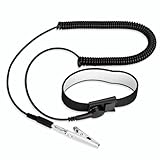


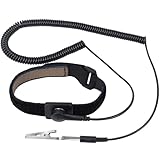
| Product | Best for | Key spec from the title |
|---|---|---|
| 11-Inch Grounding Bracelet with Alligator Clip | Basic builds on a budget | 11 inch, adjustable, extendable cable |
| FRXIE Adjustable ESD Strap | Longer reach at the bench | Alligator clip, extra long cord, for PC building and electronics repair |
| iFixit Anti-Static Wrist Strap | Larger wrists and repair kits | Adjustable up to size XL |
| STREBITO Anti Static Wrist Strap | Extra long cord with elastic band | 11 inch, extra long cord, alligator clip, elastic adjustable |
| Antistatic Wrist Strap, 6 Pack | Classrooms, shops and shared toolkits | 6 pack, adjustable |
| WLLHYF 2 Pack | Two builders or a spare | 2 pack, reusable, extendable long cable |
| Kingwin Cordless Wrist Strap | No cable to snag | Cordless, adjustable strap |
How to Choose
Cord length and clip style
A corded strap needs to reach something to clip to, usually an unpainted metal part of the case or a dedicated ground point. A short cord forces you to hunch over the case, while an extra long cord lets you stand or move around the bench. Look for a coiled or extendable cable so it does not tangle with fan wires. Alligator clips grip metal edges well but can slip off thin sheet metal, so check that the clip has solid tension. Never clip to a painted surface, since paint insulates and defeats the purpose.
Strap fit and comfort
An adjustable band should sit snug against bare skin without pinching. Elastic or hook-and-loop closures are the usual designs, and a metal plate on the underside provides contact. Wrist sizes vary, so look for a title that mentions adjustability or an extended size range. A strap worn over a sleeve does not make contact, so roll your sleeve up. If a strap slides around, readjust it; a loose band is the most common reason these tools fail in practice.
Corded versus cordless
Corded straps work because the wire connects you to a reference point. A cordless strap has no cable, so check how the maker describes its operation before relying on it, and treat it as a convenience item rather than a replacement for good habits. Many experienced builders prefer corded versions for exactly that reason. Whichever you pick, touching an unpainted metal part of the case before handling parts is a useful extra step.
Pack size, materials and what to ignore
Multi-packs make sense for shops, schools and anyone who lends tools out. Single straps from repair brands often come with better build quality and clearer documentation. Many listings share nearly identical wording, so ignore generic claims of lifetime protection. Look for a resistor built into the cord, which is a standard design for these straps, and confirm it in the listing. Remember that a strap should never be worn when working on mains-powered equipment: unplug a power supply and let the system sit before opening it, and follow the manufacturer’s instructions.
A short routine ties the pieces together. Start by unplugging the power cable and pressing the power button once to drain remaining charge, then move to a hard, uncluttered table instead of a carpet. Put the strap on bare skin, snug but not tight, and clip the lead to an unpainted metal part of the case such as an exposed screw head or a bare edge. Handle each component by its edges, keep graphics cards and memory in their bags until the moment of installation, and set removed parts on the anti-static bag they came in rather than on the table.
Environment plays a role as well. Dry winter air and synthetic clothing build charge faster, and wool socks on a rug are a classic cause. Wearing cotton and working in a room with moderate humidity lowers the risk, and so does touching the case before reaching for parts. None of this replaces following the instructions that come with your motherboard and components. If a strap lead feels frayed, the clip no longer grips or the band has lost its elasticity, replace the strap, since an unreliable ground can give a false sense of care. Store straps coiled loosely in a drawer rather than crushed in a toolbox, which breaks internal wiring over time.
Finally, remember that straps address only one source of risk. Rough handling, liquid and bent connector pins damage parts just as easily, so slow, deliberate work with good lighting does as much for a build as any accessory. When something does not fit easily, stop and check the manual rather than forcing it.
The 7 Best Options
11-Inch Grounding Bracelet with Alligator Clip
This generic listing offers an 11 inch adjustable wristband with an extendable cable and an alligator clip, and the wording states it helps reduce static buildup. A 13 inch version exists under similar wording. It fits first-time builders who want a basic tool for one project.
- Strength: Extendable cable adds working reach.
- Strength: Simple, low-cost design with an alligator clip.
- Trade-off: Unbranded, so documentation and build quality vary.
Skip it if you want clear brand support or a tool kit companion.
FRXIE Anti Static Wrist Strap
FRXIE’s strap is described as adjustable with an alligator clip and an extra long cord, aimed at PC building and electronics repair. The longer cord is useful for benches where the clip point sits far from your hands.
- Strength: Extra long cord gives freedom of movement.
- Strength: Marketed for both PC building and repair work.
- Trade-off: Title text is truncated, so confirm included accessories on the listing.
Skip it if you want a short, tidy cord for a small desk.
iFixit Anti-Static Wrist Strap
iFixit is a well-known name in repair tools, and the title notes that the strap adjusts up to size XL. That makes it a good choice for larger wrists and for anyone already using iFixit screwdriver sets. Few other details appear in the title, so check the cord length on the listing.
- Strength: Adjusts up to size XL.
- Strength: Comes from a recognized repair brand.
- Trade-off: Little else is stated in the title, so verify cord details.
Skip it if you need a multi-pack or a very long cord.
STREBITO Anti Static Wrist Strap
STREBITO appears with an 11 inch band, an extra long cord, an alligator clip, a grounding bracelet and elastic adjustment. It is built for electronics work generally and fits a hobbyist with a dedicated bench. Two nearly identical listings exist, so match the cord details before ordering.
- Strength: Elastic adjustable band with an extra long cord.
- Strength: Alligator clip is included.
- Trade-off: Near-duplicate listings make comparing details harder.
Skip it if you want a cordless design.
Antistatic Wrist Strap, Adjustable, 6 Pack
This listing is a six-pack of adjustable straps meant for working on sensitive electronic devices. Quantity is the point: a classroom, repair counter or maker space can hand one to each person. The title gives few other details.
- Strength: Six straps cover a group at one price tier.
- Strength: Adjustable design suits different wrist sizes.
- Trade-off: A multi-pack likely emphasizes cost over refinement.
Skip it if you need a single, well-documented strap for one build.
WLLHYF 2 Pack Anti Static Wrist Straps
The WLLHYF set gives two reusable, adjustable ESD straps with alligator clips and an extendable long cable. Two straps let a pair of builders work together or keep a spare in a tool bag.
- Strength: Two straps in one order, reusable.
- Strength: Extendable long cable with an alligator clip.
- Trade-off: Lesser-known brand, so durability is worth checking in buyer comments.
Skip it if you only need one strap and prefer a known brand.
Kingwin Anti-Static Cordless Wrist Strap
Kingwin sells a cordless strap marketed as a static-control accessory for PC work, with an adjustable band for comfort. The absence of a cord means nothing to snag on fans or cables. Because it works differently from a corded strap, read the maker’s description carefully.
- Strength: No cable to catch or drag across parts.
- Strength: Adjustable strap for comfort.
- Trade-off: Cordless designs rely on different operation, so confirm how it works before trusting it.
Skip it if you want a tool that clips directly to the chassis.
Which One Fits Your Situation
You are building your first PC this weekend
The generic 11 inch bracelet or the STREBITO strap gives you a basic corded setup at a low tier. Clip it to bare metal on the case and keep working.
You have larger wrists or already own repair tools
The iFixit strap adjusts up to size XL and pairs well with an existing toolkit.
You teach or run a shared workshop
The 6 pack covers a group, and the WLLHYF 2 pack suits a smaller team.
You hate tangled cables
The Kingwin cordless strap removes the cord, though you should read how it is designed to work and keep other precautions in place.
Common Mistakes
- Clipping to a painted surface, which insulates instead of grounding.
- Wearing the band over a sleeve so it never touches skin.
- Leaving the power supply plugged in and switched on while the case is open.
- Working on thick carpet and in dry air without any other precautions.
- Treating a strap as a substitute for handling parts by their edges.
Related guides
- What Is The Best Budget Most Responsive Gaming Mouse Wired
- Low Latency Gaming Headphones Usb-C 2.4 Ghz Wireless
- Mechanical Gaming Keyboards Competitive Pc Gaming
Frequently Asked Questions
Is a wrist strap really needed to build a PC?
Many builders go without, but a strap is a low-cost habit that adds a margin of care. Touching bare case metal and handling parts by their edges also helps.
Where should the clip go?
Attach it to an unpainted metal part of the case, or follow the instructions on the strap. Avoid painted panels and plastic parts.
Can I wear a strap while the PC is on?
No. Disconnect power and let the machine sit before opening it, and follow the manufacturer’s guidance for internal components.
Are cordless straps as good as corded ones?
They work differently, and many builders prefer corded versions. Read the listing to understand how a cordless model operates.
Related guides
More from Amazon
Programs that pair well with the guide above. Offers and eligibility are set by Amazon and may change.
Free shipping on eligible items, Prime Video and more. Eligible new members can start with a free trial.
Start a Prime free trialAd-free music streaming. Eligible new subscribers can start with a free trial.
Try Music Unlimited freeA Prime membership for ages 18-24 with a trial period. Eligibility is set by Amazon.
See Prime for Young AdultsAudiobooks and podcasts to listen to on the go. Eligible new members can start with a free trial.
Try Audible freeAs an Amazon Associate we earn from qualifying purchases.