The Logitech G502 Lightspeed review verdict: it is a wireless version of the classic G502 shape with the HERO 25K sensor, 11 programmable buttons and adjustable weights, and it suits players with a palm or claw grip who want a heavy, feature-packed mouse without a cable. It is a poor fit if you want an ultralight flick-shot mouse.
Short answer: Buy the G502 Lightspeed if you like a full-size, button-rich mouse and accept roughly 114 g of weight. Skip it if you play fast tracking shooters and want something near 60 g. The sensor and shape are the draw; the weight is the trade-off.
Our Top Picks
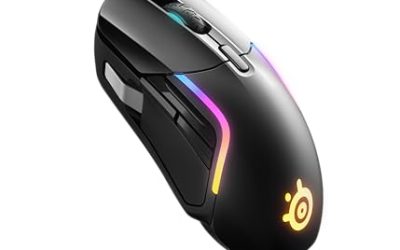
 Razer Basilisk V3 X HyperSpeed Customizable Wireless GamingStandard5.12 x 2.96 x 1.67 inches0.2 poundsCheck on Amazon

Top 3 picks at a glance
Verdict at a glance
- Best for: MMO, MOBA and general PC players who bind many actions, and anyone who liked the wired G502 and wants to drop the cable.
- Skip if: you play precision FPS titles and prefer mice under 70 g, or you have small hands.
- Sensor: HERO 25K, up to 25,600 DPI. Far more than most players ever use.
- Battery: sources report Logitech’s rating differently (48 hours is the commonly quoted figure, and RGB changes the result), so check the maker page for the current number.
- Wireless charging: works with the POWERPLAY mat, sold separately.
Logitech G502 Lightspeed wireless RGB gaming mouse: key specs
If you searched for the Logitech G502 Lightspeed wireless RGB gaming mouse or the Logitech G G502 Lightspeed wireless gaming mouse, these are the same product line sold under slightly different listing names. Here is what the published specs say.
| Spec | Logitech G502 Lightspeed | Notes |
|---|---|---|
| Sensor | HERO 25K (optical) | Up to 25,600 DPI |
| Weight | About 114 g | The wired G502 HERO is listed around 121 g |
| Size | About 131 x 75 x 40 mm | Full-size body |
| Buttons | 11 programmable | Includes the DPI shift button and a wheel-mode toggle |
| Switches | Mechanical (Omron) | Not the optical switches used in the G502 X |
| Connection | Lightspeed 2.4 GHz wireless | Plus a charging cable |
| Lighting | RGB | Set through Logitech G HUB |
| Extras | Adjustable weights, POWERPLAY compatible | Weight set is removable |
Specs on third-party pages differ in small ways, especially battery life and weight with and without the tuning weights. Treat the table as a guide and confirm the exact numbers on Logitech’s own product page before buying.
Design and comfort
The G502 shape has been around for years because it fits many palm and claw grips. A sculpted thumb rest on the left side, a wide right-side finger rest and a high hump that fills the palm make it feel secure for large and medium hands. Small hands may find the reach to the thumb buttons long, and fingertip grippers will find the body too tall.
The weight is the headline. At roughly 114 g it is lighter than the wired HERO version, but it is still heavy by current standards, where many wireless mice sit well below 80 g. Some players like that planted feel for slow, controlled aim and general desktop work. Others find it tiring during fast sweeps. The removable weight cartridge lets you shed a little mass, but it is a minor adjustment rather than a transformation.
Build quality is the other half of comfort. The shell combines matte plastic with textured rubber grips on the thumb side, and the side buttons sit where the thumb rests, so accidental presses are possible if you hold the mouse loosely. Owners who keep a firm claw grip rarely mention this, while palm-grip users with long thumbs sometimes do. If you share a desk with someone else, the right-handed shape matters too: the G502 is not ambidextrous, and left-handed players should look at a symmetrical design.
Buttons and scroll wheel
Eleven programmable controls give you room for macros, push-to-talk, ability binds and profile switching. The dual-mode wheel lets you flip between a notched feel for precise scrolling and a free-spin mode for long documents. The DPI shift button under the thumb can be set to hold a lower DPI while pressed, useful for sniper shots in shooters.
A practical way to use that many buttons is to split them by purpose. Keep the two thumb buttons for the actions you press most, use the top-edge buttons for profile or DPI changes, and leave the DPI shift for a single precision mode. Overloading every button tends to make muscle memory worse, not better.
Performance by use
Competitive shooters
The HERO 25K sensor is accurate and does not need high settings to track well. Most players run it between 400 and 1,600 DPI, a small fraction of its ceiling. The limiting factor is the mass. If you prefer slow, wide arm movements and a stable crosshair, the weight can help. If your style is quick flicks and micro-corrections, a lighter mouse will feel easier, and the Shroud-style G303 described below may suit you better.
MMOs, MOBAs and strategy
This is where the mouse is strongest. Thumb-side buttons map naturally to hotbars, and profiles in G HUB can switch automatically per game. Wireless freedom helps if your desk setup has a long cable path, and the receiver can sit on a short extension close to the mouse for a stable signal.
Work and everyday use
The scroll wheel modes and button count carry over well to spreadsheets, editing and browsing. The size makes it a comfortable all-day mouse for larger hands, and the free-spin wheel is handy for long pages and timelines.
Battery and charging
Logitech’s published battery claim is reported differently across sources, and it depends on lighting. Turning RGB down or off stretches the time between charges. The mouse can charge over its cable or wirelessly on a POWERPLAY mat, which keeps it topped up while you play. If you do not own that mat, plan on plugging in every few days of heavy use. We have not used the product ourselves, so we cannot give you our own run-time numbers; rely on the maker’s rating and long-term owner reports, which describe the battery as good but not outstanding.
Setup and software
Logitech G HUB handles DPI stages, button assignments, lighting and onboard profiles. A few habits make the setup smoother:
- Install G HUB, update the mouse firmware if prompted, then pick two or three DPI stages you will really use.
- Save at least one profile to onboard memory so your core settings follow the mouse to another computer.
- Lower the lighting brightness if battery life matters more than looks.
- Keep the wireless receiver in a front USB port or on an extension, away from large metal objects and other 2.4 GHz devices.
Who should buy and who should skip
Buy it if
- You want a wireless version of a shape you already know.
- You bind a lot of actions and use several profiles.
- You have medium or large hands and a palm or claw grip.
Skip it if
- You want an ultralight mouse for fast tracking.
- You need optical switches or the newest battery rating, which belong to the G502 X line.
- You use a fingertip grip, have small hands or are left-handed.
Logitech G502 Lightspeed compared with the Shroud Logitech G303
People also search for the Shroud Logitech G303 as a comparison. The G303 Shroud Edition is a very different mouse: much lighter at about 75 g, with only five buttons and a smaller body built for shooters. If your priority is aim speed, the G303 approach is the better match. If your priority is buttons and a larger body, the G502 wins.
| Point | G502 Lightspeed | G303 Shroud Edition |
|---|---|---|
| Sensor | HERO 25K | HERO 25K |
| Weight | About 114 g | About 75 g |
| Buttons | 11 | 5 |
| Best use | MMO, MOBA, general | Competitive shooters |
| Grip | Palm, claw | Palm, claw, relaxed fingertip |
Logitech G502 Lightspeed Wireless Gaming Mouse
As an Amazon Associate we earn from qualifying purchases at no extra cost to you.
The model under review pairs the HERO 25K sensor with up to 25,600 DPI, 11 programmable buttons, RGB lighting and adjustable weights. It is POWERPLAY compatible for wireless charging and uses Logitech’s Lightspeed receiver for a low-latency connection. Best for players who want a familiar full-size body without a cable. Skip if you want a light mouse.
Logitech G303 Shroud Edition Wireless
A lighter, simpler alternative built around the HERO 25K sensor, with Lightspeed wireless, a listed weight of about 75 g and five buttons. It fits shooter players who want fewer buttons and quicker movement. Skip it if you need many programmable binds or a large palm-filling shell.
Alternatives to consider
Razer Basilisk V3 X HyperSpeed

A wireless, button-rich option with an 18K optical sensor, second-generation mechanical switches and a customizable layout. It sits in the same general ergonomic category as the G502, with a thumb rest and multiple side buttons, and is a good pick if you prefer Razer software. Check the maker page for the weight and battery rating.
Razer Basilisk V4 HyperSpeed

A newer wireless model listed with a 140-hour battery, a four-way HyperScroll tilt wheel and a 33K DPI sensor. It suits players who want longer run time and extra scroll controls in a large, ergonomic body.
Glorious Model O Eternal

A wired ultralight alternative listed at 55 g, with six programmable buttons and RGB. If the weight of the G502 is the thing putting you off, this is the opposite approach, though you give up wireless and most of the buttons.
You may also see the newer G502 X Lightspeed in search results. It is lighter than this model, uses optical switches and carries a longer battery rating according to published specs, so it is worth comparing on the maker page if you are open to the newer design.
Is the original G502 Lightspeed still relevant in 2026?
The G502 line now has several members, and the original Lightspeed is the one that gets confused with the rest. The wired G502 HERO shares the sensor but keeps the cable and the heavier body. The G502 X Lightspeed is the newer wireless design, with a lower listed weight, optical switches and a longer battery rating. The G502 X Plus adds lighting and a charging dock. The original Lightspeed sits between them in age, and it stays relevant for two reasons: it is easy to find, and it keeps the adjustable weight system that some players still like.
If you are comparing the original against the newer X models, use this short checklist.
- Want to tune the weight yourself: the original has the removable weights; the X models drop them in favor of a lighter fixed body.
- Want the longest battery: the X Lightspeed carries a much higher published rating than the original.
- Worried about double-clicking over time: optical switches in the X line remove the mechanical wear point, although mechanical switches in this class are widely used without complaint.
- Want to charge without plugging in: all Lightspeed versions can use POWERPLAY, but the X Plus ships with its own charging dock.
Common problems and how owners handle them
No mouse is free of quirks, and a review should say what to watch for. These are the points that come up most in long-term owner discussion, and the standard fixes.
Scroll wheel feel changes over time
Owners sometimes report that the free-spin mode becomes less smooth after heavy use. Dust and lint in the wheel well are usual causes. Switching the wheel mode a few times and using compressed air or a soft brush around the wheel usually helps. If the wheel stops responding in either mode, use Logitech’s warranty route rather than opening the mouse.
Disconnects or stutter
Wireless dropouts almost always trace to receiver placement. Move the receiver to a port close to the mouse, avoid plugging it behind the case or into a hub with many devices, and keep other 2.4 GHz gear (wireless headsets, dongles) a hand’s width away.
Battery drains faster than expected
High-brightness RGB is the biggest drain. Drop the brightness or switch effects to a static color in G HUB. Also check that the mouse is not waking from sleep because of desk vibration or a nearby fan.
Side buttons pressed by accident
This tends to affect players who hold the mouse loosely. A slightly firmer grip or moving a thumb binding to a less-used function reduces the problem. You can also unassign the lower thumb button if you never use it.
Mouse feet wear down
A heavier mouse wears its feet faster, especially on rough pads. If the glide feels scratchy, replacement feet are sold by third parties for this mouse. Make sure the set lists the G502 Lightspeed specifically, because shapes differ between G502 generations.
Pad and desk setup tips
A mouse of this weight benefits from a smooth, low-friction surface. A medium-speed cloth pad reduces the effort needed to start and stop movement, while a hard pad makes the mouse feel faster but louder. Wrist position matters too: with a palm grip, keep the wrist roughly straight and let the forearm do the work, and if you feel strain, a lower DPI with a bigger pad is gentler than a high DPI with tiny wrist flicks. If you play on a large pad, a wireless mouse also avoids cable drag, which is one of the practical reasons to choose Lightspeed over the wired HERO.
How it fits next to other wireless mice
For context, here is where this mouse lands against the types of wireless gaming mice you will meet when shopping.
| Type | Typical weight | Typical buttons | Who it suits |
|---|---|---|---|
| Ultralight shooter mouse | Under 70 g | 2 to 6 | Fast aim, small to medium hands |
| Mid-weight ergonomic | 80 to 110 g | 6 to 8 | General gaming and work |
| Heavy button-rich (G502 type) | Above 100 g | 10 or more | MMO, MOBA, macros, large hands |
The G502 Lightspeed belongs in the last row, and that is the right way to judge it. Compared with an ultralight shooter mouse it will always feel heavy; compared with other button-rich wireless mice it holds up through its sensor, shape and software support.
How we chose what to compare
This review is based on research: published specifications from Logitech and retailers, long-term owner reports and editorial reviews. We did not use the mouse ourselves, so we avoid claiming personal impressions and flag numbers that sources disagree on. Alternatives were chosen to cover three situations: lighter weight, similar ergonomic shape with more battery life, and a wired option for players who do not need wireless.
Buying guide: what matters for a mouse like this
- Weight: under 70 g suits fast shooters; 70 to 100 g is a middle ground; above 100 g favors comfort and control.
- Grip: palm and claw grips suit the G502 shape. Fingertip grips prefer shorter bodies.
- Hand size: measure from the wrist crease to the tip of your middle finger. Above roughly 18 cm, full-size shells like this one tend to feel natural; below roughly 16 cm, consider a smaller body.
- Buttons: count only the buttons you will bind. Five to seven covers most shooters; MMO players may want ten or more.
- Battery: a rating above 50 hours means weekly charging for most people; wireless charging mats remove the chore.
- Switches: mechanical switches are fine for most users; optical switches avoid double-click wear.
- Wireless type: a 2.4 GHz receiver is the low-latency choice for games; Bluetooth is better for travel and office use.
FAQ
Is the Logitech G502 Lightspeed worth it?
Yes, if you want a wireless, button-rich, full-size mouse and are comfortable with its weight. For ultralight preferences, look elsewhere.
How heavy is the G502 Lightspeed?
Published specs put it near 114 g, lighter than the wired G502 HERO. Adjustable weights let you shave a little off.
Does the G502 Lightspeed work with the POWERPLAY mat?
Yes. It is listed as POWERPLAY compatible, so it can charge wirelessly on that mat, which is sold separately.
Is the G502 Lightspeed good for FPS games?
The sensor is excellent, but the weight suits slower, controlled aim better than fast flicks. Many FPS players prefer lighter mice.
What is the difference between the G502 Lightspeed and the G502 X Lightspeed?
The X version is lighter, uses optical switches and has a longer battery rating per published specs. The original uses mechanical switches and adjustable weights.
Is the G502 Lightspeed better than the Shroud G303?
They target different players. The G502 offers more buttons and a bigger body; the G303 is lighter and simpler for shooters.
Can I use the G502 Lightspeed wired while it charges?
Yes. The charging cable lets you keep playing while the battery tops up, which is a useful fallback if the battery runs low mid-session. Check the maker page for the exact cable setup, since receiver and cable arrangements vary by pack.
Does the G502 Lightspeed work on Mac?
Logitech G software supports macOS, and basic mouse functions work without it. Program buttons and DPI stages through G HUB if you want full control; confirm current system support on the maker page.
Which one should you buy?
Choose the G502 Lightspeed for buttons, comfort and a familiar shape. Choose the G303 Shroud for light, fast aim. Choose a Basilisk model if you prefer Razer’s approach and longer battery claims, and a Model O Eternal if weight matters most and a cable does not bother you.
Sources
- Logitech G product page
- Tom’s Hardware mouse reviews
- Mouse Compare spec database
- The Gaming Setup G502 review
Last updated: November 2026
Related guides
More from Amazon
Programs that pair well with the guide above. Offers and eligibility are set by Amazon and may change.
Free shipping on eligible items, Prime Video and more. Eligible new members can start with a free trial.
Start a Prime free trialAd-free music streaming. Eligible new subscribers can start with a free trial.
Try Music Unlimited freeA Prime membership for ages 18-24 with a trial period. Eligibility is set by Amazon.
See Prime for Young AdultsAudiobooks and podcasts to listen to on the go. Eligible new members can start with a free trial.
Try Audible freeAs an Amazon Associate we earn from qualifying purchases.