Two nurseries, one monitor: that is the real question behind a search for a baby monitor with 2 cameras. Maybe twins sleep in separate cribs, maybe a toddler and a newborn share a hallway, or maybe you want one camera on the crib and another on the changing table or a playroom. A two-camera kit puts both views on a single handheld screen, so you are not carrying two parents’ worth of gadgets around the house at 3 a.m.
This guide is for families who want that setup without a cloud account or home network in the middle. Most kits here are listed as “No WiFi,” which means the camera and the parent unit talk directly. That trades app convenience for privacy and simplicity. The notes below stick to what the listings state, then show how to match screen size, battery capacity, and camera controls to your layout in 2026.
Our Top Picks
Top 3 picks at a glance
Quick Picks
As an Amazon Associate we earn from qualifying purchases at no extra cost to you.

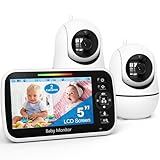
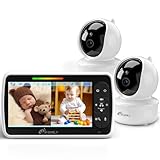


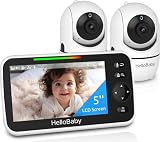
| Product | Best for | Key spec from the title |
|---|---|---|
| HelloBaby HB6550 | Twins in separate rooms | 5″ screen, 2-room monitoring, no WiFi |
| GoodBaby 5″ Split Screen | Long overnight stretches | 30-hour battery, remote PTZ |
| iFamily 5″ Split Screen | Large display on a budget | Remote pan tilt, long range |
| HelloBaby 6″ 30H | Biggest picture | 6″ IPS screen, 1000ft range |
| HelloBaby 3.2″ | Pocketable parent unit | 3.2″ screen, ECO mode |
| iFamily 4.3″ | Mid-size screen | 4.3″ split screen, temperature sensor |
| Blemil 6″ | Big screen, big battery | 6″ split screen, 4000mAh |
| HelloBaby 6″ 4000mAh | Battery-conscious families | 4000mAh, ECO mode, 2-way talk |
How to Choose
Screen size and split view
With two cameras, the parent screen is divided in half, so every inch matters, and the picture each camera gets is smaller than the diagonal suggests. A 3.2-inch panel split in two gives you small thumbnails; 5 inches is a workable middle, and 6 inches lets each camera feed be readable from across the bed. Check that the listing says “split screen” rather than “switching,” because switching hides one nursery while you watch the other.
Battery life and ECO mode
Look for a stated runtime of about 30 hours or a battery around 4000mAh if you want to unplug the parent unit overnight. ECO mode, mentioned on several listings here, typically blanks the screen until sound is detected, which stretches runtime. Whichever you pick, plan to dock the unit every day; a monitor that dies at 4 a.m. is worse than none. A simple habit helps: put the parent unit on its charger each morning when you wake the baby, so the battery is full when the evening starts.
Range, signal, and privacy
Listings quote ranges up to 1000ft, which is an open-air figure. Walls, appliances, and floors cut it hard, so treat it as a ceiling. A two-story house with the camera upstairs and the monitor in a basement office is the classic case where the number falls apart, so test the link in your own layout during the return window. “No WiFi” and “FHSS” in a title describe a closed radio link between camera and monitor, which keeps footage off your router. If you do want phone viewing while at work, none of these listings advertise it, so look elsewhere.
Camera controls and night vision
Remote pan, tilt, and zoom lets you re-aim a camera without walking into the room and waking anyone. Infrared night vision is standard, so ignore it as a differentiator; instead check for two-way talk and a temperature readout. Budget kits cut corners on zoom smoothness and on how fast the screen wakes, so read the controls list before assuming every PTZ is equal. Also check whether pan and tilt move both cameras independently, since two nurseries rarely need the same angle.
The 8 Best Options
HelloBaby HB6550 (5″ screen)
This is the straightforward two-room kit: a 5-inch video screen, two cameras, audio, and a private no-WiFi link. The title highlights 2-room monitoring, which fits twins or siblings sleeping apart. It is aimed at parents who want the monitor to behave like an appliance with no app, no login, and no router dependence. Set the two cameras once, pair them, and the system keeps working even when the internet drops, which matters during storms or when a router reboots overnight.
- Private link keeps the video off your home network
- 5-inch screen is large enough for a split view
- Trade-off: no phone access, so you must be near the parent unit
Skip it if you want to check on the baby from the office or want a screen bigger than 5 inches.
GoodBaby 5″ Split Screen
GoodBaby pairs two cameras with a 5-inch split screen and puts the battery front and center with a stated 30-hour runtime. Remote PTZ, auto night vision, and a room temperature display round out the list. It suits parents who move the monitor between nightstand and kitchen all day, and who do not want to hunt for a charger every evening.
- 30-hour battery claim covers a full night plus daytime use
- Remote PTZ and temperature readout help judge whether the room is comfortable
- Trade-off: a 5-inch screen divided in two shows small detail
Skip it if you need a larger picture for a dark, wide room.
iFamily 5″ Split Screen
The iFamily 5-inch unit leans on a large display and long range, with remote pan-tilt and night vision listed. It reads like a general-purpose pick for homes with a bedroom at one end and the living space at the other. Parents with a toddler in one room and an infant in another can aim each camera with the remote controls and keep the whole setup on one screen.
- Large display relative to the price tier
- Remote pan-tilt reduces trips to the nursery
- Trade-off: the title does not state a battery runtime, so verify it before buying
Skip it if battery hours are your deciding factor and you want a number on the box.
HelloBaby 6″ Split Screen, 30H
This listing calls out a 6-inch IPS screen, 2-room monitoring built for twins, two-way audio, and a 30-hour battery. A 1000ft range is quoted. It is the strongest pairing of big picture and long runtime in the HelloBaby lineup, and the twins wording signals that the split view was designed for two cribs rather than added as an afterthought.
- 6-inch IPS panel gives each camera feed more room
- Two-way audio lets you soothe without entering the room
- Trade-off: a larger unit is bulkier on a crowded nightstand
Skip it if you want a compact monitor for travel.
HelloBaby 3.2″ Screen
The smallest panel in this group comes with two cameras, infrared night vision, remote pan/tilt/zoom, ECO mode, and two-way talk. It is for parents who value a handheld that fits a pocket or bag, and who mostly need an audio-first alert with a quick visual check. Think of a grandparent’s guest room, a camping cabin, or a second home where the monitor is used a few nights at a time.
- Compact parent unit travels easily
- ECO mode and two-way talk are included despite the small size
- Trade-off: a split view on 3.2 inches is tiny
Skip it if you want to read expressions or see detail on both feeds.
iFamily 4.3″ Split Screen
A middle-size option at 4.3 inches with two cameras, long range, remote pan-tilt, night vision, and a temperature sensor. It fits apartments where the monitor stays in one or two rooms and the picture does not need to be huge. The listing’s long-range wording is less important in a small space, so the money goes to the sensor and controls instead.
- Temperature sensor adds useful nursery context
- Remote pan-tilt for repositioning from the parent unit
- Trade-off: smaller screen than the 5-inch and 6-inch peers
Skip it if you plan to glance at the screen from a distance.
Blemil 6″ Split Screen
Blemil pairs a 6-inch split screen with a 4000mAh battery, remote pan-tilt-zoom, and auto night vision, all without WiFi. It targets parents who want the big screen and a large cell in a single package. The listing also advertises a long language list, but the title is cut off, so confirm what that feature actually covers before counting on it.
- 6-inch split screen with a stated 4000mAh battery
- Remote pan-tilt-zoom and auto night vision on both cameras
- Trade-off: the brand is less established, so check the return policy and warranty terms
Skip it if brand familiarity matters more than raw specs.
HelloBaby 6″ Split Screen, 4000mAh
This variant also offers a 6-inch split screen and a 4000mAh battery, with infrared night vision, ECO mode, two-way talk, and remote pan-tilt-zoom. It is a fit for parents who want the largest display plus power-saving behavior, especially those who leave the screen on a nightstand and glance at it between feedings.
- ECO mode helps stretch each charge
- Full control set, including PTZ and two-way talk
- Trade-off: it overlaps heavily with the other 6-inch HelloBaby, so compare listings closely
Skip it if you would rather save space with a smaller unit.
Which One Fits Your Situation
Twins in separate cribs
Go with the HelloBaby 6″ 30H model. The bigger screen makes each crib easy to read, and the twins-focused listing matches the use case.
Overnight shifts and long battery needs
Pick the GoodBaby 5″ Split Screen. Its 30-hour claim is stated plainly, and the temperature readout helps if you tweak the thermostat at night.
Small apartment, budget mindset
The iFamily 4.3″ keeps cost and footprint low while still giving two cameras and a sensor. It is the sensible choice if the monitor lives on one nightstand.
Frequent travel or grandparent visits
The HelloBaby 3.2″ screen is compact enough to pack. Choose it when you want something simple that works in a hotel room without a network.
Common Mistakes
- Trusting a 1000ft range number inside a house with several walls.
- Buying a tiny screen and expecting a split view to show detail.
- Ignoring battery specs, then discovering the monitor must stay plugged in.
- Assuming “No WiFi” means phone viewing is included.
- Positioning a camera where a cord reaches the crib, which is a safety hazard.
Related guides
- What Is The Best Budget Most Responsive Gaming Mouse Wired
- Low Latency Gaming Headphones Usb-C 2.4 Ghz Wireless
- Mechanical Gaming Keyboards Competitive Pc Gaming
Frequently Asked Questions
Do two-camera monitors need WiFi?
The kits above are listed as no-WiFi, so the camera and parent unit connect directly. That keeps setup simple and avoids sending video through your router. The tradeoff is that you will not see the baby on your phone when you leave the house.
How big should the screen be?
For a split view, 5 inches is a practical minimum and 6 inches is more comfortable. Choose 3.2 or 4.3 inches only if portability or budget comes first.
Can I add a third camera later?
That depends on the brand and model. The listings here describe two cameras, so check the manufacturer’s compatibility notes before assuming expansion.
What does ECO mode do?
ECO mode generally dims or blanks the screen until the monitor hears sound, which saves battery. Check the manual for how sensitive the trigger is.